
Textline Review: Team SMS Tools and AI Features – Worth Adding to Your Stack?
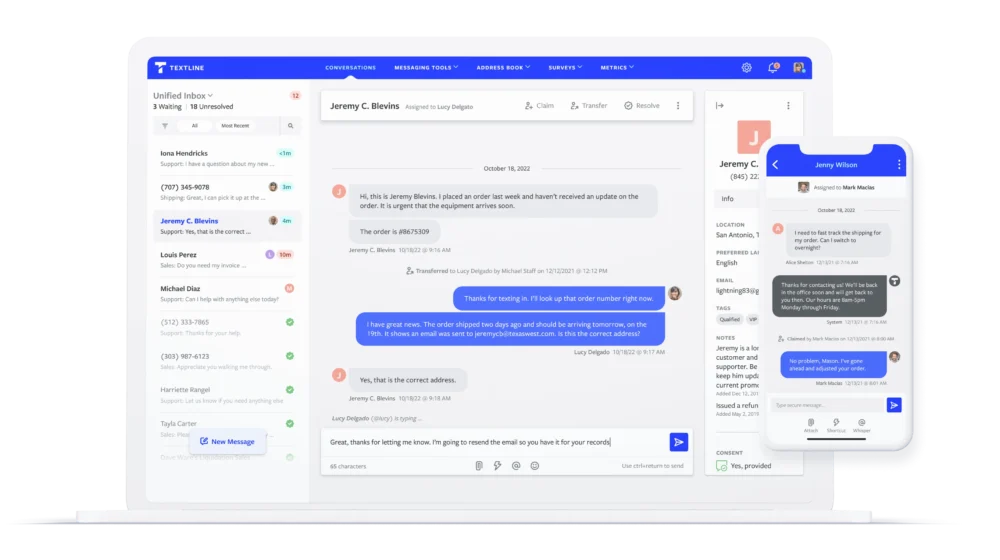
If you’ve ever tried to run customer communication through a mix of personal cell numbers, missed voicemails, shared Gmail inboxes, and “Did anyone reply to that text?” Slack messages, you already know the problem Textline is trying to solve: business texting at team scale.
Customers want speed and convenience. Teams want visibility, consistency, and compliance. And leaders want something that won’t become a shadow IT mess six months from now.
Textline positions itself as a secure business texting platform built for teams, with a “universal inbox” approach and a strong focus on compliance, collaboration, and integrations.
TextlineOverall verdict (short version): 8.8/10
Best for: support, sales, operations, and healthcare-adjacent teams that need a shared texting inbox, robust internal collaboration (like private notes), and native CRM/help desk integrations.
Not ideal for: organizations that only want cheap outbound SMS blasts, or that need highly advanced marketing segmentation comparable to full marketing automation suites.
Textline
Textline is a business text messaging platform used for communication, sales, and support in technology minded companies. Textline enables businesses to deliver innovative customer sales and service by replying to their text messages effectively. Textline also eliminates the need of customers installing other apps as they can text messages to your existing business through a dedicated phone number. Textline provides a responsive web app that provides an excellent platform for your customers to text messages on multiple devices. Textline main features are; attachments, emojis, whispers, claiming or transfers, reminders, and the power tools. Textline provides you with a messaging platform…
Textline is a business text messaging platform used for communication, sales, and support in technology minded companies. Textline enables businesses to deliver innovative customer sales and service by replying to their text messages effectively.
• Messaging center
• Emojis
• Attachments
• Respond from anywhere
• Whispers
• Claiming/transfers
• Reminders
• Shortcuts
• Schedule messages
• Auto responder
• Net promoter scores
• Integrations with tools you use
• Lite - $29/mo
• Standard - $49/mo
• Pro - $189/mo
• Enterprise – Starts at $2,500/mo
• Messaging center
• Emojis
• Attachments
• Provides a responsive web app that provides an excellent platform for your customers to text messages on multiple devices
• Allows internal discussion within the chat flow
• Allows sending of forms, documentation, forms to your clients easily and quickly right from your desktop to your client’s phones
Here’s what this review covers
- Introduction
- Overview and company background
- Pricing and plans (with tables and “hidden costs”)
- Setup and onboarding experience
- UI and ease of use (plus screenshot guidance)
- Core feature breakdown
- Advanced features and integrations (with top apps table)
- Performance, reliability, and security
- Customer support and learning resources
- Pros and cons
- User reviews and ratings summary
- Alternatives and comparisons
- Who Textline is best for (and who should avoid it)
- Final verdict and recommendations
- FAQ (15 questions)
Introduction
The pain point: texting is easy—until it’s a team sport
Texting is the most natural channel in the world for customers. It’s fast, familiar, and doesn’t require downloading an app. But for businesses, “just text them” quickly becomes a liability:
- A rep uses a personal phone number (and now the relationship walks out the door if they leave).
- There’s no shared visibility (“Who answered this? Did we promise a discount?”).
- Opt-in/opt-out and consent tracking is inconsistent.
- You can’t tie the conversation back to the CRM or help desk.
- You lose reporting—so you can’t manage response times, workload, or quality.
Textline is designed to replace this duct tape approach with a structured system: one platform where teams can send and receive texts, collaborate internally, and integrate those conversations into the tools they already use.
Overview and company background
What Textline is (and what it’s not)
At a product level, Textline is a business text messaging platform that emphasizes:
- A shared inbox (“universal” / “unified” inbox concept)
- Multi-channel messaging beyond SMS/MMS (notably webchat and social channels like Facebook and Instagram)
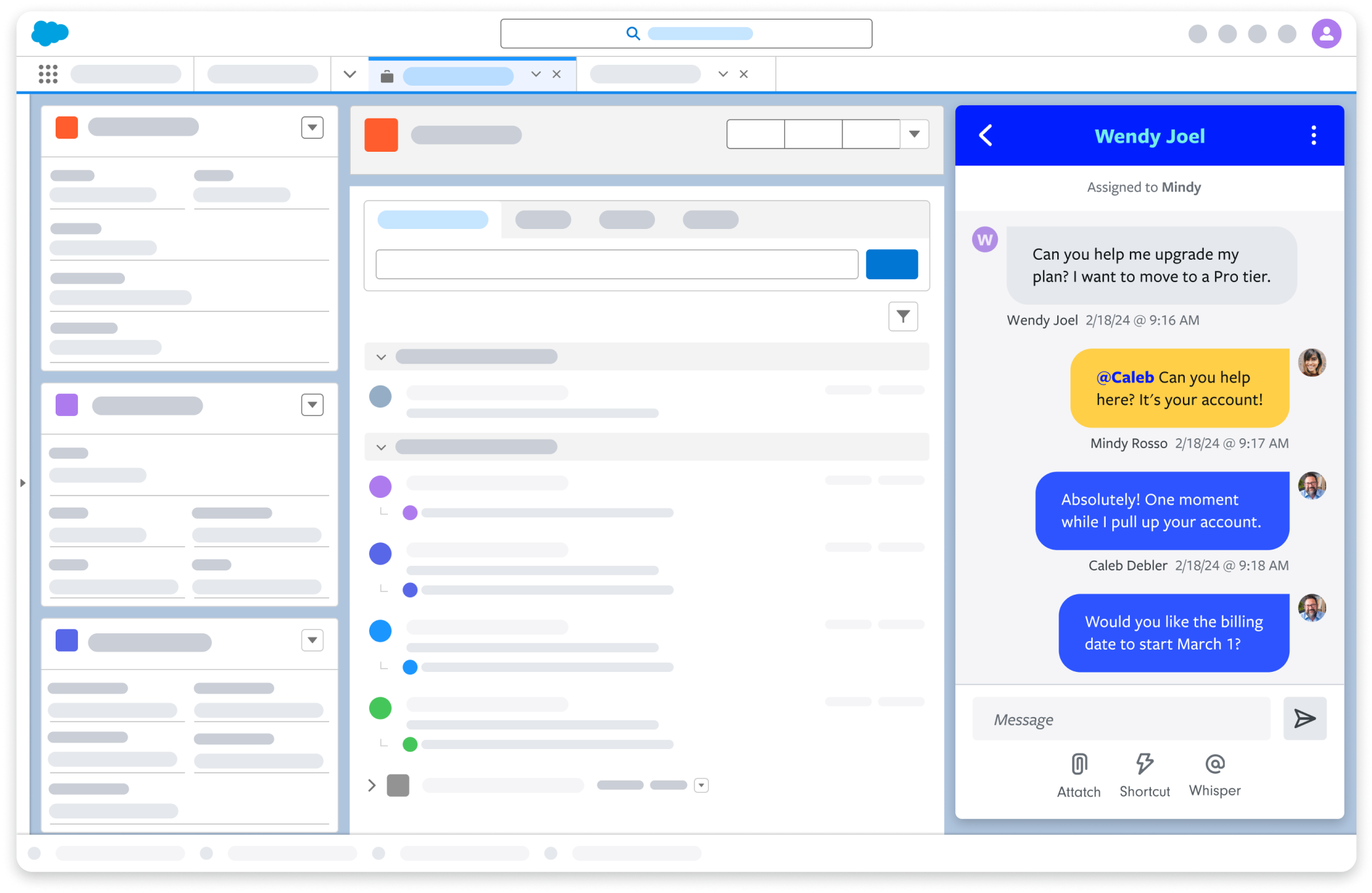
- Team workflows (claiming, transferring, internal notes, routing)
- Automation, surveys, templates (“shortcuts”), and metrics
- Integrations with CRMs and help desks like HubSpot, Salesforce, Zendesk, and Freshdesk
In practical terms, Textline is closer to a team inbox + workflow product than to a pure “SMS marketing blast” tool.
Company background (high-confidence framing)
Textline’s “founding year” varies across public directories—some cite 2014, others 2015, and corporate registration information points to incorporation/activity around 2016. Rather than forcing a single number, the safest conclusion for a buyer is that:
- Textline emerged in the mid-2010s as a business messaging platform.
- Textline was acquired by Inunity in December 2022 (as publicly announced by Inunity).
Target audience and market positioning
Textline positions itself as:
- A team-first business texting platform (not “one person + one phone”).
- A secure/compliance-forward option (SOC 2, HIPAA, TCPA messaging is prominent in its marketing).
- A platform that fits into an existing CX stack through native integrations (HubSpot, Salesforce, Zendesk, Freshdesk, Slack, etc.).
Key differentiators (high level)
Textline’s differentiators generally cluster into five themes:
- Universal inbox approach: unify multiple channels and keep conversations in one queue.
- Workflow controls for teams: claiming, transfer, routing, internal notes (“Whispers”), dispositions/tags, and admin controls.
- Integrations that embed texting into core systems: CRM widgets, help desk ticket syncing, and workflow-triggered texting.
- Compliance posture: SOC 2 and HIPAA messaging, plus consent tooling (including a HIPAA “double consent” workflow concept).
- Operational transparency: a public status page with component-level reporting.
Pricing and plans
Textline’s pricing is easiest to understand if you separate it into two layers:
- Platform subscription (plans like Essentials / Pro / Enterprise)
- Messaging usage (message credits and telecom registration requirements)
Textline also promotes a free trial (commonly referenced as 14 days).
Plan comparison table (platform layer)
Where a vendor does not publicly list a universal “base subscription price” (or that price varies by contract term), the most publication-honest approach is to document plan structure and the real cost drivers (agents, numbers, credits, and registration).
| Plan | Base subscription | Included agents | Included phone numbers | Included message credits / month | Conversation history | Best for |
|---|---|---|---|---|---|---|
| Essentials | Quote-based / varies by term | Includes first 5 agents (then add-on) | 1 | 600 | 3 years | Small teams adopting shared texting |
| Pro | Quote-based / varies by term | Includes first 10 agents (then add-on) | 2 | 2,000 | Unlimited | Scaling teams, integration-heavy ops |
| Enterprise | Custom | Custom | Custom | Custom | Custom | Governance, security, and scale requirements |
Publication note: If you maintain a pricing page, include a short footnote explaining that subscription base pricing can vary by term and negotiation, while add-ons and usage are usually the most predictable cost levers.
Messaging costs: the credit model (usage layer)
Textline uses a credit model where sending/receiving SMS/MMS consumes credits. The number of credits consumed can vary by destination country and message type.
| Credit package | Price | Effective cost / credit |
|---|---|---|
| 500 | $15 | $0.030 |
| 2,000 | $52 | $0.026 |
| 5,000 | $120 | $0.024 |
| 15,000 | $330 | $0.022 |
| 50,000 | $1,000 | $0.020 |
Textline also references an overage/backup credit rate of $0.04 per credit when you exceed your balance.
Hidden costs and “gotchas” to budget for
- Additional agents (seats): Essentials and Pro include agent thresholds; additional agents are typically billed per agent per month (e.g., $50/agent/month on Essentials and $70/agent/month on Pro, as stated in plan comparison materials).
- Additional phone numbers: often priced per number per month (e.g., $15/month per number in plan comparison).
- 10DLC registration/vetting: plan comparison references a registration fee (e.g., $50).
- Time-to-text lead time: some number/campaign types may require vetting that can take weeks, depending on your setup and messaging use case.
Value-for-money analysis (which plan fits which buyer)
A useful decision model is:
- Essentials is best for teams graduating from ad hoc texting to a shared inbox with basic workflow controls.
- Pro is the better fit when Textline needs to behave like a system embedded in your CX stack—especially for integration-heavy operations and teams that need unlimited conversation history.
- Enterprise is for governance: larger seat counts, deeper controls, and procurement/security requirements.
Bottom line: Textline’s cost structure rewards clarity. If you can estimate (a) how many agents truly need access and (b) your message volume, you can predict spend accurately. If you cannot, your costs will feel “mysteriously elastic.”
TextlineSetup and onboarding experience
Textline’s onboarding is conceptually simple: create an account → pick a number → configure teams → import contacts → integrate tools → start texting.
What makes real-world onboarding succeed or fail is not the UI—it’s telecom compliance, number strategy, and workflow design.
The initial decisions that matter most
- Number strategy: new local number (10DLC), toll-free number, text-enable an existing landline, or reuse an existing provider/number (e.g., Aircall/Twilio).
- Department structure: define routing based on function (Support, Sales, Dispatch) rather than “whoever is available.”
- System of record: decide whether CRM/help desk is authoritative for customer history and whether Textline should push conversation notes/tickets into that system.
Time to get started (realistic expectations)
| Path | What it looks like | Why it’s faster/slower |
|---|---|---|
| Fastest (same day) | Start with a toll-free number or a previously approved texting configuration, and begin messaging once compliance steps are satisfied. | Minimal telecom friction; simpler provisioning. |
| Common business path (days) | Configure departments, import contacts, create shortcuts/auto-responses, integrate your CRM/help desk, and train agents. | You’re building workflow discipline, not just logging in. |
| Slowest path (weeks) | 10DLC registration/vetting and carrier approval for certain messaging profiles. | External approval cycles; deliverability requirements. |
Implementation hurdles to plan for
- Consent and opt-out design: establish consistent opt-in, opt-out, and documentation workflows from day one.
- Workflow standards: define what “resolved” means, when to transfer, and how to tag dispositions.
- Compliance ownership: assign a named owner for 10DLC registration, message templates, and policy.
User interface and ease of use
Textline’s UI is built around an inbox metaphor—because that’s the mental model most teams already understand.
What the dashboard and navigation typically look like
Expect a structure like this:
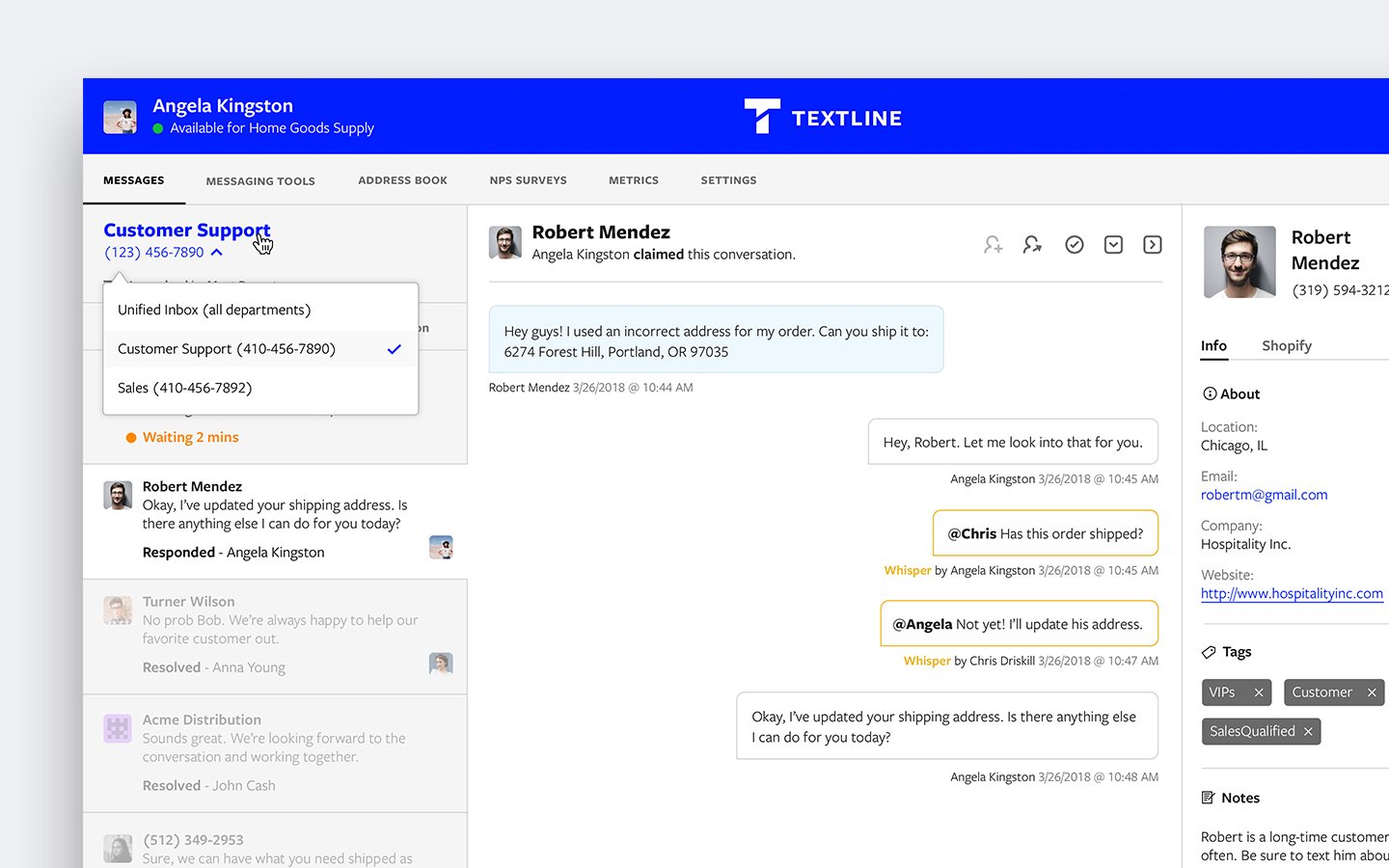
- Conversation list / inbox queue: filterable list of conversations with ownership and status indicators.
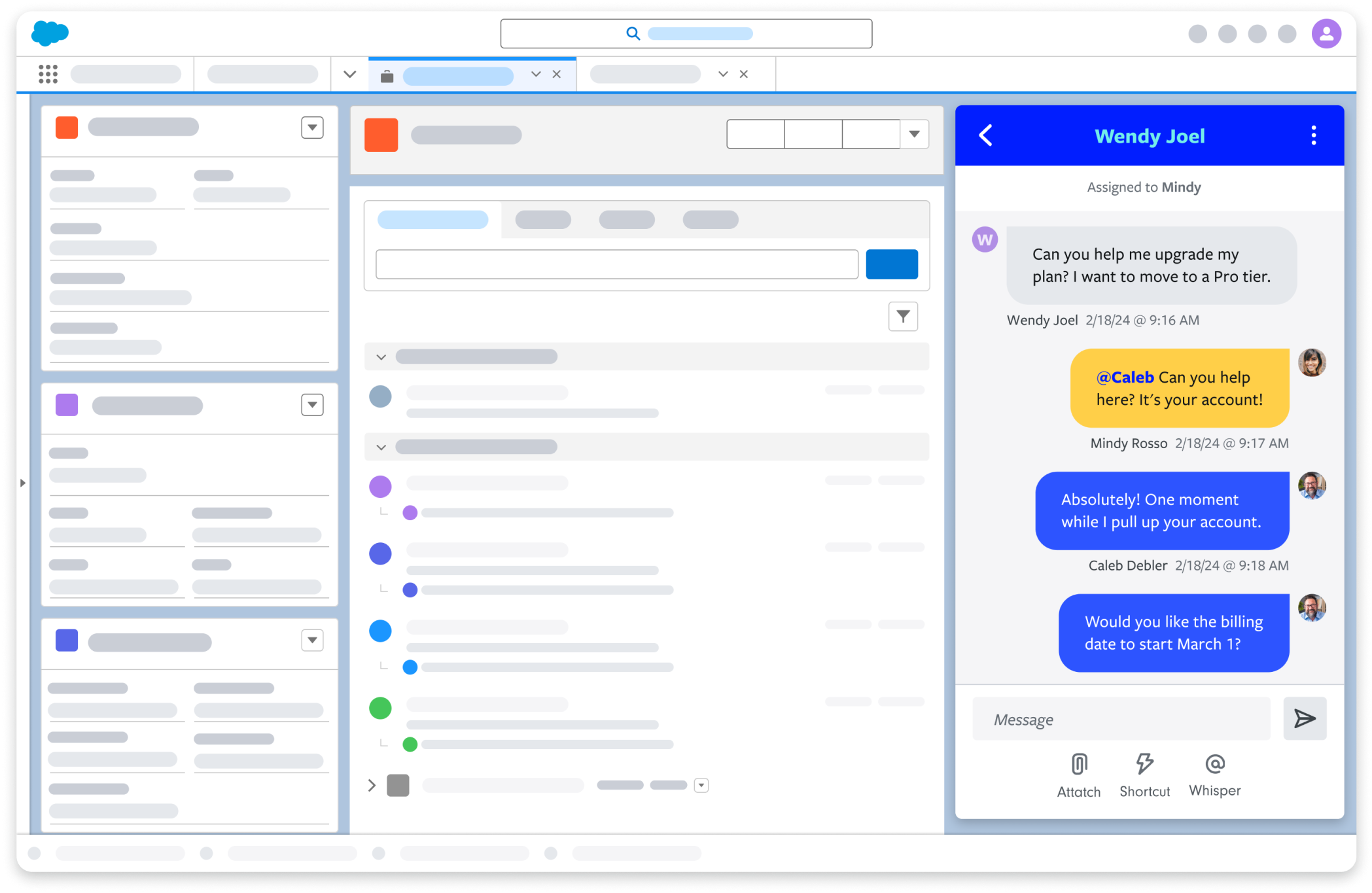
- Conversation thread view: message history, attachments, internal notes (“Whispers”), and actions (transfer/resolve).
- Contacts / address book: contact profiles, tags, and (in compliance-heavy use cases) consent tracking.
- Automation / surveys / announcements: tools for scaling beyond 1:1.
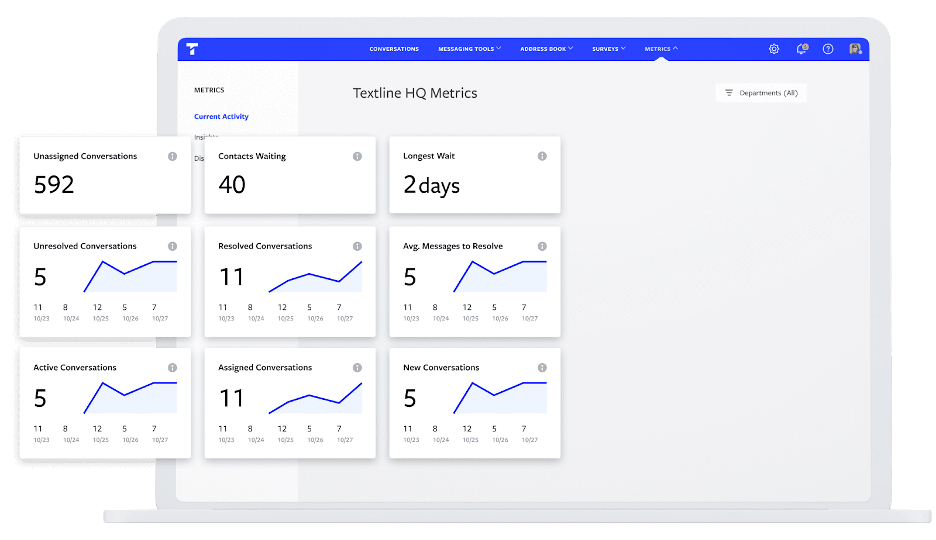
- Metrics / insights: reporting for performance and workload.
Learning curve (new users vs admins)
- New users: ramp quickly because the workflow resembles email/help desk queues.
- Admins/power users: spend time on roles/permissions, routing rules, automation, integrations, and telecom compliance configuration.
Mobile apps (execution-first)
Textline offers iOS and Android apps. For field teams (home services, logistics, healthcare staff), mobile can become the primary interface. The practical expectation is that mobile is strongest for execution and responsiveness—less so for deep admin configuration.
Customization options
Customization in Textline tends to focus on operational controls rather than superficial theming:
- roles and permissions
- tags and dispositions
- routing and department structure
- widgets embedded inside other platforms (HubSpot, Salesforce, Zendesk, Freshdesk)
Screenshot checklist (publication-ready)
If you’re publishing this review, these screenshots tell the most complete story:
- Inbox / conversation list (open vs resolved, assignment/claiming)
- Conversation detail (shortcuts/templates, whispers/internal notes, attachments)
- Transfer/claim workflow (handoff between agents)
- Automation rule builder (trigger + action)
- Announcements/bulk messaging UI (list selection + compliance notice)
- Survey creation + sample survey interaction
- Metrics dashboard (response time, volume, agent performance)
- Integration inside HubSpot (widget + message logged to contact)
- Integration inside Salesforce (widget + conversation logging)
- Zendesk/Freshdesk ticket sync view (ticket created from conversation)
Core feature breakdown
Textline is best understood as four interconnected systems:
- Messaging channels (SMS/MMS + more)
- Team workflow (ownership, routing, internal collaboration)
- Scaling tools (automation, announcements/bulk, surveys)
- Visibility (metrics, auditability, integrations)
1) Conversation management (the “shared inbox” core)
Textline behaves like a ticketing system for texting—an inbox where conversations are assigned, worked, and resolved. In practice:
- Inbound texts enter the shared queue.
- An agent claims the conversation, responds, and resolves it.
- Conversations can be transferred across departments.
- Integrations can create/update help desk tickets based on conversation events.
2) Multi-channel support (SMS/MMS plus additional channels)
Textline supports channels beyond SMS/MMS, including webchat and social channels like Facebook and Instagram. This is valuable if you want to centralize inbound communication into one operational queue.
3) Messaging modes: 1:1, group messaging, announcements, bulk texting
Operationally, think of it this way:
- 1:1 for support issues, sales conversations, and operational coordination.
- Announcements/bulk for alerts, reminders, closures, and proactive updates (with opt-in requirements).
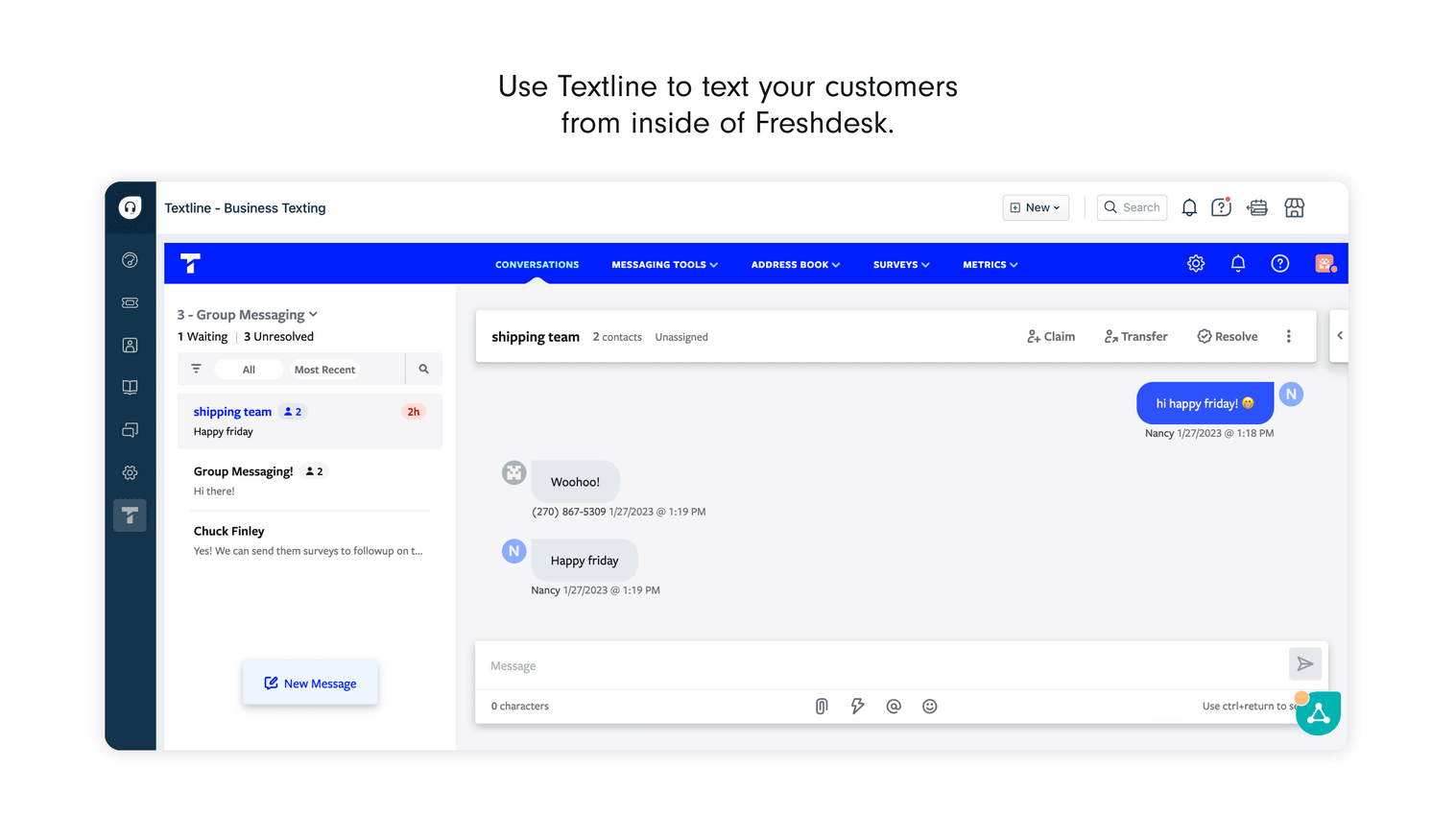
- Group messaging when multiple participants need to coordinate in-thread.
4) Scheduled texts (simple feature, huge impact)
Scheduling texts reduces “I’ll remember later” failure modes and improves reliability for workflows like appointment reminders, delivery windows, and sales follow-ups.
5) Templates (“Shortcuts”) and internal notes (“Whispers”)
These are the features that turn texting from “chat” into “process”:
- Shortcuts: message templates for speed and consistency.
- Whispers: internal/private notes for context and collaboration.
Example (support workflow)
- Shortcut: “Thanks for reaching out—can you share your order number?”
- Whisper: “This is a VIP customer; offer expedited replacement if needed.”
6) Routing, claiming, transferring, dispositions/tags
At team scale, these are foundational:
- Claiming prevents duplicate responses.
- Transfer enables clean handoffs (support → billing, sales → onboarding).
- Routing reduces manual triage time.
- Dispositions/tags make reporting meaningful (what happened, why it happened, outcome).
7) Metrics and insights
For managers, the value of “metrics” is operational control. The questions you want answered:
- Inbound conversations per day/week
- Median first response time
- Backlog count and age
- Agent workload distribution
- Outcome trends (via dispositions)
8) Surveys (feedback collection over text)
Surveys are a high-leverage add-on for post-visit or post-service workflows (healthcare, dental, home services, NPS-lite feedback loops).
Advanced features and integrations
API access and webhooks (why technical teams care)
Textline provides API access (plan-dependent) and implementation-grade webhook documentation. Webhooks are the bridge between “Textline is an inbox” and “Textline is part of our system architecture.” Common webhook events include inbound/outbound messages, internal notes (whispers), and conversation status changes.
Integrations ecosystem (native + embedded widgets)
Textline’s integrations strategy is practical: embed texting where teams already work (CRMs and help desks), and use automation platforms when you need breadth.
Top integrations table (publication-ready)
| Integration | Category | What it enables (high level) | Notes |
|---|---|---|---|
| HubSpot | CRM | Text within HubSpot, sync contacts, log messages, trigger texts via HubSpot workflows | Strong for lifecycle messaging |
| Salesforce | CRM | Text from lead/contact pages, log conversations, sync contacts | Setup may require API access and admin effort |
| Zendesk Support | Help desk | Push texts into Zendesk ticket queue; respond via widget; configure sync behavior | Makes texting behave like a ticket channel |
| Freshdesk | Help desk | Create tickets for conversations; respond via widget/sidebar experience | Important workflow caveat: reply occurs via widget |
| Aircall | Voice | Text-enable existing Aircall number; unify calling + texting identity | Vetting lead time may apply |
| Zapier | Automation | Connect Textline with thousands of apps | Best for non-engineering workflows |
| Slack | Collaboration | Notifications, responsiveness, and internal collaboration loops | Good for team swarming and escalations |
| Help Scout | Help desk | Track conversations inside Help Scout mailbox | Useful for support orgs |
| Instagram Business + Facebook Messenger | Social | Centralize DMs into the same workflow | Reduces channel switching |
How “seamless” are the integrations? Practical examples
HubSpot (CRM-native texting)
A high-ROI setup pattern: when a lead submits a form, a HubSpot workflow triggers a Textline message: “Thanks—are you available today at 2:00 or 4:00?” This is how you increase speed-to-lead without creating more manual work.
Zendesk (texting as a ticket channel)
A practical setup: inbound text → Zendesk ticket created → agent replies via widget → when the ticket is solved, the conversation can optionally resolve in Textline (depending on configured rules).
Freshdesk (similar pattern, with an important caveat)
Freshdesk ticket records can be created from conversations, but agents should expect to reply via the Textline widget/sidebar experience—not necessarily as a native ticket reply in the help desk UI.
Salesforce (powerful, but more technical)
Salesforce setups often require admin involvement. Expect requirements like Salesforce API access and configuration effort if you want continuous sync and full logging behavior.
Performance, reliability, and security
Uptime and reliability (what matters in practice)
Textline operates a public status page with component-level reporting. For texting platforms, that detail matters because “deliverability” is not only an app issue—it is also a carrier and provider dependency issue.
Scalability signals
Scalability for team texting tends to show up in:
- agent and department structure
- routing and ownership discipline
- conversation history retention (e.g., unlimited history on Pro)
- cost controls (seats, credits, numbers)
Security posture (what a buyer should validate)
Textline markets itself as compliance-forward, with SOC 2 and HIPAA messaging and operational controls such as encryption and auditability.
HIPAA note: “HIPAA compliant” messaging is not a substitute for your organization’s compliance program. In regulated environments, confirm items like a signed BAA, vendor risk assessment, data retention settings, and operational policies.
Customer support and learning resources
Support channels
Textline’s support posture is aligned with its product: support is commonly reachable via text, in addition to standard channels like email and phone. This is a practical “dogfooding” signal for a messaging vendor.
Documentation quality
Textline’s documentation is strongest where it matters most for teams:
- integration setup guides (HubSpot, Salesforce, Zendesk, Freshdesk, Aircall)
- developer documentation (API + webhooks)
Support responsiveness
While vendors often advertise response times, the procurement-grade approach is to validate support hours, response-time commitments, and escalation SLAs within your contract or support plan.
Pros and cons
| Pros (where Textline consistently performs well) | Cons (where teams often hit friction) |
|---|---|
|
|
User reviews and ratings summary
Textline generally receives strong user feedback in third-party marketplaces. Because review counts and rating averages can shift over time, treat this section as a snapshot rather than a permanent claim.
| Platform | Headline rating (snapshot) | Common themes |
|---|---|---|
| G2 | High 4.x/5 (varies by page/time) | Ease of use, scheduling, support quality; requests for deeper bulk templates/filtering |
| Capterra | High 4.x/5 (varies by region) | Mobile app usefulness; shared inbox value; team workflows |
Common praise themes
- Ease of use and straightforward messaging workflows
- Scheduling and batch messaging usefulness
- Helpful customer support
- Mobile app effectiveness (especially for operational teams)
Common complaint themes
- Desire for more shortcut/template controls in bulk texting contexts
- More filtering options
- Occasional requests for deeper integrations or smoother CRM behaviors (varies by stack)
Alternatives and comparisons
Textline is a strong option, but the right alternative depends on whether you prioritize shared inbox workflows, marketing campaign depth, developer control, or vertical-specific tooling.
Common alternatives buyers evaluate
- Podium: often strong for local business messaging + reputation + payments bundles
- Heymarket: shared inbox style business texting used for sales/support
- Sakari: business SMS workflows with a simplicity bias
- EZ Texting / SimpleTexting: more outbound marketing-oriented programs
- Twilio: engineering-first, API-first build-your-own communications stack
When Textline tends to win
- You want team workflows + integrations as the core value (HubSpot/Zendesk/Salesforce/Freshdesk patterns).
- You need compliance-forward posture and consent discipline.
- You want operational transparency (status page + dependency visibility).
When an alternative may be a better fit
- You only need outbound marketing blasts and care more about campaign tooling than shared inbox workflows.
- You want an API-first platform and plan to build everything custom (Twilio-style).
- You want bundled reputation management and local directory experiences (Podium-style).
Who Textline is best for (and who should avoid it)
Best for
- Customer support teams that want texting to behave like a ticket channel (especially with Zendesk or Freshdesk).
- Sales teams operating inside HubSpot or Salesforce who need managed pipeline communication and conversation logging.
- Operations/logistics teams coordinating in real time with routing and internal collaboration controls.
- Healthcare-adjacent organizations needing HIPAA-conscious workflows and consent discipline.
Not ideal for
- Organizations that only want the cheapest per-message outbound SMS cost.
- Teams without an owner for telecom compliance, templates, and consent workflows.
- Salesforce users without admin capacity to implement and maintain integration requirements cleanly.
Final verdict and recommendations
Rating: 8.8/10
Rating breakdown (publication-friendly):
- Features: 9.2/10
- Integrations & extensibility: 9.3/10
- Ease of use: 8.7/10
- Security & compliance posture: 9.2/10
- Value for money: 8.0/10
Key takeaways
- Textline is not “a texting app.” It’s a team communication system designed for ownership, auditability, routing, and reporting.
- The strongest value comes from integrations (HubSpot/Zendesk/Salesforce/Freshdesk) plus workflow controls (routing, transfers, whispers, templates).
- Your biggest implementation risk is telecom compliance and workflow design, not the UI.
Recommended evaluation plan (2-week pilot)
If you’re evaluating Textline seriously, run a two-week pilot with a concrete checklist:
- Choose your number strategy (toll-free vs 10DLC vs existing landline/voice number).
- Define team workflow rules: claim → respond → resolve → disposition.
- Build 20–30 shortcuts/templates for top inquiries.
- Implement consent capture (and HIPAA secondary consent if applicable).
- Integrate your system of record (HubSpot, Zendesk, Salesforce, Freshdesk).
- Review metrics weekly and tune routing + templates.
Call to action: If your organization is ready to operationalize texting (not just experiment with it), Textline is worth a serious trial—especially if you live inside HubSpot, Zendesk, or Salesforce and want texting to become a managed channel rather than an improvisation.
Textline
Textline is a business text messaging platform used for communication, sales, and support in technology minded companies. Textline enables businesses to deliver innovative customer sales and service by replying to their text messages effectively. Textline also eliminates the need of customers installing other apps as they can text messages to your existing business through a dedicated phone number. Textline provides a responsive web app that provides an excellent platform for your customers to text messages on multiple devices. Textline main features are; attachments, emojis, whispers, claiming or transfers, reminders, and the power tools. Textline provides you with a messaging platform…
Textline is a business text messaging platform used for communication, sales, and support in technology minded companies. Textline enables businesses to deliver innovative customer sales and service by replying to their text messages effectively.
• Messaging center
• Emojis
• Attachments
• Respond from anywhere
• Whispers
• Claiming/transfers
• Reminders
• Shortcuts
• Schedule messages
• Auto responder
• Net promoter scores
• Integrations with tools you use
• Lite - $29/mo
• Standard - $49/mo
• Pro - $189/mo
• Enterprise – Starts at $2,500/mo
• Messaging center
• Emojis
• Attachments
• Provides a responsive web app that provides an excellent platform for your customers to text messages on multiple devices
• Allows internal discussion within the chat flow
• Allows sending of forms, documentation, forms to your clients easily and quickly right from your desktop to your client’s phones
FAQ (15 questions)
1) Does Textline offer a free trial?
Yes—Textline promotes a free trial (commonly referenced as 14 days). Confirm your trial scope (features, agent limits, and message credits) during signup.
2) Can my whole team text from one business number?
Yes. Team-based texting from a shared business number is the core value proposition, enabled through a shared inbox and assignment/transfer workflows.
3) What channels does Textline support besides SMS?
Textline supports additional channels such as webchat, Facebook, and Instagram (availability and configuration may vary by plan and region).
4) Does Textline have mobile apps?
Yes—Textline offers iOS and Android apps, commonly used for execution and responsiveness in operational teams.
5) What can you do on the mobile apps?
In practice, mobile is used for messaging, notifications, scheduling messages, using shortcuts, transferring conversations, and handling announcements—depending on your configuration and permissions.
6) Does Textline integrate with HubSpot?
Yes—HubSpot integrations commonly support in-CRM texting, contact syncing, message logging, and workflow-triggered texts.
7) Does Textline integrate with Salesforce?
Yes—Salesforce integration supports in-CRM texting and conversation logging. For best results, plan for Salesforce admin involvement (API access and configuration needs can apply).
8) Does Textline integrate with Zendesk?
Yes—Textline can push inbound texts into Zendesk and support agent replies via widgets, making texting behave like a ticket channel.
9) Does Textline integrate with Freshdesk?
Yes—Textline can create Freshdesk tickets from conversations. Depending on configuration, replies may occur via Textline widgets/sidebar rather than native ticket replies.
10) What is 10DLC and will it slow down setup?
10DLC is a US business messaging registration framework. For some number types and messaging profiles, registration and approval can introduce lead time; plan accordingly.
11) How does Textline pricing work?
Most teams should model pricing in two layers: (1) platform subscription (plan tier + agents + phone numbers), and (2) message usage (credits and potential overages).
12) Does Textline provide an API?
Yes—Textline offers API access (availability can be plan-dependent). APIs matter most for custom workflow automation and deep platform integration.
13) Does Textline support webhooks?
Yes—Textline documents webhooks for operational events (inbound/outbound messages, internal notes, conversation status changes), which are critical for system-to-system automation.
14) Is Textline HIPAA compliant?
Textline markets HIPAA-oriented capabilities (consent workflows, auditability, encryption). In regulated environments, you should still complete your vendor assessment and ensure appropriate agreements (such as a BAA) are in place.
15) Where can I check Textline’s uptime?
Textline provides a public status page with uptime reporting and component-level indicators.








By clicking Sign In with Social Media, you agree to let PAT RESEARCH store, use and/or disclose your Social Media profile and email address in accordance with the PAT RESEARCH Privacy Policy and agree to the Terms of Use.