
Synder Review: The Accounting Sync Tool That Tries to Fix Month End Chaos
If you have ever stared at a payout that refuses to match your books, you already know the feeling. The numbers look close. Not equal. Close is not good enough in accounting.
One marketplace shows gross sales. Another shows net payouts. Stripe splits fees across balance transactions. PayPal tosses in disputes. Shopify adds taxes, refunds, gift cards, and tips. Meanwhile QuickBooks or Xero sits there, politely waiting for clean entries that actually reconcile.
That is the pain Synder is built to solve.
Synder is an accounting automation platform that connects your sales channels and payment processors to your accounting system or ERP. Its core job is to bring in sales data, fees, refunds, taxes, and payouts in a way that keeps your ledger accurate and your bank reconciliation sane. It also expands beyond sync: Synder offers analytics (Synder Insights) and subscription revenue recognition (Synder RevRec).
SynderMy overall rating: 8.8 out of 10.
Synder shines when you sell across multiple platforms and need a repeatable, accountant friendly workflow. It can feel expensive if you run low volume or you only need one narrow connector. The value grows fast as complexity grows.
What You Will Learn in This Review
- What Synder is and who it is for
- Company background and product evolution
- Pricing tiers, hidden costs, and value analysis
- Setup and onboarding, including likely hurdles
- Interface and ease of use
- Core features, explained with practical workflows
- Advanced tools: analytics, AI dashboards, RevRec, integrations
- Security and reliability
- Customer support quality and learning resources
- Pros and cons based on real user feedback
- What reviewers praise and complain about
- Best alternatives and when to pick them
- Who Synder fits best, and who should skip it
- Final verdict and recommendations
- FAQ (15 questions people actually ask)
Overview and Company Background
What Is Synder?
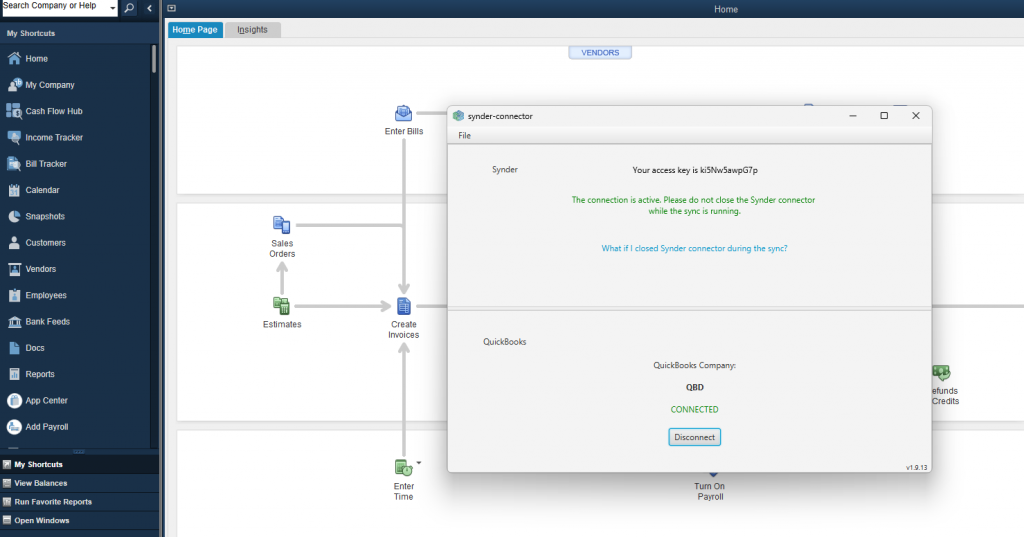
Synder is a cloud platform designed to automate bookkeeping for businesses that collect money through online channels and payment processors. Think: Shopify, Amazon, Etsy, Stripe, PayPal, Square, and similar systems feeding into QuickBooks Online, QuickBooks Desktop, Xero, Sage Intacct, Oracle NetSuite, or Puzzle.
Synder positions itself around a simple promise: accurate numbers with less manual work, especially at month end. It pushes hard on reconciliation, duplicate prevention, and control over what gets posted and how.
The Product Suite: Sync, Insights, and RevRec
Synder is not one feature. It is more like a small toolbox:
- Synder Sync: automated multi channel bookkeeping and reconciliation
- Synder Insights: KPI dashboards and reporting for sales, products, and customers
- Synder RevRec: GAAP aligned subscription revenue recognition, with Stripe support and schedule automation
That matters because many “sync tools” stop at journal entries. Synder tries to cover more of the finance workflow.
Company Timeline and Milestones
Synder’s own “About” page lays out a clear timeline:
- 2019: launch of Synder Sync, starting with Stripe, PayPal, and Square integrations
- 2021: joined Y Combinator (S21 batch)
- 2022: launched Synder Insights and introduced Summary Sync mode
- 2024: launched Synder RevRec for automated GAAP compliant Stripe revenue recognition
Synder lists its company as CloudBusiness Inc and provides a San Francisco address on its site.
Target Audience and Market Positioning
Synder is best understood as a platform for:
- Multi channel ecommerce sellers (Shopify plus Amazon plus Etsy, or similar)
- Retail and consumer goods brands with multiple locations or channels
- SaaS businesses that need subscription revenue recognition workflows
- Accounting firms managing clients with messy platform data
Synder’s reviews and positioning also point at industries beyond ecommerce, but ecommerce and payments are where the feature set is most obvious.
SynderHigh Level Differentiators
Here is what Synder does differently from many competitors:
- Two sync styles: per transaction detail or summarized posting (daily summaries, plus newer monthly summaries)
- Reconciliation first thinking: it emphasizes clearing accounts, payout matching, and controls to prevent duplicates and resync mistakes
- Rollback and resync workflows: undo postings, adjust settings, post again without leaving a trail of broken entries
- Broader suite: analytics dashboards (Insights), AI reporting (AI Dashboards), and revenue recognition (RevRec)
- Enterprise accounting targets: Sage Intacct, NetSuite, and other systems show up in its integration story, not only QuickBooks Online
Pricing and Plans
Synder pricing is not “per seat.” It is primarily based on transaction volume, plus plan tier. That is good if you have many users but stable volume. It is painful if your volume spikes during seasonal peaks.
Synder offers a 15 day free trial and publishes monthly and yearly billing options.
How Synder Counts Transactions
Synder’s pricing page calls out a key rule: the plan needs to cover the number of transactions your business generates, and the “transaction balance” is consumed when sales transactions sync to your books. It also notes that processing fees are treated differently in counting.
Translation: the cost is not about how many platforms you connect. It is about how much activity you push through those platforms.
Also important: Synder explains that Summary Sync and Per Transaction Sync both consume credits based on the number of underlying transactions. A summary can represent many transactions, and the credit use matches that count.
So summary posting keeps your accounting system cleaner, but it does not automatically mean cheaper.
Plan Overview (Business Pricing)
Synder lists these tiers on its pricing page:
- Basic
- Essential
- Pro
- Premium (talk to sales)
Pricing Comparison Table
| Plan | Price (billed yearly) | Price (billed monthly) | Volume range (monthly) | Integration slots | Notes |
|---|---|---|---|---|---|
| Basic | $52 per month | $65 per month | Up to 500 sales transactions | 2 | Entry tier, limited volume |
| Essential | From $92 per month | From $115 per month | 500 to 3,000 sales transactions | Unlimited | Price varies with volume |
| Pro | From $220 per month | From $275 per month | 3,000 to 50,000 sales transactions | Unlimited | Price varies with volume |
| Premium | Talk to sales | Talk to sales | 50,000 plus | Unlimited | For complex needs |
Sources: Synder’s pricing page.
What “From” Really Means
Essential and Pro use “from” pricing because Synder says the final price is tailored to match your monthly transaction syncing needs within the plan limits.
That is fair. But it also means you should not assume the listed number is your number.
If you are an accountant doing vendor comparisons, this is where you slow down and model your monthly activity.
Feature Differences by Tier (What Changes as You Pay More)
Third party pricing summaries like Capterra and Software Advice highlight feature differences that commonly map to tiers:
- Sync frequency: daily in Basic, hourly in Essential and Pro
- Inventory tracking: basic vs extended
- Multicurrency: included in higher tiers
- Product mapping: often cited in Pro
- White glove onboarding: often cited in Pro
This lines up with Synder’s general positioning: Basic for smaller operators, Pro for high volume multi channel finance teams.
Hidden Costs and Gotchas
Synder does not hide its model, but people still get surprised. Here is what to watch.
- You Can Outgrow Your Tier Fast
On G2, one reviewer explicitly warns that different tiers include different allowances in monthly syncs. That is the core trade off with transaction based pricing.If you run promotions, seasonal spikes, or marketplace expansions, you can jump tiers. - Volume Based Pricing Can Punish Low Complexity Businesses
GetApp’s pricing commentary reflects a split: many users like the transaction based model and call it good value compared to pricier options, but others say it feels expensive for small businesses and that higher tiers can feel like too much. - Premium Plan Means “Custom” in Practice
Premium is “talk to sales.” That is not bad. It just means you should expect a conversation about workflow and volume, not a click to buy. - Implementation Time Is a Cost Even If Onboarding Is Not a Line Item
Synder promotes white glove onboarding in higher tiers in some pricing summaries.Even if you do not pay extra, time is still money. If your chart of accounts is messy, or your tax setup is inconsistent, Synder cannot magically fix that. It can only enforce what you configure.
Value for Money: Which Plan Fits Which Buyer?
Here is the practical breakdown.
Basic: Best for single channel sellers who want clean books
Pick Basic if:
- You do not exceed 500 sales transactions per month
- You only need one or two integrations active at the same time
- You want daily sync and can live with that pace
Who will feel friction: anyone with multiple stores, multiple processors, or large volumes.
Essential: The “real” starting point for multi channel
Essential is for:
- Shopify plus PayPal plus Stripe, or similar stacks
- Teams that want hourly sync
- Operators who want less manual cleanup month to month
This is where Synder starts to look like a true automation tool.
Pro: For scale, complexity, and tighter controls
Pro becomes appealing when:
- Volume is high (thousands to tens of thousands of transactions per month)
- Product mapping matters
- You need more structured onboarding
- You want features that support detailed workflows
Premium: For enterprise workflows and special cases
If you are at 50,000 plus transactions per month, you already know you need a custom fit. Premium exists for that world.
Setup and Onboarding Experience
Setup is where accounting tools either win your trust or lose it. Synder knows that. Its product pages repeatedly pitch speed to value and support access.
Signing Up
Synder repeatedly advertises “sign up free” and a 15 day free trial, and some pages note no credit card required for starting.
In practice, you should still expect to connect:
- Your accounting system
- Your sales channels
- Your payment processors
That is the minimum viable setup.
The Typical Onboarding Flow (What Most Teams Actually Do)
A realistic onboarding sequence looks like this:
- Connect your accounting system first
Decide early: QuickBooks Online vs Xero vs an ERP. Your posting options, item mapping behavior, and tax handling will vary. - Connect your platforms
Synder emphasizes 30 plus integrations across channels. This is the “plumbing” step. - Choose sync mode
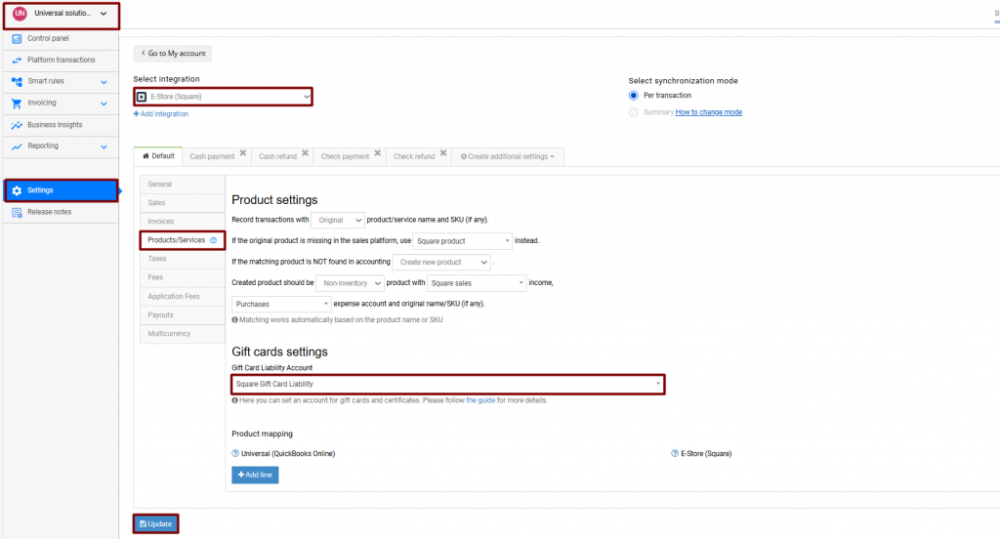
Summary or per transaction. This is not a small decision. It changes how your general ledger reads and how reconciliation feels. - Map accounts and taxes
You will map income, fees, taxes, and clearing accounts. This is the core of accuracy. - Run a small historical sync test
Do not start with three years of data on day one. Start with a week. Confirm postings and reconciliation logic. Then scale. - Lock in settings, then backfill
Once you trust the configuration, import more history.
Synder explicitly says you can import years of historical data and also roll back if you do not like the results.
That rollback promise is a safety net, but it should not be your plan.
Likely Hurdles During Setup
Here are the common friction points, based on product behavior and user feedback patterns.
Choosing Summary vs Per Transaction Too Early
Many teams pick per transaction because it feels “more accurate.” Then they realize their accounting system becomes a wall of entries.
Summary sync exists for a reason. It posts consolidated daily records, including sales, fees, refunds, taxes, and discounts, rather than each order line.
If you need SKU level reporting in the accounting system, per transaction can be worth it. If you mainly need clean financials, summary is often the calmer route.
Tax Setup and Jurisdiction Details
Synder supports tax tracking as part of its feature set, but tax logic always depends on upstream data quality.
If your platforms do not record taxes cleanly, no sync tool can invent clarity.
Multi Currency
Synder supports multicurrency, and it also introduces exchange rate complexity that can affect reconciliation if your bank feed is in a different currency or if platforms settle in mixed currencies.
Mapping and Product Catalog Consistency
Product mapping has improved over time, including UI improvements and CSV import support called out in the changelog.
That is a clue: teams do struggle with mapping at scale.
Time to Get Started
For a simple stack like Stripe plus QuickBooks Online, a small business can often get a first sync running quickly, then iterate. For multi channel plus inventory plus classes plus locations, it takes longer because the chart of accounts and mapping decisions take longer.
Synder’s support options (including screenshare) reduce the pain here, especially for non accountants.
User Interface and Ease of Use
Accounting automation tools have a tricky UI challenge. They must be simple enough for business owners and detailed enough for accountants. Most tools pick a side. Synder tries to sit in the middle.
On G2, Synder scores high overall (4.7 out of 5) but ease of use is still a theme in comparisons with competitors like A2X.
What the Interface Is Built Around
Synder’s help content and product descriptions point to a few core UI areas:
- A place to review platform transactions before posting
- A register or summary view for what will sync
- Mapping and rules configuration
- Sync logs and alerts for troubleshooting
- Rollback tools for cleanup
The changelog shows ongoing investment in internal visibility, including:
- Sync time breakdown in the Sync Log
- A Notification Center for system alerts
- Summary balance reconciliation in app (beta)
- Chart of accounts and summary reports inside Synder
Those are not minor. They are the difference between “trust the black box” and “I can see what happened.”
Learning Curve: New Users vs Experienced Bookkeepers
If you are new to accounting
Synder can still work, but you will need guidance on:
- clearing accounts
- how fees and payouts flow
- why sales do not equal deposits
- how refunds and disputes move through the system
Synder’s educational resources exist for this reason. It promotes webinars, eSchool, guides, and support access.
If you are an accountant or controller
You will likely like:
- the ability to control mapping
- rollback safety
- logs and audit trails
- summary posting options
- multicurrency support
But you may still find parts of setup tedious, especially if you manage many SKUs or many channels.
Customization Options
Synder customization tends to live in:
- smart rules and categorization logic
- product mapping behavior
- posting date options and grouping options
- summary versus transaction level detail
It is not a “theme and layout” product. It is a control panel product.
That is the right choice for finance software.
Core Features Breakdown
This is the section that matters. Features are why you pay. And with Synder, features are mostly about preventing accounting mess.
1. Ticket One: Summary Sync vs Per Transaction Sync
Synder supports two primary posting styles:
Per Transaction Sync (High detail)
Per transaction sync posts each sale individually with customer and product level details. Synder’s own article describes it as syncing each transaction separately with full information, including product names and customer details.
Use it when:
- You need SKU level revenue in the accounting system
- You want customer level detail in QBO or Xero
- You run workflows that depend on transaction level entries
Trade off: your accounting file grows fast. That can slow review and close.
Summary Sync (Cleaner books)
Summary sync groups activity and posts a single record per day per platform, capturing key financial data like sales, fees, refunds, taxes, and discounts.
Use it when:
- You want clean financial statements without noise
- You reconcile payouts and clearing accounts, not every order
- You have high volume and need sanity
Synder’s changelog also mentions monthly summaries, which can compress postings further for month end workflows.
The Practical Choice
If you are stuck, ask yourself one question:
Do I need the accounting system to be my sales analytics tool?
If yes, per transaction might be right. If no, summary is often better, and you can use Synder Insights or your ecommerce analytics stack for detailed reporting.
2. Multi Channel Sync and Integration Slots
Synder consistently promotes 30 plus integrations, and its Basic plan limits integration slots while higher plans remove that limit.
In practice, this matters because many businesses connect:
- one sales platform (Shopify)
- multiple payment processors (Stripe and PayPal)
- marketplaces (Amazon, Etsy)
- shipping or fulfillment data (varies)
Synder is designed for that layered stack, not a single pipe.
3. Reconciliation: Clearing Accounts and Payout Matching
This is the heart of Synder.
The cleanest way to reconcile ecommerce money is:
- Post sales and related items (fees, refunds, taxes) into a clearing account
- When the platform pays out, match the deposit to the clearing account movement
- The clearing account should net to zero, or near zero with timing differences
Synder pushes this approach in multiple places, including its messaging around streamlined reconciliation and month end close.
Synder also introduced Summary Balance Reconciliation (beta) to verify clearing account amounts before posting, based on its changelog.
That feature is meaningful because it addresses a real fear: “If I sync this, will I regret it?”
4. Duplicate Prevention and Resync Protection
Duplicate entries are how sync tools destroy trust. Synder has leaned into prevention.
On its changelog, Synder notes resync protection: transactions already marked synced are skipped in future sync attempts unless rolled back.
G2’s product profile also mentions a duplicate detection mechanism and rollback capability as core parts of the tool.
This is the kind of feature you only appreciate after you have cleaned a ledger at 11 pm.
5. Rollback and “No Mess” Cleanup
Synder highlights bulk rollback as a way to clean books and resync data with new settings in a few clicks.
It also states you can import years of historical sales data and, if you are not satisfied, roll back and resync with corrected settings.
This matters for two scenarios:
- You set mappings wrong early and only notice later
- A platform changes how it reports a fee type and you need to adjust
Rollback does not eliminate all risk. You still need to confirm what it removes and whether anything else depends on those entries. But it is a strong safety feature.
6. Smart Rules, Categorization, and Control
Synder’s G2 profile describes sorting transaction data by fee, tax, discount, inventory, customer location, and more using smart rules.
The exact UI details vary by sync mode, but the concept is consistent:
- define rules for how items should map
- apply those rules during sync
- keep the output consistent
This is one of the “accountant features” that separates serious tools from lightweight connectors.
7. Product Mapping and SKU Handling
If you sell physical products, product mapping gets complicated quickly.
Synder’s changelog shows major work here:
- improved product mapping UI
- CSV import for mapping
- configurable product search priority (for QuickBooks Online)
- configurable product search for Xero
That tells you two things:
- Users demanded more control
- Synder is actively improving the mapping experience
If you run a large catalog, you should ask about mapping strategy before you sync a full year of history.
8. Inventory Tracking
Synder pricing summaries (Capterra and Software Advice) show inventory tracking as part of its tiers, moving from basic to extended.
SynderInventory is where many automation tools get messy because:
- sales platforms track items
- accounting platforms track items differently
- refunds and returns alter inventory logic
- bundles and assemblies complicate everything
Synder’s Pro tier summaries mention bundle and assemblies sync, which suggests it is aware of these edge cases.
9. Multicurrency Support
Multicurrency shows up as a Pro feature in Capterra pricing summaries.
If you sell across regions or collect payouts in different currencies, you want:
- consistent posting currency logic
- clear reporting for gains and losses
- reconciled clearing accounts in the right currency
Synder has been improving “home currency columns” in summary registers based on its changelog, which supports the idea that it is actively working on this pain point.
10. Built In Invoicing and Payment Matching
Synder’s Sync product page calls out built in invoicing with auto matching capabilities: create one time or recurring invoices without additional charges, then let automation match payments to invoices.
This is not the main reason to buy Synder, but it is a useful add on if you need lightweight invoicing tied to your books.
11. Reporting and Internal Registers
Synder has been adding more in app reporting visibility, including chart of accounts, registers, and summary reports inside the platform.
That is a strong trend. It points toward Synder becoming more than a pipe. It becomes a layer where finance teams can verify and review before posting to the general ledger.
12. Real World Workflow Examples
Let’s make this concrete. Here are three typical setups.
Example A: Shopify plus Stripe plus QuickBooks Online (Summary Sync)
Goal: clean month end close without thousands of entries.
Workflow:
- Connect QBO and Shopify and Stripe
- Choose Summary Sync
- Map sales to income accounts, fees to fee accounts, taxes to tax liability
- Sync daily summaries
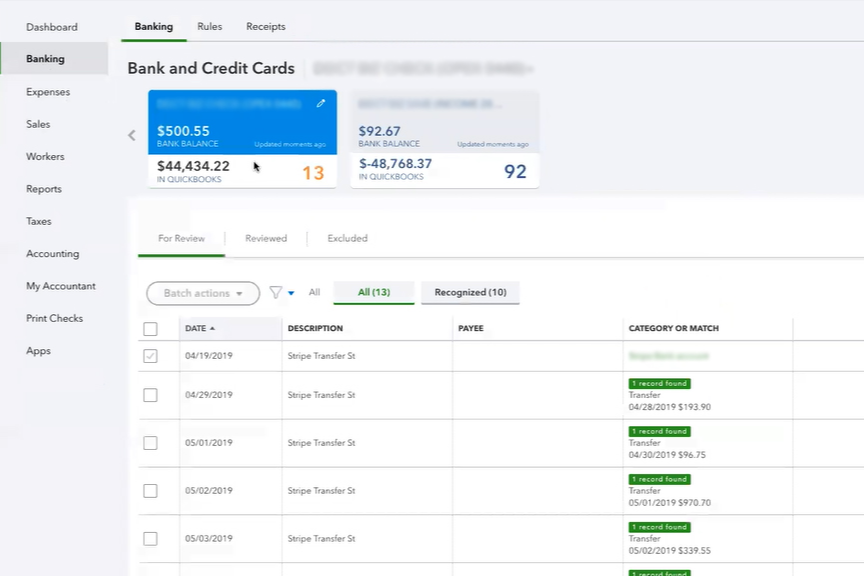
- Reconcile Stripe payouts in the bank feed by matching deposits to clearing account movements
- If a mapping is wrong, roll back affected summaries, adjust mapping, resync
Why it works: daily entries keep the ledger readable while preserving fee and tax detail.
Example B: Amazon plus PayPal plus Xero (Per Transaction)
Goal: transaction level detail and customer data in accounting.
Workflow:
- Connect Xero and marketplaces
- Choose per transaction sync
- Set product mapping rules to reduce duplicate item creation
- Sync transactions
- Use payout matching logic in reconciliation
- Monitor alerts and sync statuses if errors occur
Why it works: you get full detail in the accounting file, which helps some reporting needs, though at the cost of volume.
Example C: SaaS subscriptions in Stripe (Revenue Recognition with RevRec)
Goal: comply with GAAP aligned revenue recognition and handle upgrades, downgrades, refunds, cancellations.
Workflow:
- Enable Synder RevRec and connect Stripe
- Import subscription data
- Let Synder build recognition schedules
- Post recognized revenue and deferred revenue movements into the accounting system
- Use RevRec reporting for audit support
Why it works: subscription changes update schedules in real time for direct Stripe integration, reducing manual spreadsheet work.
Advanced Features and Integrations
Synder’s advanced story is where it starts to separate from simpler sync tools.
AI Dashboards: Natural Language Reporting
In May 2025, Synder announced AI Dashboards that let users query financial data using natural language prompts like asking about fees last quarter or sales by region. It positions this as real time reporting based on Synder’s internal register, and it notes that AI builds queries of your data without sharing it to external AI systems.
SynderThis is an interesting move because most accounting tools either:
- require fixed reports
- require exports to spreadsheets
- require BI tooling
Natural language reporting is not magic, but it can reduce friction for non technical teams.
Synder Insights: KPI Dashboards and Business Reports
Synder Insights is pitched as a business intelligence tool for multi channel performance:
- single dashboard across platforms
- sales, products, and customer reports
- “3 easy steps” onboarding: connect platforms, filter, get reports
Synder also lists a Shopify app entry for Synder Insights with pricing starting from $99 per month.
If you are a founder who keeps asking “Which channel is actually profitable?” this is the module aimed at you.
Synder RevRec: Subscription Revenue Recognition
Synder RevRec is designed for subscription businesses, especially those using Stripe.
Synder states RevRec can:
- integrate with Stripe and support Excel uploads
- automatically build revenue recognition schedules
- track subscription changes like cancellations, refunds, upgrades, downgrades
- update schedules in real time for direct Stripe integration
Synder’s own “About” timeline says RevRec launched in 2024.
Integration Ecosystem: What You Can Connect
Synder repeatedly states 30 plus integrated platforms.
Here is a practical list of common integrations Synder highlights across its materials:
Common sales channels and payment platforms
| Category | Examples Synder highlights |
|---|---|
| Ecommerce and marketplaces | Shopify, Amazon, Etsy, Walmart, BigCommerce |
| Payment processors | Stripe, PayPal, Square |
| Additional platforms referenced in product materials | TikTok (statement integration in changelog), ShipStation (transactions added in changelog) |
Sources: Synder site, G2 profile, and changelog.
Accounting platforms and ERPs
Synder highlights:
- QuickBooks Online and QuickBooks Desktop
- Xero
- Sage Intacct
- Oracle NetSuite
- Puzzle
If you are on NetSuite, Synder has a dedicated Stripe NetSuite integration page describing an integrate, customize, reconcile flow and summary sync posting into NetSuite.
How Seamless Are Integrations?
This is where user reviews matter more than marketing.
On G2, Synder holds a 4.7 out of 5 rating with 233 reviews, and reviewers frequently praise integration with multiple platforms and automation of data entry.
But even positive reviews include warnings about tier allowances and scaling costs, and some mention manual effort still needed for complex items like refunds and chargebacks.
That is honest. Refunds and disputes are messy in any system.
Performance, Reliability, and Security
Speed and Reliability Signals
I cannot provide uptime percentages here because Synder’s public status page did not load usable uptime metrics in my research environment. It does exist as a link on Synder’s site, but the data was not accessible during capture.
What I can say, based on product artifacts:
- Synder invests in tooling that helps diagnose sync performance, like “sync time breakdown” in the Sync Log.
- It also added a Notification Center to surface key alerts inside the app.
- It emphasizes duplicate prevention and resync protection, which reduces the most common reliability failure: accidental duplicate posting.
Scalability for Growing Teams
Synder claims scale signals on its site:
- 2.5M sync per month
- 5,000 plus businesses
- 30 plus platforms
- 150 plus transaction types synced
Even if you treat those as marketing numbers, the product design makes sense for scale:
- summary posting controls
- bulk mapping
- improved mapping UI and CSV import
- internal registers and reports for review
Security and Compliance
This is one of Synder’s stronger areas in public documentation.
Synder states it is SOC 2 Type 2 certified, and it explains that a SOC 2 Type 2 report is a third party audit aligned to trust criteria like security, availability, processing integrity, confidentiality, and privacy.
Synder also lists specific security practices:
- TLS 1.2 and 1.3
- salted password hashing
- AES at rest and in transit
- GDPR and CCPA compliance
- regular penetration testing performed by Synopsys
It also highlights a “no humans in the loop” approach to processing, describing it as end to end automation without manual intervention into customer data processing.
Customer Support and Resources
Synder is unusually explicit about support channels.
Its Sync product page says support is available worldwide and lists communication options including phone, email, live chat, and screenshare.
Synder also promotes a large learning library:
- webinars
- blog
- eSchool
- success stories
- help center guides
User reviews reinforce support strength. On G2, reviewers often call out responsive and knowledgeable support, sometimes naming support reps in reviews.
If you are choosing between tools, support quality matters more than a feature checklist. Sync tools sit in the middle of your money flow. When something breaks, you want answers fast.
Pros and Cons
Pros
- Excellent fit for multi channel sales and payment stacks, with 30 plus integrations promoted across product materials
- Flexible posting style: per transaction detail or clean daily summaries, with newer monthly summaries
- Strong controls: rollback, resync protection, duplicate prevention signals
- Advanced finance modules: Insights analytics, AI dashboards, and RevRec for subscription revenue recognition
- Security posture is clearly documented, including SOC 2 Type 2 and encryption standards
- Strong support options including screenshare
Cons
- Pricing can rise quickly with transaction volume, and reviewers warn about tier allowances
- Transaction based pricing can feel expensive for low volume businesses
- Refunds, chargebacks, and edge cases can still require manual work, even in otherwise automated workflows
- Product mapping and configuration can be complex, though Synder has been improving it
User Reviews and Ratings Summary
Synder has strong public ratings across major review platforms:
- G2: 4.7 out of 5, based on 233 reviews
- Capterra: pricing and plan breakdown shown with value for money rating, with 251 reviews referenced in the pricing section
- Synder’s own site references an average rating based on 3,400 plus reviews across sources, though that aggregates across platforms
Common Praise Themes
Across G2 snippets and general platform summaries, users frequently praise:
- automation of data entry and time savings
- integration across multiple platforms
- accuracy improvements and reconciliation support
Common Complaint Themes
The most repeated concerns:
- pricing and tier limits tied to monthly sync allowances
- cost increases as volume grows
- manual effort for tricky edge cases like refunds and chargebacks
Trends Over Time: What Has Improved Recently
Synder’s changelog reads like a roadmap focused on control and visibility. In 2025 it added or improved:
- in app alerts via Notification Center
- PayPal dispute processing
- Puzzle integration
- monthly summaries
- resync protection
- summary line drill down and better statuses
- improved mapping workflows and bulk mapping
- sync time breakdown in logs
- summary balance reconciliation beta and chart of accounts views
This pattern suggests a product that listens to operational pain, not just feature marketing.
SynderAlternatives and Comparisons
Synder is not the only tool in this space. Your best option depends on your channels, accounting system, and tolerance for configuration.
Here are five alternatives that come up often in ecommerce accounting automation.
Quick Comparison Table
| Tool | Best for | Starts around | Notable strength | Notable trade off |
|---|---|---|---|---|
| Synder | Multi channel sellers, accounting firms, SaaS needing RevRec | $52 per month (yearly) | Summary or transaction level sync, rollback, analytics and RevRec modules | Can feel expensive as volume grows |
| A2X | Marketplace settlement accounting, especially Amazon and Shopify | $29 per month | Strong ease of use reputation and channel specific settlement workflows | Often centered on payout summaries and channel scope per plan |
| Link My Books | Order volume based pricing for ecommerce sellers | $17 per month | Lower entry pricing, tiers by orders | Channel list and workflow depth differ by business needs |
| Webgility | Broader ecommerce operations and inventory automation, NetSuite links | Plans vary widely, can be higher | Strong automation story for multichannel operations | Reviews show mixed support experiences and higher pricing tiers |
| Bookkeep | Daily summary posting and accrual style workflows | Varies by marketplace listing | Daily accrual journal entry approach can keep books clean | Pricing and platform support vary by connector |
When Synder Wins
Pick Synder if you need:
- multi platform syncing plus reconciliation controls
- ability to choose summary vs per transaction
- rollback safety
- analytics and revenue recognition in the same ecosystem
When an Alternative Might Be Better
Choose A2X if:
- you primarily care about clean settlement posting for one marketplace
- you want a very focused tool chain with strong ease of use reputation
Choose Link My Books if:
- you want a low cost entry point based on orders
- your channels match what it supports and you are price sensitive
Choose Webgility if:
- you need broader ecommerce ops automation with inventory syncing and are willing to pay for it
- you want a tool that positions itself around many channels and systems
Choose Bookkeep if:
- you like a daily summary journal entry approach and your stack matches its supported integrations
Who Is Synder Best For (And Who Should Avoid It)
Best For
Synder is a strong fit if you are:
- A multi channel ecommerce operator who needs reliable reconciliation
- A finance lead tired of patchwork spreadsheets and manual fee tracking
- A SaaS business using Stripe subscriptions and needing revenue recognition schedules
- An accounting firm supporting clients with Shopify, Stripe, PayPal, Square, and marketplaces
Consider Skipping Synder If
Synder may not be your best choice if:
- You have very low transaction volume and your main driver is lowest price
- You only need one narrow connector and nothing else
- You do not want to spend time on mapping and accounting configuration
Synder is powerful, but power comes with setup decisions.
SynderFinal Verdict and Recommendations
Synder is built for one problem: platform money is messy. It attacks that problem with two posting modes, reconciliation focused workflows, and safety features like rollback and resync protection. It also expands into analytics, AI dashboards, and revenue recognition, which pushes it beyond “just a sync tool.”
Overall rating: 8.8 out of 10
Score Breakdown
- Features: 9.2 out of 10
- Integrations: 9.0 out of 10
- Ease of use: 8.3 out of 10
- Value for money: 8.2 out of 10
- Support and resources: 9.1 out of 10
- Security: 9.4 out of 10
My Recommendation
If you sell on more than one channel or you accept payments through more than one processor, Synder is worth serious consideration. Start with Summary Sync unless you have a clear reason you need transaction level entries, then scale into per transaction only where it pays off.
If you are evaluating it, do two things during the trial:
- Run a one week sync and reconcile payouts end to end
- Test rollback on that same dataset, just to confirm you trust the cleanup workflow
Synder offers a 15 day free trial, so you have enough room to do this properly.
SynderFAQ: 15 Common Questions About Synder
1. Is Synder free?
Synder promotes a 15 day free trial. Ongoing use is paid and tied to plan tier and transaction volume.
2. How does Synder pricing work?
Pricing is based on plan tier plus monthly transaction volume. Essential and Pro use “from” pricing and Synder states final price is tailored to syncing needs within plan limits.
3. What is the difference between Summary Sync and Per Transaction Sync?
Per transaction posts each transaction with full detail. Summary sync posts grouped entries (often daily per platform), capturing key financial totals like sales, fees, refunds, taxes, and discounts.
4. Does Summary Sync reduce sync credit usage?
Not automatically. Synder states both modes consume credits based on the number of underlying transactions included. A summary can contain many transactions, and credits match that count.
5. Can I import historical data?
Synder states you can import years of historical sales data, and if you are not satisfied you can roll back and resync with corrected settings.
6. Does Synder prevent duplicates?
Synder highlights duplicate detection and also added resync protection in its changelog, where synced transactions are skipped unless rolled back.
7. What accounting platforms does Synder support?
Synder highlights QuickBooks Online, Xero, Sage Intacct, NetSuite, and Puzzle, among others.
8. What channels can I connect?
Synder promotes 30 plus integrations, including platforms like Shopify, Amazon, Etsy, Walmart, Stripe, PayPal, Square, BigCommerce.
9. Does Synder support multicurrency?
Multicurrency appears as a feature in higher tiers in pricing summaries, and Synder has added home currency columns in summary registers according to its changelog.
10. Does Synder handle refunds and chargebacks automatically?
Synder syncs many transaction types, but user reviews suggest refunds and chargebacks can still require manual work depending on how they appear in the accounting system.
11. What is Synder RevRec?
RevRec is Synder’s subscription revenue recognition product. It integrates with Stripe, can build revenue recognition schedules, and tracks subscription changes like cancellations, refunds, upgrades, and downgrades.
12. What is Synder Insights?
Synder Insights is a business analytics module that provides KPI dashboards and sales, product, and customer reports across connected platforms.
13. What are Synder AI Dashboards?
Synder announced AI Dashboards in 2025, describing them as natural language reporting over your organization’s financial data. It also states it builds queries without sharing data to external AI systems.
14. Is Synder secure?
Synder states it is SOC 2 Type 2 certified and lists encryption and compliance details such as TLS 1.2 and 1.3, AES at rest and in transit, salted password hashing, and GDPR and CCPA compliance.
15. What do real users think overall?
Synder’s G2 rating is 4.7 out of 5 with 233 reviews. Reviewers often praise integration and automation, while also noting tier limits and pricing sensitivity as volume grows.








By clicking Sign In with Social Media, you agree to let PAT RESEARCH store, use and/or disclose your Social Media profile and email address in accordance with the PAT RESEARCH Privacy Policy and agree to the Terms of Use.