
SurveySparrow Review: Features, Pricing, Pros & Cons, Use Cases, and Alternatives
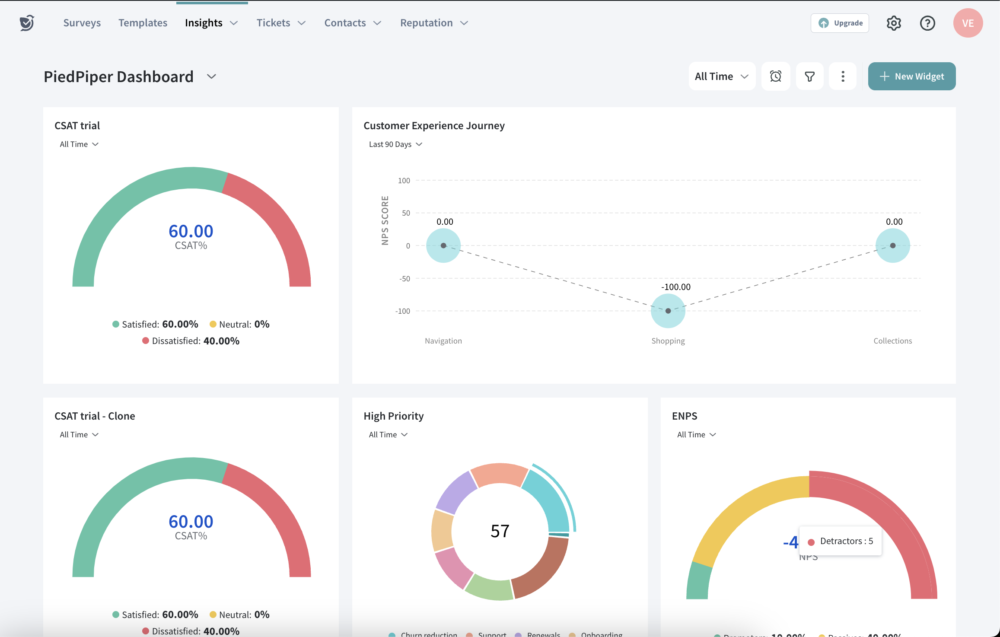
SurveySparrow positions itself as a unified Voice of Customer (VoC) and experience management platform designed to help teams collect feedback across channels, analyze it with AI, and then close the loop through ticketing, workflows, and reputation management.
If you’re evaluating SurveySparrow, the right lens is not “Can it build a survey?”—it’s:
- Can it reliably generate responses at scale (distribution + UX)?
- Can it turn qualitative feedback into prioritized actions (analytics + AI)?
- Can it operationalize follow-up (ticketing, workflows, routing, SLAs)?
- Can it connect to the rest of your stack (integrations, API, data export)?
- Can it meet your security/compliance constraints (SOC2/ISO, data residency, DPA)?
SurveySparrow
SurveySparrow is an online survey platform that can turn surveys into conversations. Build beautiful, conversational surveys which will result in a 40% higher completion rate. SurveySparrow transforms surveys into conversations by serving one question at a time. Choose question types with ease. SurveySparrow lets users select question types from an array of options. Create a versatile survey with the right combinations of question types wherever needed. SurveySparrow embed surveys offer insightful data such as usability, user impressions, and how effective the user found the website. Moreover, use them to collect real-time leads from the website. Improve the quality of student…
• Built-in Email Share
• Employ Contact Forms to collect necessary information from respondents in a quick and easy way while taking a survey
• Matrix Question Type: Ask multiple questions at one go
•Built-in Audience Management
• Recurring Surveys: Send surveys at regular intervals to gauge customer or employee pulse
• Mobile First Surveys: Keep the audience engaged with the conversational interface
• Starter - $19 / month
• Plus - $29 / month
• Premium - $49 / month
• Enterprise - $199 / month
• Built-in Email Share
• Employ Contact Forms to collect necessary information from respondents in a quick and easy way while taking a survey
• Matrix Question Type: Ask multiple questions at one go
• Display Logic: Control the behavior of the overall survey and enhance the quality of the data obtained
• Multi-device Compatibility: Audience can answer surveys from anywhere in the world with simple taps on their preferred device
• Import Contacts: Just upload a CSV file with all the contact information or quickly drag and drop the file to the dashboard
Overall verdict (short version): 8.6/10
Best for: CX/support teams running NPS/CSAT programs that must route issues to resolution; organizations that need omnichannel feedback (including WhatsApp/SMS) and want AI-driven analysis of open-text feedback.
Not ideal for: teams that only need occasional basic forms with minimal reporting, or organizations that want a pure research suite with advanced sampling/panel management as the core requirement.
Here’s what this review covers
- Introduction
- SurveySparrow at a glance
- Pricing and plans (with table + “hidden costs”)
- Setup and onboarding experience
- UI and ease of use (plus screenshot guidance)
- Core feature breakdown
- Advanced features and integrations (with top apps table)
- Performance, reliability, and security
- Customer support and learning resources
- Pros and cons
- User reviews and ratings summary
- Alternatives and comparisons
- Who SurveySparrow is best for (and who should avoid it)
- Final verdict and recommendations
- FAQ (15 questions)
Introduction
The pain point: collecting feedback is easy—operationalizing it is not
Most teams don’t fail at “making a survey.” They fail at the operational layer: getting strong response rates consistently, reaching customers in the right channel, extracting themes from open text, and closing the loop fast enough that customers feel the improvement.
SurveySparrow is designed to function like a feedback-to-action system: collect feedback across channels, analyze it with reporting and AI, then route outcomes into tickets/workflows so issues are resolved and patterns are fixed.
SurveySparrow at a glance
What it is
A feedback and experience management platform that combines:
- Survey creation (including conversational/chat-style experiences)
- Multichannel distribution (Email/SMS/WhatsApp, web links, embeds, QR codes)
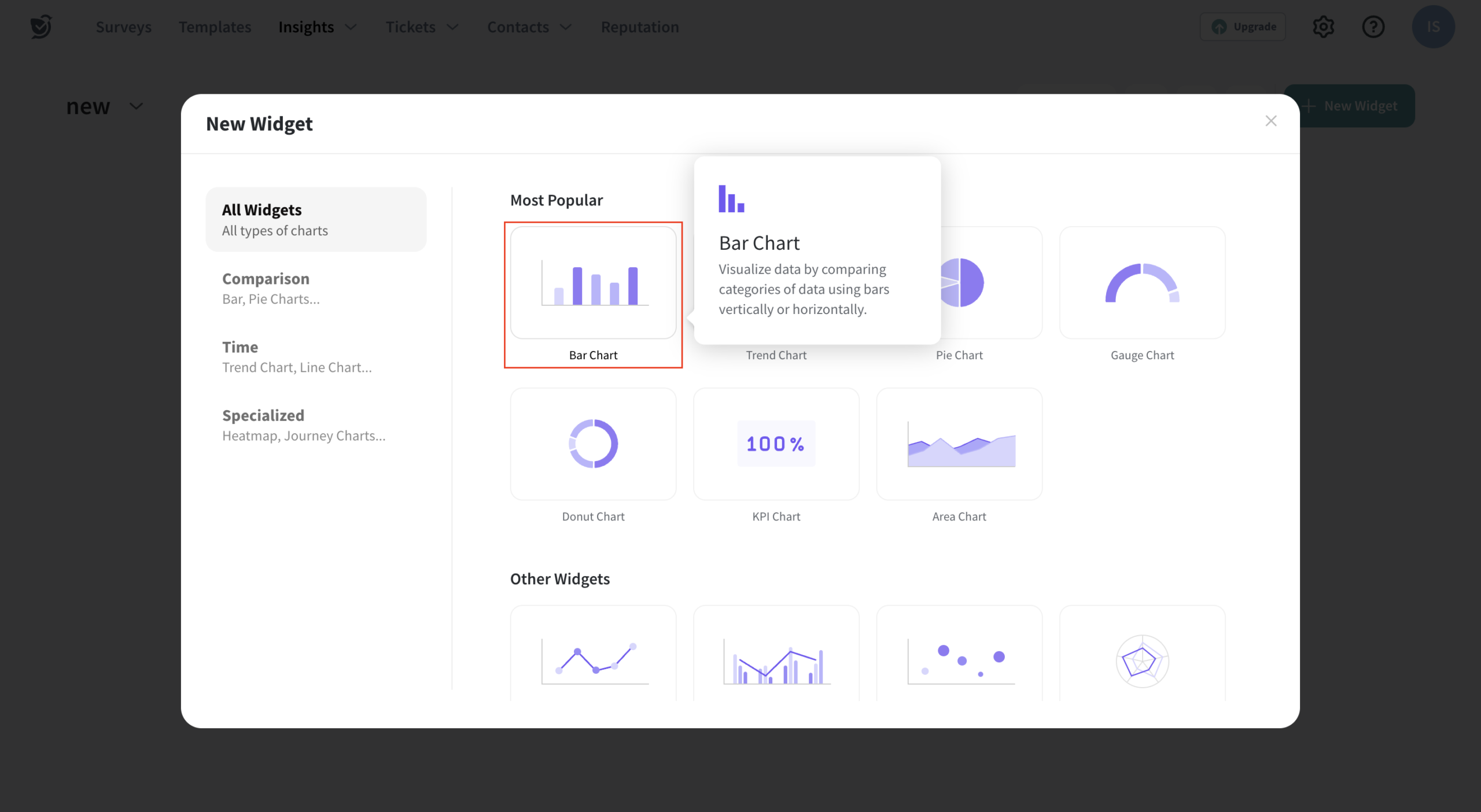
- AI and text analytics (CogniVue)
- Micro-feedback widgets (SpotChecks)
- Ticketing / case management to close the loop
- Reputation (review) management across 100+ platforms
- Offline and kiosk data collection
- 360-degree assessments for employee performance reviews
- Document generation (generate and send documents upon submission)
Free trial / free plan
SurveySparrow advertises a free trial and a free plan option. Practically, your evaluation should confirm what’s included (channels, AI, integrations, and ticketing scope) and what’s tier-gated.
“Signature” differentiators (why it’s not just another survey tool)
- Conversational surveys designed to improve completion and reduce fatigue.
- Operational follow-through via ticketing, automations, and workflows (closing the feedback loop).
- Omnichannel listening + AI text analytics (drivers + topics + sentiment) via CogniVue.
- Reputation management (review aggregation + AI insights + AI reply assistance + workflows).
What it isn’t
SurveySparrow is not a minimalist “form-only” tool. It’s also not solely an enterprise research suite built around advanced sampling and panel management. It’s designed for teams that want feedback programs to be repeatable, operational, and connected.
Pricing and plans
Survey tools can be deceptively priced if you only look at “per month.” A better evaluation model is:
- Usage limits: responses, contacts, emails, API calls/day
- Feature gating: AI analytics (e.g., driver analysis), advanced logic, SSO, integrations, support level
- Scale curve: how quickly adoption increases response volume and contact counts
Plan comparison table (high level)
| Plan | Responses (listed) | Users (listed) | Key inclusions (examples) | Best for |
|---|---|---|---|---|
| Basic | Low-to-moderate | 1 | Email surveys, partial responses, skip/display logic, basic integrations | Individuals / simple programs |
| Starter | Moderate | 1 | Email embed, translation, redirect on completion, API access | Growing usage, light automation |
| Business | Higher volume | Team | Custom branding, advanced question types, workflows/webhooks | Teams operationalizing feedback |
| Professional | High volume | Team | Sentiment analysis, CSS customization, auto-translate, stronger support options | Scaling CX programs |
| Enterprise | Custom | Custom | Key driver analysis (CogniVue), governance controls, dedicated success support | Regulated/large orgs, advanced analytics |
Hidden costs / “gotchas” to budget for: higher response volume, additional seats, WhatsApp/SMS delivery costs, advanced AI analytics, SSO, and integration requirements. In most real deployments, the price driver is scale + capabilities, not the entry plan.
Setup and onboarding experience
SurveySparrow onboarding is straightforward in concept (build → distribute → analyze → act). The success factor is governance: clear ownership, naming conventions, audience segmentation strategy, and an agreed “close-the-loop” workflow.
The initial decisions that matter most
- Program type: NPS (relational), CSAT/CES (transactional), micro-feedback (SpotChecks), reputation/reviews, employee 360, or offline/kiosk.
- Routing model: what triggers a ticket, who owns the ticket, and what the SLA is.
- Channel strategy: email vs SMS vs WhatsApp vs embedded vs QR (and when to use which).
- Systems of record: CRM/help desk/warehouse—where the “truth” lives and what must sync.
Time to get started (realistic expectations)
| Path | What it looks like | Why it’s faster/slower |
|---|---|---|
| Fastest (same day) | Launch a basic survey from a template and distribute via link/QR/email. | Minimal integration and workflow complexity. |
| Typical (days) | Add logic/piping, define segments, set up dashboards, create basic close-the-loop rules. | Requires governance and testing. |
| Advanced (weeks) | Multi-channel SmartReach sequences, WhatsApp onboarding, SSO, warehouse sync, AI analytics rollout. | Cross-team dependencies + policy/security reviews. |
User interface and ease of use
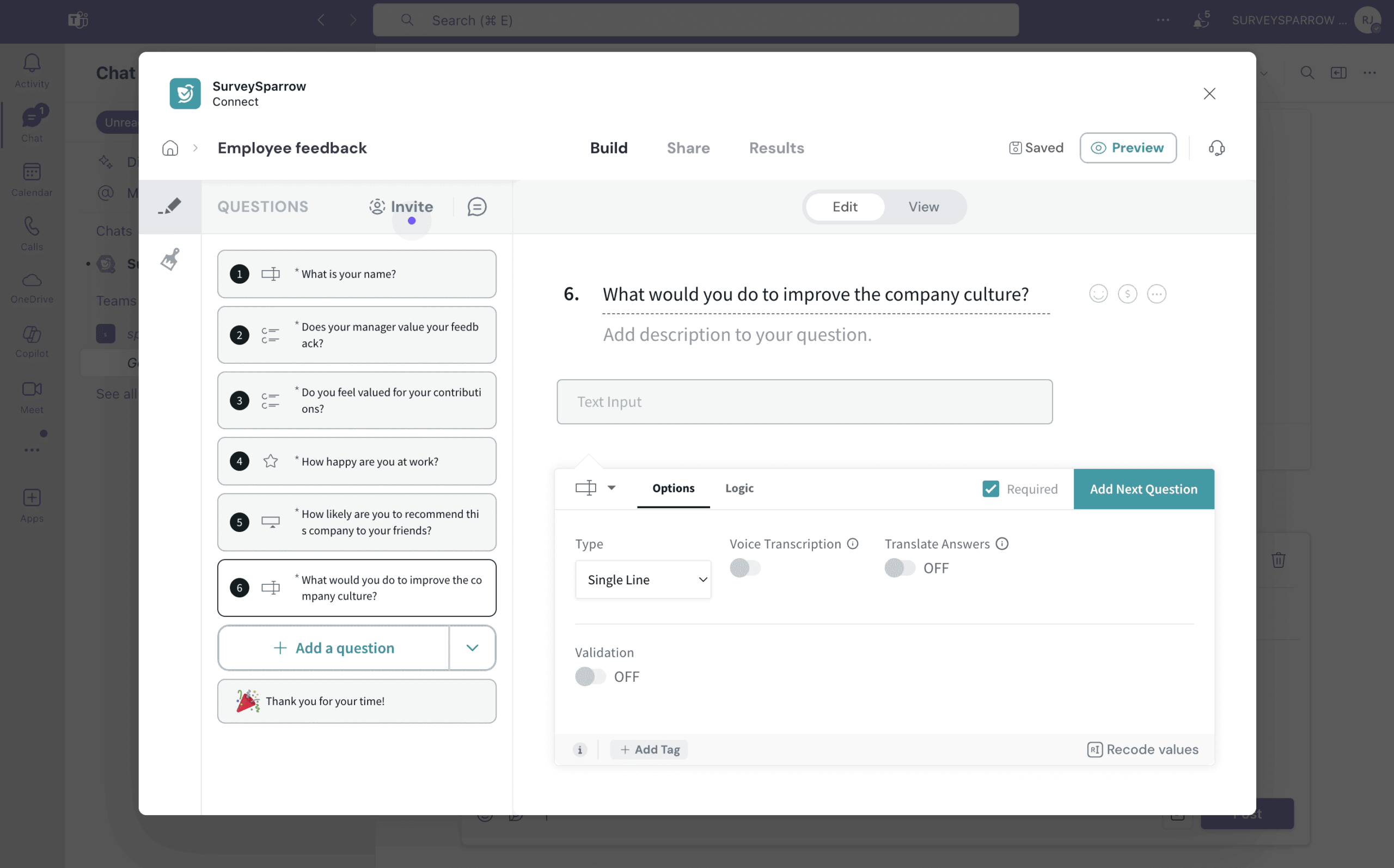
SurveySparrow’s UX is designed around “build fast, deploy across channels, and act on outcomes.” The conversational survey builder is typically the first UI value driver; ticketing/reputation modules become the second.
SurveySparrowLearning curve (new users vs admins)
- New users: can launch surveys quickly using templates and standard share links.
- Admins/power users: spend time on segments, workflows, SmartReach orchestration, permissions, and integration mappings.
Screenshot checklist (publication-ready)
- Survey builder (conversational vs classic) + logic rules
- Template gallery / survey setup screen
- SmartReach sequence builder (email → wait → SMS/WhatsApp follow-up)
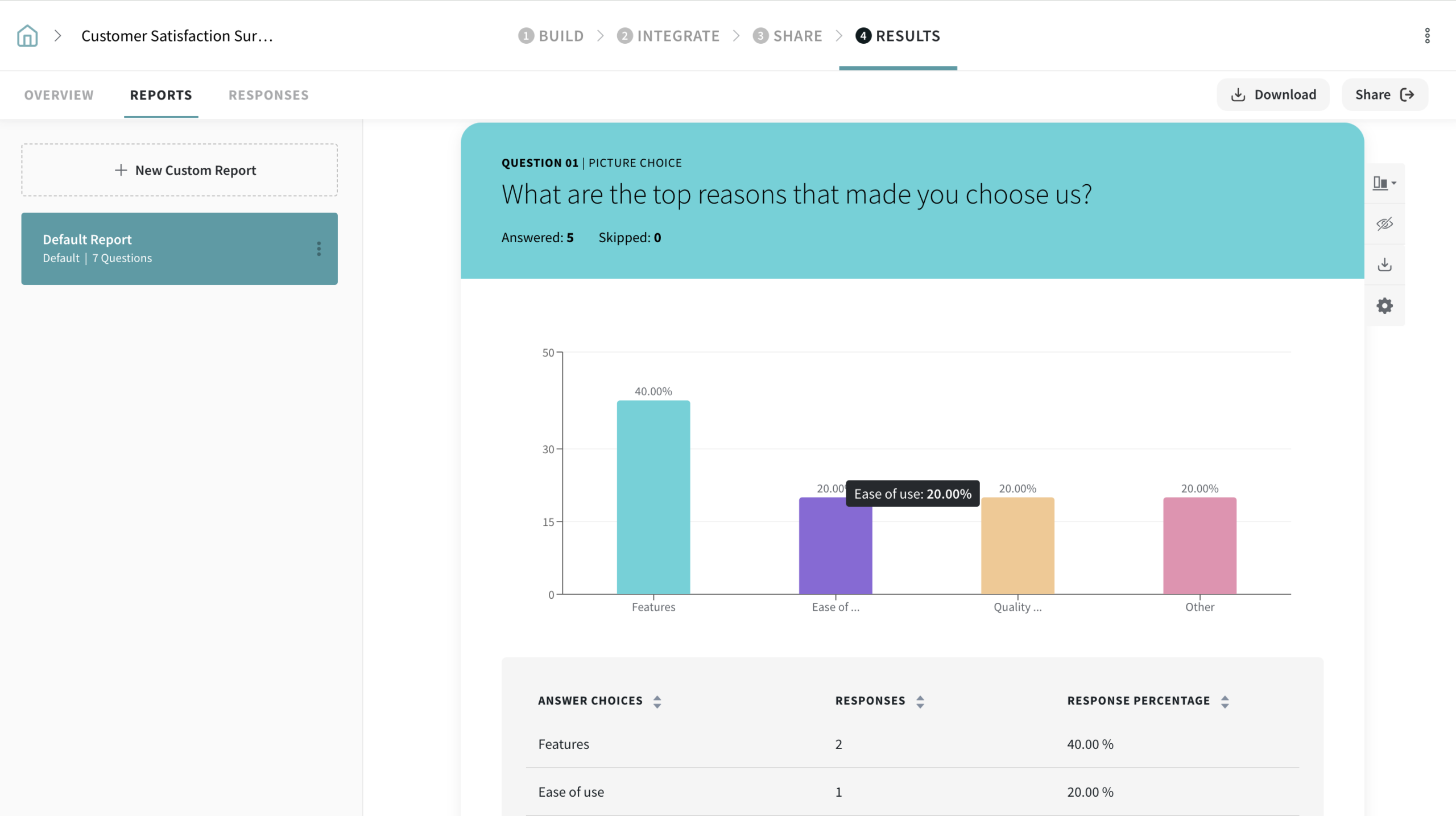
- Dashboard/report view with filtering/cross-tabs
- CogniVue topic extraction / driver analysis screen
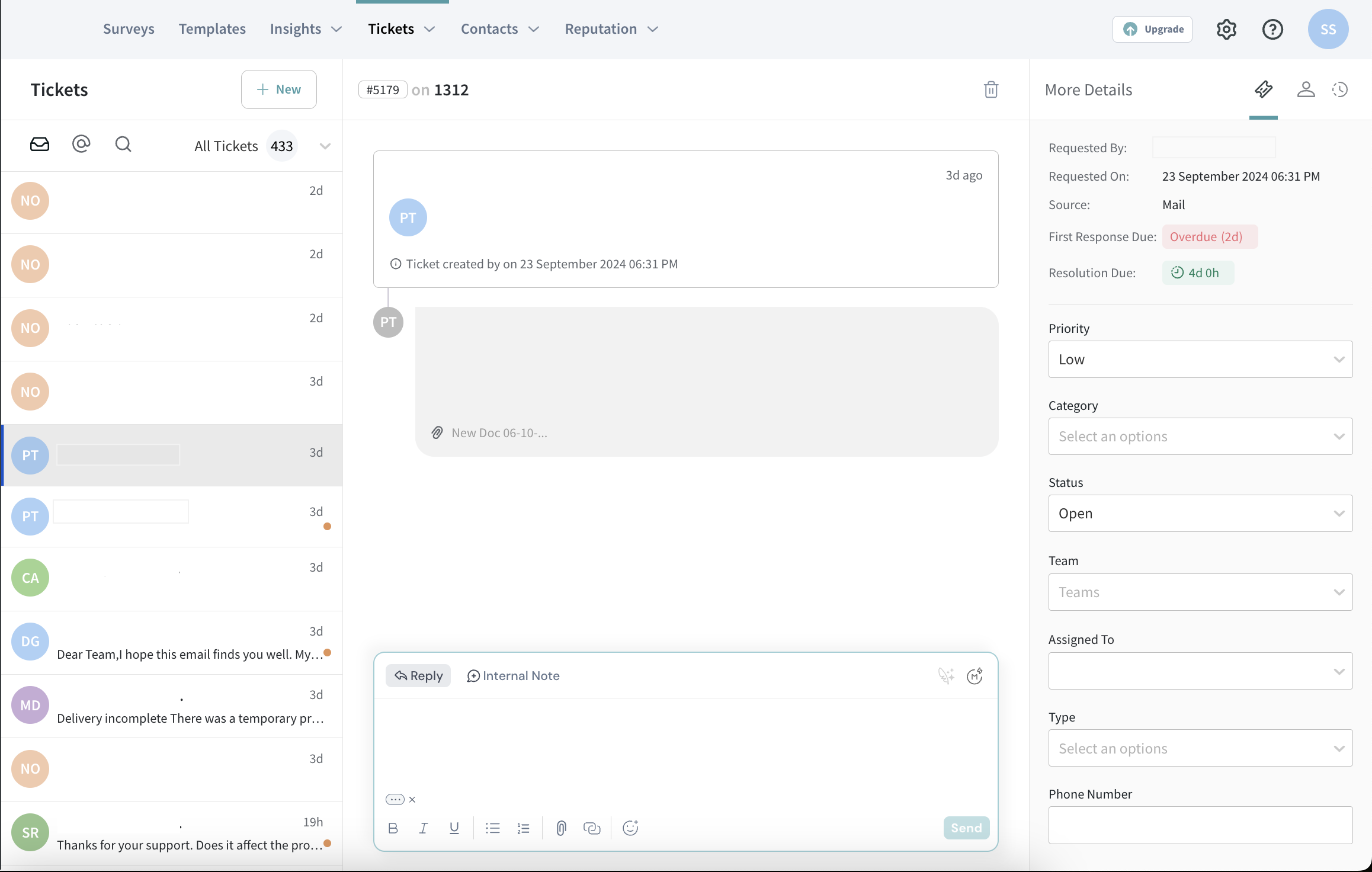
- Ticket created from a negative response + SLA/routing settings
- Reputation management dashboard + AI-generated reply example
- SpotChecks widget placement settings
- Offline/kiosk configuration (if relevant)
Core feature breakdown
SurveySparrow is best understood as eight connected systems:
- Survey creation (conversational + classic + templates)
- Distribution (email/SMS/WhatsApp + embeds/QR)
- Analytics (dashboards + exports)
- AI insights (CogniVue for open text and drivers)
- Close-the-loop operations (ticketing + workflows + SLAs)
- Reputation management (review aggregation + responses)
- In-the-moment feedback (SpotChecks micro-surveys)
- Field readiness (offline/kiosk + device-based collection)
1) Survey creation: conversational and classic surveys
- Conversational UX: chat-style flows can reduce fatigue and improve completion for mobile-heavy audiences.
- Templates at scale: reduces build time and supports governance (standard question sets across teams).
- Logic & personalization: skip/display logic and piping enable adaptive, “production-grade” survey experiences.
- Branding controls: white-labeling and custom domains can improve trust and conversion (plan dependent).
2) Distribution: omnichannel delivery
- Standard channels: email, share links, embeds, QR codes, portals.
- SmartReach: automated multichannel delivery sequences (email/SMS/WhatsApp) with analytics and follow-ups.
- WhatsApp: validate WhatsApp Business requirements and template approvals early if it’s core to your program.
3) Analytics and reporting
- Real-time dashboards and filtering for trend analysis and segmentation.
- Exports to support downstream analysis (BI, spreadsheets, statistical workflows) when needed.
- Scheduled reporting to keep programs operational, not episodic.
4) CogniVue: AI-powered text analytics
CogniVue is designed to convert unstructured feedback into structured insight via themes/topics, sentiment signals, and key drivers—reducing the manual tagging burden that slows down CX programs at scale.
5) Closing the loop: ticket management
- Create tickets from responses to ensure follow-up happens (not just reporting).
- Routing, assignment, due dates, SLAs, escalation, and workflow automation for consistent closure.
- Operational benefit: prevents feedback from “dying in dashboards.”
6) Reputation management: reviews + workflows
- Centralize reviews across platforms in one place.
- Analyze sentiment and trends; standardize response workflows.
- Use AI-assisted replies with appropriate governance and approval standards.
7) SpotChecks: micro-feedback widgets
SpotChecks are contextual micro-surveys embedded in web/mobile experiences—useful for capturing friction at the moment it occurs rather than relying solely on end-of-journey surveys.
8) Offline surveys and kiosk mode
For physical locations and low-connectivity environments, offline/kiosk support can be a differentiator. If this matters, validate device limits, kiosk constraints, and integration requirements early.
9) Employee 360 assessments
SurveySparrow supports multi-rater performance review workflows (360 feedback) with reminders and reporting—useful for organizations that want structured cycles without adding a separate tool.
10) Document Generator (submission-to-document workflows)
Document generation is “PandaDoc-adjacent” in spirit: template-driven outputs triggered by form/survey submissions (e.g., reports, confirmations, attachments).
Advanced features and integrations
Integration ecosystem (native + automation platforms)
SurveySparrow is typically evaluated in the context of a CX stack: CRM, help desk, collaboration, automation, and analytics. A practical integration strategy is:
native integrations where possible → automation layer (e.g., Zapier) for breadth → APIs/webhooks for deeper control.
Top integrations table (publication-ready)
| Integration | Category | What it enables (high level) | Notes |
|---|---|---|---|
| Salesforce | CRM | Sync contacts, trigger surveys, associate feedback to account/customer records | Validate mapping + API limits |
| HubSpot | CRM/Marketing | Segment contacts, trigger surveys from lifecycle events | Excellent for onboarding and post-demo flows |
| Zendesk / Freshdesk | Help desk | Route feedback into support workflows; close the loop operationally | Decide if help desk or SurveySparrow ticketing is system of record |
| Slack / Microsoft Teams | Collaboration | Alerts, escalation, team “swarming,” visibility of hot issues | Use for escalations and daily triage |
| Jira | Engineering | Turn recurring feedback themes into product/engineering work items | Best paired with topic/driver insights |
| Zapier | Automation | Connect SurveySparrow to many external systems without engineering effort | Good for non-engineering workflows |
Developer tools (APIs, webhooks, audit logs)
For technical teams, the differentiator is whether SurveySparrow can become part of your architecture: webhooks for event-driven workflows, APIs for sync, and audit logs for governance (especially in regulated environments).
Performance, reliability, and security
For many buyers, security/compliance is a must-pass. SurveySparrow publicly references major security and compliance artifacts. Your procurement process should validate scope and current documentation.
Security checklist (what to validate in evaluation)
- SSO/SCIM availability and role-based access control (RBAC)
- 2FA and admin audit logs
- Encryption in transit/at rest
- Data residency options and your required region
- DPA terms and breach notification commitments
- HIPAA requirements (if applicable): BAA process, retention controls, and workflow policies
Important: “HIPAA available” or “SOC2 compliant” messaging is not a substitute for your organization’s compliance program. Treat vendor claims as a starting point; complete your security review as usual.
Customer support and learning resources
Support posture typically scales with plan tier (email → chat/call → dedicated customer success). For operational CX programs, higher-tier support can matter because deliverability, routing, and escalation issues are time-sensitive.
Learning resources that reduce rollout friction
- Template libraries for survey programs and standardized questions
- Implementation guides for SmartReach and channel setup
- Integration guides for CRM/help desk tools
- Admin-level docs for workflows, tickets, and governance
Pros and cons
| Pros (where SurveySparrow consistently performs well) | Cons (where teams often hit friction) |
|---|---|
|
|
User reviews and ratings summary
Third-party ratings can be useful as a directional signal. Treat them as a snapshot—counts and averages shift over time.
SurveySparrow
| Platform | Headline rating (snapshot) | Common themes |
|---|---|---|
| G2 | 4.4/5 (snapshot) | Ease of use, survey flexibility, UX; pricing/tiers in some cases |
| Capterra | 4.4/5 (snapshot) | Templates and reporting; exports may need post-processing |
Alternatives and comparisons
SurveySparrow is strong, but the best alternative depends on whether you prioritize design-led forms, enterprise XM governance, or advanced survey research controls.
Common alternatives buyers evaluate
- Typeform: design-led conversational forms; often chosen for UX polish.
- SurveyMonkey: mainstream survey platform with broad familiarity and enterprise options (tier dependent).
- Qualtrics: enterprise XM programs with deep governance and research tooling.
- Alchemer: advanced survey logic and data workflows (often more “research ops” oriented).
When SurveySparrow tends to win
- You want conversational UX plus operational closure via ticketing/workflows.
- You want omnichannel delivery and automation (including SMS/WhatsApp patterns).
- You need AI assistance for open-text feedback analysis at scale.
- You want reputation management capability in the same ecosystem.
When an alternative may be a better fit
- You only need lightweight forms and basic reporting.
- You require a dedicated enterprise research/XM suite as the primary driver (complex governance, sampling, panel management).
- You want the most design-centric form UX and can live without built-in ticket/reputation tooling.
Who SurveySparrow is best for (and who should avoid it)
Best for
- CX and support ops teams that need measurable closure (tickets, routing, SLAs).
- Multi-channel outreach programs where email alone underperforms and SMS/WhatsApp drives engagement.
- Multi-location brands needing review aggregation and response workflows.
- Field operations requiring offline/kiosk data collection.
- People ops teams running structured 360 feedback cycles.
Not ideal for
- Teams that only need basic one-off surveys and don’t want operational workflows.
- Organizations without an owner for segmentation, governance, and close-the-loop operations.
- Buyers who primarily need advanced research sampling/panel management tooling.
Final verdict and recommendations
Rating: 8.6/10
Rating breakdown (publication-friendly):
- Features: 9.0/10
- Integrations & extensibility: 8.7/10
- Ease of use: 8.8/10
- Security & compliance posture: 8.9/10
- Value for money: 7.8/10
Key takeaways
- SurveySparrow is strongest when used as a feedback operating system, not a one-off survey tool.
- SmartReach + ticketing + AI insights is the core “close-the-loop” value stack.
- The main risk is under-implementation: if workflows and ownership aren’t defined, the platform becomes underutilized.
Recommended evaluation plan (2-week pilot)
If you’re evaluating SurveySparrow seriously, run a two-week pilot with a concrete checklist:
- Pick one high-value program (post-support CSAT or onboarding NPS).
- Build the survey from a template; add skip/display logic and piping.
- Define ticket thresholds (e.g., detractors/low CSAT) and owners + SLAs.
- Test at least two channels (email + SMS/WhatsApp if relevant).
- Set up a weekly dashboard rhythm and one executive summary view.
- Review outcomes: response rate, time-to-close tickets, and top themes.
Call to action: If your priority is to move from “measuring feedback” to “operationally resolving and improving,” SurveySparrow is worth a serious pilot—especially for teams that need omnichannel delivery and structured close-the-loop execution.
SurveySparrow
SurveySparrow is an online survey platform that can turn surveys into conversations. Build beautiful, conversational surveys which will result in a 40% higher completion rate. SurveySparrow transforms surveys into conversations by serving one question at a time. Choose question types with ease. SurveySparrow lets users select question types from an array of options. Create a versatile survey with the right combinations of question types wherever needed. SurveySparrow embed surveys offer insightful data such as usability, user impressions, and how effective the user found the website. Moreover, use them to collect real-time leads from the website. Improve the quality of student…
• Built-in Email Share
• Employ Contact Forms to collect necessary information from respondents in a quick and easy way while taking a survey
• Matrix Question Type: Ask multiple questions at one go
•Built-in Audience Management
• Recurring Surveys: Send surveys at regular intervals to gauge customer or employee pulse
• Mobile First Surveys: Keep the audience engaged with the conversational interface
• Starter - $19 / month
• Plus - $29 / month
• Premium - $49 / month
• Enterprise - $199 / month
• Built-in Email Share
• Employ Contact Forms to collect necessary information from respondents in a quick and easy way while taking a survey
• Matrix Question Type: Ask multiple questions at one go
• Display Logic: Control the behavior of the overall survey and enhance the quality of the data obtained
• Multi-device Compatibility: Audience can answer surveys from anywhere in the world with simple taps on their preferred device
• Import Contacts: Just upload a CSV file with all the contact information or quickly drag and drop the file to the dashboard
FAQ (15 questions)
1) Does SurveySparrow offer a free trial?
SurveySparrow advertises a free trial. Confirm which modules and channels are included in your trial.
2) Is SurveySparrow just a survey builder?
No—SurveySparrow is positioned as a feedback-to-action platform with surveys, analytics, ticketing, and reputation workflows.
3) What’s the main differentiator?
Conversational survey UX plus operational close-the-loop (ticketing/workflows) and omnichannel automation are the most distinctive elements.
4) Can SurveySparrow run NPS and CSAT programs?
Yes—SurveySparrow is commonly evaluated for CX programs like NPS/CSAT, especially when teams need repeatable workflows.
5) Does SurveySparrow support WhatsApp surveys?
It supports WhatsApp as a channel in its broader omnichannel strategy. Validate your WhatsApp Business setup requirements during onboarding.
6) What is SmartReach?
SmartReach is SurveySparrow’s automation layer for multi-channel delivery sequences (email/SMS/WhatsApp), designed to improve engagement and follow-up efficiency.
7) What is CogniVue?
CogniVue is the AI text analytics layer used to extract themes, sentiment, and driver signals from open-ended feedback.
8) Can SurveySparrow create tickets from negative feedback?
Yes—ticketing/case management is used to route and resolve issues from responses and track closure performance.
9) Does SurveySparrow have reputation management?
Yes—SurveySparrow positions reputation management as a module to aggregate and respond to reviews across platforms.
10) Does SurveySparrow support offline/kiosk surveys?
Yes—offline and kiosk workflows are part of the platform’s field-ready positioning. Confirm device and kiosk constraints early.
11) Can it do 360-degree employee feedback?
Yes—SurveySparrow supports 360 feedback survey workflows for structured performance review cycles.
12) Does SurveySparrow integrate with HubSpot and Salesforce?
SurveySparrow is commonly integrated into CRM ecosystems. Confirm your specific sync, mapping, and API-limit requirements during evaluation.
13) Does SurveySparrow offer APIs and webhooks?
SurveySparrow supports API/webhook-based extensibility, which matters for automation, warehouse sync, and governance.
14) What are the biggest implementation risks?
Lack of ownership/governance, unclear routing/SLA rules, and over-surveying without close-the-loop execution.
15) What’s the fastest way to evaluate SurveySparrow?
Run a two-week pilot: one program, two channels, ticket routing, and one executive dashboard—then measure response rate + resolution time.








By clicking Sign In with Social Media, you agree to let PAT RESEARCH store, use and/or disclose your Social Media profile and email address in accordance with the PAT RESEARCH Privacy Policy and agree to the Terms of Use.