
Streak Review: CRM Built Inside Gmail (and Why Email‑First Teams Love It)
If your team lives in Gmail, you already know the real problem with most CRMs: it’s not that they’re “bad.” It’s that they ask you to leave the place where work actually happens—your inbox—just to log activity, update fields, move deals forward, and coordinate follow‑ups.
That context switching is where CRM hygiene goes to die. Notes don’t get captured. Stages don’t get updated. The “real” pipeline lives in people’s heads and in scattered email threads, while the CRM becomes a lagging indicator (and a reporting nightmare).
Streak’s entire premise is to eliminate that gap by making the CRM a layer inside Gmail—so your pipeline, records, and collaboration tools sit directly alongside the conversations that drive your deals, recruiting workflows, support tickets, or partnerships.
StreakOverall verdict (short version): 8.6/10
Best for: email-first teams in Google Workspace who want a CRM “where the conversations are,” plus simple-to-moderate pipeline tracking, collaboration, and workflow automation. Think founders and small-to-mid sales teams, recruiting teams, VCs/accelerators managing dealflow, agencies managing clients, real estate teams, and partnership teams.
Not ideal for: organizations that need a classic enterprise CRM stack (complex opportunity hierarchies, advanced forecasting, CPQ, heavyweight role-based sales ops analytics), or teams that want the CRM to be the primary workspace instead of Gmail. Also not ideal if a meaningful subset of the org is not on Gmail/Google Workspace.
Streak
Streak is a spreadsheet style CRM provider that makes data management and everyday processing functions easier. Streak is supported by both Google chrome and safari. It has a user friendly simple collaboration feature that permits the sharing of data within seconds. Users link their google IDs through open id without having to share any personal information with streak. It also provides a multipurpose feature that allows for management of different functions within Gmail so that you can multitask. Streak works with Google apps and provides a secure connection to you various accounts. It is easy to install as no IT…
•Sales
•Product Dev
•Deal Flow
•Reach out to people at scale
•Track applicants where you actually talk to them
•Manage pipelines and team activity from one place
Here’s what this review covers
- Introduction
- Overview and company background
- How Streak works (the “Gmail-native CRM” model)
- Core CRM features (pipelines, boxes, contacts, tasks, collaboration)
- Email power tools (tracking, snippets, mail merge, send later, sharing, thread splitter)
- Streak AI and what it actually does (and what’s “coming soon”)
- Pricing and plans (with tables + hidden costs)
- Setup and onboarding (step-by-step)
- User interface and ease of use (plus screenshot checklist)
- Mobile apps + Gmail add-on (what you can do on the go)
- Integrations and automation (top integrations table + API/webhooks)
- Security, privacy, and compliance posture
- Performance and reliability
- Support and learning resources
- Pros and cons
- User reviews and ratings summary
- Alternatives and comparisons
- Who Streak is best for (and who should avoid it)
- Final verdict and recommendations (with an adoption playbook)
- FAQ (15 questions)
Introduction
The pain point: CRMs fail at the “last 10%” of workflow
Most CRM failures are not about missing features. They’re about behavior:
- People don’t log notes.
- Follow-ups stay in inboxes.
- Deal stages don’t move until the weekly pipeline meeting.
- No one trusts the data, so no one uses the reports.
This is especially common in Google Workspace teams where Gmail is the operational hub. If your reps, recruiters, or partner managers already work inside email threads all day, a separate CRM interface becomes a second job.
Streak is designed to collapse that distance. Its value proposition is straightforward: manage relationships and processes directly inside Gmail so the record stays updated as a byproduct of doing the work.
Overview and company background
What Streak is, and how it positions itself
Streak positions itself as a CRM built into Gmail that helps teams manage sales and customer relationships without leaving their inbox. In practical terms, it’s a workflow layer that turns email threads into structured records (with fields, stages, tasks, and ownership) so teams can coordinate and report without switching contexts.
Credibility signals that matter (for a CRM that lives inside email)
- Extension-scale adoption: Streak is widely installed and actively maintained as a browser extension (a key trust factor for Gmail-native tooling).
- Security posture visibility: Streak publishes security information, explains Google permission requirements, and maintains a vulnerability reporting path.
Market positioning (in one line)
Streak is best understood as a CRM for teams whose “system of action” is Gmail—and who want their “system of record” to sit directly on top of it.
StreakHow Streak works (the “Gmail-native CRM” model)
The Gmail-native model in plain English
Most CRMs treat email as an integration: messages sync into the CRM, and the CRM remains the system of record.
Streak flips that model: Gmail is the workspace, and Streak is a structured layer on top of it.
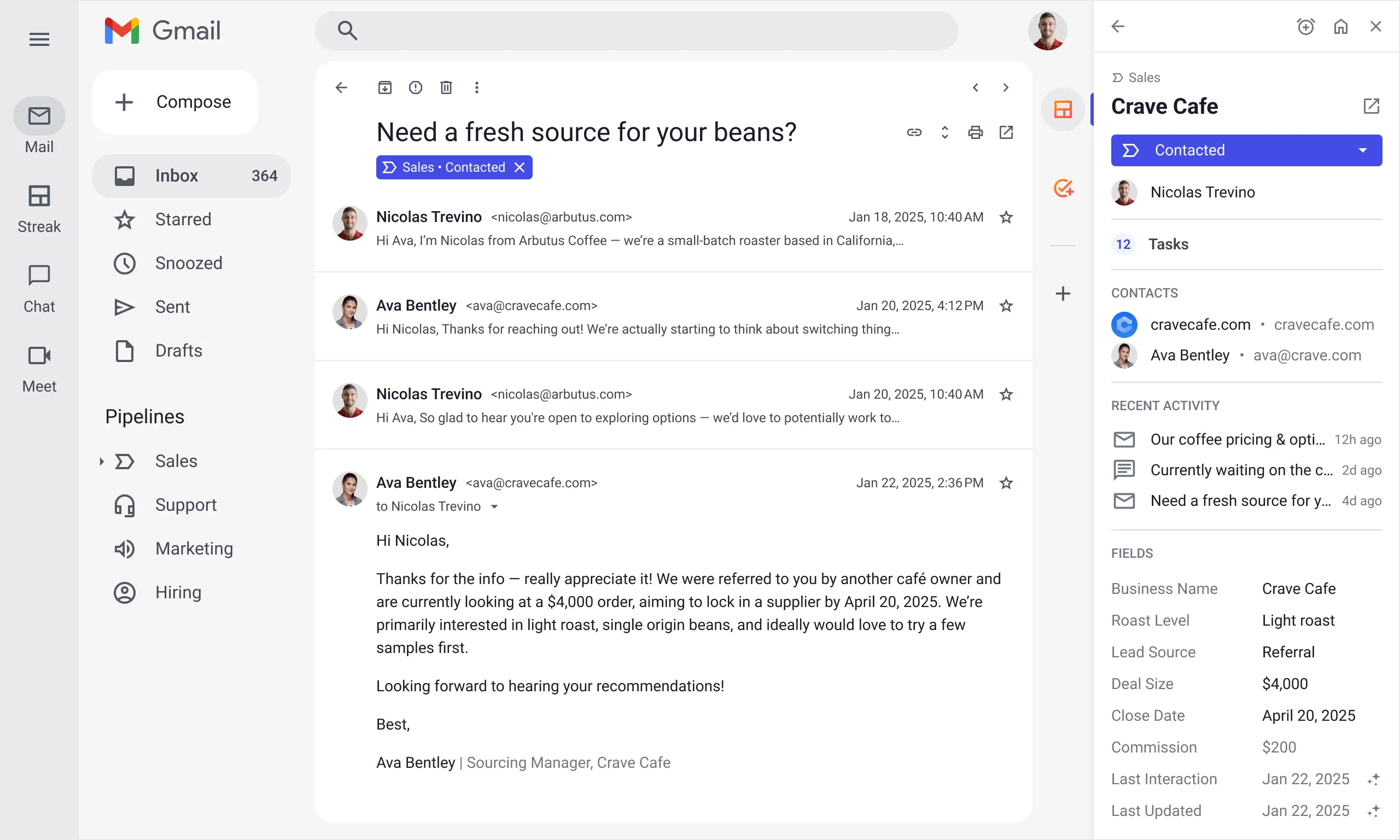
Instead of asking “Did you log the email in the CRM?”, Streak asks “Would you like this email thread to belong to a CRM record?” That record becomes the container for:
- The email thread(s) tied to that relationship or deal
- Custom fields (budget, stage, next step, last contact date, etc.)
- Tasks/follow-ups and reminders
- Collaboration signals (ownership, handoffs, notes)
A useful mental model:
Gmail = the communication stream
Streak pipeline = the workflow map
Streak boxes = the work items / relationship records
Streak fields = the structured data you want for reporting and automation
If your team is already disciplined about email, Streak can feel like “CRM without the CRM overhead.” If your team isn’t disciplined, Streak can still help—but you’ll want a rollout plan (covered later).
Core CRM features (pipelines, boxes, contacts, tasks, collaboration)
Pipelines: flexible workflow tracking inside Gmail
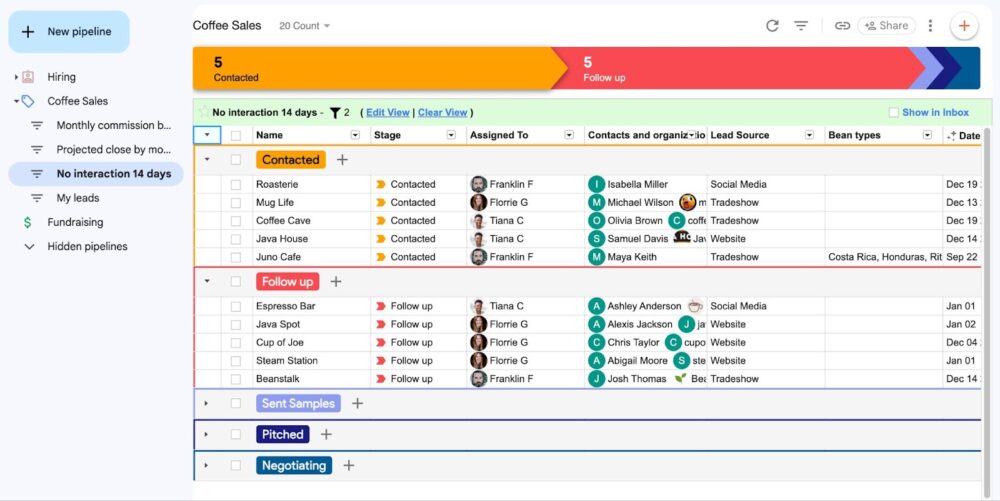
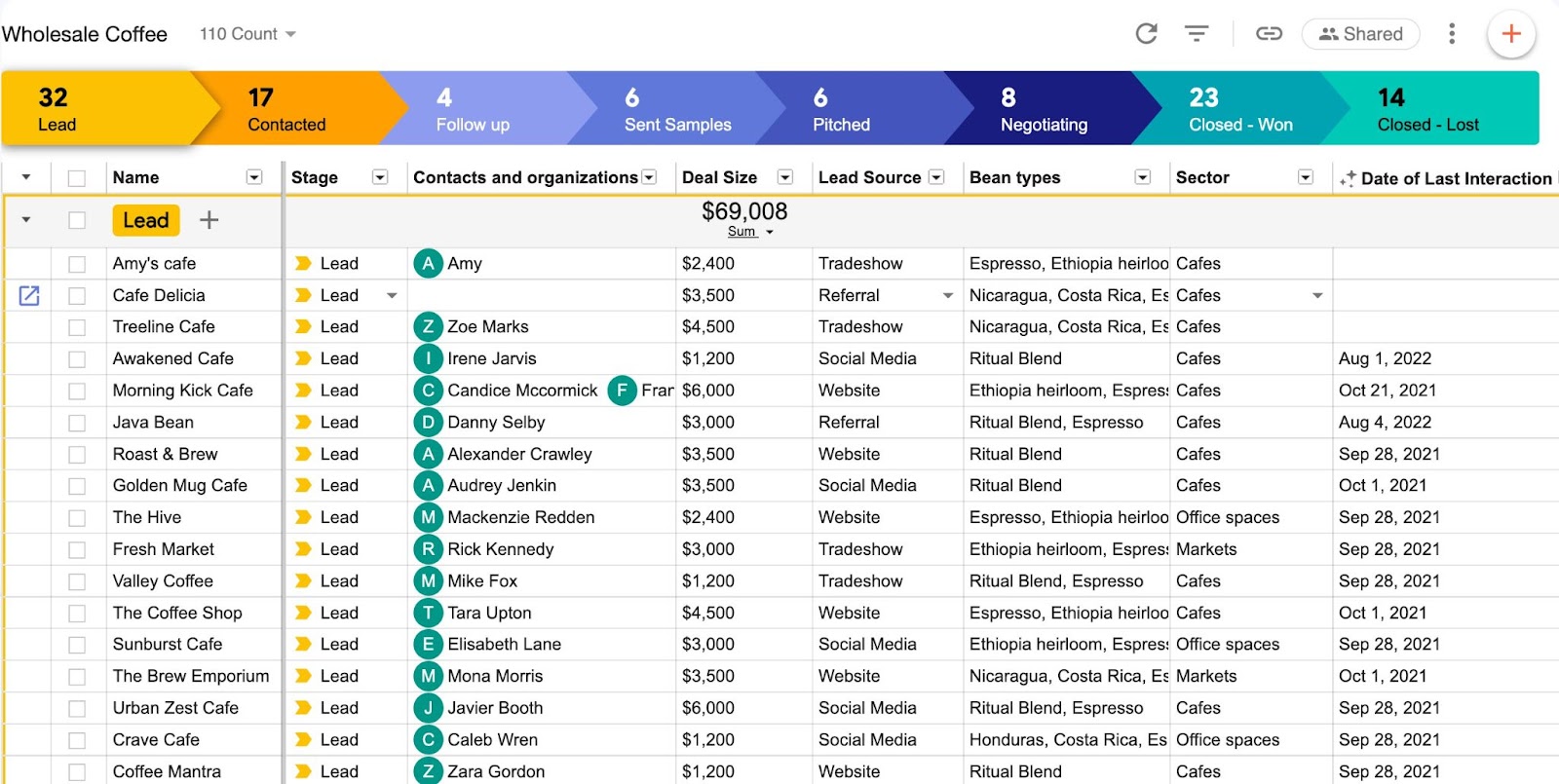
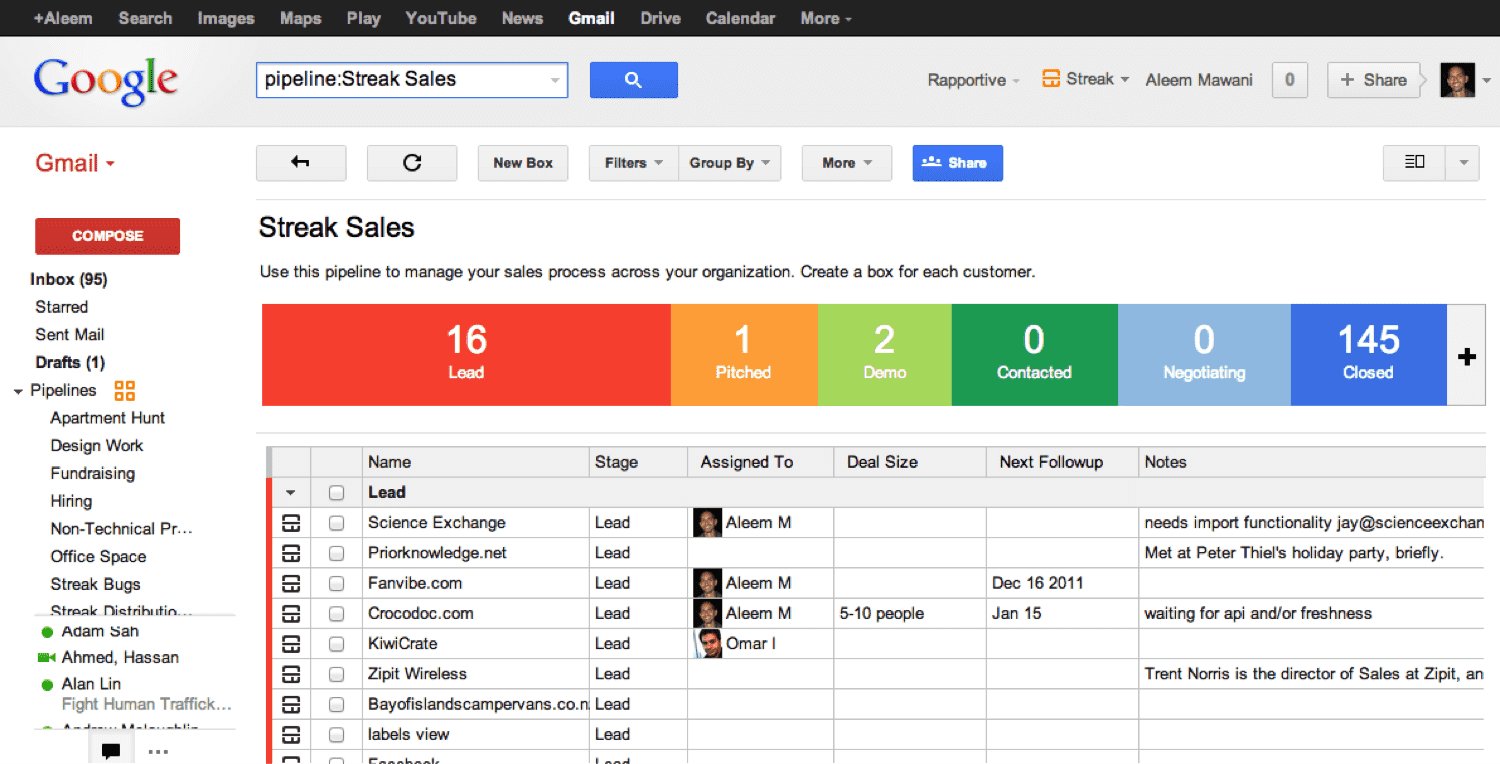
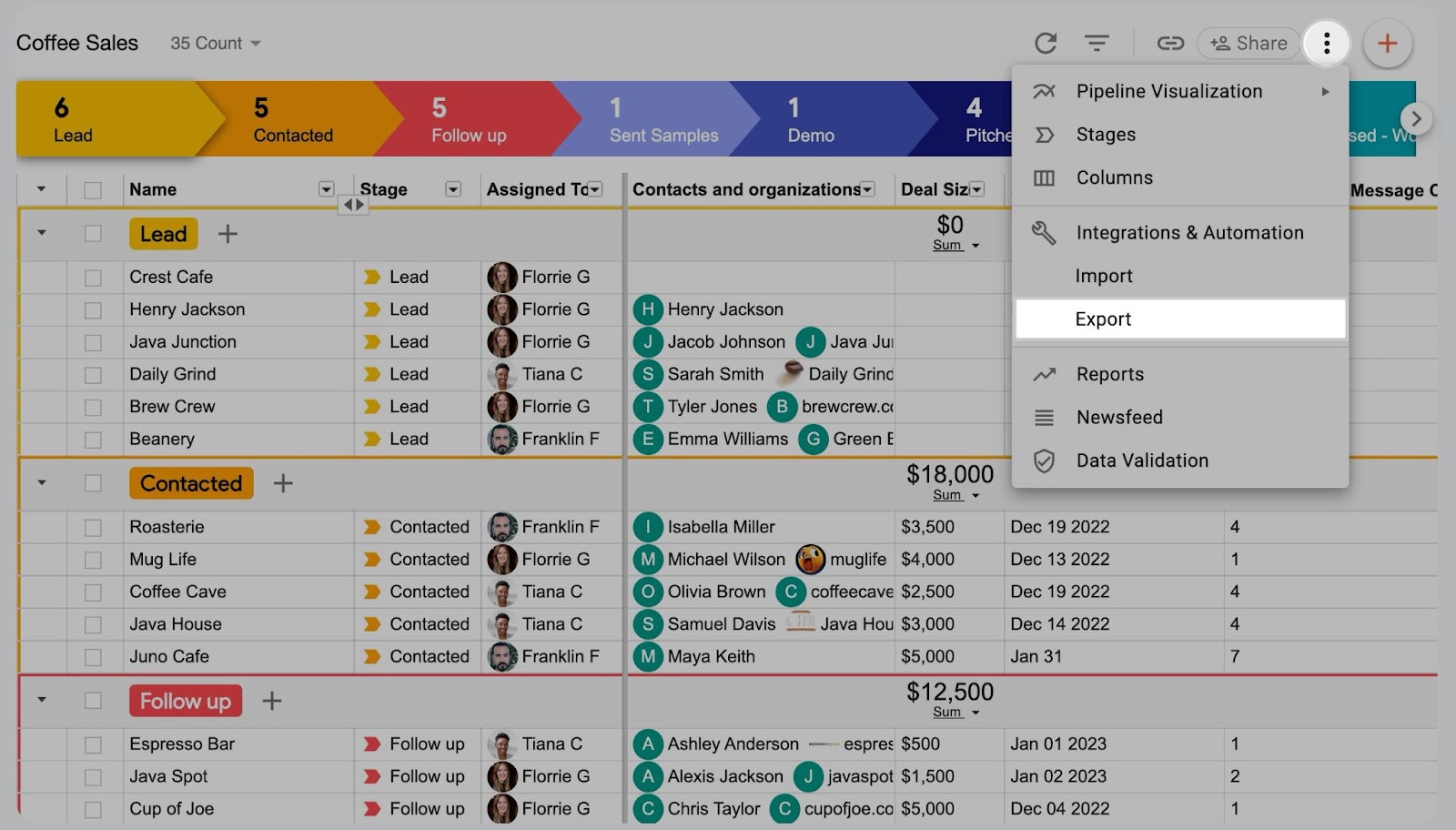
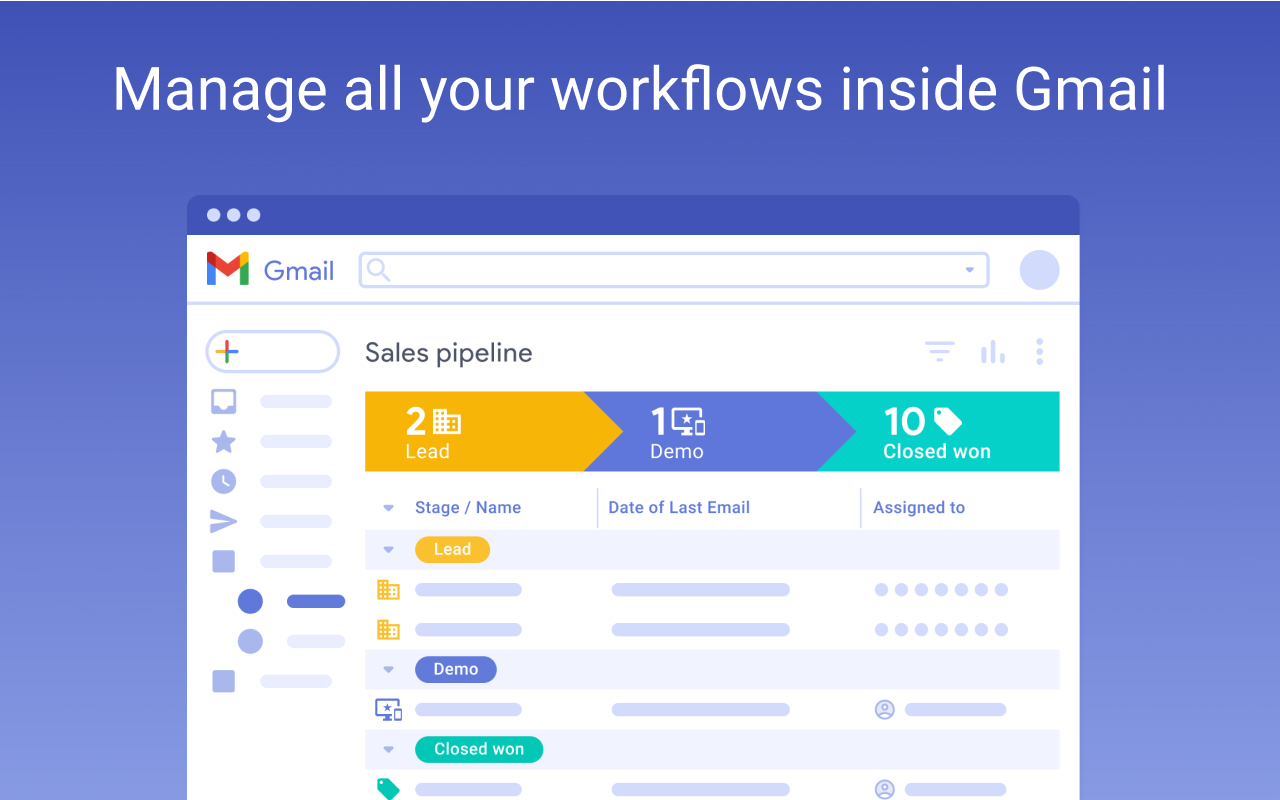
Pipelines are Streak’s backbone. You define stages, define columns/fields, and manage work through a spreadsheet-like pipeline view inside Gmail.
- Define stages (e.g., New Lead → Contacted → Qualified → Proposal → Closed Won/Lost)
- Define columns (e.g., Deal value, Close date, Lead source, Owner, Next step)
- Filter and sort (e.g., “needs follow-up,” “stuck in stage,” “by owner”)
Boxes: the CRM record that ties emails to workflow
A “box” is the unit of work/relationship record that Streak attaches to email threads. It’s where structured CRM data (fields) meets the unstructured reality (email history).
Collaboration and shared visibility
Streak is often used as the antidote to the “private inbox CRM” problem. When records are shared, teammates can see what’s happened without forwarding threads or digging.
Tasks and follow-ups (linked to Gmail + Calendar)
For most teams, the real ROI of a CRM is follow-up discipline. A task should not live in someone’s head; it should be tied to a record (box), assigned, and time-bound.
Contacts and organizations (lightweight CRM data, Gmail-adjacent)
Streak supports contact and organization tracking, often in a “good enough” way for small-to-mid teams who want context connected to conversations. If you expect deep account hierarchies and complex relationship graphs, Streak usually isn’t the best possible CRM choice.
Email power tools (tracking, snippets, mail merge, send later, sharing, thread splitter)
Why the email tools matter (even if you “just want a CRM”)
Streak isn’t only a CRM. It’s also an email productivity layer. That matters because it creates a wedge:
- Teams adopt Streak for tracking + snippets first
- Then naturally expand into pipelines for structure
- Then upgrade when they need reports, automations, AI, or scale
Email tracking (engagement signals and follow-up timing)
Email tracking helps teams follow up at the right time, prioritize warmer threads, and reduce guesswork. Use it as a signal—not a strategy.
Reality check: open tracking is imperfect (privacy protections, image blocking, security scanners). Use it as directional evidence, not a source of truth.
Snippets (repeatable quality and speed)
Snippets are a quality system at scale: they standardize critical messaging (intro, follow-up, scheduling, objection handling) without forcing reps to copy/paste from old emails.
Mail merge (personalization at scale, inside Gmail)
Mail merge is powerful—but easy to misuse. Treat it like a managed capability:
- Define segmentation rules
- Personalize beyond the first name
- Respect opt-outs and comply with email rules/policies
- Protect deliverability (domain reputation is fragile)
Send later (timing and workflow control)
Send later is one of those features that quietly improves both response rates and sanity: write when you have time; send when the recipient is likely to read.
Email sharing (team visibility without forwarding)
Email sharing reduces internal chaos: fewer forwarded threads, fewer screenshots in Slack, and faster access to context when someone else needs to step in.
Thread splitter (when one thread becomes three workflows)
Long threads often drift across topics (proposal → support issue → billing question → new opportunity). Thread splitting preserves CRM structure when email reality gets messy.
Streak AI and what it actually does (and what’s “coming soon”)
AI that maps to real CRM pain (not AI theatre)
A practical way to evaluate Streak’s AI is to focus on whether it reduces CRM admin overhead and improves context retrieval. The most “real” AI use cases in CRMs are typically:
- Summaries (reduce time reading long histories)
- Q&A (retrieve context fast)
- Autofill (reduce missing fields)
- Meeting notes/call logs (reduce post-call admin)
Plan gating and “coming soon” reality
Streak’s AI story includes both “available now” functionality and roadmap items labeled “coming soon.” Treat roadmap items as upside—not a procurement requirement. Buy based on what exists today.
AI privacy and opt-out (what buyers should care about)
If you’re in a regulated environment, treat AI as a governed feature:
- Confirm whether AI is optional per user/team
- Confirm what data is sent only when AI is used
- Confirm whether customer data is used to train models (ideally: no)
- Define internal policy: which workflows are allowed to use AI
Pricing and plans (with tables + hidden costs)
Streak’s pricing is straightforward in structure (free email power tools + paid CRM tiers), but buyers often miss two practical “gotchas”:
- Per-seat costs compound quickly as the team grows.
- Teams must be on the same plan tier (no “light user” tiering).
Plan overview table (as listed on Streak pricing)
| Plan | Annual price (per user / month) | Monthly price (per user / month) | Best for |
|---|---|---|---|
| Email power tools (free) | $0 | $0 | Individuals who want tracking/snippets/mail merge (limited) |
| Pro | $49 | $59 | Teams that want the Gmail-native CRM core and standard reporting |
| Pro+ | $69 | $89 | Teams that need advanced reports, integrations/automations, and advanced AI |
| Enterprise | $129 | $159 | Larger teams needing enterprise controls + dedicated support |
Budgeting note: pricing changes over time. Treat this table as “as-of” and verify on Streak’s pricing page during procurement.
Procurement gotchas (that actually matter)
- Uniform tier requirement: everyone on your team must be on the same plan tier. This can be a deal-breaker if you want “view-only” or “light user” pricing.
- Seat-based scaling: Streak isn’t “cheap CRM” once you go beyond a small team—even if it’s worth it.
- Outbound limits: mail merge limits and Gmail sending limits still apply; deliverability and compliance are the real ceiling.
A practical plan selection guide
- Choose free email power tools if you want tracking/snippets/basic mail merge and aren’t ready to formalize a pipeline.
- Choose Pro if you want the CRM inside Gmail and your reporting/automation needs are light-to-moderate.
- Choose Pro+ if advanced reporting, deeper automation, and advanced AI features are required at scale.
- Choose Enterprise if you need enterprise controls (e.g., roles, validation) and higher-touch support.
Setup and onboarding (step-by-step)
How to get value in the first week (without turning this into an IT project)
Streak is typically deployed as a browser extension (Chrome/Edge/Safari). A practical setup path looks like this:
- Install Streak and connect it to your Google account.
- Create your first pipeline (start simple). Sales: 5–7 stages. Recruiting: candidate stages. Partnerships: partner lifecycle.
- Define your “minimum viable fields.” Start with 6–10 fields used in weekly operations and reporting.
- Decide how records get created. Manual from email threads, semi-automatic habits, or automation via Zapier/API.
- Build your follow-up system. Tie tasks to boxes, assign owners, set reminders.
- Standardize your email operating system. Snippet library, mail merge rules, tracking discipline.
- Roll out with a two-week pilot. Week 1: pipeline + record creation. Week 2: reporting cadence + templates + automation.
Adoption risk to plan for: partial adoption. Streak works best when the team shares one consistent playbook for “what becomes a box,” “when stages move,” and “how follow-ups are enforced.”
User interface and ease of use
What Streak feels like day-to-day
Streak’s core UX advantage is proximity: it lives in Gmail. Day-to-day usage typically spans three “surfaces”:
- Inbox surface: read/send email normally, with CRM context alongside the thread.
- Pipeline surface: spreadsheet-like view for managing stages, filtering “needs follow-up,” sorting by owner, and identifying stuck items.
- Record (box) surface: detail view where email history, notes, tasks, and fields live together.
Mobile apps + Gmail add-on (what you can do on the go)
Streak offers mobile apps (iOS/Android) and a Gmail add-on experience on mobile (typically more limited than the standalone app). Operationally, here’s the realistic split:
- Mobile is great for: checking deal context before/after meetings, updating stages quickly, adding notes right after a call, and keeping follow-ups moving during travel.
- Desktop is still better for: pipeline administration (field configuration), bulk workflow operations, mail merge setup, and deeper automation tuning.
If mobile workflows matter to your team, validate them during a pilot (don’t assume parity with desktop).
Integrations and automation (top integrations table + API/webhooks)
Extensibility: when Streak becomes more than “nice Gmail CRM”
Streak becomes materially more valuable when you connect it to the rest of your stack—forms, lead sources, Slack, spreadsheets, data tools—so records are created and updated automatically.
Top integration methods (practical view)
| Integration method | Best for | Complexity | Notes |
|---|---|---|---|
| Zapier | No-code automations (form fill → create box, stage change → Slack alert) | Low–Medium | Best for quick wins and MVP automations |
| Streak API | Custom integrations, data sync, internal tooling | Medium–High | Best for deeper ownership and scaling |
| Webhooks | Real-time triggers from pipeline events | High | Reduces polling; enables event-driven systems |
| Google Workspace | Calendar/task coupling, Drive attachment flows, Contacts enhancements | Medium | Core to Gmail-native workflows |
A pragmatic automation maturity model
- Layer 1: consistency rules (required fields, stage definitions, snippet library)
- Layer 2: notifications and reminders
- Layer 3: lead capture automation (forms → pipeline)
- Layer 4: data sync and enrichment (API/webhooks)
- Layer 5: AI-assisted workflows (summaries, autofill, meeting notes)
Security, privacy, and compliance posture
The questions every Gmail-native CRM must answer
Because Streak lives in Gmail and interacts with Google APIs, security and privacy aren’t “nice-to-have.” They are the product. Your due diligence should include:
- What Google permissions are required, and why?
- How is email data handled (stored vs fetched on demand)?
- Where is data stored (region) and what controls exist?
- What encryption standards are stated (in transit/at rest)?
- How does AI data handling work (if AI is enabled)?
Practical AI governance guidance
If you enable AI features, treat it like any other governed capability:
- Define allowed workflows
- Define what data should never be sent to AI
- Set team-level enablement rules and document opt-out mechanisms
Performance and reliability
Performance in a Gmail-native CRM depends on more than the vendor. It also depends on Gmail performance, browser load, and pipeline size/complexity.
Operational best practices for keeping Streak fast
- Keep pipelines scoped (avoid one mega-pipeline for everything)
- Archive/segment old records
- Use saved views to avoid loading massive datasets constantly
Support and learning resources
Streak promotes multiple learning and support channels (knowledge base, training, and structured education). For adoption, the important question is not “Do they have docs?” but “Can we standardize usage fast?”
A realistic adoption pattern
- One internal owner becomes the Streak admin
- That person builds the pipeline template + snippet library
- The team trains on 3–5 standard operating procedures
- Managers enforce usage via weekly pipeline review inside Streak
Pros and cons
Pros
- Gmail-native workflow that reduces context switching and increases adoption
- Highly customizable pipelines that map to sales, recruiting, partnerships, and dealflow
- Strong email productivity tools (tracking, snippets, mail merge, send later)
- Solid extensibility via Zapier + API/webhooks
- Fast time-to-value for Google Workspace teams
Cons
- Not a full enterprise CRM suite (advanced forecasting, deep BI, CPQ, complex object graphs)
- Can get expensive for larger teams (per-user pricing compounding over time)
- Uniform plan tier requirement can block “light user” seat strategies
- Mobile parity varies; validate your critical mobile workflows in a pilot
User reviews and ratings summary
What real users consistently like
- Ease of use and quick adoption
- Seamless Gmail integration
- Tracking and productivity improvements
Common complaints / risks
- Pricing sensitivity (especially if packaging changed over time)
- Reporting depth limitations for complex sales ops needs
- Occasional performance or mobile functionality concerns (context-dependent)
How to interpret reviews intelligently: if reviewers praise Gmail-native workflow and ease of use, that’s the core differentiator and it’s likely real. If reviewers complain about cost or reporting depth, validate against your expected seat count and your management reporting requirements before committing.
Alternatives and comparisons
Streak is strongest when Gmail is your primary workspace. It is weaker when the CRM must be the primary workspace.
A practical alternatives map
- Need deep sales ops + enterprise CRM: Salesforce / Dynamics / Zoho-type platforms
- Want easy CRM + marketing alignment: HubSpot-style platforms
- Want pipeline-first standalone CRM: Pipedrive-style tools
- Want Google Workspace-first CRM (not necessarily inside Gmail): Copper (often cross-shopped)
- Need shared inbox support-first workflows: Front / Help Scout-type tools
Decision hinge: choose Streak when Gmail-native workflow is your execution advantage. Choose alternatives when you need the CRM to be a deeply structured system-of-record with heavy revenue ops requirements.
Who Streak is best for (and who should avoid it)
Best-fit profiles
- Founder-led or lean sales teams on Google Workspace who need a CRM that gets used daily
- Recruiting and hiring workflows where pipelines map cleanly to candidate stages
- VC / dealflow / partnerships teams managing high-volume relationship threads
- Agencies and professional services teams where client communication lives in email
Who should be cautious
- Teams that need sophisticated forecasting and BI-grade reporting
- Organizations with mixed email environments (not mostly Gmail/Google Workspace)
- Large teams where seat costs + uniform tier requirements create budgeting constraints
Final verdict and recommendations (with an adoption playbook)
If you’re considering Streak, don’t start by asking “Is it a good CRM?” Start by asking: Will our team actually keep it updated because it’s inside Gmail?
If the answer is yes, Streak can deliver disproportionate ROI relative to its complexity, because adoption is the #1 CRM multiplier.
Adoption playbook (what I’d do)
Phase 1: 2-week pilot (minimum viable CRM)
- Install extension for the pilot group
- Define one pipeline and 6–10 fields
- Create a snippet library (top 15 use cases)
- Define follow-up SLAs (e.g., 24-hour follow-up discipline)
- Run weekly pipeline review from inside Streak
Success criteria:
- 90% of active deals/candidates have a box
- 80% of boxes have required fields filled
- Follow-up tasks exist for every active record
Phase 2: Operationalize (30 days)
- Add manager views/filters
- Introduce mail merge where it’s safe and valuable
- Add simple automations via Zapier or API/webhooks
- Decide whether Pro is sufficient or Pro+ is required for reporting/automation/AI
Phase 3: Scale and govern (60–90 days)
- Define pipeline governance (who can change stages/fields)
- Establish AI policy (enable/disable, opt-out posture)
- Audit security permissions and apply least privilege
- Build onboarding SOPs for new hires
Streak
Streak is a spreadsheet style CRM provider that makes data management and everyday processing functions easier. Streak is supported by both Google chrome and safari. It has a user friendly simple collaboration feature that permits the sharing of data within seconds. Users link their google IDs through open id without having to share any personal information with streak. It also provides a multipurpose feature that allows for management of different functions within Gmail so that you can multitask. Streak works with Google apps and provides a secure connection to you various accounts. It is easy to install as no IT…
•Sales
•Product Dev
•Deal Flow
•Reach out to people at scale
•Track applicants where you actually talk to them
•Manage pipelines and team activity from one place
FAQ (15 questions)
1) Is Streak free?
Streak offers free email power tools (tracking, snippets, and limited mail merge). Full CRM tiers (Pro/Pro+/Enterprise) are paid.
2) What does Streak cost per user?
As listed on Streak pricing (Dec 2025): Pro $49/user/month annually ($59 monthly); Pro+ $69 annually ($89 monthly); Enterprise $129 annually ($159 monthly). Confirm current pricing during purchase.
3) Do all users need the same plan?
Yes. Streak’s pricing indicates everyone on a team must be on the same plan tier.
4) Does Streak work outside Gmail (like Outlook)?
Streak is designed for Gmail and Google Workspace workflows. If your primary email client isn’t Gmail, Streak is usually not the right fit.
5) Which browsers are supported?
Streak is commonly deployed as a browser extension (notably Chrome/Edge/Safari support is typically referenced). Validate your team’s browser environment during rollout.
6) Does Streak store the body of my emails?
Security documentation should be reviewed directly in procurement, but Streak positions itself as minimizing what it stores and relying on Gmail API access as needed. Confirm details on Streak’s security page for your compliance requirements.
7) Where is Streak data stored?
Streak publishes data storage and security details on its security page. Confirm region requirements during due diligence.
8) Does Streak integrate with Google Drive, Calendar, and Contacts?
Streak leverages Google Workspace components. Validate the exact permission scopes and feature mappings in your rollout plan.
9) Does Streak have an API?
Yes—Streak provides an API that supports integrating core CRM objects (pipelines, boxes, tasks, contacts) into external workflows.
10) Does Streak support webhooks?
Yes—Streak supports webhook-style event triggers (validate your required events in the API documentation).
11) Does Streak integrate with Zapier?
Yes. Zapier is a common low-code bridge for Streak automation (forms → pipelines, Slack alerts, etc.).
12) Does Streak have mobile apps?
Yes—Streak offers mobile apps (iOS/Android). Expect desktop to remain better for deep configuration and bulk operations.
13) What can I do inside the Gmail mobile app with Streak?
Streak offers a Gmail add-on experience on mobile, typically more limited than the standalone app. Validate your specific mobile requirements during a pilot.
14) Does Streak use OpenAI for AI features?
Streak’s AI documentation should be reviewed directly for current model/provider details and policy statements.
15) Will my data be used to train AI models?
Streak’s AI privacy policy statements should be reviewed directly. As a buyer, require clarity on (a) training usage, (b) retention windows, (c) opt-out controls, and (d) what data is transmitted only when AI is used.








By clicking Sign In with Social Media, you agree to let PAT RESEARCH store, use and/or disclose your Social Media profile and email address in accordance with the PAT RESEARCH Privacy Policy and agree to the Terms of Use.