
Reply.io Review: A Detailed Look at Multichannel Sales Engagement, Deliverability, and the Jason AI SDR
Cold outreach is rarely a single problem. It is usually a stack of problems that compound:
- Your reps jump between Gmail, LinkedIn, a dialer, spreadsheets, and a CRM.
- Deliverability becomes a constant fire drill (spam placement, domain reputation, warm-up).
- Personalization does not scale, so sequences become generic, and reply rates drop.
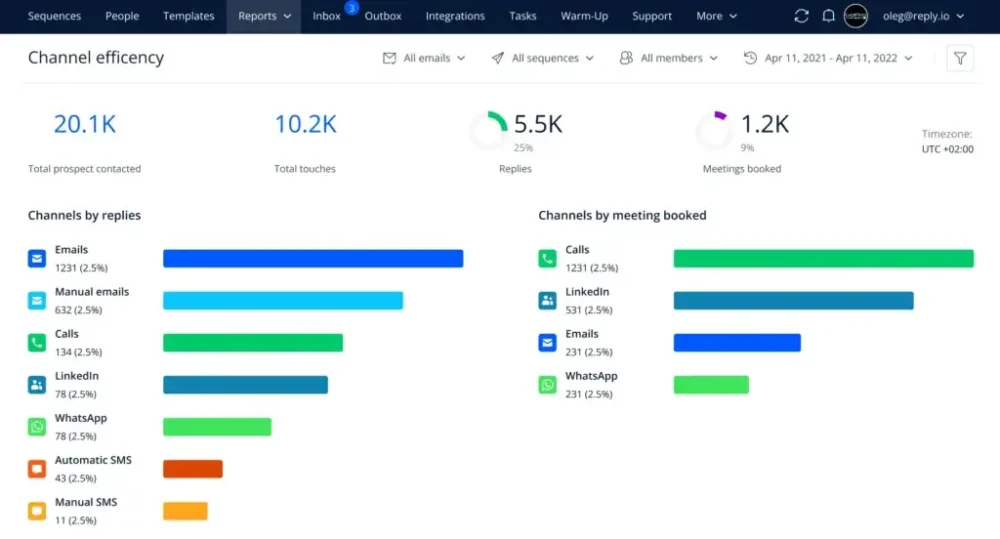
- Reporting is fragmented, so it is hard to tell which channel is driving meetings.
- As soon as you add more reps, the process gets harder to standardize and govern.
Reply.io is designed to address that entire workflow. It is a sales engagement platform that combines multichannel sequencing (email plus LinkedIn plus calls and SMS plus WhatsApp and tasks), deliverability tooling, prospecting data, CRM syncing, and automation. It also positions an AI-led option called Jason, an AI SDR agent, for teams that want to automate more of the outbound motion end to end.
Overall verdict: Reply.io is a strong fit if your priority is multichannel outbound with deliverability guardrails and solid CRM connectivity, and you want a platform that can scale from individual reps to teams and agencies. Where you need to be more cautious is around channel add-ons (cost can climb), operational complexity (there is real power here, but you have to configure it), and any workflow that depends heavily on third-party channel providers (which Reply acknowledges in its SLA for certain provider-related functionality).
Rating: 8.7 out of 10
| Category | Score |
|---|---|
| Features | 9.2 / 10 |
| Deliverability and outbound ops | 9.0 / 10 |
| Ease of use | 8.2 / 10 |
| Integrations | 8.8 / 10 |
| Reporting | 8.5 / 10 |
| Value for money | 8.1 / 10 |
| Support and enablement | 8.6 / 10 |
| Security and governance | 8.7 / 10 |
Here’s what this review covers
- Overview and company background
- Pricing and plans (with a comparison table)
- Setup and onboarding experience
- User interface and ease of use
- Core feature breakdown (with practical examples)
- Advanced features, AI, API, and integrations (with top integrations table)
- Performance, reliability, and security
- Customer support and learning resources
- Pros and cons
- User reviews and ratings summary
- Alternatives and comparisons
- Who Reply.io is best for (and who should avoid it)
- Final verdict and recommendations
- FAQ (15 questions)
Overview and company background
What Reply.io is
Reply.io is a sales engagement platform focused on outbound and prospecting workflows. The product centers on:
- Multichannel conditional sequences that can mix email, LinkedIn steps, calls, SMS, WhatsApp, and manual tasks.
- Deliverability tooling and warm-up to improve inbox placement (Reply includes unlimited warm-up on certain plans and positions deliverability as a core value).
- Prospecting and data through Reply Data and real-time search powered by Generect, including intent signals.
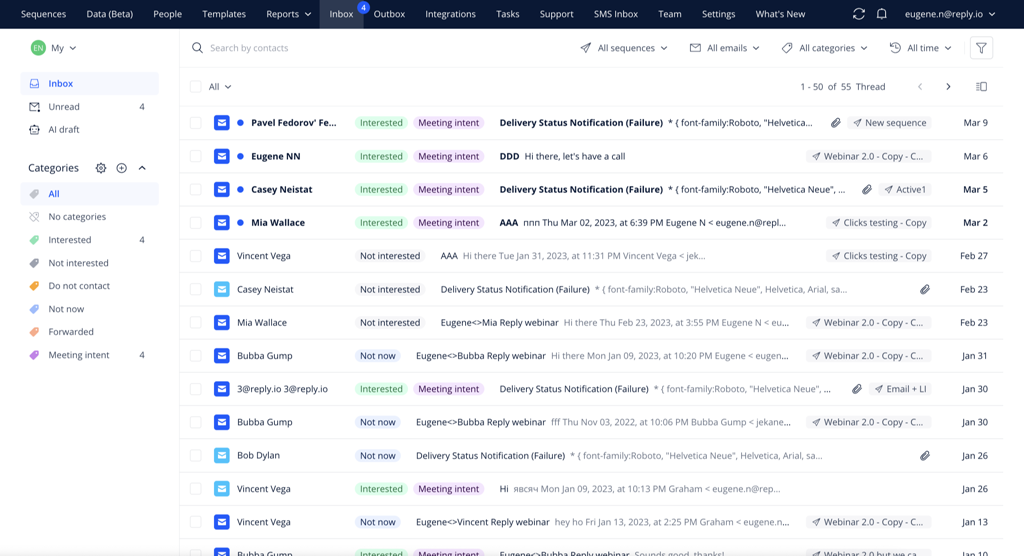
- Unified inbox, task flow, and team collaboration to keep execution and responses centralized.
- Native CRM integrations and automation via Zapier, webhooks, and an API.
- Jason AI SDR, positioned as an AI agent that can automate outbound from targeting through response handling.
Who it is for
Reply.io consistently positions itself for:
- Solo users and small teams doing cold email and LinkedIn outreach
- SDR teams that want standardized sequences, reporting, and CRM sync
- Agencies that manage outbound for multiple clients
- Teams that want to test AI-led outbound with an agent model (Jason)
Company history and footprint
Reply.io’s About page states the company was founded in 2014 and notes offices in the US, Canada, and Ukraine. Some third-party listings cite different “founded” dates. In practice, the most reasonable way to interpret this is that product origins appear to go back to 2014 (per the company’s own About page), while some directories may record later dates due to incorporation timing, brand positioning, or when the product reached broader market adoption.
Market positioning and key differentiators
Reply.io’s differentiators are easiest to understand if you compare it to two common tool categories:
- Email-first sequencing tools (strong for cold email, sometimes weaker when you need multi-channel execution and governance)
- Enterprise sales engagement platforms (feature-rich, but often heavier to implement and usually priced for larger orgs)
Reply.io sits between those. It is:
- More multichannel than many email-only tools (LinkedIn automation, calls and SMS, WhatsApp, tasks)
- More self-serve than many enterprise tools, with a clear free trial and published starting prices
- Strongly oriented toward outbound operations, especially deliverability and workflow automation
- Building toward AI-led outbound through Jason and formal AI policy and capabilities
Pricing and plans
Pricing is where most outbound platforms either win or lose. With Reply.io, the pricing model is best understood as:
- A 14-day free trial
- Multiple plan families (Email Volume, Multichannel, AI SDR, and Agency)
- Add-ons for channels and data that can materially change total cost
Free trial
Reply.io offers a 14-day free trial. On the pricing page, Reply describes the trial as including core features such as access to a B2B database and email finder extension, multichannel sequences, reports and analytics, API and integrations, and AI features for sequences, templates, and personalization.
Plan families at a glance
Reply’s pricing page highlights four main tracks with starting prices:
- Email Volume: starts from $59 per user per month
- Multichannel: starts from $99 per user per month
- AI SDR (Jason): package-based pricing; the pricing page shows multiple monthly packages and also describes an on-page “starting from” level
- Agency: agency-focused packaging; entry pricing is shown on the pricing page in comparison blocks
Practical note: Reply’s pricing page uses multiple blocks and package tiers. Treat “starts from” numbers as entry points, then validate the exact tiering you need based on channels, mailboxes, and contact volume.
Pricing comparison table (practical interpretation)
| Plan family | Published starting price | Best for | Channels and notable inclusions |
|---|---|---|---|
| Email Volume | $59/user/month (starting) | Email-first outbound teams that still want deliverability tooling | Email automation with sequences, multiple mailboxes (pricing page shows a mailbox count in this section), warm-up, email sending volume positioning, deliverability suite, onboarding support noted |
| Multichannel | $99/user/month (starting) | Teams that want a single platform for email plus other channels | Multichannel outreach positioning (email + additional steps), team reporting and channel efficiency reporting called out, mailbox count shown on pricing page in this section |
| AI SDR (Jason) | Package-based monthly pricing | Teams that want AI-led outbound, including targeting and response handling | AI-created ICP, AI sequences, AI personalization, response handling, multichannel automation; onboarding tiers including “white-glove onboarding” at higher packages |
| Agency | Agency entry pricing shown on pricing page | Agencies managing multiple client workspaces and repeatable outbound delivery | Multi-client operations positioning, standardized playbooks, agency-focused packaging |
Add-ons and hidden costs to watch
Reply’s pricing page explicitly calls out add-ons that can meaningfully affect total cost:
- LinkedIn add-on: priced per account
- Calls and SMS add-on: priced per account
- AI and live data credits: sold in credit packages (used for real-time B2B data and personalization)
- Email validation: sold in validation volume packages
In other words, Reply can look competitively priced at the starting tier, but your true spend depends on:
- How many reps need LinkedIn automation
- Whether you want to run calls and SMS inside Reply
- How heavily you use real-time data and enrichment
- How strict you want validation and deliverability controls to be
Value for money analysis
- Email Volume tends to make sense when email is your primary channel, you want warm-up and deliverability tooling included, and you either already have a dialer or you do not run call-heavy SDR motions.
- Multichannel tends to make sense when you want to coordinate touchpoints across email and other channels, and you need reporting on channel efficiency and team performance.
- AI SDR (Jason) tends to make sense when you have enough top-of-funnel capacity to justify an agent model and you can operationalize review and governance (AI-led outbound still requires guardrails).
- Agency makes sense when you need multi-client workflows, standardized playbooks, and predictable delivery across accounts.
Setup and onboarding experience
Reply’s onboarding experience is not just “create an account and start sending.” Like any outbound system, the first hour you invest determines whether your program is sustainable.
What setup typically looks like
A practical setup path looks like this:
- Create the account and start the 14-day trial.
- Connect mailboxes (Gmail or Microsoft is common) and decide how many mailboxes you will rotate per sequence.
- Set deliverability foundations (authentication, sending limits, warm-up strategy).
- Connect your CRM if you will sync contacts and activities.
- Build the first sequence using email and at least one secondary channel (LinkedIn steps, calls, tasks).
- Configure triggers and automations so contacts move cleanly based on outcomes (reply, bounce, opt-out, meeting booked).
Onboarding and guided help
Reply’s plan descriptions and pricing language indicate setup help is available (particularly for annual plans), including support for configuration, integrations, and best practices for sequences and content creation. Reply also maintains structured learning resources like a Help Center and Reply Academy.
Likely hurdles in the first week
- Deliverability discipline: decide your sending volume policy and mailbox rotation before scaling.
- CRM schema mapping: if you want clean reporting, you need consistent field mapping and ownership rules.
- Sequence governance: you need standards for templates, variables, A/B tests, and opt-out handling.
The good news is that Reply is built for these concerns, so you are not fighting the platform. You are mostly making operational decisions.
User interface and ease of use
Reply.io is a platform with breadth, so ease of use depends on your role.
What the UI is optimized for
Based on the platform’s feature set, Reply’s UI is optimized around five daily workflows:
- Build sequences (multichannel, conditional logic)
- Execute tasks (Task Flow, Chrome extension execution)
- Manage replies (Unified inbox with tagging, filters, and team context)
- Manage meetings (meeting scheduler and calendar sync)
- Analyze performance (reports across email, calls, tasks, team outcomes)
Learning curve
- New users: Expect a learning curve typical for sales engagement platforms. Sequences, deliverability, data, tasks, inbox, reporting, and integrations all live in one system.
- Experienced SDR ops users: The structure will feel familiar if you have used sequencers before. The main time investment will be in automations and governance.
Customization
Customization is more about workflow configuration than visual themes:
- Conditional sequences
- Triggers and automations
- Field mapping and filtering rules in CRM sync
- Templates and variables for personalization
Operational reminder: Cold outreach and automation require policy discipline. Ensure your team’s messaging, opt-outs, data usage, and channel automation comply with applicable laws, customer preferences, and platform terms.
Core feature breakdown
This is the heart of the review. If Reply.io is a fit, it is because these features align with how you actually run outbound.
1) Prospecting and data (Reply Data and Generect)
Reply positions prospecting as a first-class component through Reply Data and Real-Time Data Search by Generect.
Where this matters: You reduce tool sprawl. If your current workflow is “find leads in one tool, validate in another tool, import into sequencer,” Reply is trying to compress that flow.
Practical example
If you run outbound to SaaS companies hiring for a specific role, intent signals can be used to prioritize accounts. You build a list in Reply Data, validate emails, then push the segment directly into a multichannel sequence that starts with email and follows with LinkedIn touchpoints for non-openers.
Trade-off to watch: Data usage often ties into credit packs, which can increase cost as you scale.
2) Chrome extensions (Findy and Name2Email)
Reply emphasizes Chrome extensions that connect LinkedIn prospecting to outreach execution. Extensions reduce friction between “research” and “outreach,” which is especially useful when prospecting workflows start in LinkedIn.
3) Multichannel conditional sequences
This is Reply’s core value proposition: building sequences that can mix channels and adapt based on behavior.
A practical sequence blueprint
- Day 1: Email 1 (short, specific, one CTA)
- Day 3: LinkedIn profile view or connection request (automated where permitted)
- Day 4: Email 2 with a different angle (problem framing, proof, or relevance hook)
- Day 6: LinkedIn message or InMail step (if connected or using Sales Navigator)
- Day 8: Call task or cloud call if enabled
- Day 10: Breakup email and opt-out confirmation
Then use automations so:
- Replies exit the sequence
- Bounces are flagged
- Opt-outs are respected
- Call outcomes can mark the contact as finished or trigger a next action
4) LinkedIn automation
Reply treats LinkedIn as a first-class channel inside sequences (messages, connection requests, profile views, InMails, and more). Two practical watch-outs:
- LinkedIn automation can be operationally sensitive (platform rules, account risk, provider dependencies).
- LinkedIn automation is shown as a paid add-on per account, which can increase total cost.
5) WhatsApp and social automation
Reply calls out WhatsApp and social media automation (including semi-automation patterns and the ability to connect other messengers using Zapier). This tends to be most useful for international motions and high-intent follow-up where prospects have opted into messaging.
6) Cloud calls and SMS
Reply supports calls and SMS inside the platform (VoIP calls via browser, click-to-call, dialer workflow, SMS send/receive, local presence, call recording, and sharing). Calls/SMS are shown as an add-on, so treat this as an “operations decision,” not just a feature checkbox.
7) Unified inbox
Reply’s unified inbox centralizes conversations and supports filtering, search, tagging, and team message handling across channels like email and LinkedIn. This matters because response handling is where outbound either converts or becomes messy.
8) Triggers and automations
Automations reduce manual ops work. Example patterns include:
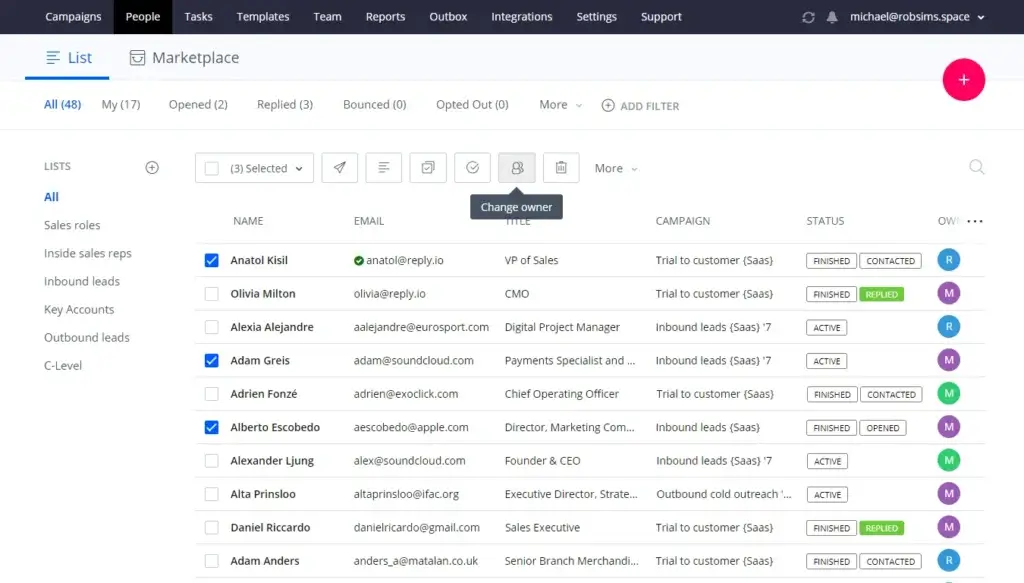
- Assign contacts to owners based on company size or location
- Add contacts to lists based on contact fields
- Remove contacts from sequences based on response, bounce, or opt-out
- Mark contacts finished once a call is logged
9) Meeting scheduler
Reply includes a meeting scheduler experience (Google Calendar sync, availability settings, meeting duration, and automatic Google Meet links). This reduces friction between “reply” and “meeting booked.”
10) Task Flow and execution discipline
Reply’s Task Flow helps standardize daily execution at team scale:
- Manage and execute tasks in the UI and via the Chrome extension
- Open tasks sequentially for fast execution
- Log activity cleanly on the prospect timeline
- Create tasks from semi-automated steps (calls, social, manual emails, SMS, WhatsApp)
11) Team collaboration
Reply includes team-level controls like shared assets, templates, blacklists, public/private modes, team management, and account-based selling support. These become more important as you scale beyond a single rep.
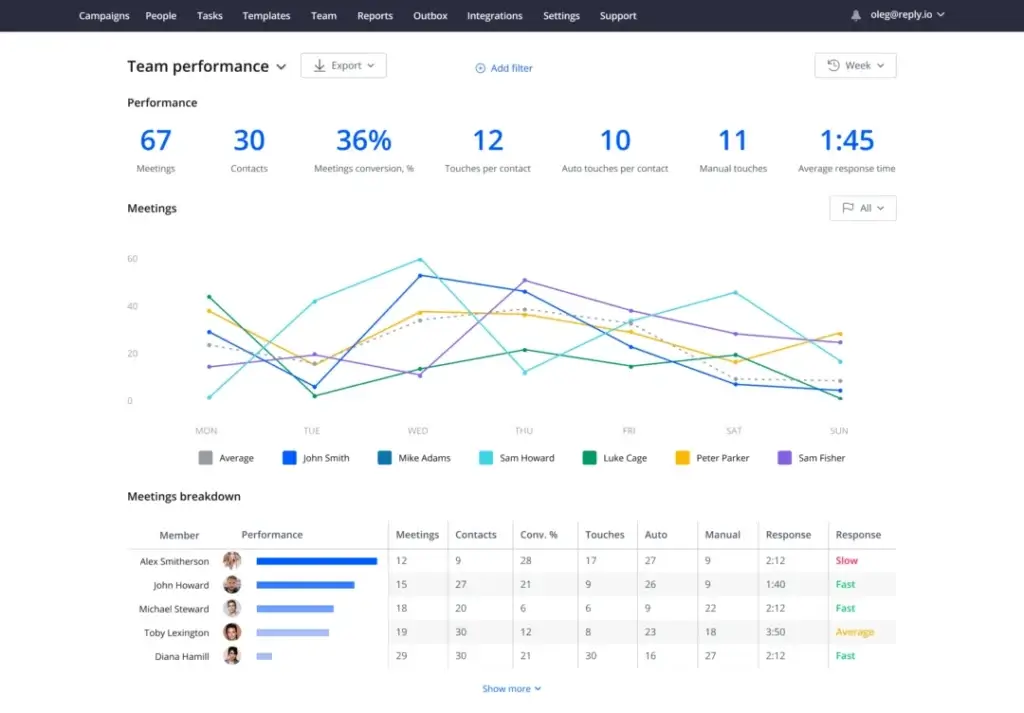
12) Reports and analytics
Reporting covers email, call, task, and team performance, plus meeting analytics and sequence performance insights. If you care about scaling what works, you need reporting that covers more than open rates.
Advanced features, AI, API, and integrations
AI capabilities and Jason AI SDR
Reply positions AI in two layers:
- AI assistance inside a human-led workflow (content generation, variables, personalization)
- AI-led outbound through Jason AI SDR (agent model)
On the pricing page, Jason is described as an AI agent that automates outreach from prospecting through response handling, including items like AI-created ICP, AI-generated sequences, real-time B2B database, AI personalization, and response handling. Reply also publishes an Artificial Intelligence Policy (effective November 13, 2025), which signals AI is treated as a formal product and governance area.
Practical advice: If you evaluate Jason, treat it like hiring a junior SDR team.
- Define your ICP and exclusions
- Define what counts as a qualified meeting
- Create escalation rules for sensitive replies
- Require review workflows until performance is stable
API and developer options
Reply provides API documentation and notes that it offers V1 and V2 APIs, which is relevant if you need custom integrations, internal tooling, or data sync beyond native CRM connectors. Reply also promotes API-based embedding for adding sequences into other products.
Integration ecosystem
Reply’s integrations approach is typically framed as:
- Native integrations (typically CRMs)
- No-code integrations (Zapier and similar automation bridges)
- Third-party integrations built outside Reply using its API
Top integrations table (practical shortlist)
| Integration | Type | High-value use case |
|---|---|---|
| Salesforce | Native | Bi-directional sync; activity logging; ownership mapping for teams |
| HubSpot | Native | Bi-directional sync; log activities; keep fields aligned |
| Pipedrive | Native | Sync contacts and actions; action-based triggers for pipeline workflow |
| Copper | Native | CRM sync for teams using Google-centric CRM workflows |
| Zendesk Sell | Native | Sales engagement workflow alignment with CRM execution |
| Close | Native | CRM + sequencing for SDR teams that live in Close |
| Zapier | No-code | Workflow glue (Slack alerts, list updates, meeting-triggered actions) |
| Webhooks | Developer | Event-driven automation for internal tooling and systems |
| Google Calendar | Native | Built-in meeting scheduling flow and calendar sync |
| Zoom | Integration | Meeting booking flow integrated with conferencing |
How “seamless” are integrations in practice? Native integrations are typically best for bi-directional sync and activity logging. Zapier/webhooks are best for the long tail of tools. Third-party integrations can be valuable but should be validated because quality can vary across external builds.
Performance, reliability, and security
Reliability and incident handling
Reply publishes a Service Level Agreement that outlines incident priority definitions and resolution time targets. It also distinguishes between Reply-owned functionality versus provider-related functionality, which is particularly relevant when a workflow depends on third-party channel providers.
Scalability
Reply supports team collaboration features (ownership, shared templates, blacklists), reporting across team activity, and CRM sync and automation rules that become more important as teams grow. In high-scale outreach, your true bottleneck is usually inbox placement/deliverability stability, data quality/validation, and governance—not raw feature access.
Security posture and safeguards (as described publicly)
Reply’s Trust materials describe safeguards such as hosting on Microsoft Azure, encryption of sensitive data at rest and in transit, SSL-protected connections, backup practices, data ownership controls, a Data Processing Agreement, a vulnerability disclosure program, and an Artificial Intelligence Policy.
A note on GDPR, Privacy Shield references, and modern data transfer reality
Reply’s Trust page discusses GDPR and includes historical references to EU–US Privacy Shield. However, EU–US Privacy Shield was invalidated by the Court of Justice of the European Union (Schrems II, July 2020). After that, the EU–US Data Privacy Framework was adopted via an adequacy decision in July 2023. If cross-border data transfer compliance is material for your organization, confirm which transfer mechanism applies today for your account (e.g., Standard Contractual Clauses and supplementary measures, or DPF participation if applicable).
Customer support and learning resources
Reply’s pricing page states that support is available via in-app chat and cites a response time target under 15 minutes during operating hours (described as 2 AM to 7 PM EST). Reply also points users to its Help Center, Reply Academy, and community resources.
Pros and cons
| Pros | Cons |
|---|---|
|
|
User reviews and ratings summary
On G2, Reply.io is rated 4.6 out of 5 based on 1,520 reviews (as shown on the G2 seller page).
Common praise themes (what typically shows up)
- Productivity gains from sequencing and automation
- Centralizing multichannel outreach
- Ease of scaling outreach with templates, variables, and tasks
- Positive experiences when CRM sync is stable
Common complaint themes to monitor
- Deliverability issues when teams scale too quickly without domain and sending discipline
- LinkedIn workflow inconsistencies (especially when tools rely on provider layers)
- Reporting nuance and data cleanliness if CRM mapping is incomplete
- Pricing surprises from add-ons
Alternatives and comparisons
Reply compares itself against tools like Instantly, Smartlead, Apollo, Lemlist, and Outreach in pricing-page comparison sections. The practical way to choose is to match tool complexity to your outbound maturity.
Side-by-side positioning table (practical, not marketing)
| Platform category | Reply.io tends to win when… | Consider alternatives when… |
|---|---|---|
| Email-first sequencers | You want multichannel steps, calls/SMS/WhatsApp, task flow, and inbox workflows, plus deliverability tooling in one platform. | You only need simple cold email sequencing and want minimal configuration. |
| Lead database + sequencer bundles | You want real-time data plus sequencing plus multichannel execution and CRM governance. | You need a single system of record for enrichment and already use a dedicated engagement platform. |
| Enterprise sales engagement platforms | You want multichannel breadth but prefer self-serve entry and published starting prices. | You need deep enterprise governance, formal admin frameworks, and procurement-level SLAs across every component. |
My take on “when to choose Reply”: Choose Reply.io if you want one platform to run outbound and you care about multichannel sequencing, execution discipline, deliverability guardrails, CRM syncing with operational value, and the option to test AI SDR workflows without rebuilding your stack.
Who Reply.io is best for (and who should avoid it)
Best for
- SDR teams that need multichannel outbound: If email alone is no longer enough, Reply’s channel breadth matters.
- Ops-minded sales leaders: If you care about tasks, routing, activity logging, and governance, Reply’s features align with how you scale.
- Agencies: Reply has explicit agency positioning and multi-client workflow support.
- Teams that want to explore AI-led outbound: Jason is positioned as an agent that can handle targeting, sequencing, and responses—not just copywriting.
Who should avoid (or be cautious)
- Teams that only want a lightweight email blaster: Reply is more than that. You will pay, configure, and govern accordingly.
- Teams that cannot operationalize deliverability: If you do not want to think about domains, authentication, warm-up, and sending policy, you may struggle no matter which platform you pick.
- Teams where LinkedIn automation is the only channel that matters: Reply offers it, but it is an add-on and can involve provider layers. Validate deeply in trial if it is mission-critical.
Final verdict and recommendations
Reply.io is a well-rounded sales engagement platform that takes a serious stance on the realities of outbound:
- deliverability is not optional
- multichannel execution must be structured
- scaling requires task discipline and reporting
- integration and automation decide whether outreach is measurable
If you are selecting a platform for modern outbound, Reply should be on your shortlist—especially if you want multichannel sequencing plus deliverability tooling plus data/enrichment in one place.
My recommendation: Start with the 14-day trial and validate three things before you commit.
- Your deliverability setup and mailbox workflow (warm-up, limits, reputation practices)
- CRM sync and activity logging for your specific fields and ownership model
- A real multichannel sequence that includes at least one non-email step, so you can see how the team actually executes day to day
If those three work cleanly, Reply is likely a strong long-term fit.
FAQ (15 questions)
1) Is Reply.io worth the price?
It is worth it when you actually use the multichannel stack and automation. If you only send basic email sequences, you may not capture the value that justifies the broader platform cost. Add-ons like LinkedIn automation and calls/SMS can increase total spend, so map your motion before you choose a plan.
2) Does Reply.io include a free trial?
Yes. Reply.io offers a 14-day free trial and describes access to core features during that period, including multichannel sequences, analytics, integrations, and AI features.
3) What channels can you use in Reply sequences?
Reply’s pricing and features pages highlight email automation, LinkedIn automation (paid add-on), calls and SMS (paid add-on), WhatsApp (semi-automation), tasks, and the ability to connect other channels via Zapier and API-driven workflows.
4) Is LinkedIn automation included by default?
LinkedIn automation is shown as available with a paid subscription/add-on per account on Reply’s pricing page.
5) Does Reply.io support calling and texting?
Yes. Reply supports cloud calls and SMS (including click-to-call and SMS handling). Calls and SMS are shown as a priced add-on per account on the pricing page.
6) What is Reply Data?
Reply Data is Reply’s prospecting layer. It is positioned as a real-time data search experience (powered by Generect) with intent signals for personalization and segmentation.
7) Does Reply.io have a unified inbox?
Yes. Reply’s unified inbox is designed to centralize conversations and support filtering, search, tagging, and team message handling across channels like email and LinkedIn.
8) Does Reply.io integrate with Salesforce and HubSpot?
Yes. Reply highlights native CRM integrations including Salesforce and HubSpot, and it also supports automation via Zapier, webhooks, and API-based integrations.
9) How often does CRM sync run?
Reply’s integrations content describes auto-sync behavior and cadence for certain CRMs. Validate sync frequency and logging behavior in your trial because details can vary by CRM and integration configuration.
10) Does Reply.io have an API?
Yes. Reply provides API documentation and indicates it offers both V1 and V2 APIs.
11) What is Jason AI SDR?
Jason is Reply’s AI SDR agent offering. It is positioned as automating outreach from prospecting through response handling and is packaged in tiered monthly plans on Reply’s pricing page.
12) Does Reply.io publish an AI policy?
Yes. Reply publishes an Artificial Intelligence Policy with an effective date of November 13, 2025.
13) What security measures does Reply claim?
Reply’s Trust materials describe hosting on Microsoft Azure, encryption at rest and in transit, SSL-protected connections, backup practices, and data ownership controls, among other safeguards.
14) Does Reply.io have a vulnerability disclosure program?
Yes. Reply publishes a vulnerability disclosure program describing scope and good-faith testing posture.
15) How is Reply.io rated by users?
On G2, Reply.io shows a rating of 4.6 out of 5 stars with 1,520 reviews on the seller page (as cited in this review).








By clicking Sign In with Social Media, you agree to let PAT RESEARCH store, use and/or disclose your Social Media profile and email address in accordance with the PAT RESEARCH Privacy Policy and agree to the Terms of Use.