
Papaya Global Review: The Standout Features, Cost Realities, and Why Teams Trust (or Question) It
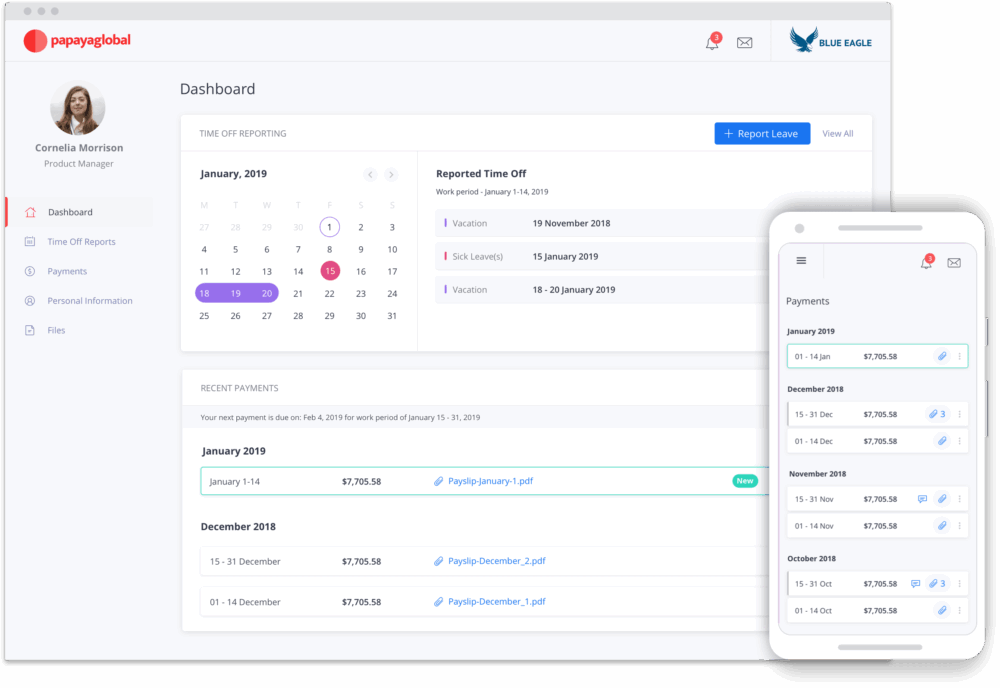
Global payroll sounds simple until you do it for real.
One country turns your payroll file into a neat bank upload. Another wants a specific local format. A third has a holiday calendar that eats your cut off date. Someone asks, “Why did the net pay change?” and you realize the answer lives across three vendors, a spreadsheet, and an email thread titled “FINAL v7”.
If you are nodding right now, you are the target audience for Papaya Global.
Papaya Global positions itself as a unified platform for managing payroll and workforce payments across a large country footprint, with an emphasis on getting money to people on time and keeping compliance tight as you scale. On its website, Papaya frames this as “enterprise workforce payments” optimized for 160+ countries, with options that cover employees, contractors, vendors, and EOR and AOR models.
This review is long on purpose. Papaya is not a simple tool, and the buying decision is not small. I am going to walk through what Papaya does well, where it can feel messy, what it costs in practice, and the kinds of teams that usually get the best outcome.
Papaya globalOverall verdict (short version): 8.6/10
Papaya Global is strongest when you want one operational layer for payroll plus payments across many countries, and you want payments tracking and reconciliation to feel like part of the payroll workflow rather than an afterthought. Its “Payments OS” and wallet model is a real differentiator, especially for finance teams that are tired of chasing wires and bank file failures.
Where it can feel less friendly is the learning curve, the invoice and reconciliation detail some customers want, and the reality that global workforce tools always involve process change, not just software. Real users on G2 and Capterra call out ease of management after you learn the workflow, but also note onboarding complexity, invoice review friction, and occasional slow issue resolution.
Best for
- Mid market and enterprise teams paying people across multiple countries who want to standardize payroll operations and centralize payments, approvals, tracking, and reconciliation.
- Finance and payroll leaders who care about “money movement” as much as “payroll calculation”, especially if you currently depend on bank files and scattered bank accounts.
- Organizations hiring internationally via Employer of Record and managing contractors at the same time, with a preference for one platform rather than a patchwork of vendors.
Not ideal for
- Very small teams with only one or two countries, where a lighter local payroll provider or a simpler global EOR tool may be enough.
- Teams that want a “plug in and forget” experience with minimal process design. You will still need payroll calendars, approvals, cutoffs, data governance, and someone who owns the system.
- Buyers who need fully public, fixed pricing with no quoting. Papaya’s official pricing page emphasizes transparency and what is included, but the actual numbers often come through tailored quotes.
Here’s what this review covers
- What Papaya Global is trying to solve
- A quick map of the Papaya product surface area
- The big differentiator: Papaya treats payments as a first class product
- Workforce OS and Payroll Plus: where payroll operations live
- What the day to day payroll cycle can look like in Papaya
- Employer of Record: what Papaya is offering and how it is framed
- EOR versus PEO and what Papaya says
- My take on Papaya’s EOR positioning
- Agent of Record and contractor operations: where Papaya is going beyond simple payouts
- Contractor classification: how Papaya approaches misclassification risk
- A practical note on classification tools
- The wallet and payment infrastructure: Virtual IBANs, Workforce Wallet, Worker Wallets
- Workforce Wallet and global direct deposit
- Virtual IBAN accounts for treasury control
- Worker Wallets: the worker-facing experience
- Payments services and Azimo
- Integrations and connectors: how Papaya plugs into your stack
- A deeper example: BambooHR integration details
- The NetSuite angle
- Security, compliance, and controls: what Papaya publicly claims
- Setup and onboarding: what to expect if you buy Papaya
- User interface and ease of use: what users say, and what the product shape implies
- Pricing and total cost: what is public, what is inferred, and what you should validate
- Performance and reliability: what Papaya claims and what users report
- Customer support and service model: what Papaya emphasizes
- Pros and cons: a grounded summary
- User reviews and ratings: what the market feedback looks like
- Alternatives: when another vendor might be a better fit
- Who should buy Papaya Global, and who should pass
- Final verdict
- FAQ (15 questions)
What Papaya Global is trying to solve
Papaya Global’s founding story is basically a description of modern global payroll pain: repetitive payroll tasks, juggling bank accounts, and foreign exchange. Papaya says it was founded in 2016 by Eynat Guez, Ruben Drong, and Ofer Herman to unite finance, HR, payroll, and payments on one platform.
That “unite payroll and payments” line matters.
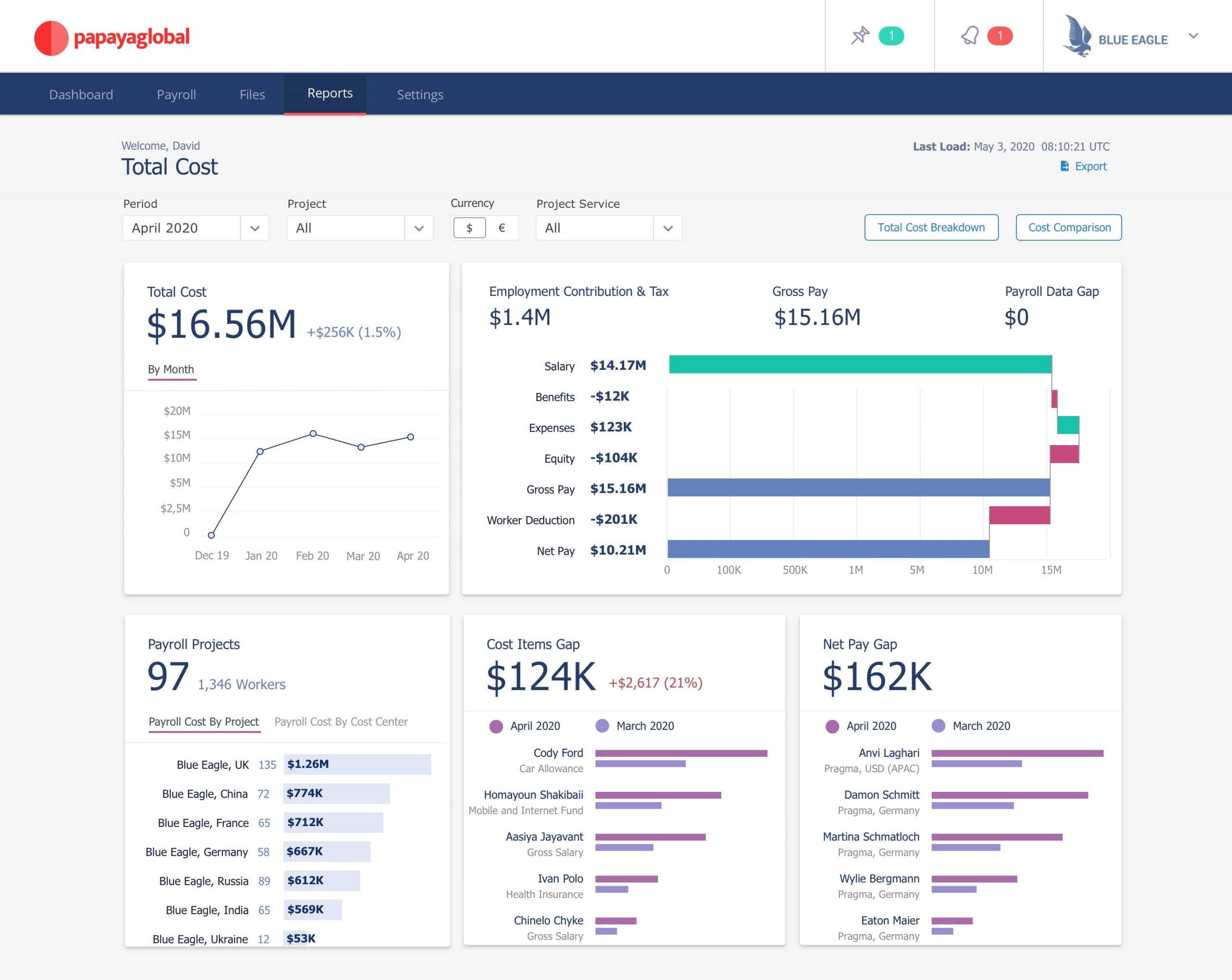
Most global payroll stacks still treat payroll as step one and payments as step two. Payroll generates outputs. Then finance figures out funding, bank files, payment routing, confirmations, and reconciliations. If something fails, it is often not obvious where the failure happened. That is where deadlines slip and trust erodes.
Papaya’s pitch is that payroll, payments, and compliance should sit in one operating system: Workforce OS for payroll and data, and Payments OS plus wallet infrastructure for funding and payout execution.
If that sounds like a finance driven view of HR tooling, it is. And for many global companies, that is exactly the point.
Papaya globalA quick map of the Papaya product surface area
Papaya Global’s website and pricing page highlight several major solution buckets:
- Payments OS (global payments infrastructure and tools).
- Payroll Plus (global payroll plus payments, with broader payroll management features).
- Employer of Record (EOR) for hiring employees without setting up local entities.
- Agent of Record (AOR) for compliant contractor engagement in many countries.
- Contractor management and contractor payments, with payment rails and currency support.
- Worker wallets and the Papaya Card concept for fast access to earnings and flexible payout preferences.
- Compliance and security posture, including ISO and SOC attestations and platform controls like SSO and permissions.
- Connectors and integrations into HRIS, HCM, ERP, VMS, expenses, and journal entry workflows.
At a high level, Papaya is not trying to be your full HRIS. It is trying to be your global payroll and payments operating layer, sitting under HR systems and feeding finance systems.
The big differentiator: Papaya treats payments as a first class product
Here is where Papaya stands out, at least in positioning and in the way its feature list is structured.
On the Papaya pricing page, “Payments OS” is presented as the baseline layer. That layer includes things like:
- Unified payments platform
- 95 percent same day payments
- Mass payments support for 10,000+ transactions
- Global coverage in 160+ countries
- Funding in 15+ currencies
- Digital wallet and Papaya card link
- Early payment financing (factoring)
- Invoice to pay automation
- Real time payment tracking
- Automated reconciliation
- Segregated and safeguarded accounts
- Fraud protection and AML screening
- API integration and 24/7 support
This is not how traditional payroll vendors usually lead. Many will start with payroll calculation, country coverage, payslips, and compliance. Payments show up later as “we can also pay people”. Papaya flips the order and says: paying people is the core.
The practical upside: finance teams can stop thinking in terms of “export files” and start thinking in terms of “land dates”, confirmation, and reconciliation. Papaya’s payments platform page explicitly talks about end to end automation replacing fragmented workflows, and mentions support for bringing in data from common formats like PAIN.001, Excel, CSV, and UTF-8 encoded files, with mapping and standardization.
That technical detail sounds boring, but it is one of those boring details that keeps payroll from turning into a monthly fire drill.
Workforce OS and Payroll Plus: where payroll operations live
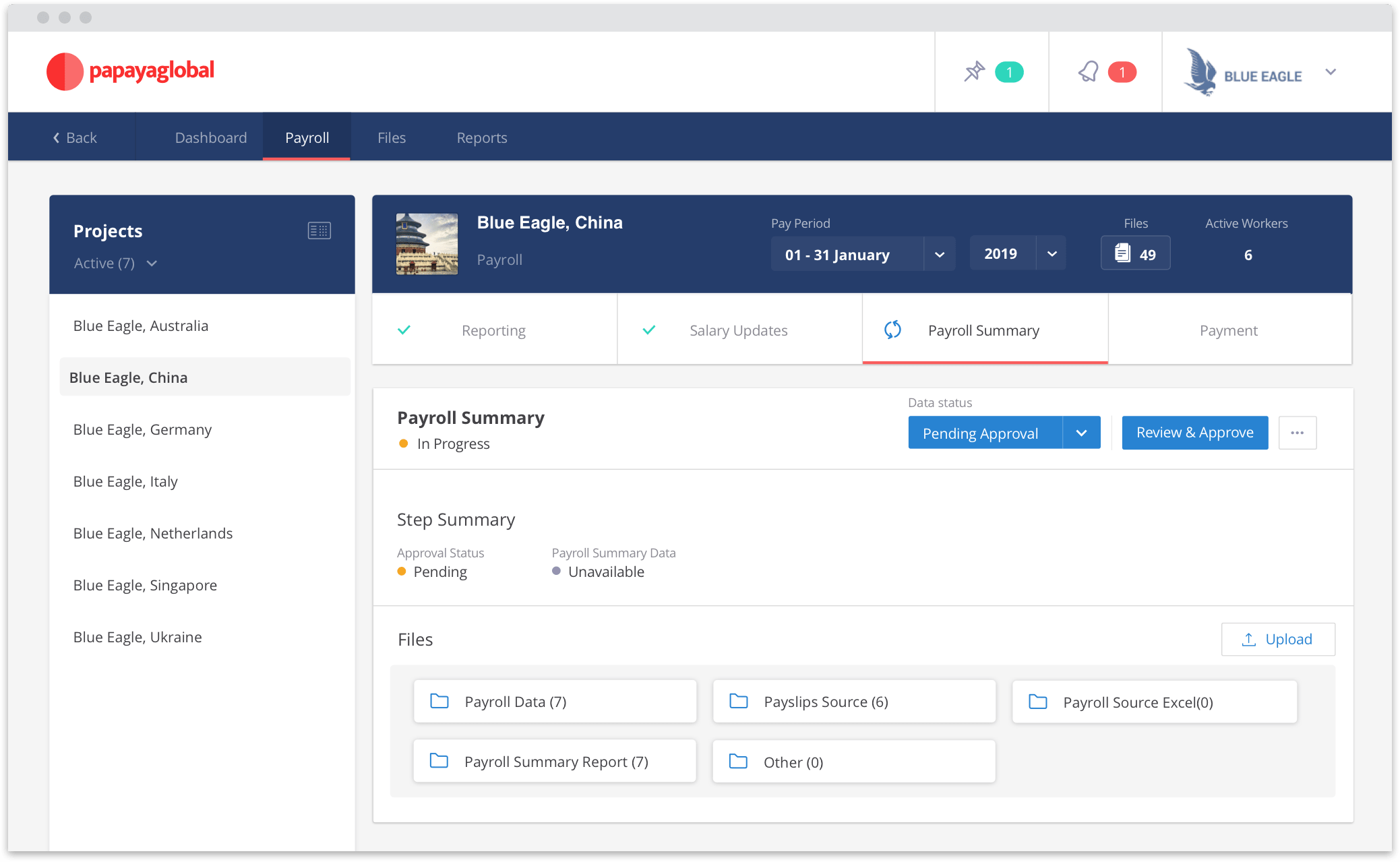
Papaya describes Workforce OS as an end to end platform that covers payroll from data upload and salary updates through payments and payslip distribution.
On the pricing page, Payroll Plus is framed as a layer that includes:
- Fully managed global payroll
- Centralized workforce data
- Automation of payroll processes
- Standardized gross to net reporting
- U.S. payroll support
- Automated payslip distribution
- Time and attendance tracking
- Global payment capability and statutory payments
- Direct debit payments
- Advanced BI analytics
- 24/7 support and in country experts across 160+ countries
- A global knowledge base referenced as askAI
If you are comparing vendors, I would treat this set of bullets as Papaya’s core “run payroll across many countries with one operational model” package. The promise is not just calculation. It is also:
- Standardization of data across countries
- Standardization of reporting
- Standardization of how payroll gets approved and executed
- Standardization of how payroll costs flow into finance systems
That last point is why Papaya also emphasizes connectors for journal entry automation and reconciliation. The connectors page calls out a “Papaya Journal Entry Connector” and lists payroll to JE automation and reconciliation as a dedicated connector category.
What the day to day payroll cycle can look like in Papaya
Papaya does not publish a perfect “here is the full monthly workflow” diagram on a single page, but its product pages give enough clues to outline the operating model:
- Bring in workforce and pay data from HRIS or spreadsheets via connectors or mapping tools.
- Validate payroll inputs and run gross to net in each jurisdiction, using in country experts and automated workflows for compliance changes.
- Generate payslips and distribute them.
- Fund payments through Papaya’s wallet infrastructure and payout rails, with defined land dates and tracking.
- Pay net salaries and statutory authorities as part of the same execution layer.
- Reconcile using automated reconciliation and reporting.
In G2 reviews, users describe the platform as manageable once you understand the workflow, and they highlight reliability around people getting paid on time. That aligns with Papaya’s emphasis on payment execution and tracking.
The caution: the same review also asks for more training and webinars to shorten the early learning curve. That is common in tools that try to cover payroll plus payments across many geographies.
Employer of Record: what Papaya is offering and how it is framed
Papaya’s EOR page says it supports hiring, onboarding, and paying employees without setting up a local entity, and it emphasizes enterprise scale, local experts, and a unified platform that spans onboarding through offboarding.
Key points Papaya highlights for EOR:
- EOR payments in local currencies across 160+ countries, powered by its embedded payment solution.
- Compliance and liability: Papaya states it is the Employer of Record in 160+ countries and uses certified country experts plus automated compliance workflows to keep contracts, benefits, tax, and legal processes aligned with local law.
- Papaya Direct: a network of fully managed local entities and on the ground specialists for local HR administration, compliant contracts, immigration support, transparent SLAs via Papaya 360 Support, and liability coverage.
On the pricing page, the EOR module includes:
- Hiring in 160+ countries
- Full payroll and benefits
- Immigration services
- Mass onboarding at 1,000+ scale
- Auto generated country specific contracts
- Time and attendance tracking
- Secure signing
- End to end local compliance
- Automated statutory payments
- Liability coverage
- Worker wallets
- “No deposit needed” plus in country experts and 24/7 support
The “no deposit needed” line is worth calling out because some EOR providers require deposits or prefunding buffers, especially in higher risk payment corridors. Papaya is explicitly saying it does not require that for EOR in its packaging.
EOR versus PEO and what Papaya says
Papaya’s EOR page includes an explanation of EOR versus PEO, describing PEO as joint employment where the provider and the company share responsibility, with the provider overseeing HR and payroll decisions while the company handles day to day tasks.
That matters if you are a U.S. headquartered buyer who keeps hearing “PEO” in the same breath as “global hiring”. They are not the same model, and Papaya is trying to keep the distinction clear.
My take on Papaya’s EOR positioning
Papaya appears to aim more at enterprises and larger mid market companies that need repeatable operations across many countries. The language around bulk onboarding, unified platform, liability coverage, and “Papaya Direct” gives a “standardize at scale” vibe.
If you are hiring one person in one new country, you may still benefit, but you may also feel like you are buying an aircraft carrier to cross a lake. This is not a knock. It is just fit.
Agent of Record and contractor operations: where Papaya is going beyond simple payouts
Papaya’s pricing page lists “Agent of Record (AOR)” as “Hire and Pay Contractors Compliantly” and includes features similar to EOR, plus worker wallets and “no deposit required.”
In parallel, Papaya has a contractor management solution page that focuses heavily on payment infrastructure:
- Funding in one of 15 currencies
- Funds protected and segregated in virtual IBAN accounts until payment processing
- Real time payments to contractors’ bank accounts and digital wallets through payment rails powered by J.P. Morgan and Citibank
It also states contractors can receive payments in 130+ currencies across 160+ countries, and that contractors can choose their preferred receiving currency while the employer funds in a supported funding currency set.
This framing matters because “contractor management” can mean very different things:
- For some vendors, it mostly means onboarding forms and contract templates.
- For others, it is primarily payments.
- For the best systems, it is both, plus compliance classification risk management.
Papaya is trying to cover all three.
Contractor classification: how Papaya approaches misclassification risk
Papaya has a contractor classification product page describing “AI-driven classification” supported by local experts. It says contractor assessments are reviewed individually and classifications are delivered within 1-2 business days.
A Papaya support article snippet describes the workflow as completing a questionnaire, having an AI engine calculate results, and then having a Papaya expert review and provide a final classification.
If you have ever dealt with contractor misclassification issues, you know why this is attractive. It is not just a legal risk. It is a relationship risk. Nothing strains goodwill faster than telling a contractor you need to change their status because your paperwork was sloppy.
A practical note on classification tools
Even the best classification process does not remove the need for good internal discipline. Your hiring managers still need to describe roles accurately. Your procurement and HR policies still need to match reality. A classification tool helps you make consistent decisions and document them, but it does not magically turn a de facto employee into a contractor.
Papaya’s pitch is that its standardized process helps remove complexity while keeping local compliance.
The wallet and payment infrastructure: Virtual IBANs, Workforce Wallet, Worker Wallets
Papaya uses the word “wallet” in a few ways, and it can get confusing. Let’s sort it out.
Workforce Wallet and global direct deposit
A PRNewswire release from October 12, 2023 describes Papaya’s “Workforce Wallet” as enabling direct deposit in 12 currencies and payment in over 160 countries, with most transactions on the same day. It also says the wallet safeguards and segregates client funds, eliminates the need for multiple bank accounts, and optimizes FX management.
The same release claims 95 percent same day worker payments, less than 0.1 percent bounced payments, and payments arriving as quickly as 15 seconds up to 72 hours. Those are strong claims, and I would treat them as marketing metrics that should be validated in your own demo and reference calls. Still, they show exactly where Papaya is placing its bets: payment reliability and speed.
Virtual IBAN accounts for treasury control
Papaya’s virtual IBAN account page positions this as a treasury infrastructure product:
- Funds held in dedicated accounts at J.P. Morgan and Citibank, separated from operational accounts
- Fund in 15 currencies and pay to 160+ countries in 130+ currencies
- Favoring local payment routes to reduce correspondent bank fees
- Real time balance visibility and payment reporting for reconciliation
It also claims it can reduce correspondent bank fees and FX costs by up to 30 percent through optimized routing. Again, treat that as a “possible outcome” rather than a guaranteed number for your business, because fee structures vary by corridor and by bank relationships.
Still, the story is compelling: instead of setting up bank accounts in every region, you centralize funding and control, then push money through efficient rails.
Worker Wallets: the worker-facing experience
Separate from the employer funding layer, Papaya’s “worker wallets” page focuses on giving workers flexible access to earnings:
- Workers can hold balances in major currencies and spend via the Papaya Card or withdraw to bank accounts with minimal fees
- Options to pay to wallets, bank accounts, or split payments
- Instant payments to wallets
- A worker cashflow feature described as an advance on earnings
The worker wallets page also states funds are held in J.P. Morgan accounts and that payments move directly from employer wallets to worker wallets through Papaya’s payment rails.
This worker-facing angle is a subtle but meaningful shift. Many payroll tools treat the worker experience as “here is your payslip.” Papaya is trying to make the payment itself part of the experience, and that matters for retention and satisfaction if you pay a global contractor base that cares about FX rates, fees, and payout timing.
Payments services and Azimo
Papaya also states that its payment services are offered through Azimo, described as Papaya’s licensed payments arm, regulated in five Tier-1 jurisdictions.
In March 2022, Papaya announced it agreed to acquire Azimo, and the PRNewswire release describes the acquisition as expanding Papaya’s payroll payments capabilities and bringing payment licenses in the UK, the Netherlands, Canada, Australia, and Hong Kong.
If you are a buyer who cares deeply about regulatory posture and licensing, this is the kind of detail you want to ask about in diligence. Not because you distrust Papaya, but because your own finance team and auditors will.
Integrations and connectors: how Papaya plugs into your stack
A global payroll and payments tool lives or dies by integrations. You cannot afford to manually key payroll inputs for hundreds or thousands of people across countries.
Papaya’s connectors page lists featured connectors and categories that matter in real operations:
- HCM Cloud Connector to integrate pre payroll data from any HCM, HRIS, ERP, or Excel into Workforce OS
- Payments Connector to connect payments data in any form to Papaya Payments
- VMS Connector for vendor management workflows
- Expenses Connector for expense systems
- Partner Connector to connect local payroll provider data into Workforce OS for visibility and control
- Journal Entry Connector for payroll JE creation and reconciliation
- Time and Attendance Cloud Connector
It also lists specific third-party systems like SAP SuccessFactors, Oracle HCM, NetSuite, Workday HCM, BambooHR, SAP Fieldglass, Expensify, Personio, HiBob, UKG, Sage, Beeline, and others.
A deeper example: BambooHR integration details
Papaya’s BambooHR connector page gets unusually specific, which I appreciate because integration vagueness is a common sales trap.
It states:
- The API connector can sync HR and PTO data from BambooHR to Papaya Global.
- HR data sync runs daily.
- PTO sync runs on the salary cutoff date, with rules about approval status and historical windows.
- Payslips can be exported back into BambooHR automatically, to a selected folder, including a test option.
You may not use BambooHR. The point is the level of operational detail. That is what you want to see for every connector you care about.
The NetSuite angle
Papaya also has content about its NetSuite partnership and notes it is integrated with Workday, BambooHR, and Expensify.
If you live in NetSuite, the payroll to journal entry flow and reconciliation story is often the real battle. It is rarely payroll calculation that slows the close. It is data alignment and approvals.
Security, compliance, and controls: what Papaya publicly claims
Payroll and payments are sensitive. The bar is high. The sales pitch is easy. The proof matters.
Papaya’s compliance page says the platform adheres to international standards including ISO 27001 and ISO 27701, SOC1 Type II, and SOC2 Type II, and it mentions encryption, single sign-on, and user permission controls.
Papaya also has content about completing a SOC1 Type II audit report and lists GDPR compliance and ISO certifications alongside SOC2 Type II.
From a buyer perspective, here is the useful way to think about this:
- Certifications and attestations are table stakes for serious enterprise evaluation. Papaya appears to check many of the boxes on paper.
- Controls in the product matter as much as external reports. Role based permissions, SSO, audit trails, approval chains, and data export governance are what keep you safe day to day. Papaya explicitly mentions SSO and permission controls, and its pricing packaging references custom roles and permissions.
- Payments compliance also matters. AML screening and fraud protection appear in the Payments OS feature list.
My opinion: Papaya’s security posture reads like a company that wants to be in the enterprise room, not just the startup room. That does not mean you skip diligence. It means you can start diligence with a more serious baseline.
Papaya globalSetup and onboarding: what to expect if you buy Papaya
No global payroll platform is truly “quick”. Anyone who promises instant setup is either selling a very narrow product or they are about to surprise you later.
Papaya’s pricing page says “get started in weeks,” and it frames onboarding speed as a selling point.
Here is what I would expect based on Papaya’s product shape and integration approach:
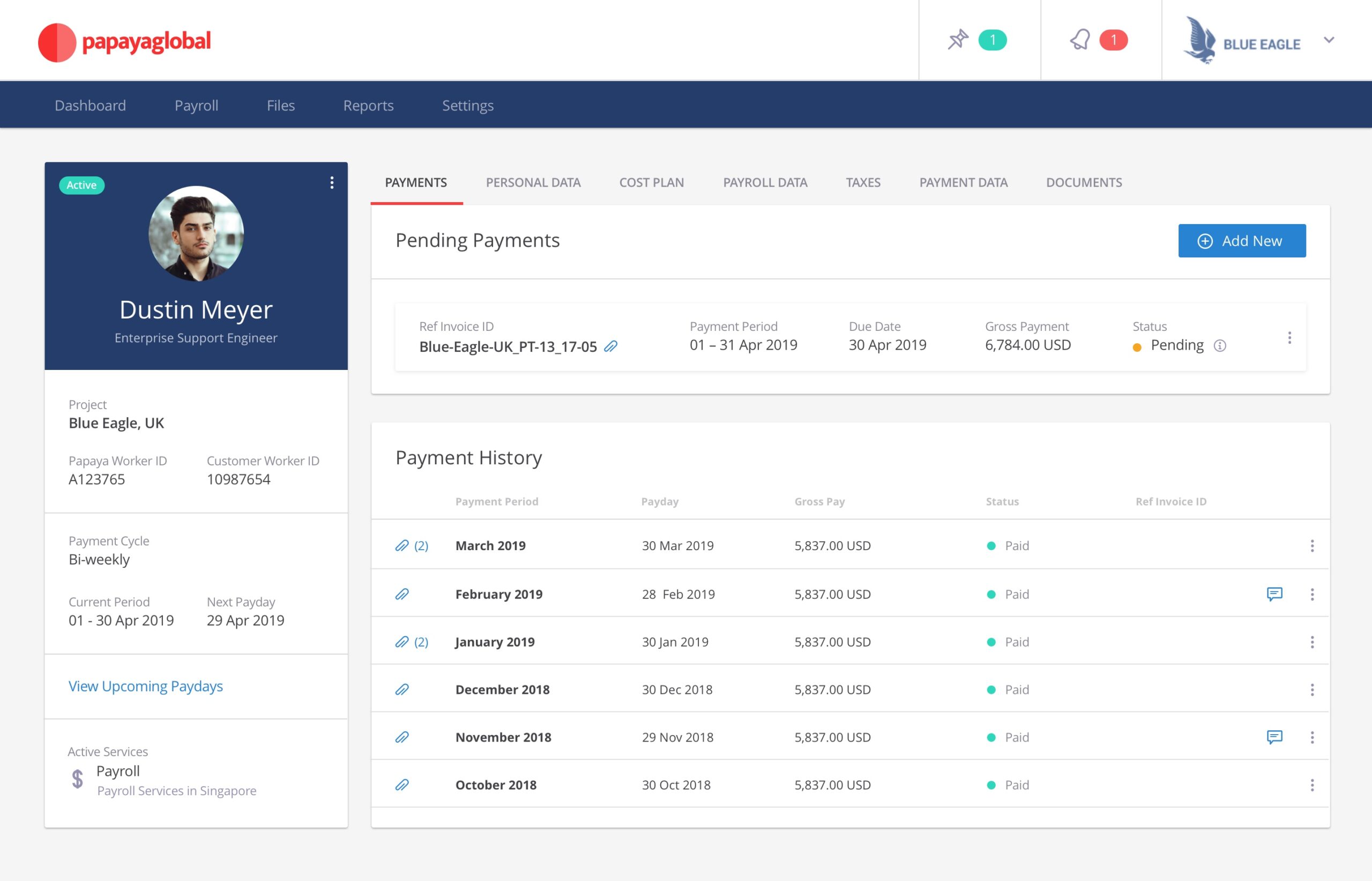
1) You will start with workforce mapping
Before implementation, you need a clear inventory:
- Countries and worker counts per country
- Employment types (employees, contractors, EOR, AOR)
- Payroll frequencies (monthly, biweekly)
- Benefit and statutory complexity
- Current systems of record (Workday, BambooHR, SAP, NetSuite, local payroll vendors)
Papaya’s platform is designed to cover employees, contractors, and EOR and AOR models in one place, so this upfront mapping determines how much value you get from consolidation.
2) Data integration is not optional
Papaya emphasizes connectors and file mapping. The connectors page even calls out the ability to integrate pre payroll data from any HCM, HRIS, ERP, or Excel.
The key decision is whether you:
- Use native connectors where possible
- Use Papaya’s mapping tools for custom data
- Maintain parallel workflows for edge cases
The BambooHR connector example shows the level of field mapping and sync rules you may need to define.
3) You will need a payroll calendar and cutoffs
This is the part people skip. Then they regret it.
Papaya’s payments platform messaging talks about setting land dates and ensuring payroll payments arrive on time. That implies you will define calendars that align payroll cutoff, approval, funding, and payout timing.
4) Funding and KYC will be part of the journey
If you use Papaya’s wallet infrastructure, you are going to go through KYC and funding setup.
The PRNewswire release about Workforce Wallet mentions a 2 day KYC process and a 3 day pre payment period for the wallet solution.
Treat those numbers as directional and validate with Papaya for your jurisdictions and entity structure, but do assume you will need treasury involvement early.
5) The first few payroll cycles will feel heavier
This is normal. Even G2 reviewers who like Papaya mention early challenges understanding how everything works and suggest more training.
If you plan for that up front, it becomes a controlled ramp. If you plan for “business as usual,” it becomes a stressful month.
Papaya globalUser interface and ease of use: what users say, and what the product shape implies
I cannot log into your tenant, so I am not going to pretend I can rate button placement. What I can do is triangulate from product design and real user feedback.
What users praise
A G2 reviewer describes Papaya’s team as supportive and mentions dedicated country partners and account management, with the platform being “easy to manage once you understand the workflow.” They also say they have not had issues with people getting paid on time.
A Capterra reviewer calls the platform straightforward and says Papaya is “always optimizing the system,” while still noting cost concerns.
Where users struggle
That same G2 review mentions the initial learning curve and asks for more training.
The Capterra review also mentions slow issue recovery and frustration with invoice checking and mistakes.
Another G2 review excerpt notes invoice reconciliation can be challenging, and asks for better invoice breakdowns for internal compliance and easier extraction into spreadsheets.
My read: Papaya is designed like an operations platform, not a lightweight app. Operations platforms are powerful, but they demand process clarity. If your org does not have an owner for payroll operations and finance workflow, any tool will feel hard.
Pricing and total cost: what is public, what is inferred, and what you should validate
Papaya’s pricing page does something I like: it lists what is included, and it emphasizes “no surprise fees or hidden markups.” It does not, however, publish universal price points for each tier directly on the page.
So how do you think about cost?
1) Think in modules, not a single subscription
From Papaya’s packaging, you can treat it like:
- Payments OS as the base layer
- Payroll Plus as the payroll management layer
- EOR and AOR as higher value employment models
- Contractor management as a separate solution category
2) Watch the “per worker per month” math
Third-party pricing writeups in 2025 commonly state Papaya’s EOR pricing starts around $599 per employee per month.
One third-party article also lists Workforce OS as $5 per employee per month and Payroll Plus tiers starting higher, but treat third-party numbers as directional because packaging changes.
The right way to use these numbers is not “this is the price.” Use them as:
- A sanity check against quotes
- A budgeting anchor for internal ROI models
- A prompt for questions: what is included, what is extra, what varies by country
3) Cost drivers that often surprise teams
Even if a vendor says “no hidden fees,” global payroll and EOR has real cost drivers. Some are not optional.
Common drivers you should model:
- Number of workers by type (EOR is usually far more expensive than payroll for your own entities)
- Number of countries and payroll frequencies
- Implementation and integration work
- Payments and FX economics
- Additional services like immigration, benefits, and equity management (Papaya lists these as services in its solution menu)
Papaya’s pricing page lists immigration services and equity management as part of its broader offering categories, and Payroll Plus includes “benefits, immigration, and equity support.”
4) A quick reality check on “value”
A Capterra reviewer says Papaya is expensive and mentions management fees can feel high, but also says representatives are responsive and the platform is straightforward.
That is a typical pattern with global workforce tools: you are paying for infrastructure, expertise, and risk reduction, not just software.
Papaya globalPerformance and reliability: what Papaya claims and what users report
Papaya is unusually explicit about speed and reliability claims, especially around payments.
From its pricing page, it claims:
- 95 percent same day payments
- Mass payments support for 10,000+ transactions
- Flexible funding in 15+ currencies
From its PRNewswire release about Workforce Wallet, it claims:
- 95 percent same day worker payments
- Less than 0.1 percent bounced payments
- Payments arriving as quickly as 15 seconds up to 72 hours
From real user reviews, at least one G2 reviewer reports they have not had issues with people getting paid on time.
My advice: treat performance claims as hypotheses you will validate.
How to validate without getting lost:
- Ask for corridor specific examples that match your footprint.
- Ask how Papaya handles failed payments and what remediation looks like operationally.
- Ask what data you get for tracking and reconciliation, and how quickly.
Papaya’s platform pitch around real time tracking, automated reconciliation, and visibility over funds suggests this is an area they care about deeply.
Customer support and service model: what Papaya emphasizes
Papaya repeatedly mentions 24/7 support in its packaging for Payments OS, Payroll Plus, EOR, and AOR.
Its EOR page emphasizes local experts and describes Papaya Direct as including transparent SLAs via Papaya 360 Support.
User reviews on G2 include praise for responsive support and access to in country teams, which is exactly what you want in global payroll.
At the same time, other user comments mention response times can sometimes be slow when clarifications are needed.
This mix is normal. In global payroll, the hardest issues often involve local partners, local regulations, and edge cases. The best support model is the one that sets expectations clearly and gives you escalation paths.
Pros and cons: a grounded summary
What Papaya Global does well
- Unifies payroll and payments as one operating layer, not two disconnected workflows.
- Strong payments infrastructure story: wallets, virtual IBANs, payment rails, tracking, reconciliation, and AML controls.
- Broad coverage framing: 160+ countries is consistently referenced across its platform, payments, and EOR pages.
- Integration depth through a large connectors catalog across HRIS, HCM, ERP, VMS, expenses, and JE flows.
- Compliance and security posture with public statements around ISO and SOC attestations plus product controls like SSO and permissions.
- Contractor compliance tooling via classification workflows supported by local experts.
Where Papaya can disappoint or require extra work
- Learning curve: users say it becomes easy once you learn the workflow, which implies the early stage can feel heavy.
- Invoice and reconciliation detail: multiple users ask for better invoice breakdowns and easier reporting exports.
- Cost: users describe it as expensive, which is common in EOR and enterprise payroll, but still important for ROI math.
- Global complexity never disappears: Papaya can reduce chaos, but your org still needs ownership and process discipline.
User reviews and ratings: what the market feedback looks like
Papaya’s rating on G2 is shown as 4.5 out of 5 in recent review content, and its seller profile indicates a 4.5 star rating based on verified reviews.
On Capterra, reviewers often highlight responsiveness and platform straightforwardness, alongside cost concerns and occasional operational frustrations.
A few patterns emerge from the text of reviews:
- People like having a single platform across multiple regions and country specific support.
- People want more training and clearer enablement early on.
- People want more granular invoice and expense breakdowns and smoother internal reconciliation workflows.
If you are evaluating Papaya, I would ask for customer references that match your size and footprint, and ask specifically about implementation, invoice detail, and escalation experience.
Alternatives: when another vendor might be a better fit
Papaya is not the only serious player in global payroll and EOR. The right choice depends on whether you prioritize:
- Payroll plus payments infrastructure
- EOR coverage and speed
- Contractor onboarding and classification
- HRIS breadth
- U.S. payroll plus global add-ons
- Reporting and finance close integration
A few practical “when to look elsewhere” scenarios:
If you want the simplest EOR experience for a small footprint
Some EOR-first platforms are optimized for speed and simplicity for small teams. Papaya can still work, but it may feel heavy if you are only hiring a handful of people.
If you want a full HR suite, not a payroll and payments layer
If your main goal is a single HR system of record with performance, engagement, and talent management, you may want to anchor on an HRIS suite and then layer global payroll underneath, rather than trying to make Papaya the center.
If your biggest pain is U.S. payroll plus light international
Papaya does list U.S. payroll support in Payroll Plus, but U.S.-first payroll platforms can be a more natural center if 90 percent of your workforce is domestic.
If payments infrastructure is not a priority
If you are already happy with your treasury and payment rails, and you mostly want payroll calculation and compliance, you might prefer a more traditional global payroll provider.
Who should buy Papaya Global, and who should pass
Buy Papaya Global if
- You pay workers in many countries and want to replace scattered bank files and fragmented payment workflows with one platform.
- You need a consistent model for paying employees, contractors, and EOR hires, and you want shared reporting and controls.
- You care about payment reliability, tracking, and reconciliation as core payroll requirements, not add-ons.
- You need integrations across HRIS, ERP, VMS, and expenses, and you want a connector catalog rather than a custom build for everything.
Pass, or at least slow down, if
- You only operate in one or two countries and do not have near-term expansion plans.
- You do not have an internal owner who can run implementation, governance, and ongoing operations.
- You want the cheapest possible contractor payout tool. Papaya is building an enterprise-grade operating layer, and the cost structure reflects that.
Final verdict
Papaya Global is best understood as a workforce payments and payroll operating system, built to help enterprises reduce the messy gap between payroll calculation and money movement. Its product packaging makes that clear: Payments OS is the foundation, with payroll, EOR, AOR, contractor management, and worker wallets layered on top.
If your organization is scaling across countries and you are tired of running global payroll like a monthly rescue mission, Papaya is worth serious evaluation. If your footprint is small and stable, you may not need this much system.
A last note: the best outcomes with platforms like Papaya come from pairing the software with a clean operating model. Payroll calendars. Data ownership. Approval chains. Clear escalation rules. The software can do a lot, but it cannot create discipline for you.
Papaya globalFAQ: 15 common questions about Papaya Global
1) What does Papaya Global actually do?
Papaya provides a platform for global payroll and workforce payments, including payments infrastructure, payroll operations, EOR, AOR, contractor management, and worker wallet capabilities.
2) How many countries does Papaya support?
Papaya repeatedly references optimization and coverage for 160+ countries across its platform, payments, and EOR pages.
3) What is Payments OS?
Payments OS is Papaya’s packaged payments layer, including unified payments, same day payments claims, mass payout support, funding currency options, wallets, tracking, reconciliation, and compliance controls like AML screening.
4) What is Workforce OS?
Workforce OS is Papaya’s payroll and workforce management layer, described as covering payroll end to end from data upload and salary updates through payments and payslip distribution.
5) Does Papaya handle both payroll and payments?
Yes. Papaya explicitly positions its platform as unifying payroll and payments, with features for payments execution and tracking alongside payroll processing and payslip distribution.
6) What is Papaya’s Employer of Record offering?
Papaya’s EOR offering is designed to hire, onboard, and pay employees in 160+ countries without setting up local entities, with local experts, compliance workflows, and liability coverage.
7) What is Agent of Record in Papaya?
Papaya lists AOR as a way to hire and pay contractors compliantly, packaged with Payments OS features and local compliance support.
8) Does Papaya support contractor payments in multiple currencies?
Yes. Papaya’s contractor management page states contractors can receive payments in 130+ currencies across 160+ countries, with employer funding in supported currencies and payout via bank accounts or digital wallets.
9) How does Papaya reduce payment failures?
Papaya emphasizes direct payment rails, wallet infrastructure, and tracking. Its PRNewswire release claims low bounced payment rates and fast payout windows, and its pricing page includes fraud protection, AML screening, and segregated accounts.
10) What are worker wallets and the Papaya Card?
Worker wallets allow workers to hold balances in major currencies and access funds via the Papaya Card or withdrawals, with options for instant wallet payouts and split payments.
11) What are virtual IBAN accounts in Papaya?
Papaya’s virtual IBAN accounts are positioned as a way to centralize funding and payouts with dedicated accounts held at J.P. Morgan and Citibank, supporting multi-currency funding and payouts with reporting for reconciliation.
12) What integrations does Papaya offer?
Papaya lists many connectors across HRIS, HCM, ERP, VMS, expenses, time and attendance, and journal entry flows, including Workday HCM, NetSuite, BambooHR, Oracle HCM, SAP SuccessFactors, and more.
13) Is Papaya secure enough for enterprise use?
Papaya’s compliance page states adherence to ISO 27001 and ISO 27701, SOC1 Type II, and SOC2 Type II, and mentions encryption, SSO, and permission controls. Always validate with your security team, but the published posture is aligned with enterprise expectations.
14) What do users dislike about Papaya Global?
Common complaints include the early learning curve, invoice and reconciliation detail, and occasional slow issue resolution. These themes appear in G2 and Capterra review text.
15) How should I evaluate Papaya in a demo?
Focus on your highest-risk workflows:
- One complete payroll cycle in a representative country
- Funding, land dates, and payment tracking
- Statutory payments handling
- Reporting and reconciliation into your ERP
- Integration setup with your HRIS
- Support escalation paths and SLAs Papaya’s own product packaging is heavy on these areas, so a good demo should be able to show them clearly








By clicking Sign In with Social Media, you agree to let PAT RESEARCH store, use and/or disclose your Social Media profile and email address in accordance with the PAT RESEARCH Privacy Policy and agree to the Terms of Use.