
Livestorm Review: The Standout Strengths, Hidden Drawbacks, and Why Teams Stick (or Switch)
One tab for the meeting link. Another tab for a landing page builder. A spreadsheet full of registrants. A calendar invite that someone forgot to send. A follow up email that goes out two days late. Analytics scattered across tools that do not agree with each other.
Livestorm’s pitch is simple: stop duct taping your webinar workflow together. Run the whole thing in one place, from registration to reminders to the live room to replay analytics. And do it in the browser, so attendees are not pushed into downloading an app at the last moment.
I will be direct. Livestorm is one of the cleanest end to end webinar platforms I have reviewed, especially for B2B teams who care about repeatable processes. It feels like it was built by people who have actually shipped webinars at scale, then got tired of chasing missing pieces.
It is not perfect. Pricing can be confusing if you do not internalize the “active contacts” model. Some deeper integrations are gated behind Enterprise. And the Free plan is more of a test bench than a real production setup because of the 20 minute limit.
Still, if webinars are part of your growth engine, customer training program, or product demo motion, Livestorm is absolutely worth a serious look.
LivestormOverall verdict (short version): 8.7/10
Best for:
- Marketing teams running recurring lead gen webinars and wanting built in registration pages and automated email sequences
- Customer education teams who need reliable live delivery plus replays and reporting
- Sales and partnerships teams who want webinar engagement data to land in CRM or marketing automation tools
Not ideal for:
- Teams who need long live sessions on the Free plan (hard stop at 20 minutes)
- Buyers who want the simplest “per host seat” pricing model and do not want to track contact usage
- Organizations where Enterprise grade identity and advanced integrations are mandatory, but budget is not aligned with an Enterprise tier
Here’s what this review covers
- Introduction
- What Livestorm is and what it is trying to solve
- A practical first week plan for evaluating Livestorm
- Core features that matter (and how Livestorm handles them)
- Integrations, automation, and extensibility
- Pricing and plans (what to understand before you budget)
- Performance and reliability
- Security, privacy, and compliance posture
- Support, onboarding, and learning resources
- User feedback and ratings patterns
- Pros and cons
- Alternatives and how to choose
- Who should buy Livestorm (and who should pass)
- Final recommendation
- FAQ (15 questions)
Introduction
The main thing Livestorm gets right is that a webinar is not just “a video call with more people.” It is a workflow:
- Someone discovers the event
- They register
- They get reminders
- They show up (or they do not)
- They engage (or they multitask)
- They watch the replay
- They click something
- You follow up
Livestorm is designed to keep that chain inside one platform: registration, emailing, delivery, engagement, replays, analytics, and exports.
What Livestorm is and what it is trying to solve
At a practical level, Livestorm is webinar software that blends four jobs into one platform:
- Promotion: registration pages, forms, embedded widgets, email reminders, email sequences
- Delivery: a browser based live room with chat, Q&A, polls, moderation, CTAs, and presenter controls
- Content lifecycle: recordings, replays, on demand workflows (and AI-adjacent assets like transcripts/captions depending on plan)
- Measurement: dashboards, attendee behavior data, exports, and connectors to marketing and sales systems
Why browser-first matters: “No download” sounds minor until you run a webinar for hundreds of people joining from locked-down corporate laptops. Reducing join friction is a real attendance booster.
A practical first week plan for evaluating Livestorm
The fastest way to judge Livestorm is not to read feature lists. It is to run a tiny pilot with real colleagues and a realistic audience.
Day 1: Build one event like you actually work
Create a webinar with:
- A real title and description
- One internal speaker and one moderator
- A registration form with at least two custom fields
Custom fields matter because the real value of webinars is usually segmentation later (routing, scoring, and follow up personalization).
LivestormDay 2: Set up promotion surfaces
- Build a registration page
- Test embedded registration forms if you publish events on your site
- Configure a confirmation email and at least one reminder email sequence
Day 3: Run a rehearsal with your presenters
Do not skip this. Most webinar failures are not software failures; they are rehearsal failures.
- Test screen share and speaker handoffs
- Practice Q&A handling
- Run at least one poll
- Confirm timing against a run of show
Day 4: Host a short live session
Invite a small group. Keep it tight. Use at least one poll and one CTA.
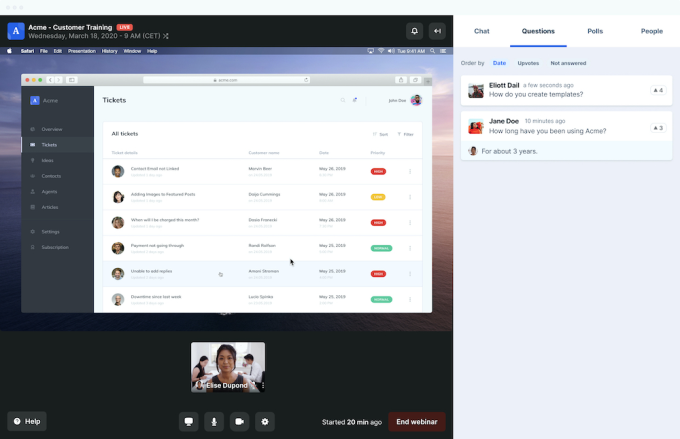
Livestorm includes webinar room features like chat, Q&A, polls, question upvotes, and CTA buttons. These are not decorations. They are how you keep attention from drifting.
Day 5: Review analytics and exports
This is where teams either smile or sigh.
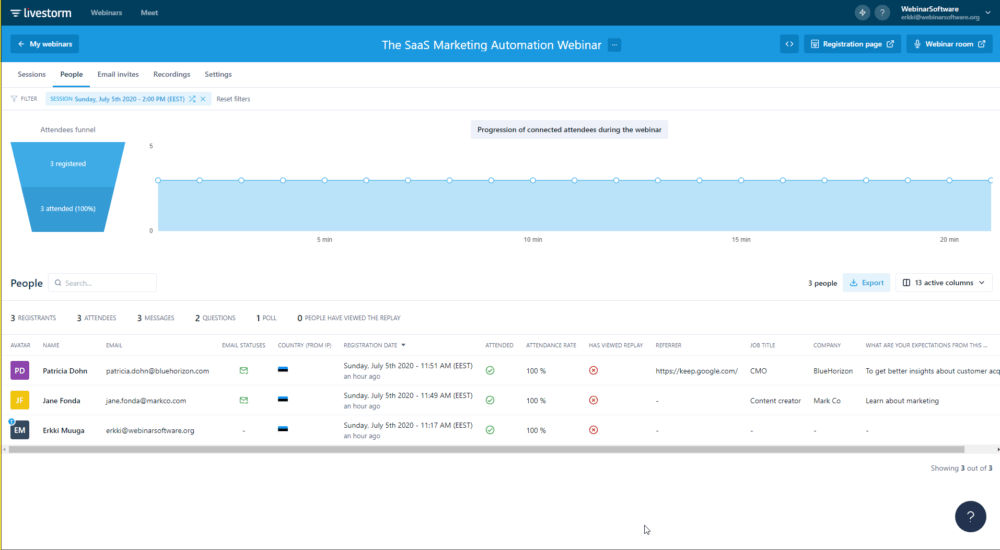
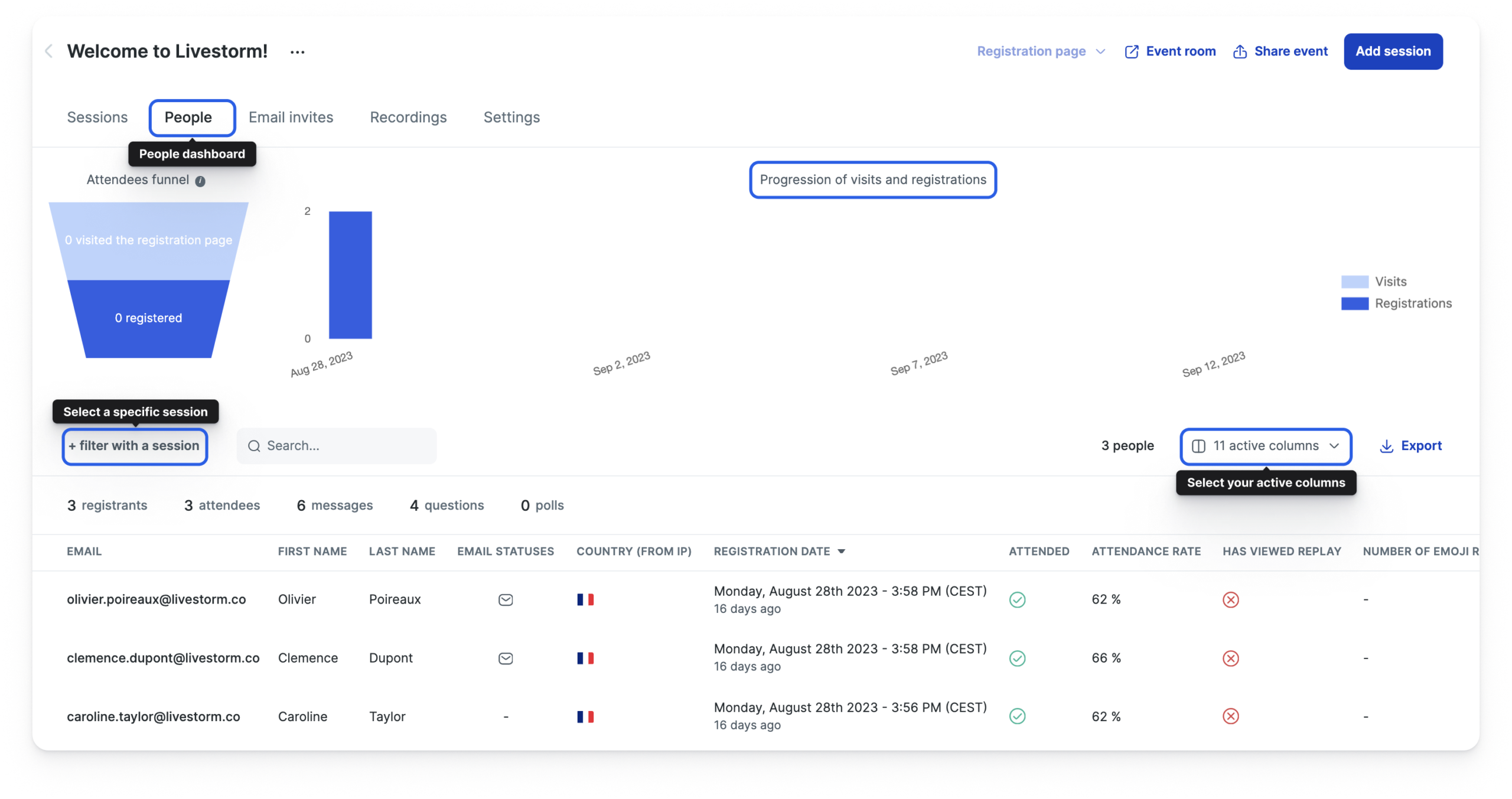
Livestorm provides event-level dashboards with selectable columns like registrants, attendees, no shows, replay viewers, messages, questions, polls, and average duration.
Then, test exporting:
- CSV
- XLSX
- ODS
The export experience matters because most webinar programs eventually feed reporting decks, CRM notes, or pipeline attribution models.
Core features that matter (and how Livestorm handles them)
Let’s talk about what you actually use in a webinar platform, not what looks good on a pricing page.
1) Registration pages, forms, and gating
Livestorm includes customizable registration pages and registration forms, including the ability to embed forms on your own website.
- Speed: stand up a decent registration surface without adding another web tool.
- Consistency: registration data is already in the system that runs the event, which makes analytics and follow up cleaner.
My take: if you run a lot of webinars, built-in registration pages reduce friction. If you run only a few flagship events a year, you might still prefer a specialized landing page builder. The question is whether you value conversion optimization more than workflow simplicity.
2) Email reminders and email sequences
Livestorm supports customizable emails and customized email sequences that can be scheduled to send automatically.
LivestormQuiet truth: webinars fail more often because of weak attendance than because of weak video quality. Reminder emails are where a lot of attendance is won.
3) The live room: engagement tools and moderation
Inside the event room, Livestorm focuses heavily on audience interaction. The platform supports chat, emoji reactions, Q&A, question upvotes, and polls.
It also supports CTA buttons inside the room. That is a practical feature if your webinar has a next step, like:
- Book a demo
- Download a guide
- Start a trial
A detail I like: moderation is treated as part of the workflow, not an afterthought. A predictable room sidebar (chat, questions, polls, people) is a form of stress reduction when you’re live.
4) Polls and Q&A as mechanics, not gimmicks
Many platforms “have polls.” The better question is whether polls are easy to run live.
- Draft polls in advance and publish them during the event, or create them live.
- Use Q&A with upvotes to surface the most important questions.
In real webinar operations, upvotes are gold. They prevent the classic failure mode where the host answers the most recent question, not the most important one.
5) Replay workflows and on demand behavior
If you run a mature webinar program, you stop thinking in terms of “one live session.” You start thinking in terms of assets:
- A live webinar is a content production event
- The replay is the long tail
- The on demand version becomes a self-serve education path
6) Analytics that are actually usable
Livestorm’s analytics structure is practical:
- Events dashboard: “How did each webinar perform?”
- People dashboard / People page: “What did this person do across webinars?”
For many teams, export still matters more than dashboards. Livestorm supports exporting event and attendee data (CSV, XLSX, ODS) and can also export interaction data like chat messages, questions, and polls.
Integrations, automation, and extensibility
Livestorm is not only trying to be a webinar room. It is trying to be part of your revenue and customer systems.
Native marketing automation and CRM integrations
Livestorm highlights integrations with platforms like HubSpot, Marketo, and Pardot. The important nuance is availability: some advanced integrations are tied to certain plans (for example, some connectors are positioned as Enterprise-only).
LivestormProcurement tip: if “webinar → CRM” workflows are a requirement, do not assume the integration you need is available on your tier. Confirm plan gating early and get it in writing.
Webhooks for automation scenarios
Livestorm provides webhooks to send registrant and event data to a URL you control. That is how technical teams build glue workflows without waiting on a vendor roadmap.
Realistic examples:
- Post a Slack notification when an event ends
- Push no-shows into a follow up sequence
- Create or update a Google Sheets log for webinar ops
API access and developer posture
Livestorm lists API access as part of paid plans and provides developer resources. If webinars touch revenue, programmatic access becomes valuable as you scale (multi-webinar campaigns, attribution, internal tooling).
Plugin SDK and room customization
Livestorm also highlights a Plugin SDK. Most teams will not use this early, but it is a credibility signal that the platform expects customers to extend the room experience.
Pricing and plans (what you need to understand before you budget)
Livestorm’s pricing model is not “per seat.” It is primarily based on active contacts.
The platform positions the model as unlimited licenses and unlimited events, with payment tied to active contacts throughout the year.
The Free plan (what it is really for)
The Free plan is best understood as a real product trial environment, not a production webinar plan. The published limits commonly highlighted include:
- Up to 30 active contacts per month
- Up to 20 minutes per session
- Up to 30 live attendees
- Unlimited team members
If you run external marketing webinars, 20 minutes disappears fast.
Pro, Business, Enterprise (what is visible publicly)
Livestorm lists a paid Pro tier with a visible price in EUR (commonly displayed as 105 EUR / month billed annually in some pricing views), with Business and Enterprise shown as “contact sales” tiers.
Session length limits are typically framed as:
- Pro: up to 4 hours per session
- Business: up to 4 hours per session
- Enterprise: up to 12 hours per session
The attendee cap nuance you should not ignore
One thing to watch: some pricing layouts show different “Pro attendee cap” numbers in different areas of the same page (for example, a comparison table may list one cap while a plan summary block references another). If attendee capacity is a hard requirement, treat this as a “confirm with sales” item and get the cap in writing.
What are active contacts, really?
Livestorm defines an active contact as a unique person (external registrant or team member) who registers for or joins at least one webinar in a given month. If they attend multiple events in the same month, they typically count once for that month.
Plain-English budgeting: your cost is driven more by unique people per month than by how many events you run. This is great for recurring programs with a stable audience. It can surprise teams running big one-off events with lots of new attendees.
Add ons and Enterprise features
Livestorm calls out add ons such as multiple workspaces, restreaming, custom API quota, RTMP input, and SAML SSO. If your organization requires SSO and advanced identity controls, expect the pricing conversation to move quickly into Business or Enterprise territory.
Performance and reliability
Most webinar tools look similar on a good day. The real test is the day when:
- The CEO’s WiFi drops
- 2,900 attendees try to join at once
- Someone is on an older browser build
- A corporate firewall blocks WebRTC traffic
Livestorm publishes technical guidance about browser compatibility, presenter best practices (Chrome is commonly recommended for presenters), and network/firewall considerations for secured environments. That level of specificity is a positive operational signal.
LivestormLarge attendance and compatibility behavior
Livestorm describes a “compatibility mode” behavior for very large sessions, where additional attendees may be served with a delayed stream experience once certain thresholds are reached. If you regularly push into the high thousands, validate this behavior during evaluation so you know what attendees will experience.
Status transparency
Livestorm provides a status page intended to give timely system health information without requiring customer support interaction. For customer-facing webinars, a public status page is an operational trust feature.
Security, privacy, and compliance posture
Security is one of those topics where you rarely get perfect visibility from the outside, but Livestorm publishes more documentation than many webinar platforms.
Encryption and streaming security details
Livestorm describes a WebRTC-based delivery model and references encryption approaches for traffic in transit (for example, TLS for transport, SRTP / DTLS-SRTP patterns). For compliance teams, this is useful context, but it should still be validated through vendor documentation during procurement.
Data location and region control
Livestorm discusses data location in its documentation (including EU-based storage for certain plans) and describes Enterprise options for restricting video traffic to EU or US servers as a paid add on. If you have strict data residency needs, this belongs in your shortlist of procurement questions.
Compliance and identity controls
Livestorm’s pricing and security materials commonly reference GDPR alignment, ISO 27001 positioning, and SAML SSO as an add on. If SSO is mandatory, confirm exactly how it is packaged and priced for your tier.
Support, onboarding, and learning resources
Livestorm differentiates support levels by tier (Free typically email-only; paid tiers often include higher-touch options; Enterprise may include an SLA). If webinars are revenue-critical for your org, support SLAs and onboarding matter as much as features.
A practical evaluation move: during your pilot, submit one real support question you care about (integrations, firewall setup, analytics exports, or pricing definitions). Response quality during trial is usually predictive.
User feedback and ratings patterns
No rating site tells the full story, but patterns across review platforms are still useful. Livestorm is generally rated strongly across major directories, with recurring praise for browser-based joining, engagement tooling, and the end-to-end workflow (registration → emails → live room → analytics).
Common positive themes you can reasonably expect
- Ease of joining because it is browser based
- Engagement tools that are actually usable live (polls, Q&A, chat, CTA buttons)
- Clean analytics structure with exports that support reporting workflows
Common friction points to watch for
- Understanding and forecasting active contacts usage
- Integration gating by tier (especially for Enterprise-grade marketing automation connectors)
- Presenter setup requirements in locked-down corporate networks (firewall/WebRTC constraints)
Pros and cons
Pros
- True end-to-end webinar workflow (registration, email sequences, live delivery, replays, analytics).
- Browser-first design that reduces attendee friction and increases join rates.
- Engagement features that matter (polls, Q&A with upvotes, chat, CTA buttons, moderation).
- Solid reporting and export path including exporting interaction artifacts like chat and polls.
- Automation options via webhooks and API posture for technical teams.
Cons
- Free plan is too limited for serious webinars (20 minutes per session is restrictive).
- Active contacts pricing requires forecasting discipline and can feel confusing at first.
- Some deeper integrations are tier-gated (Enterprise-level connectors may be required for certain stacks).
- Public attendee cap information can appear inconsistent across different pricing page elements; confirm in writing if it is a hard requirement.
Alternatives and how to choose without overthinking it
A simple way to choose webinar software is to ask one question:
Do you need a webinar funnel system, or do you just need a place to host a live call?
If you mostly need meetings with a bit of webinar flavor
Meeting tools (like standard video conferencing) can work, but you may need separate systems for registration pages, reminders, and analytics. That “tool sprawl” is exactly what Livestorm is designed to reduce.
If you need a repeatable webinar program
Livestorm’s strengths show up when you run webinars as an operating motion: automated email cadence, engagement tooling, exports, integrations, and on-demand workflows.
LivestormIf you run massive events beyond typical webinar caps
If your events exceed the attendee caps you see on Livestorm’s public pricing (and you truly need “conference scale”), you will likely end up evaluating conference-oriented platforms rather than webinar-first tools.
Who should buy Livestorm (and who should pass)
You should strongly consider Livestorm if:
- You run webinars monthly or weekly and want a single workflow from registration to follow up
- Engagement matters and you want built-in polls, Q&A, CTA buttons, and moderation tools
- You care about reporting, replays, and exporting clean data to spreadsheets or downstream systems
- You have technical resources and want automation via webhooks or API-based workflows
You should probably pass if:
- Your team refuses to track usage metrics like active contacts
- Your events are mostly internal short meetings and you do not need registration funnels
- You need long sessions but only want the Free tier
Final recommendation
Livestorm is best thought of as a webinar operating system, not just a streaming room.
It is at its best when you treat webinars like a process you want to refine: better attendance, better engagement, cleaner follow up, and clearer reporting. The platform is built around that lifecycle, and the browser-first approach reduces friction for real audiences.
If you are evaluating it, do not get stuck in feature-checklist mindset. Run a pilot. Use real reminder emails. Host a short live session. Export the data. Try one integration. Then decide.
FAQ (15 questions)
1) Does Livestorm have a Free plan?
Yes. Livestorm offers a Free plan intended to let teams test the product without committing.
2) What are the limits of the Free plan?
The Free tier is commonly positioned with caps like 20 minutes per session and lower attendee/contact limits. Use it as a trial bench, not as a production webinar plan.
3) What is an active contact?
An active contact is typically defined as a unique person (external registrant or team member) who registers for or joins at least one webinar in a given month.
4) Is Livestorm priced per host?
No. Livestorm’s pricing is primarily tied to active contacts rather than a per-host seat model, and it is commonly positioned as including unlimited team members/licenses.
5) Does Livestorm support automated email sequences?
Yes. Livestorm supports confirmation emails and scheduled reminder email sequences tied to event registration.
6) Can I embed Livestorm registration forms on my website?
Yes. Embedded registration forms are part of Livestorm’s promotion tooling.
7) Does Livestorm support polls and Q&A?
Yes. Livestorm includes polls and a Q&A experience, including question upvoting to prioritize what the audience cares about.
8) Does Livestorm include CTA buttons inside the webinar room?
Yes. CTA buttons can be used during sessions to drive a next step (demo request, download, trial, etc.).
9) Can Livestorm export webinar data?
Yes. Livestorm supports exporting event and attendee data, including common spreadsheet formats like CSV and XLSX (and ODS in some export flows).
10) Can Livestorm export chat messages and polls?
Yes. Livestorm supports exporting interaction data such as chat messages, questions, and polls.
11) Does Livestorm have a status page?
Yes. Livestorm provides a public status page for system health visibility.
12) Do attendees need to install software?
No. Livestorm is browser-based and is positioned to reduce “download an app” friction for attendees.
13) Does Livestorm have a mobile app?
Livestorm is generally positioned as “works in the browser,” including on mobile devices, rather than pushing a dedicated mobile app requirement.
14) What browsers does Livestorm recommend for presenters?
Livestorm’s technical guidance commonly recommends Chrome for presenters for best stability and streaming behavior. Validate your presenter environment during rehearsal.
15) Can Livestorm restrict video hosting region for compliance?
Livestorm describes Enterprise options for restricting video traffic to EU or US servers as a paid add-on. If data residency is a hard requirement, confirm the exact packaging and scope during procurement.








By clicking Sign In with Social Media, you agree to let PAT RESEARCH store, use and/or disclose your Social Media profile and email address in accordance with the PAT RESEARCH Privacy Policy and agree to the Terms of Use.