
Jungle Scout Review: Opportunity Finder, Keyword Scout, and AI Look at the Amazon Seller Toolkit
Selling on Amazon has a funny way of making smart people feel scattered.
One tab for Amazon search results. Another for Seller Central. A spreadsheet for product ideas. A note on your phone with “check reviews for that competitor.” Then the big question hits you at 11:47 p.m.:
Is this product idea actually good… or does it just look good because I want it to be good?
That is the mood Jungle Scout is built for.
Jungle Scout is an Amazon seller platform that aims to turn fuzzy hunches into something closer to a decision. It does that with product research, keyword research, listing optimization, review requests, financial and advertising analytics, inventory forecasting, supplier discovery, and an API for teams who want to build custom workflows. It also offers an enterprise suite called Cobalt for brands and agencies that need market level intelligence and advanced operational controls.
This review is long because the product is broad. I will walk through what Jungle Scout does well, where it can disappoint, what the plans really include, and who should choose it over alternatives.
I am also following the same overall article structure as the example you shared earlier, while keeping the focus on the review itself.
JunglescoutOverall verdict (short version): 8.6/10
Best for: Amazon sellers who want one connected toolkit for research, launch, and day to day decision making, especially if you value the browser extension and the research flow from Product Database to Opportunity Finder to Keyword Scout to Listing Builder.
Also strong for: teams that want programmatic access to Amazon intelligence data via an API, including a Python client and workflows via Postman and Zapier.
Not ideal for: sellers who want built in listing monitoring alerts, because Jungle Scout sunset its Alerts feature in early 2025.
The big reason it scores well: Jungle Scout has a coherent “from idea to execution” path, and it has improved its analytics and AI assisted workflows across listing creation and financial analysis.
The big reason it does not score higher: the feature set is wide, but plan limits, add on costs, and the removal of Alerts mean you may still need a second tool depending on your operating style.
What I will cover
- What Jungle Scout is and how the product lineup is organized
- Pricing and plans, including what you actually get
- Setup and onboarding experience
- User interface and day to day usability
- Core tools for product and keyword research
- Listing optimization and review generation features
- Analytics, advertising insights, and inventory forecasting
- Supplier sourcing and operational tools
- API capabilities for builders and data teams
- Data accuracy and where estimates can mislead
- Marketplaces supported
- Customer support and learning resources
- Pros and cons
- Alternatives and comparisons
- Who should buy Jungle Scout and who should skip it
- Final verdict
- FAQ
Introduction
Introduction: the problem Jungle Scout is trying to solve
Most Amazon seller mistakes do not come from laziness. They come from incomplete information.
You pick a product based on “it seems popular.” You pick keywords based on “it sounds right.” You build a listing based on “this is what competitors do.” Then you launch and discover the part no one brags about on social media:
- your niche is more competitive than you thought
- your costs are higher than you modeled
- your ads eat your margin
- your inventory plan is off by weeks
- your listing does not rank for the keywords you expected
Jungle Scout’s pitch is that you can reduce those surprises by using Amazon data and structured workflows.
At the small business level, Jungle Scout markets its seller tools as a go to toolkit for new and growing sellers. The company also positions itself as a broader Amazon intelligence platform for major brands, agencies, and retailers.
That dual focus matters because it explains why Jungle Scout has two “centers of gravity”:
- Catalyst: the seller toolkit for individuals and small teams
- Cobalt: the enterprise suite for large brands and agencies
The review below focuses mostly on Catalyst and the Browser Extension, because those are what most Amazon sellers evaluate first. I will still explain when Cobalt becomes the better fit.
Overview and company background
What Jungle Scout is, in plain terms
Jungle Scout is Amazon seller software designed to help you:
- find product opportunities using a large Amazon product catalog and keyword niche analysis
- research keywords and competitor listings
- track products and keyword rankings over time
- optimize listings with keyword guided tools and AI assistance
- request reviews at scale using an Amazon policy aligned process
- monitor profit, ad performance, and inventory needs using synced Seller Central data
- source suppliers and match products to factories
- access Amazon intelligence data via an API for custom tools and workflows
These capabilities show up across feature pages such as Product Database, Opportunity Finder, Keyword Scout, Listing Builder, Review Automation, Sales Analytics, Rank Tracker, Product Tracker, Supplier Database, and the Browser Extension.
JunglescoutThe product lineup you will see on the site
Jungle Scout’s site presents several offerings:
- Jungle Scout Catalyst for sellers
- Jungle Scout Browser Extension for quick research directly on Amazon pages
- Jungle Scout SMB API for programmatic access to data
- Jungle Scout Cobalt for enterprise brands and agencies
- Jungle Scout Cloud and Consult for data delivery and custom reporting at larger scales
This matters because a lot of confusion comes from thinking “Jungle Scout is one product.” It is more accurate to say it is a platform with a seller oriented bundle and an enterprise oriented bundle.
A quick note on trust signals
Jungle Scout claims that over 1M sellers and brands trust the platform and positions its seller tools as established over about a decade. Treat that as a vendor claim, but it does reflect broad market awareness.
You will also see marketplace badges on certain pages, such as a G2 “Top 50 Best Commerce Products 2025” badge shown on the extension page.
Pricing and plans: what it costs and what you actually get
Pricing is where Jungle Scout becomes either an easy yes or a slow no.
Not because the sticker price is extreme, but because your real cost depends on:
- whether you pay monthly or annually
- how many users you need
- whether you need advanced analytics, supplier data, or competitive intelligence
- whether you plan to use the API heavily
Catalyst plan pricing (as listed on December 22, 2025)
Jungle Scout lists three Catalyst plans with monthly and annual billing options:
- Starter: $49 per month, or $29 per month billed annually ($348 per year)
- Growth Accelerator: $79 per month, or $49 per month billed annually ($588 per year)
- Brand Owner: $149 per month, or $129 per month billed annually ($1,548 per year)
They also note “save up to 40%” on annual plans.
| Plan | Monthly | Annual (per month) | Annual total |
|---|---|---|---|
| Starter | $49 | $29 | $348 |
| Growth Accelerator | $79 | $49 | $588 |
| Brand Owner | $149 | $129 | $1,548 |
Money back guarantee and trial expectations
Jungle Scout states there is no free trial, but there is a 7 day money back guarantee.
That is a subtle but real psychological difference.
A free trial encourages casual exploration. A money back guarantee encourages a short, intentional test. If you buy Jungle Scout, you should plan your first week like a sprint: test the tools that matter most to your workflow.
Users and extra seats
Here is the part that surprises teams.
- Starter includes 1 user seat
- Growth Accelerator includes 1 user seat and allows extra seats as an add on
- Brand Owner includes 10 user seats
Extra seats are listed as $49 per month or $459 per year.
My take: if you are a team of 2 to 4, pricing can climb faster than you expect on Growth Accelerator. In that case, Brand Owner can sometimes become the “less annoying” option, even if it feels like a jump.
Plan feature differences that matter in real life
Jungle Scout’s plan comparison page is detailed. The highlights that tend to change outcomes are these:
Starter feels like a research starter kit.
It includes core research tools like Product Database, Opportunity Finder, Keyword Scout, Product Tracker, Rank Tracker, Listing Builder, and the extension. It has tighter limits and removes several operations oriented tools.
Growth Accelerator is where Jungle Scout becomes operational.
This plan adds tools like Sales Analytics, Review Automation, Ads Analytics, Inventory Manager, Supplier Database, and FBA Reimbursements, plus higher usage limits.
Brand Owner is where deeper competitive intelligence enters.
This plan includes Competitive Intelligence and much higher caps across trackers and analytics.
A simple way to choose:
If you are validating a first product and you mostly want research, Starter can work.
If you are already selling and your decisions are constrained by ads, cash flow, and inventory, Growth Accelerator is usually the real starting line.
Catalyst vs Cobalt: when enterprise changes the conversation
Jungle Scout positions Cobalt for larger brands and agencies. On its pricing page, it contrasts Cobalt with Catalyst on things like:
- broader geographic coverage (Catalyst listed for 8 marketplaces vs Cobalt listed for 19)
- larger segment size limits (Catalyst listed at 200 vs Cobalt listed at 20,000)
- more metrics availability (Catalyst listed at up to 140 vs Cobalt listed at up to 800)
It also markets Cobalt features like advanced controls for brands, plus a vendor claim that brands using Cobalt grew Amazon revenue 28% year over year on average.
If you are a solo seller, ignore Cobalt.
If you are a brand team running multiple portfolios, defending your Buy Box position, and managing reseller risk, Cobalt becomes relevant fast.
Setup and onboarding experience
Jungle Scout setup is not hard, but it is layered.
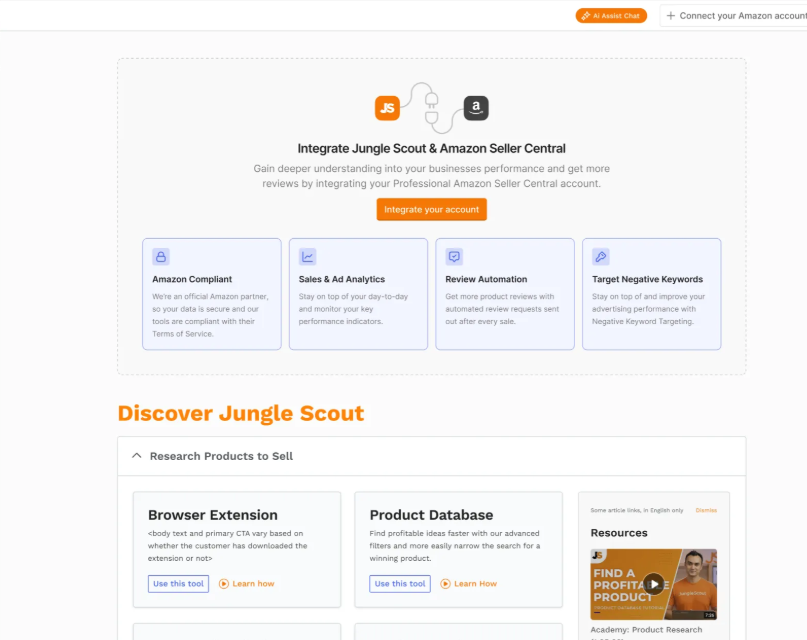
You can do “surface level” work without connecting Seller Central. You can also do “deep” work only after syncing data and entering product cost settings.
The setup steps that most users follow
- Create your account and choose a plan
- Install the browser extension (Chrome or Firefox)
- If you need analytics tools, connect your Amazon Seller Central account
- Add product costs and settings so profit and ad dashboards can calculate correctly
- Start building your research workflow: Product Database, Opportunity Finder, Keyword Scout, then Listing Builder
You can see on multiple feature pages that Jungle Scout emphasizes connecting with Seller Central for syncing listings and performance data, especially for listing workflows and analytics.
The biggest onboarding pitfall
Many sellers install the extension, play with sales estimates for a day, and assume they have “seen Jungle Scout.”
That is like opening a spreadsheet and claiming you have seen all of Excel.
The more meaningful test is whether Jungle Scout improves your decision loops:
- can you move from keyword idea to niche segment to top products with confidence
- can you understand your profit drivers without rebuilding reports manually
- can you connect ad spend to real net margin, not just Amazon’s surface level dashboards
Those are the workflows where Jungle Scout starts to justify its price.
User interface and day to day usability
Jungle Scout’s interface is mostly friendly, with a consistent left navigation structure for analytics tools and a tool by tool layout for research.
Where the experience really shines is the extension.
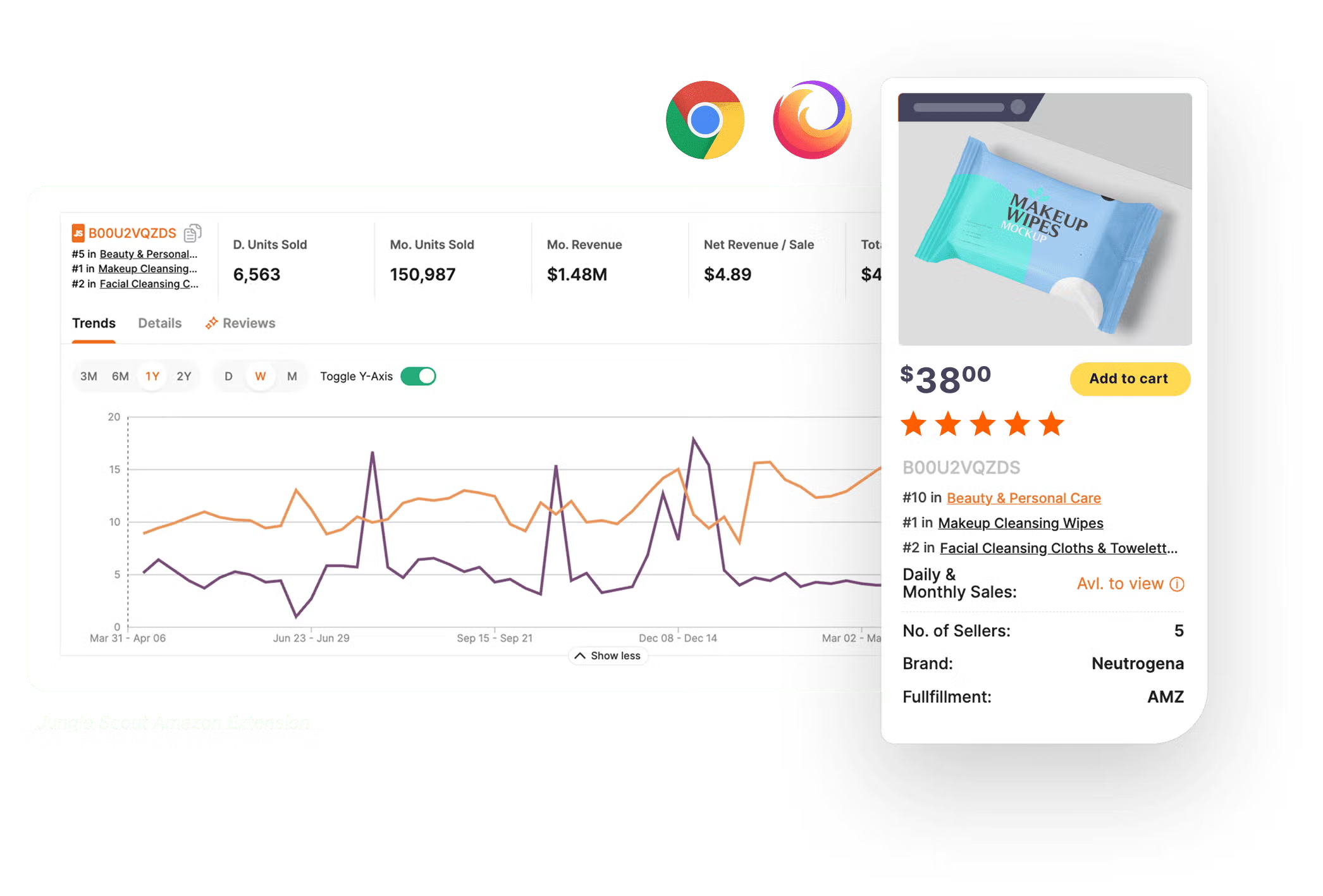
The Browser Extension: fast feedback, fewer tab flips
The extension is one of Jungle Scout’s signature strengths.
Jungle Scout describes it as a way to validate product ideas while browsing Amazon, with embedded insights on search results pages and product listing pages. It supports Chrome and Firefox.
Key capabilities called out on the extension page include:
- product demand and competitive data overlays
- profit projections
- historical sales and pricing views
- monthly sales estimates
- the Opportunity Score metric
- AI Review Analysis to summarize themes in reviews
- the ability to request reviews through Seller Central with a click
It also says its AccuSales algorithm analyzes over 1 billion data points daily to generate sales estimates and historical data views.
This is the kind of tool you feel immediately. You search Amazon, click a listing, and suddenly the page has context.
Is it perfect? No. Sales estimates are still estimates. But speed matters. And the extension is fast enough to become part of your reflexes.
JunglescoutSupported marketplaces for the extension
Jungle Scout lists the extension as fully compatible with the U.S., Canada, the U.K., Germany, France, Spain, Italy, and India, with limited data support in a longer list of other marketplaces.
If you sell mainly in one of the fully supported markets, life is simpler. If you sell across less supported markets, validate whether the specific datasets you care about are available.
Core tools for product and keyword research
This is where Jungle Scout built its reputation.
You do not buy Jungle Scout because you want another dashboard. You buy it because you want to answer questions like:
- How many products are already fighting in this niche?
- Are buyers searching for this keyword consistently, or is it seasonal?
- Are competitors winning mainly through ads or organic rank?
- Is this niche full of weak listings you can out execute?
Product Database: the “start here” catalog
Jungle Scout’s Product Database is described as a searchable catalog of 475 million products pulled directly from Amazon.
What it gives you in practice is:
- a structured way to explore product ideas without guessing categories
- filtering by estimated sales, sales rank, revenue, and other attributes
- a way to spot opportunity patterns like high competition with low ratings or underperforming listings
That last point is interesting.
Many sellers chase “low competition.” But sometimes the better play is “high competition with weak listings,” because it implies buyer demand exists and execution might be the gap. Jungle Scout explicitly points toward that kind of interpretation.
Opportunity Finder: niche research from a keyword
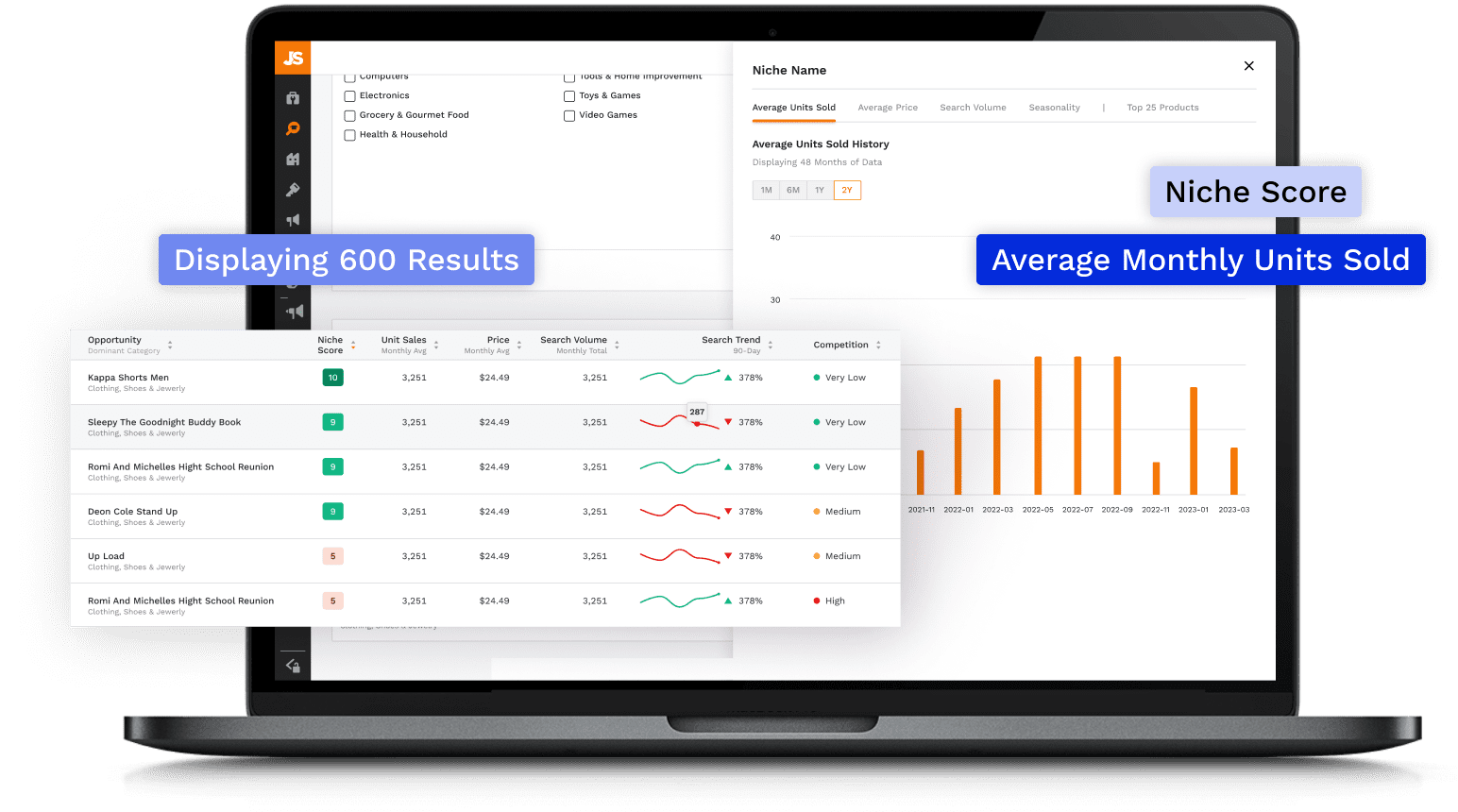
Opportunity Finder is one of Jungle Scout’s most useful mental models.
Instead of starting with a product, you start with a keyword, and it turns that keyword into a market segment with data on sales performance, trends, and competitive insights.
It also includes:
- historical views for units sold, average price, search volume, and seasonal trends
- a Niche Score that measures demand, competition, and listing quality to predict keyword success
- a view of the top 25 products in a niche, with a workflow to add them to Product Tracker
All of that is described directly on the Opportunity Finder page.
My opinion: this tool is where Jungle Scout can save you weeks.
You stop thinking “I want to sell a garlic press” and start thinking “I want a niche where demand is steady, listings are messy, price points support margin, and review moats are not insane.”
That is a different game.
Product Tracker: monitoring product ideas like a portfolio
Product Tracker is built for the part of research most people skip: watching something over time.
Jungle Scout describes Product Tracker as a way to track how a group of products performs over time, monitor sales, and create a strategy based on how products behave.
It includes:
- tracking average sales, revenue, and Best Seller Rank
- grouping similar products with roll up metrics
- graphs for inventory, units sold, rank, and Buy Box price over time
- CSV export of table and graph data
If you have ever tried to do this manually in spreadsheets, you know why this matters.
Keyword research: where winners quietly separate from hopefuls
Amazon SEO and Amazon ads are both keyword games. Even if you think you are not “doing SEO,” you are still doing it, just accidentally.
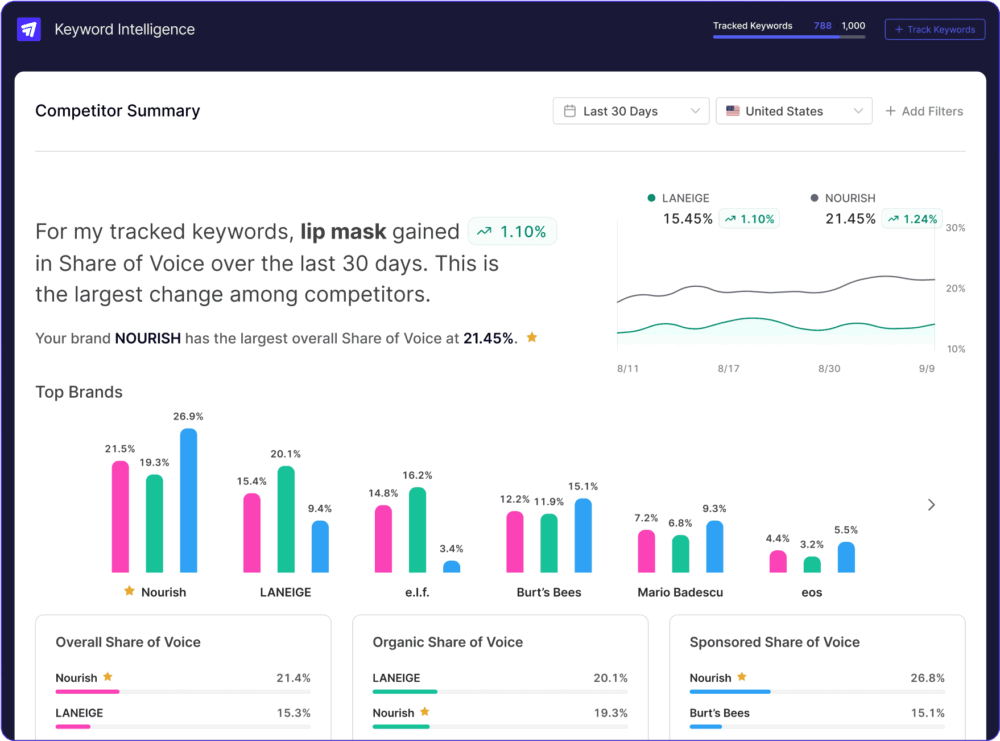
Jungle Scout’s keyword stack centers on Keyword Scout and Rank Tracker.
Keyword Scout: reverse ASIN, search volume, and paid vs organic context
Keyword Scout is described as an Amazon keyword research tool that shows what shoppers search for, including reverse searching multiple ASINs to see what competitors rank for.
Notable features include:
- reverse search up to 10 ASINs and compare related organic and sponsored keywords
- a view that separates organic versus sponsored keyword performance
- the ability to see which products “own” Amazon badges in the context of keywords
- search volume views and ranking data
- historical search volume trends for up to two years, with monthly and quarterly views
These are all described on the Keyword Scout page.
Why this matters: a keyword can look attractive by search volume but be dominated by sponsored placements or badge winners. Keyword Scout tries to put those layers into the same decision space.
Rank Tracker: keyword performance over time
Rank Tracker is positioned as a way to track keyword rank history across multiple keywords on one graph, with competitor ASIN reverse search and annotations.
This is useful for answering questions like:
- did a listing change correlate with ranking shifts
- did a price change affect organic rank
- are you gradually gaining position or bouncing randomly
It is not glamorous, but it is the kind of tool that helps you stop guessing.
Listing optimization and review generation features
Listing optimization: building a listing that can rank and convert
Listings are where research becomes money. Also where research often goes to die.
Jungle Scout’s approach here is practical: turn keywords into a structured bank, then help you write and grade listings based on those keywords.
Listing Builder: keyword guided writing with AI assistance
Jungle Scout’s Listing Builder is described as a tool that helps you compete in Amazon search results with data driven listings, using recommended keywords to improve ranking.
Two parts stand out:
AI Assist for writing
Jungle Scout says AI Assist can generate a title, description, and feature bullets using relevant keywords from your Keyword Bank.
Listing Optimization Score
It describes an AI driven score that grades how likely your listing is to rank and convert, based on elements like the title, description, key features, keywords, images, and more.
It also highlights a workflow connection to Seller Central: pull listings into Jungle Scout, test and optimize, then sync updates back.
My take: AI writing is not the main value. The main value is keyword discipline.
AI can write text. What most sellers need is a structured way to avoid writing a beautiful listing that ignores how shoppers search.
Listing Builder pushes you toward that discipline.
JunglescoutReview generation: Review Automation and what “ToS approved” really means
Product reviews are not just social proof. They are a conversion lever and a moat.
Jungle Scout’s Review Automation tool is described as an Amazon terms approved solution that automates the Seller Central review request process.
The key claims and capabilities include:
- automatically sending review requests for eligible orders
- saving time versus manual requests
- monitoring orders and request statuses in a table view
- bulk changes and filters by status
- customization of review request delays at marketplace, product, or order level
All of this is described on the Review Automation page.
This is one of those features that can feel small until you do the math.
If you sell 30 units a day across multiple ASINs, manual requests become a chore you stop doing. Automation turns it into a default habit.
A caution: this does not magically create good reviews. It increases the number of asks. Your product quality and customer experience still run the show.
Analytics, advertising insights, and inventory forecasting
Sales Analytics: the financial layer most sellers underinvest in
Jungle Scout’s Sales Analytics is positioned as a financial command center, organizing and tracking Amazon sales data in real time so you can focus on profit building and cost saving strategies.
It highlights:
- Profit Overview dashboards that show units sold, net margin, ROI, revenue, and more
- comparisons over custom date ranges to understand the impact of promotions and refunds
- product level performance using ASIN or SKU, including PPC performance and supplier and shipping costs
- inbound FBA shipment tracking visibility
- profit and loss statement creation
- expense customization, including positive and negative entries
Those elements are described on the Sales Analytics feature page.
AI Assist as “CFO mode”
The Sales Analytics page also describes an AI Assist feature that analyzes Profit Overview data such as revenue, cost of goods sold, and fees, producing a report framed as something a CFO would be proud of.
If you are allergic to finance, this matters. Not because AI is magic, but because it can nudge you toward asking better questions:
- where is margin shrinking
- which ASINs look busy but not profitable
- are refunds or fees rising quietly
Ads Analytics: understanding PPC beyond Amazon’s default views
Advertising is where many sellers bleed margin.
Jungle Scout’s Ads Analytics help center article explains that Ads Analytics provides PPC metrics from both Seller Central and Campaign Manager so you can understand advertising impact at a company level.
Important plan note: Starter does not include Advertising Analytics, while Growth Accelerator and Brand Owner do.
The help article describes the Ads Analytics dashboard as including:
- widgets for impressions, clicks, TACoS, ad spend, ad sales, ACoS, CTR, and conversion
- a waterfall chart that breaks down sponsored and organic sales, costs, and net profit
- a total sales chart showing organic vs sponsored ratio
- top products views based on filters like ad sales, spend, gross profit, net margin
- tabs for Sales Activity and Advertising Performance, with views like campaigns, product ads, ad groups, keywords, and search terms
These are outlined in the updated January 23, 2025 help article.
This is one of Jungle Scout’s stronger “business owner” additions over time.
It pushes you toward blended thinking: ads plus profit, not ads in isolation.
Inventory Manager: forecasting stock instead of hoping
Inventory errors hurt in two directions:
- stockouts kill momentum and rank
- overstock ties up cash and can trigger fees
Jungle Scout’s Inventory Manager help center article says Inventory Manager uses advanced demand forecasting technology to help run the back end of an Amazon FBA business. It marks products as Order Now, Reorder Soon, Overstock, and In Stock and calculates reorder dates, quantities, estimated costs, and profits.
It also states:
- Inventory Manager syncs directly with Seller Central
- it uses real time data from your FBA inventory to predict stock needs
- it can monitor inbound inventory and help prevent stockouts
- you need to connect Seller Central to use it
All described in the updated March 20, 2025 help center article.
My take: if you are already doing volume, Inventory Manager can be one of the fastest payback tools in the suite. Inventory mistakes are expensive. Forecasting tools are boring, but boring is profitable.
Supplier sourcing and operational tools
Supplier Database: sourcing that is less blind
Sourcing is often where new sellers get stuck. You can find suppliers, sure, but validating them is harder.
Jungle Scout’s Supplier Database page describes it as a way to find legitimate global suppliers, validate suppliers by viewing customer volume or confirmed shipments, and match products to factories.
It also highlights:
- searching by ASIN to identify the supplier of a product on Amazon
- saving and managing supplier info and comparing quotes via Supplier Tracker
These capabilities are described directly on the Supplier Database page.
This is not a substitute for due diligence. It is a shortcut to better leads.
And in sourcing, better leads are half the battle.
Competitive Intelligence: when you are thinking in segments, not single ASINs
Competitive Intelligence is positioned as a toolset for deeper market and competitor analysis.
The Competitive Intelligence feature page describes capabilities such as:
- examining products in a segment and comparing performance
- discovering competitors’ revenue driving keywords, including organic vs sponsored breakdowns and badge ownership visibility
- tracking rank against competitors for top keywords
- category insights, share of voice, seasonal shifts, and pricing trends
These are described on the competitive intelligence tool page.
On the Catalyst plans page, Competitive Intelligence appears as a Brand Owner level feature.
If you are early stage, you can live without this.
If you are building a brand and managing multiple product lines, this kind of segment level view becomes the difference between reacting and steering.
JunglescoutFBA Reimbursements and revenue recovery: a newer angle
One of the more interesting shifts is Jungle Scout’s messaging around revenue recovery.
The FBA Reimbursements feature page positions it as Amazon revenue recovery for 1P vendors and 3P sellers, with a partnership between Jungle Scout and Carbon6. It claims up to 5% of annual revenue can slip away through fees, shipment errors, labeling mistakes, and similar issues, and frames the offering around audits and recovery workflows.
This is not the classic Jungle Scout story of “find a product.” It is a “keep what you earned” story.
If you are doing meaningful revenue, it is worth at least understanding. If you are small, treat it as optional.
API capabilities for builders and data teams
If you like turning manual work into scripts, Jungle Scout’s API is a real plus.
Jungle Scout’s SMB API page describes API access as a way to build tools using endpoints from its Amazon intelligence data, and notes items like keyword search estimates, estimated sales, and pricing trends.
From the API page and help center documentation, notable points include:
- API access is available with Growth Accelerator or Brand Owner plans (and also with Cobalt)
- the first 100 requests are free, with add on tiers available
- add on pricing tiers include $29 for 1,000 calls, $99 for 4,000 calls, and $199 for 10,000 calls, with overage charges described in the help article
- the API page references endpoints across keyword, product, sales estimates, search volume, share of voice, and more
- Jungle Scout mentions a Python client library and Postman and Zapier options for working with the API
This is one of the most overlooked reasons to choose Jungle Scout over a competitor.
If you run a serious operation, your advantage often comes from your custom workflows, not from clicking the same buttons as everyone else.
Data accuracy and where estimates can mislead
Jungle Scout is built on data, but no third party tool has perfect visibility into Amazon’s internal sales numbers.
So the right posture is:
- use Jungle Scout estimates to narrow and compare
- validate with multiple signals before committing money
- treat any single metric as directional, not absolute
Jungle Scout itself emphasizes algorithms like AccuSales and calls out the volume of data points analyzed daily for estimates.
That is a good sign, but it is not a guarantee.
Here are the moments where estimates can mislead sellers:
- Promotional spikes: a product can look strong due to temporary discounts or external traffic.
- Review moats: high sales can be locked behind 5,000 reviews and years of brand equity.
- Seasonality: a keyword can look steady if you sample at the wrong time. Keyword Scout’s historical views help here, but only if you actually use them.
- Category quirks: some niches have weird ranking dynamics or heavy ad dominance.
- Marketplace differences: data quality varies across markets, and Jungle Scout is transparent that some marketplaces have limited support in the extension.
My practical advice: use at least three independent checks before you commit to inventory.
For example: Opportunity Finder niche signal, Product Tracker trend behavior, and Keyword Scout search volume patterns.
Marketplaces supported
Jungle Scout clearly differentiates between full compatibility and limited data support for the extension, and it also differentiates Catalyst vs Cobalt by geographic coverage.
If you sell mainly in:
U.S., Canada, U.K., Germany, France, Spain, Italy, or India, you are in the “happy path” for extension compatibility.
If you sell mainly outside those, you should test carefully during the refund window.
Customer support and learning resources
Jungle Scout markets support and education heavily.
For example, the Keyword Scout page mentions 24/7 support from Amazon experts.
The broader site also promotes resources like reports, webinars, and educational content for sellers.
My view: Jungle Scout’s education footprint is part of why it stays top of mind for new sellers. Even if you do not use every tool, the learning ecosystem can shorten your ramp up time.
A very important update: Alerts was sunset
If you used Jungle Scout in past years, you may remember the Alerts feature for monitoring listing changes and similar events.
Jungle Scout’s help center explicitly states that it decided to sunset the Alerts feature, citing challenges and limitations, and that this allows them to focus resources on a more reliable experience. The article is updated January 30, 2025.
This is not a small detail.
Many sellers like having monitoring and notification features. If listing monitoring is key to your operations, you will need another solution for that specific job.
Pros and cons
What Jungle Scout does especially well
1. A coherent workflow from research to execution
Product Database to Opportunity Finder to Keyword Scout to Listing Builder is a clean chain. It reduces tool hopping.
2. The browser extension is genuinely useful
Embedded insights on Amazon pages, Opportunity Score, AI review theme analysis, and quick sales estimate context are strong differentiators.
3. Review Automation is simple and policy aligned
Automating Seller Central review requests is a practical feature that many sellers actually use long term.
4. Business performance tools have matured
Sales Analytics, Ads Analytics, and Inventory Manager push Jungle Scout into “run the business” territory, not just “pick a product.”
5. The API makes Jungle Scout flexible for advanced teams
If you have analysts or engineers, the API and Python client open up custom reporting, monitoring, and automation paths.
Where Jungle Scout can frustrate you
1. Starter plan is limited in the areas that matter once you sell
No Ads Analytics, no Sales Analytics, no Review Automation, no Inventory Manager. That is fine for research, but it can feel like a ceiling fast.
2. Alerts is gone
If you want built in alerting for listing changes, Jungle Scout will not cover that anymore.
3. Team costs add up
Extra seats are not free, and Growth Accelerator starts at one user seat. Teams should run the math early.
4. Estimates can create false confidence
The tool is strong, but your judgment still matters. Use it to narrow options, not to avoid thinking.
Alternatives and comparisons
I will keep this practical, not tribal.
If you want an all in one seller suite with heavier operations features
Many sellers compare Jungle Scout with other Amazon seller tool suites, especially those that emphasize alerts, operations, or PPC tooling.
Jungle Scout stands out most in:
- the extension experience
- the research workflow
- the balance between usability and depth
- the availability of an API and documented developer workflows
If your must have list includes listing alerts, plan for a complementary tool now that Jungle Scout Alerts is sunset.
If you are enterprise level
If you are managing market share, reseller monitoring, and segment level insights across thousands of products, Jungle Scout positions Cobalt as the fit, not Catalyst.
Who Jungle Scout is best for
You should strongly consider Jungle Scout if you are:
A new seller who wants a guided research path
Product Database plus Opportunity Finder plus Keyword Scout is a strong foundation for learning how Amazon demand behaves.
A growing seller who needs financial and inventory clarity
Sales Analytics and Inventory Manager can pay for themselves by preventing obvious mistakes.
A seller who lives in Amazon search pages
If you do a lot of competitive browsing, the extension’s embedded insights can speed up decisions dramatically.
A team that wants custom workflows via API
The API pricing tiers, key management workflow, and Python client references suggest Jungle Scout takes builders seriously.
You should think twice if you are:
A seller who needs alerts and listing monitoring baked in
Jungle Scout sunset Alerts, so you will need another tool for that job.
A multi marketplace seller whose main growth is outside Amazon
Jungle Scout is Amazon centric. It can still inform broader strategy, but it is not designed as a multi channel operations platform.
A team that wants a full marketing automation suite
Jungle Scout helps with research, listings, ads analytics, and reviews. It is not trying to be your full lifecycle marketing engine.
Final verdict and recommendations
If your goal is to sell on Amazon with fewer blind spots, Jungle Scout remains one of the most complete, approachable toolkits in the category.
It does not just help you find a product. It helps you move from product idea to keyword strategy to listing build to reviews to profit visibility to inventory decisions. That full chain is its real value.
If you are choosing a plan:
Starter is best viewed as a research focused entry point.
Growth Accelerator is the point where Jungle Scout becomes a business operating tool because it adds Ads Analytics, Sales Analytics, Inventory Manager, and Review Automation.
Brand Owner becomes interesting if you want deeper competitive intelligence and higher limits, or if you have enough users that the seat math pushes you upward.
Just remember the one big operational gap: Alerts is sunset. Plan accordingly.
JunglescoutFAQ (15 questions)
1) Does Jungle Scout have a free trial?
Jungle Scout states there is no free trial, but it offers a 7 day money back guarantee.
2) What marketplaces does Jungle Scout support best?
The extension is listed as fully compatible with U.S., Canada, U.K., Germany, France, Spain, Italy, and India, with limited support in other marketplaces.
3) Is the Jungle Scout Chrome extension available for Firefox?
Yes. Jungle Scout says the extension can be installed for Chrome or Firefox.
4) What is Product Database, and how big is it?
Product Database is described as a searchable catalog of 475 million products pulled directly from Amazon.
5) What is Opportunity Finder?
Opportunity Finder turns a keyword into a market segment and shows sales performance, trends, and competitive insights, including Niche Score and top products in the niche.
6) Can Keyword Scout reverse search competitor ASINs?
Yes. Keyword Scout supports reverse searching multiple ASINs and comparing them, including reverse search up to 10 ASINs.
7) Does Keyword Scout show historical search volume?
Yes. Jungle Scout says Keyword Scout can show historical search volume trends for up to two years.
8) What is Listing Builder’s AI Assist used for?
Jungle Scout says Listing Builder’s AI Assist can generate listing copy such as a title, description, and features using relevant keywords from your Keyword Bank.
9) Does Jungle Scout connect with Seller Central for listing work?
Yes. Listing Builder describes pulling listings from Seller Central and syncing updates back.
10) Is Jungle Scout Review Automation allowed under Amazon rules?
Jungle Scout describes Review Automation as an Amazon ToS approved solution that automates the Seller Central review request process.
11) Does Jungle Scout include Advertising Analytics?
Ads Analytics exists, but the Starter plan does not include it. Jungle Scout’s help article says you can upgrade to Growth Accelerator or Brand Owner to access core functionality.
12) What does Inventory Manager do?
Jungle Scout’s help center says Inventory Manager uses demand forecasting to recommend reorder timing and quantity, marking products by status and estimating costs and profits, with Seller Central sync.
13) Can Jungle Scout help you find suppliers?
Yes. Supplier Database is described as helping you find and validate global suppliers, match products to factories, search by ASIN, and manage suppliers with Supplier Tracker.
14) Does Jungle Scout still have Alerts?
No. Jungle Scout’s help center states it sunset the Alerts feature, updated January 30, 2025.
15) Does Jungle Scout offer an API, and what does it cost?
Yes. Jungle Scout documents API access, requiring certain plans, and lists API add on tiers (for example $29 for 1,000 calls, $99 for 4,000, $199 for 10,000) with overage pricing described in its help center.







By clicking Sign In with Social Media, you agree to let PAT RESEARCH store, use and/or disclose your Social Media profile and email address in accordance with the PAT RESEARCH Privacy Policy and agree to the Terms of Use.