
Ignition Review: Look at Proposal, Engagement Letter, Billing, and Payments Automation for Professional Services
Overall verdict (short version): 8.9/10
Ignition is one of the strongest “lead-to-cash” automation platforms for professional services: it helps you send proposals, lock in engagement terms, automate billing, and collect payments with less manual chasing. It works best when your firm is ready to standardize services, pricing, and billing patterns—and wants an operating system that enforces that discipline.
IgnitionOneBest for: accounting and tax firms, bookkeeping practices, agencies, consultants, and other professional services teams that want one connected system to send proposals, lock in engagement terms, automate billing, and collect payments with less chasing.
Not ideal for: product-based businesses, teams that only need a standalone proposal designer, or firms that want a full practice management suite as their primary system of record (Ignition is designed to integrate with practice management tools rather than fully replace them).
Here’s what this review covers
- Introduction: the real problem Ignition is trying to solve
- What Ignition is (and what it is not)
- Company background and market positioning
- The Ignition mental model (think in systems, not features)
- How Ignition works in practice (lead-to-cash walkthrough)
- Pricing and plans (plus add-ons and “hidden” costs)
- Setup and onboarding (how to get value fast)
- User interface and day-to-day experience
- Feature deep dive (deals, proposals, engagement letters, billing, pricing, collections)
- Integrations and ecosystem fit
- Security, privacy, and compliance (Stripe, tokenization, encryption)
- Customer support and learning resources
- Pros and cons (honest tradeoffs)
- User reviews and ratings (themes and signals)
- Alternatives and comparisons (when another tool fits better)
- Who Ignition is best for (and who should avoid it)
- A practical evaluation path (how to test without wasting time)
- Final verdict
- FAQ (15 practical questions)
Introduction: The real problem Ignition is trying to solve
Most professional services businesses do not lose margin because their teams are bad at delivery. They lose margin in the gaps between agreeing on work and getting paid for it.
Those gaps show up in very familiar ways:
- Proposals go out late or look inconsistent because they are built from scratch each time.
- Engagement terms live in a Word file, a PDF, or a template nobody wants to touch, so scope boundaries are fuzzy.
- Billing happens after delivery, then collections become a second negotiation.
- Scope creep quietly accumulates because it is easier to absorb the extra request than to draft a new mini agreement and bill for it.
- Different tools hold different parts of the truth: proposal tool, e-signature tool, invoicing tool, payments tool, workflow tool.
Ignition positions itself as a lead-to-cash platform for service businesses: capture leads, convert them into signed proposals and engagement terms, then automate billing and payment collection. On Ignition’s own homepage, the framing is explicit: “Sell. Bill. Get Paid.”
How to evaluate Ignition correctly:
If you treat Ignition as “proposal software,” you will miss the billing and collections leverage. If you treat it as “payments software,” you will underuse the engagement governance layer. The value is in the system, not one feature.
What Ignition is (and what it is not)
This review is about Ignition at ignitionapp.com (previously known as Practice Ignition), built for accounting and professional services businesses.
Ignition is:
- A proposal and agreement workflow that can include engagement letters and collect signatures.
- A billing and payments automation layer that can connect to accounting software like QuickBooks Online and Xero.
- A system designed to reduce accounts receivable by collecting payment details upfront and automating ongoing billing.
- An automation hub that triggers workflows after a client signs, using direct integrations and tools like Zapier.
Ignition is not:
- A full general ledger or accounting system. It integrates with ledgers rather than replacing them.
- A full practice management system (job management, time tracking, project delivery). It integrates with tools in that category rather than fully replacing them.
- A “design-first” proposal tool for every industry. It supports branded proposals, but its DNA is rooted in professional services operations.
Company background and market positioning
Ignition’s company materials state it was founded in 2013 and highlight scale metrics including 8,500+ customers, 2.4M+ clients engaged, and $13B+ revenue earned by Ignition customers.
That origin story matters because it explains why Ignition is opinionated about:
- Fixed-fee or recurring services
- Repeatable templates
- Standardization and automation
- Pricing structures and packaging
Practical implication: if your business model matches recurring services and standardized packages, Ignition tends to feel “built for you.” If your work is mostly bespoke projects, you can still use it—but you’ll need stronger internal discipline around service definitions and change control.
The Ignition mental model: Think in systems, not features
A good way to evaluate Ignition is to treat it like connected operational layers rather than a checklist.
In practice, Ignition connects five layers:
- Lead capture and qualification (deals pipeline and forms)
- Proposal creation (services, pricing, templates, options)
- Engagement terms and signatures (contracts and engagement letters, multiple signers)
- Billing and payment collection (recurring billing, deposits, automatic payment collection)
- Ongoing optimization (insights, renewals, bulk price increases, AI pricing support)
How Ignition works in practice: A lead-to-cash walkthrough
Here’s a realistic end-to-end flow. This is where Ignition either “clicks” for your firm or it doesn’t.
Step 1: Capture or import the client/lead
Leads arrive through a website form, referral, inbound email, or call. Ignition supports form-driven data collection and integrates with other tools depending on your stack.
Step 2: Track the opportunity in a deals pipeline (optional)
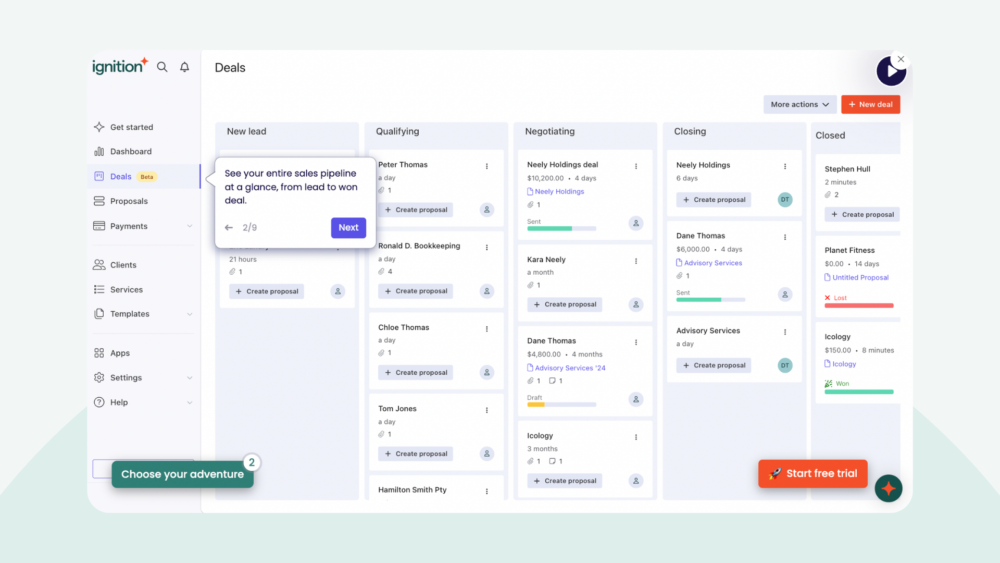
Ignition positions pipeline management as a product area and sells it as an add-on (or includes it in certain packages). It matters most when multiple partners/managers handle leads and you want standardized handoffs and forecasting.
Step 3: Build the proposal from a service library and templates
Proposal speed depends on having a service library that matches what you sell and templates that prevent rebuild-from-scratch work. Ignition leans heavily into templates and packaged options.
Why “Proposal Options” matters:
Instead of sending one static quote, you can present tiered packages. For many firms, this reduces back-and-forth and increases average deal size.
Step 4: Attach engagement terms and collect signatures
Ignition includes contracts and engagement letters with secure e-signatures. It supports multiple signers (Ignition states up to ten decision makers can review and sign a single engagement letter/contract), which is critical for common real-world scenarios (multiple owners/directors, joint tax return signers, etc.).
Step 5: Collect payment details upfront and automate billing
Ignition’s defining advantage is collecting payment details during acceptance so billing and collection can run automatically: deposits, recurring payments, and one-off charges.
Step 6: Trigger delivery workflows via integrations and automations
Once a proposal is accepted, Ignition is designed to trigger jobs or workflows in practice management tools, accounting systems, and internal coordination tools (often via direct integrations and Zapier).
Pricing and plans (plus add-ons and “hidden” costs)
Free trial
Ignition promotes a 14-day free trial and notes in multiple places that no credit card is required to start. Add-ons are typically included during the trial so you can test full workflows.
Core subscription model (what to know)
Ignition’s pricing page commonly presents plans as Solo, Core, and Pro, with custom enterprise options. However, Ignition documentation and announcements also reference plan names such as Pro+, Scale, and Enterprise. If you care about advanced governance and automation features, confirm plan eligibility during evaluation.
Starting price anchor (useful for budgeting)
Ignition states on a comparison page that subscriptions start from $39/month (billed annually). One example given: Solo at $39/month annually to manage agreements and payments for up to 20 clients.
Procurement note: pricing varies by region/currency and may be subject to eligibility criteria. Treat these numbers as anchors and confirm current pricing at time of purchase.
Add-ons that affect total cost
Ignition’s pricing page lists modular add-ons (availability and exact pricing vary by region):
| Add-on | What it’s for | Pricing signal (as described) |
|---|---|---|
| Deals pipeline | Pipeline stages, deal tracking, proposal linkage, forecasting | Region-priced (varies; confirm in your currency) |
| Online forms | Qualification + intake data collection through branded forms | Region-priced (varies; confirm in your currency) |
| Price Insights | AI-powered pricing suggestions based on proposal data | Listed as $349 (or $399 billed annually) with an intro price through Dec 31, 2025; includes 200 insights (as described) |
Payment processing fees (the real “hidden cost”)
In addition to subscription cost, payments involve transaction fees. Ignition documentation also covers mechanisms like passing on payment processing fees (with caps) and surcharging availability in certain regions (for example the United States, Canada, and Australia).
Practical budgeting advice:
- Model subscription + add-ons based on your operational maturity (pipeline, intake forms, pricing intelligence).
- Model transaction fees against time saved and improved cash flow (reduced debtor days).
- Assume implementation time is part of the “real” cost—Ignition automates a process, but it does not invent the process for you.
Setup and onboarding (how to get value fast)
Ignition can feel quick to start because you can build a proposal immediately. Real value, however, depends on setup quality.
Phase 1: First-day setup (minimum viable system)
- Define brand basics so proposals look like your firm.
- Create a minimal service library for your top services.
- Create 1–2 proposal templates that mirror your most common engagements.
- Connect one accounting system (QuickBooks Online or Xero) if that is part of your workflow.
Phase 2: Billing automation and payments
The moment you automate billing, you must make decisions:
- Will clients store payment details on acceptance?
- Will you use deposits, recurring billing, one-off billing, or a mix?
- How will you handle taxes, billing frequencies, invoice descriptions, and edge cases?
Phase 3: Integrations and orchestration
Once proposals and billing are stable, integrations become the multiplier—accepted proposal triggers job creation, onboarding tasks, internal notifications, and invoice workflows.
Common onboarding mistakes to avoid:
- Treating the service library as an afterthought (templates are only as strong as service definitions).
- Importing messy data without cleanup (automation magnifies errors).
- Skipping internal approval/review workflow if partners want oversight (proposal review is plan-dependent).
- Turning on automated billing without aligning payment expectations and fee policies.
User interface and day-to-day experience
Ignition’s UI is best understood as workflow-oriented rather than document-oriented.
Instead of thinking “I am designing a proposal,” the product nudges you toward:
- Select services
- Apply a template
- Attach engagement terms
- Decide billing behavior
- Collect signatures and payment details
- Trigger downstream workflows
Learning curve
Most teams ramp quickly on proposal sending. The learning curve is in:
- Service standardization and pricing structures
- Billing automation rules
- Payment collection behavior
- Integrations with accounting and practice management tools
Feature deep dive: What Ignition does well (and what to scrutinize)
1) Deals pipeline management
Ignition offers a deals pipeline as a product area/add-on. It’s valuable if multiple people handle leads and you want visibility into conversion rates, bottlenecks, and stage ownership. If you already use a dedicated CRM (HubSpot/Salesforce), you may prefer to keep pipeline there and use Ignition for proposals + billing.
2) Online forms (structured intake)
The forms add-on is positioned for qualifying best-fit clients and collecting structured data. For services firms, forms are operational: they reduce missing onboarding data and back-and-forth email.
3) Proposals and proposal options
Ignition’s proposal engine is built for professional services: speed, consistency, and conversion. Proposal options support tiered packaging and advisory upsell paths.
IgnitionOne4) Contracts and engagement letters (governance layer)
Engagement letters are a core value driver. Ignition emphasizes multi-signer workflows (up to ten) and also supports signing multiple required documents in a single onboarding flow on certain higher tiers.
5) Billing automation and payments (the “why buy Ignition” layer)
Ignition’s key promise is collecting payment details upfront so billing and collections can run automatically. It integrates with accounting platforms (QuickBooks Online and Xero are prominent) so invoices and reconciliation workflows remain connected to the ledger.
6) AutoCollect (collections for existing invoices)
AutoCollect is designed to import invoices created in accounting software (including QuickBooks Online and Xero), invite clients in bulk to pay via an online portal, and enable automated collections for future invoices.
7) AutoPricing (bulk price updates and renewals)
Ignition has been pushing AutoPricing capabilities such as applying bulk price updates to simplify renewals, improve consistency, and support profitability. Availability is plan-dependent in Ignition documentation.
8) Instant Bill (turn scope creep into revenue)
Instant Bill lets you invoice clients for ad hoc or out-of-scope work without requiring a new proposal signature, while still enabling automatic payment collection. Used well, it becomes a margin-protection mechanism and a cultural tool for boundary clarity.
9) Insights and reporting
Ignition positions “Business Insights” as a product area to track revenue, cash flow, and sales performance. Many firms will use this as operational reporting even if they also have BI elsewhere.
10) AI features (practical, not hype)
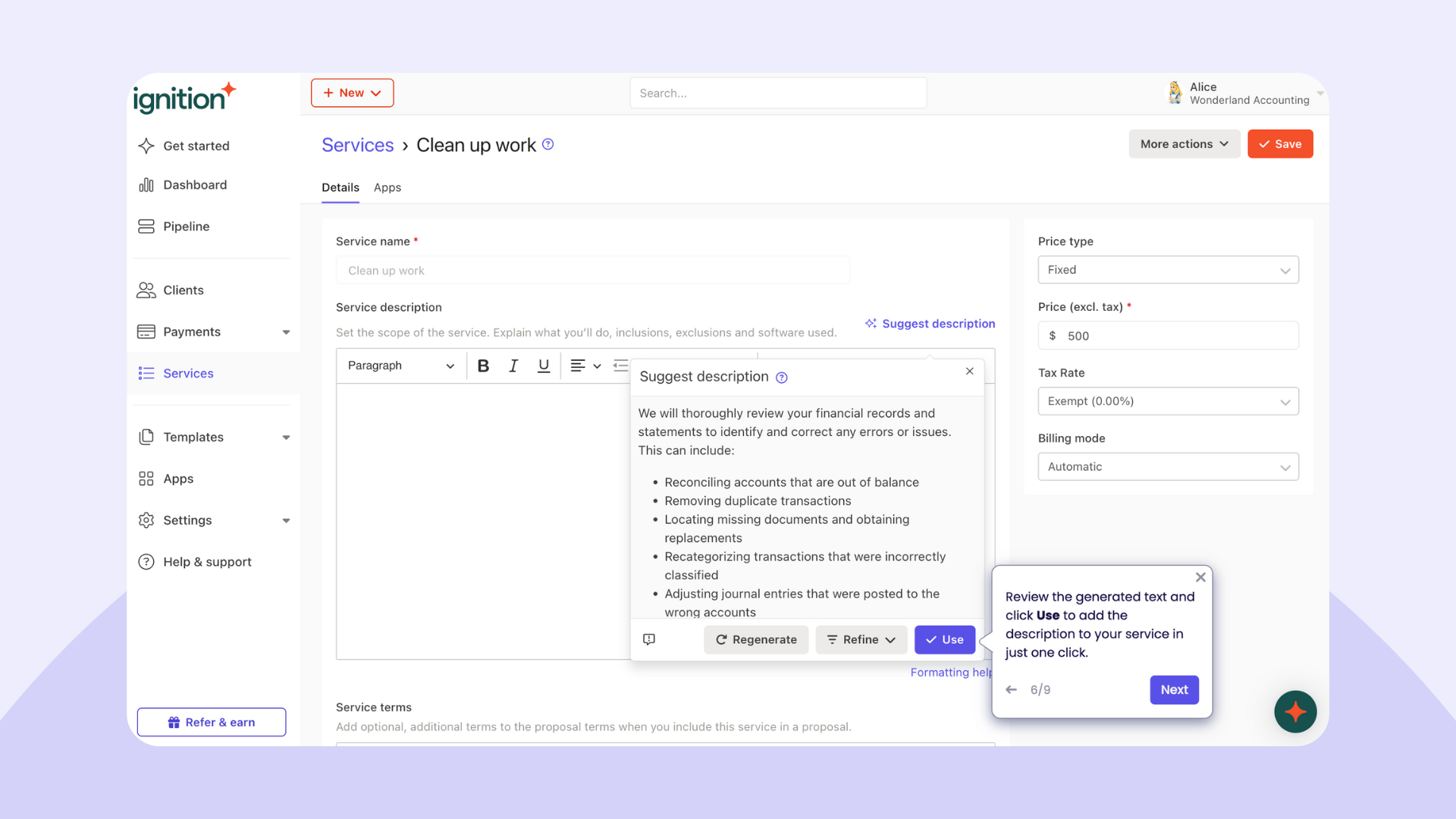
Ignition documents AI-enabled service description generation (based on service name + industry + country) and sells Price Insights as an AI-driven add-on for pricing suggestions. Treat AI outputs as decision support, not truth—your positioning and client mix still matter.
Integrations and ecosystem fit
Ignition is designed to sit inside an ecosystem rather than replace your whole stack. Its integrations directory highlights direct integrations for accounting, practice management, tax workflows, and notifications—plus automation through Zapier for the long tail.
A realistic architecture that works for most firms:
Ledger = system of record (QuickBooks/Xero). Practice management = delivery system. Ignition = agreement + billing automation layer. Zapier = glue workflows where you don’t need engineering.
Security, privacy, and compliance
Payments and Stripe tokenization
Ignition partners with Stripe for payments and states that payment information is held by Stripe and tokenized so that sensitive payment details are not stored directly in Ignition.
Encryption posture (baseline expectations)
Ignition states encryption in transit (SSL/256-bit) and encryption at rest (AES-256). For most firms, the governance questions matter just as much: access controls, internal permissions, and client data handling policy.
IgnitionOneFee handling and surcharging
If you plan to pass on payment fees or apply surcharges, treat this as a governed policy decision. Ignition documents surcharging availability in specific regions and provides configuration guidance.
Customer support and learning resources
Ignition maintains a support center with documentation covering advanced workflows (AutoCollect imports, Instant Bill, proposal reviews, pricing updates). On its pricing page, Ignition also differentiates plans by support response times (plan-dependent).
Pros and cons: The honest tradeoffs
Pros
- End-to-end proposal-to-payment workflow (system-level automation, not just documents)
- Designed for recurring services with templates and proposal options for packaging
- Engagement governance strength (multi-signer support; multi-document signature workflows on some tiers)
- Margin protection tools (Instant Bill for out-of-scope work; AutoPricing for renewals)
- Ecosystem posture (integrates with accounting and practice management tools rather than forcing a rip-and-replace)
- Security baseline grounded in Stripe tokenization for payments
Cons
- Setup complexity is real if your services, pricing, and billing practices are not standardized.
- Plan packaging can be confusing (marketing plan names vs documentation plan names; confirm eligibility for advanced features).
- Payments availability varies by region (Ignition notes payments are currently unavailable in South Africa).
- Not a full practice management replacement (you will likely still need job/workflow tooling).
- Pipeline add-on may be redundant if you already run a mature CRM.
User reviews and ratings: What the market seems to think
Public ratings are not perfect, but they provide directional signals. Based on the sources referenced in the draft:
- G2: 4.8/5 (112 reviews)
- Xero App Store: 4.93/5 (525 reviews)
- Capterra summary theme: strengths in proposals/contracts/billing workflows; some users note billing setup can be complex
How to interpret these reviews intelligently:
If users praise workflow integration and payment automation, that’s the core value. If users complain about complexity, it’s usually a process maturity issue (service catalog, billing patterns, and governance), not purely a UI problem.
Alternatives and comparisons: When another tool may be a better fit
Ignition is not the only path to better proposals and payments. The right alternative depends on what problem you are solving.
If you only need proposal design and document workflow
Consider design-first proposal tools if your primary goal is visually polished proposals and you already have separate billing and payments systems.
If you want an all-in-one practice management suite
Consider suites that include portals, document management, workflow, tasks, billing, and delivery tracking—especially if you want one primary system of record.
If your key issue is collecting on existing invoices
You may evaluate payment-focused tools or use Ignition’s AutoCollect approach as a bridge: keep invoicing in the ledger, but use a portal + auto-collection experience to reduce debtor days.
If you’re tempted by “free software” models
Evaluate based on total economics (transaction volume, per-payment fees, and operational overhead), not the word “free.” Predictability matters for firms with consistent billing volume.
Who Ignition is best for (and who should avoid it)
Ignition is a strong fit if you:
- Sell recurring services and want billing to run automatically.
- Need standardized proposals and engagement letters with consistent terms.
- Want to reduce A/R by collecting payment details upfront.
- Want operational control over renewals, including price increases at scale.
- Run on a modern cloud accounting stack and want integrations to trigger delivery workflows.
You should think twice if you:
- Primarily sell one-time bespoke projects with no desire to standardize into a service library.
- Need a full practice management suite as the primary system (jobs, time tracking, delivery).
- Already have a mature sales + billing stack and only want a small incremental improvement.
My recommendation: How to evaluate Ignition without wasting time
Do not start by exploring every feature. Validate the core workflow first.
| Step | What you’re validating | Success criteria |
|---|---|---|
| 1) Build one proposal template | Service library fit + template usability | You can produce a “real” proposal in minutes, not hours |
| 2) Attach engagement terms | Engagement letter workflow + signature experience | Client experience is clear; multi-signer works for your common cases |
| 3) Test one billing pattern | Recurring billing/deposit/one-off logic | Billing behavior matches your engagement model without workarounds |
| 4) Test payment collection | Client payment detail capture + fee policy | You can reduce A/R friction without creating client pushback |
| 5) Connect your ledger | QuickBooks/Xero workflow alignment | Invoice + reconciliation flows are reliable and understandable |
Only after the above is stable should you test add-ons like pipeline, forms, AutoCollect, AutoPricing, and Price Insights.
Final verdict
Ignition is not trying to be “just another proposal tool.” It is trying to become the operating system between selling services and getting paid for them.
IgnitionOneWhen Ignition works best, it creates a repeatable machine:
- Structured offers
- Clear engagement terms
- Faster signatures
- Automated billing
- Automated collections
- Better pricing discipline
The key condition: process maturity.
Ignition will not invent your service catalog or pricing strategy. But if you define what you sell and how you bill, Ignition can automate it—and make it scalable.
FAQ (15 practical questions)
1) Does Ignition offer a free trial?
Yes. Ignition promotes a 14-day free trial and notes that no credit card is required to start.
2) What types of businesses use Ignition?
Ignition markets to accounting and tax, bookkeeping, agencies, consultants, financial advisors, and broader professional services teams.
3) Can Ignition handle engagement letters and contracts?
Yes. Contracts and engagement letters are core product areas, including e-signatures and terms automation.
4) How many people can sign an engagement letter in Ignition?
Ignition states it supports up to ten decision makers to review and sign a single engagement letter or contract.
5) Can clients sign multiple documents during onboarding?
Yes. Ignition announced “Additional Document Signatures,” allowing clients to sign required documents in one flow alongside the proposal/engagement letter (availability is plan-dependent).
6) Does Ignition support collecting payment details upfront?
Yes. Ignition emphasizes collecting payment details during acceptance so billing and payment can be automated.
7) What is AutoCollect and who is it for?
AutoCollect is designed to help you collect payment for invoices created in accounting software by importing unpaid invoices into Ignition and inviting clients to pay via a portal, including bulk invites and pre-saved payment methods.
8) What is Instant Bill used for?
Instant Bill lets you invoice clients for ad hoc or out-of-scope work without requiring a new proposal signature, while enabling automatic payment collection.
9) Can Ignition help with bulk price increases?
Yes. Ignition documents AutoPricing features including bulk price updates and price increases during proposal edits or renewals (availability depends on plan).
10) What accounting systems does Ignition integrate with?
Ignition prominently highlights integrations with QuickBooks Online and Xero for invoicing and reconciliation workflows.
11) Is Ignition secure for client payments?
Ignition states payment information is held by Stripe and tokenized (not stored directly in Ignition), alongside encryption in transit and at rest.
12) Is Ignition available globally for payments?
Not fully. Ignition notes that payments are currently unavailable in South Africa.
13) Does Ignition replace my practice management platform?
Typically no. Ignition is designed to integrate with practice management tools and trigger workflows after a proposal is accepted, rather than fully replace delivery/job management systems.
14) Can I pass on credit card fees or surcharge clients?
Ignition documents mechanisms to pass on processing fees and provides region-specific surcharging guidance. Treat this as a policy and compliance decision for your firm.
15) What’s the fastest way to know if Ignition will work for my firm?
Test one real engagement end-to-end: build a proposal from your service library, attach engagement terms, collect signatures and payment details, automate one billing pattern, and validate your ledger integration (QuickBooks/Xero).








By clicking Sign In with Social Media, you agree to let PAT RESEARCH store, use and/or disclose your Social Media profile and email address in accordance with the PAT RESEARCH Privacy Policy and agree to the Terms of Use.