
Freshservice Review: The Wins, Pain Points, and Why It Might Outshine ServiceNow for SMBs
If you’ve ever tried to run IT support through a shared inbox, a spreadsheet of “who’s on call,” and a handful of tribal-knowledge Slack threads, you already know the core problem Freshservice is designed to solve:
IT support is simple until it becomes a system. At small scale, “email [email protected]” works. At medium scale, it turns into chaos: inconsistent triage, unclear ownership, missed SLAs, repeat incidents, shadow IT requests, and a growing asset inventory nobody can confidently audit.
Freshservice positions itself as “enterprise-grade IT service management without enterprise-grade complexity”—bringing together ITSM (tickets + ITIL processes), ITAM (asset discovery + lifecycle), ITOM (alerts + major incidents), and ESM (workspaces for non-IT teams) under one platform.
FreshserviceOverall verdict: 8.9/10
Best for: Mid-market and growing enterprise IT teams that want a modern service desk that can scale into ITIL practices (incident/problem/change/release), improve asset visibility (discovery + CMDB), and add automation/AI without the implementation gravity of the largest ITSM suites.
Not ideal for: Organizations that require extreme, highly customized enterprise workflows across dozens of global business units from day one—or teams where “advanced CMDB/service mapping maturity” is the primary requirement.
Freshservice
Freshservice is an enterprise IT management suite software is a useful software that offers everything a user needs for IT support. Freshservice provides an IT service desk that is simple. Freshservice also modernizes IT and other business functions with easy to use and simple to configure IT service desk solution in the cloud. Freshservice uses a modern and intuitive UI that requires minimal to no training and is also customizable to IT and non-IT needs. The enterprise IT management suite software offers multi-channel support. The multi-channel support provides users with an excellent platform to facilitate automation of tasks and provide…
• Uses modern and intuitive UI that requires minimal to no training
• Customizable to IT and non-IT needs
• Automate tasks and provide support for issues raised via email or in person
• Maintain records of contracts , hardware, software, and other assets
• Support the high impact employees who are on the road
• Leverage the software for IOS and Android
• Blossom - $19/agent/month
• Garden - $49/agent/month
• Estate - $79/agent/month
• Forest - $99/agent/month
• Customizable to IT and non-IT needs
• Automate tasks and provide support for issues raised via email or in person
• Maintain records of contracts , hardware, software, and other assets
• Easy to use and set up
• Multi-channel support
• Gamify your service desk
Here’s what this review covers
- Introduction
- What Freshservice is (and what it isn’t)
- Pricing and plans (plus the real cost drivers)
- Setup and onboarding (what takes 1 day vs 90 days)
- Day-to-day usability (the “will people actually use it?” test)
- Core ITSM capabilities (incident, requests, KB, SLAs, CSAT)
- ITIL process depth (problem, change, release, project)
- IT asset management + CMDB (discovery, lifecycle, relationships)
- Automation + AI (Workflow Automator + Freddy AI)
- IT operations + major incidents (alerting, on-call, status)
- Integrations and extensibility (marketplace + APIs)
- Reporting and analytics
- Security, privacy, and governance (buyer checklist)
- What real users like/dislike (themes to validate)
- Alternatives and comparisons
- Who Freshservice is best for (and who should avoid it)
- Final verdict and recommendations
- FAQ (15 common evaluation questions)
Introduction
Freshservice tends to get purchased at a specific moment: when the IT team is no longer “helping when asked,” but is instead operating a critical internal service. At that point, you need the fundamentals to be true:
- Work visibility: who owns what, what’s overdue, what’s blocked.
- Consistency: standardized request intake and fulfillment.
- Accountability: measurable SLAs and performance.
- Operational memory: knowledge that reduces repeat tickets.
- Asset truth: confidence in what devices/services exist and who uses them.
Freshservice is designed to become that internal operating system—starting as a service desk, then maturing into ITIL governance, asset + CMDB practices, and (in many orgs) broader enterprise service management over time.
What Freshservice is (and what it isn’t)
What it is
Freshservice is Freshworks’ IT and employee service management platform. In plain terms: it’s a modern service desk plus ITIL-aligned processes, plus asset and operations capabilities—designed to scale without turning into an implementation program.
Freshworks positions Freshservice across four pillars:
- IT Service Management (ITSM): incident management, self-service portal, knowledge management, service catalog.
- IT Operations Management (ITOM): alert management, on-call, major incident management, service health monitoring, and status communication.
- IT Asset Management (ITAM): unified asset inventory and lifecycle data, plus contracts/purchase order management and cloud-focused visibility.
- Enterprise Service Management (ESM): extending service delivery patterns to other teams (HR, facilities, etc.) through a shared model.
What it isn’t
Freshservice is not primarily a customer-facing support desk (that’s closer to Freshdesk). Tickets may look familiar, but the center of gravity is internal operations: approvals, change risk, assets, and service continuity.
Buyer heuristic: If your “customers” are employees and your work involves assets, access, governance, and uptime, you’re in Freshservice territory.
Pricing and plans (plus the real cost drivers)
Freshservice is priced primarily per agent (the people working tickets). The published plan structure (annual billing) is straightforward:
Plan comparison table (publication-ready)
| Plan | Published price (annual billing) | Best for | Practical buyer notes |
|---|---|---|---|
| Starter | $19 / agent / month | Teams replacing a shared inbox / basic helpdesk | Get to “visibility + ownership + SLAs” quickly. Treat as foundation, not final state. |
| Growth | $49 / agent / month | Scaling IT teams adding governance + automation | Typically the “real-world default” tier for teams building catalog discipline and approvals. |
| Pro | $99 / agent / month | Mature ITIL use + deeper asset/ops workflows | Where “process platform” expectations become realistic: stronger automation + reporting expectations. |
| Enterprise | Custom | Large teams needing enterprise governance and advanced capabilities | Procurement + security review becomes more central; validate data residency, SSO, audit needs, and AI packaging. |
Publication note: Freshworks publishes pricing on its website, but pricing can vary by region, billing term, promotions, and negotiation. Treat any web-published price as your “baseline,” then confirm in procurement.
The real cost drivers buyers underestimate
- Agent count creep: most teams start with service desk agents, then add Tier 2/3 resolver groups, change managers, and asset/procurement stakeholders.
- Occasional participation: many organizations need lighter-weight participation models (e.g., “occasional agents” or limited IT contributors) to avoid over-licensing.
- Asset + CMDB maturity: discovery tooling, integration work, and lifecycle governance take time—budget internal effort, not just licenses.
- Automation scope: “just one more workflow” can become a real admin workload if you don’t set ownership and change control.
- AI adoption economics: AI is valuable, but only when paired with knowledge/catalog discipline and clear success metrics.
Practical plan choice guidance
- Choose Starter if your goal is to stop losing tickets and build a clean baseline fast.
- Choose Growth if you need meaningful workflow standardization (catalog + approvals) and expect adoption across teams.
- Choose Pro if you are actively implementing ITIL processes, deeper automation, and more mature asset/ops practices.
- Choose Enterprise when governance, scale, and compliance requirements become first-class constraints.
Setup and onboarding (what takes 1 day vs 90 days)
Freshservice can be “usable” quickly—but “mature” takes longer. A realistic onboarding view separates time-to-first-value from time-to-operational-maturity.
Time-to-value expectations
| Timeline | What you can realistically achieve | What usually slows teams down |
|---|---|---|
| 1–3 days | Basic ticketing live, groups/assignments, basic SLAs, a simple portal and intake form. | Agreeing on categories, priority rules, and ownership. |
| 2–4 weeks | Top 10–20 service catalog items, starter knowledge base, and 5–10 high-ROI automations. | Catalog design and fulfillment mapping (approvals + tasks). |
| 30–90 days | Problem + change governance, baseline CMDB relationships, major incident practice, reporting cadence. | Process alignment across stakeholders (CAB, security, leadership). |
Implementation pitfalls to avoid
- Over-designing too early: don’t build a “perfect” catalog before you understand real request volume patterns.
- Under-investing in knowledge: deflection and AI quality depend on KB accuracy.
- Automation without ownership: workflows need a named owner and change discipline.
- CMDB without relationships: a CMDB that is only a list is far less valuable than a relationship-aware CMDB.
Day-to-day usability (the “will people actually use it?” test)
A service desk can have perfect features and still fail if people avoid it. Freshservice’s UX strategy is to keep daily work centered on:
- Agent workflows: a ticket-centric workspace for triage, collaboration, and resolution.
- Requester workflows: a self-service portal and service catalog to make “using the system” easier than emailing IT.
- Cross-team workflows: approvals and notifications that can be handled through the tools stakeholders already use.
Screenshot checklist (publication-ready)
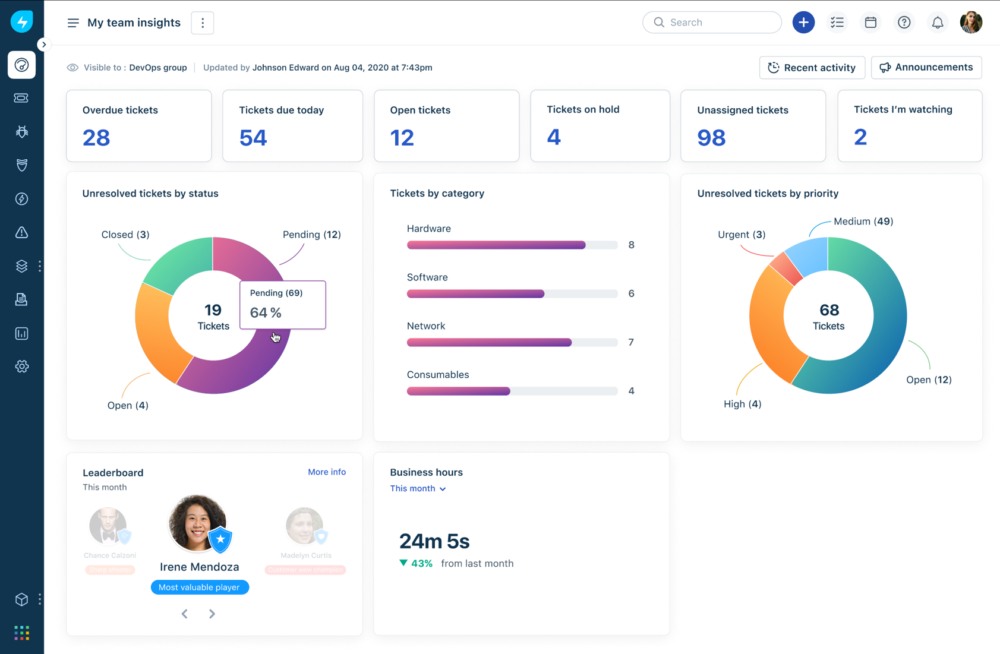
- Agent dashboard (incident list with filters, ownership, and SLA indicators).
- A service catalog item (intake form + approval + fulfillment tasks).
- A change record showing CAB approvals + rollout/backout plan fields.
- An asset record and CI relationship view (CMDB context).
- Workflow Automator builder (trigger → conditions → actions).
- Major incident / alerting view (if you use ITOM features).
- Reporting dashboard (SLA performance + top drivers).
Adoption reality: Usability is only half the equation. The “employee experience” depends on how cleanly you implement the service catalog, knowledge base, and routing—otherwise employees will keep emailing IT.
Core ITSM capabilities (incident, requests, KB, SLAs, CSAT)
1) Incident management
This is the “daily heartbeat” of IT support: triage, assign, collaborate, resolve, learn. The immediate win (for teams leaving inbox-based support) is visibility—reducing lost work and duplicate effort.
2) Service requests + service catalog
Incidents are unplanned. Requests are predictable. Your fastest ROI typically comes from standardizing your top request types into a catalog (software access, laptop requests, onboarding tasks, VPN access, shared mailbox access).
3) Knowledge management
Knowledge reduces repeat tickets and sets the foundation for automation and AI. If you want measurable value, this is one of the highest-leverage investments you can make.
4) SLAs + CSAT
SLAs create operational accountability. CSAT captures the human experience signal. Used together, you avoid a common failure mode: hitting SLA targets while employees still feel like IT is unhelpful.
5) Approvals (governance without email chains)
Approvals are where service delivery often breaks down. Email approvals are slow, non-auditable, and inconsistent. Freshservice supports structured approvals with explicit rule types (e.g., everyone, anyone, majority, first responder), and approvals can be triggered manually, by workflow, or via API—and acted on via channels like email, Slack, and Microsoft Teams.
ITIL process depth (problem, change, release, project)
Problem management
Problem management is the shift from firefighting to prevention: you identify recurring issues, run root-cause analysis, and track corrective actions so the same incidents stop returning.
Change management and CAB workflows
Change is where downtime is born. Freshservice supports CAB approval workflows as part of its approvals model—helping IT teams enforce governance, document plans, and reduce change-related outages.
Release management
For teams that deploy regularly, release management helps coordinate build/test planning and stakeholder communication—reducing the “surprise release broke X” failure mode.
Project management
Projects are where IT work becomes multi-step. The operational advantage is keeping projects close to service work so incidents, changes, and assets can remain linked to delivery initiatives.
Implementation note: Tools don’t create governance. If you implement CAB rigor without aligning stakeholders, you can slow delivery. If you implement it well, you reduce business-impacting outages.
IT asset management + CMDB (discovery, lifecycle, relationships)
Asset management is the difference between “tracking” and “knowing.” Freshservice supports building inventory and CMDB data through multiple approaches—most importantly, discovery.
Discovery: how assets enter the system
- Discovery agent: installed on devices to keep hardware/software data updated.
- Discovery probe: a Windows-based probe used for scanning assets (domain/IP range) on a schedule.
- Import options: CSV imports and other pathways for getting a baseline inventory in place.
CMDB: where “inventory” becomes “risk intelligence”
A CMDB becomes far more valuable once you model relationships and dependencies. That’s when you can answer questions like:
- “If we change this server/application, what services are impacted?”
- “Which incidents correlate with this CI over time?”
- “What dependencies create change risk?”
Buyer tip: If you want CMDB ROI, prioritize relationships for your most business-critical services first. Don’t try to model the entire world in month one.
Automation + AI (Workflow Automator + Freddy AI)
Workflow Automator (the practical engine)
Freshservice’s Workflow Automator is designed to automate repetitive service desk work using a straightforward pattern: event → conditions → actions. Practically, this is how you enforce routing rules, standardize approvals, and orchestrate fulfillment tasks without relying on “tribal knowledge.”
Freddy AI: how to evaluate it (without hype)
Freshservice’s AI strategy is easiest to evaluate as three separate value paths:
- Copilot: assists agents (summaries, drafting, guidance) to increase productivity.
- Agents: attempt autonomous resolution / deflection for common requests, often in Slack/Teams-like channels.
- Insights: pattern and trend intelligence to improve service delivery over time.
Governance reality: AI amplifies structure; it does not replace it. The quality of your outcomes will depend heavily on knowledge accuracy, catalog structure, and workflow consistency.
IT operations + major incidents (alerting, on-call, status)
Freshservice includes IT operations capabilities intended to reduce downtime and improve coordination:
- Alert management: consolidate and triage operational signals.
- On-call management: define schedules and escalations for 24/7 coverage.
- Major incident management: structured response, collaboration, and stakeholder updates.
- Service health monitoring and status communication: reduce ticket storms by proactively informing users of incidents and maintenance.
Why this matters: A status page is not just “nice communication.” It’s a ticket-volume control mechanism. When employees can see an outage is known and being addressed, you prevent floods of duplicate tickets.
Integrations and extensibility (marketplace + APIs)
Most IT teams already have a stack (IdP, endpoint management, monitoring, collaboration, engineering tools). Freshservice is strongest when you evaluate integrations based on operational impact:
- Does this reduce swivel-chair work?
- Does it enrich tickets at the moment of triage?
- Does it trigger action, or only sync records?
Top integrations table (what teams actually wire up)
| Integration | Category | What it enables (high level) | Buyer notes |
|---|---|---|---|
| Microsoft Teams / Slack | Collaboration | Approvals, notifications, request intake, and faster stakeholder response loops | High leverage: moves work to where people already are |
| Microsoft Intune / Jamf | Endpoint management | Asset sync, device context, and (in some cases) actions from the service desk | Reduces duplicate asset tracking |
| Okta / Azure AD | Identity | SSO and user lifecycle alignment | Security posture and friction reduction |
| Jira / Azure DevOps | Engineering | Escalation to engineering, bug/incident collaboration | Critical for IT teams embedded with product/engineering |
| Monitoring tools | ITOM | Alerts into Freshservice and major incident workflows | Avoid alert fatigue: route only actionable signals |
Freshservice also supports programmatic control in key areas (for example, approvals can be initiated via API in addition to manual/workflow triggers), which matters for IT teams that integrate service workflows into internal systems.
FreshserviceReporting and analytics
Reporting is where ITSM becomes a management system rather than an inbox. A practical approach:
- Executive dashboards (start with 3): ticket volume, SLA performance, and top drivers by category/service.
- Operational dashboards (per resolver group): backlog, aging, reopen rate, and major incident counts.
- Improvement dashboards: recurring incident themes and problem-management outcomes.
Management reality: Most IT orgs already have enough data. The difference is whether leadership can see it clearly and act on it consistently.
Security, privacy, and governance (buyer checklist)
For ITSM tools, governance is not optional—these systems contain employee data, access workflows, asset inventories, and operational incident history. Your evaluation should include:
- Identity and access: SSO/SAML, role-based access, least privilege.
- Auditability: approval history, change governance visibility, and administrative audit trails.
- Data residency and retention: confirm your regional and regulatory needs.
- AI governance: what data is exposed to AI features, how outputs are logged, and how you enable/disable AI by policy.
- Vendor risk artifacts: DPA, subprocessors, security documentation, and incident response commitments.
Freshservice’s structured approvals model (including CAB approvals) is also a governance feature: it replaces ad-hoc email approvals with auditable, rule-driven decisions.
What real users like/dislike (themes to validate)
Because public review platforms can change counts and may require login to view full detail, the most buyer-useful approach is to focus on themes you can validate in a pilot.
Common praise themes to expect (and validate)
- Usability: clean, modern UI compared to legacy ITSM tools.
- Time-to-value: teams often report being able to “get running” without a heavyweight implementation.
- Coverage breadth: solid service desk + asset + operations direction for mid-market IT organizations.
Common complaint themes to pressure-test
- Complex edge cases: limitations may surface in highly complex workflows and permissions models.
- Support variability: experiences can vary by tier and account context; test responsiveness during your pilot.
- Reporting depth: validate whether dashboards and exports meet your leadership expectations.
Best pilot test: build and run your “hardest 3 workflows” (multi-approver access request, CAB change process, and asset-to-incident correlation) within the trial—not just basic ticketing.
Alternatives and comparisons
Freshservice’s “most defensible” market position is the middle path: strong ITSM/ITIL coverage and credible ITAM/ITOM direction, with faster deployment and lower admin burden than heavyweight enterprise suites.
FreshservicePractical alternative map (how to choose intelligently)
- ServiceNow: deepest enterprise ITSM/ESM governance; typically higher implementation/admin overhead.
- Jira Service Management: strong for engineering-centric orgs; best when ITSM is tightly coupled with dev workflows.
- ManageEngine / Ivanti / BMC: competitive suites with varied strengths; often evaluated for specific governance or enterprise needs.
- Zendesk (or helpdesk-first tools): stronger for external support; less aligned if your core need is ITIL + assets + internal service governance.
The right decision hinge is simple: if you need extreme customization and global enterprise governance from day one, Freshservice may not be your destination. If you need deployable ITSM that can mature over time without becoming a program, Freshservice is often a strong fit.
Who Freshservice is best for (and who should avoid it)
Freshservice is a strong fit if:
- You’re replacing a shared inbox or basic helpdesk and want ITIL maturity over time.
- You want integrated asset discovery + CMDB practices (and you’re willing to invest in relationship modeling for critical services).
- You want approvals and workflows that replace email chains with auditable decisions.
- You want IT operations capabilities (alerting, on-call, major incidents, status communication) connected to the service desk.
- You intend to expand into ESM (HR, facilities, legal) with governance, not tool sprawl.
You should be cautious if:
- You require extremely deep, bespoke customization across many unique global business units immediately.
- Your primary buying driver is advanced CMDB/service mapping maturity (service graph depth) at enterprise scale.
- You expect AI to “solve ITSM” without investing in knowledge, catalog design, and workflow governance.
Final verdict and recommendations
Rating: 8.9/10
Rating breakdown (procurement-friendly):
- Core ITSM capabilities: 9.2/10
- ITIL process depth: 8.7/10
- ITAM + CMDB direction: 8.8/10
- Automation + AI strategy: 8.8/10
- Ease of use / adoption likelihood: 9.0/10
- Value for money: 8.5/10
A practical rollout roadmap (30–60–90 days)
Days 0–30: Stabilize and create visibility
- Launch incidents and requests with clean categories and assignment groups.
- Publish 10–20 knowledge articles for the top issues.
- Configure SLAs and escalation rules for critical services.
- Start asset discovery (agent/probe/import) and link assets to tickets.
Days 31–60: Standardize requests and governance
- Build a service catalog for your top request types and fulfillment patterns.
- Implement approvals for spend/security-sensitive requests.
- Deploy Workflow Automator for routing, approval follow-ups, and fulfillment tasks.
Days 61–90: Reduce risk and move toward proactive operations
- Stand up change governance (CAB) and enforce rollout/backout planning.
- Model CMDB relationships for business-critical services.
- Implement major incident workflows and status communication.
- Pilot AI in a controlled scope (top 10 request types) with measurable success criteria.
Call to action: If you want Freshservice to produce real operational change, run a pilot that includes your most complex workflow (approvals + CAB + asset context), not just basic ticketing. That’s where you’ll see whether it fits your operating model.
Freshservice
Freshservice is an enterprise IT management suite software is a useful software that offers everything a user needs for IT support. Freshservice provides an IT service desk that is simple. Freshservice also modernizes IT and other business functions with easy to use and simple to configure IT service desk solution in the cloud. Freshservice uses a modern and intuitive UI that requires minimal to no training and is also customizable to IT and non-IT needs. The enterprise IT management suite software offers multi-channel support. The multi-channel support provides users with an excellent platform to facilitate automation of tasks and provide…
• Uses modern and intuitive UI that requires minimal to no training
• Customizable to IT and non-IT needs
• Automate tasks and provide support for issues raised via email or in person
• Maintain records of contracts , hardware, software, and other assets
• Support the high impact employees who are on the road
• Leverage the software for IOS and Android
• Blossom - $19/agent/month
• Garden - $49/agent/month
• Estate - $79/agent/month
• Forest - $99/agent/month
• Customizable to IT and non-IT needs
• Automate tasks and provide support for issues raised via email or in person
• Maintain records of contracts , hardware, software, and other assets
• Easy to use and set up
• Multi-channel support
• Gamify your service desk
FAQ (15 common evaluation questions)
1) Is Freshservice a helpdesk or a full ITSM platform?
It can start as a helpdesk, but it’s designed as a full ITSM platform that can mature into ITIL-aligned processes (incident/problem/change/release/project) alongside service catalog, knowledge, and SLA discipline.
2) What’s the simplest “quick win” after launch?
Implement clean incident intake/routing and publish a starter knowledge base for the top recurring issues. This reduces repeat tickets and sets up a measurable deflection program.
3) How does Freshservice handle approvals?
Freshservice supports structured approval policies and chains. Approvals can be initiated manually, through workflows, or via API, and can be acted on via channels like email, Slack, and Microsoft Teams.
4) Does it support CAB-based change management?
Yes—CAB approvals are supported within Freshservice’s approvals model, enabling governance and visibility around changes.
5) What’s the difference between incidents and service requests?
Incidents are unplanned disruptions; requests are predictable and standardizable. Most teams get ROI fastest by standardizing their highest-volume requests into a service catalog with approvals and fulfillment tasks.
6) Does Freshservice include a CMDB?
Yes. The practical value increases as you model relationships and dependencies so incident and change decisions can be dependency-aware.
7) How does Freshservice discover assets automatically?
Freshservice supports discovery via agent-based and probe-based approaches, plus import options. Your best approach depends on your environment and how quickly you need accuracy.
8) What’s the difference between a discovery agent and a discovery probe?
An agent is installed on devices to keep asset data updated; a probe is typically a Windows machine that performs network/domain/IP-range scans on a schedule. Many teams use both.
9) What does “Workflow Automator” actually do?
It automates repetitive ITSM work using an event/conditions/actions approach. This is how teams standardize routing, enforce approvals, and orchestrate fulfillment tasks.
10) Does Freshservice include IT operations (on-call, alerting, major incidents)?
Freshservice includes IT operations capabilities such as alert management, on-call management, major incident workflows, service monitoring, and status communication features.
11) What are Freshservice’s published prices?
Freshworks publishes pricing per agent per month (annual billing) for Starter ($19), Growth ($49), Pro ($99), with Enterprise listed as custom. Always confirm your final pricing and packaging during procurement.
12) What’s the biggest “gotcha” in Freshservice budgeting?
Agent count creep and maturity scope. Most teams underestimate how many contributors become “agents” once you expand to resolver groups, change governance, and asset/procurement stakeholders.
13) Can Freshservice be used beyond IT (HR, facilities, legal)?
Yes—Freshservice is positioned for enterprise service management. This works best when you enforce governance (taxonomy, ownership, and consistent reporting) rather than letting each team build ad-hoc processes.
14) How should we evaluate Freddy AI features safely?
Treat AI as an operational program: define workflows, set success metrics (deflection, SLA improvement, CSAT lift), and apply governance around what data is exposed and how outputs are used and audited.
15) What are the best Freshservice alternatives?
If you need deepest enterprise governance and customization, benchmark ServiceNow. If you’re engineering-centric, Jira Service Management is often a strong option. For other suites (ManageEngine, Ivanti, BMC), evaluate based on your CMDB, governance, and operating model requirements.








By clicking Sign In with Social Media, you agree to let PAT RESEARCH store, use and/or disclose your Social Media profile and email address in accordance with the PAT RESEARCH Privacy Policy and agree to the Terms of Use.