
Freshsales Review: Freshworks’ AI-Powered Sales CRM
Sales CRMs often fail in a painfully predictable way: you buy them to create order, but the tool itself becomes another source of chaos.
Leads arrive from web forms, imports, referrals, and inboxes. Deals live in spreadsheets, then “temporarily” move into a shared pipeline board, then get duplicated across email threads and meeting notes. Reps forget follow-ups because the reminder lived in someone else’s calendar. Managers ask for a forecast and get a story instead of a number. And the moment you add a second pipeline (or a second team), your system breaks because it was never designed for real-world messiness.
Freshsales: Freshworks’ sales CRM positions itself as the antidote to that mess: an AI-powered CRM that helps teams capture leads, manage pipelines, automate repetitive work, and communicate with prospects from inside the CRM. It’s built to be fast to adopt, straightforward to operate, and cost-accessible compared to heavyweights like Salesforce without feeling like a “lite” CRM that you’ll outgrow in six months. Freshworks also markets Freshsales as part of a broader suite, which matters if you want sales to share context with support or marketing later.
FreshsalesMy overall verdict: 8.7/10
Bottom line: Freshsales is one of the strongest “practical CRMs” for small-to-mid-sized teams that want pipeline clarity, built-in communication tools, flexible automation, and a clean UI—without signing up for a multi-quarter implementation project. It’s especially compelling if you already use Freshworks products (like Freshdesk) or anticipate you might. Pricing is competitive, and the Free plan is genuinely usable for a tiny team.
Important caution: Freshsales is not trying to be Salesforce. If your organization needs deeply customized objects, highly specialized revenue ops workflows, extremely granular reporting, or a massive enterprise ecosystem of niche integrations, you’ll want to evaluate alternatives carefully. Some user feedback also highlights frustration around support quality and certain limits (exports, add-ons, advanced capabilities), which is worth planning for.
To make this publication-ready and useful beyond marketing bullet points, this review walks through Freshsales the way a buyer or operator would evaluate it: modules, implementation reality, trade-offs, and decision guidance.
Where pricing or capabilities are time-sensitive, this review relies on Freshworks’ official pricing pages and Freshworks’ published price list PDF (June 2025), plus current review portals for user sentiment. Pricing can change so treat all numbers as “accurate as of the cited sources.”
Here’s what this review covers
- Introduction
- Overview and company background
- Pricing and plans (with a plan comparison table)
- Setup and onboarding experience
- User interface and ease of use (with screenshot references)
- Core features breakdown (deep dive)
- Advanced features, automation, AI, and integrations
- Performance, reliability, and security
- Customer support and learning resources
- Pros and cons
- User reviews and ratings summary
- Alternatives and comparisons
- Who it’s best for (and who should avoid it)
- Final verdict and recommendations
- FAQ (10+ buyer-focused questions)
Introduction
Sales CRMs fail when they become a “data dumping ground” instead of a system of action. The right way to evaluate Freshsales isn’t “Does it have CRM features?”—it’s:
- Will reps actually use it every day?
- Can it enforce follow-through (tasks, reminders, sequences, automation) without becoming brittle?
- Can leadership get a forecast that reflects reality?
- Can you scale pipelines, segments, and integrations without rebuilding everything?
Freshsales aims to solve these problems with a modern UI, built-in communication tools, automation and workflows, and Freddy AI as a productivity layer—while keeping implementation lighter than enterprise incumbents.
Overview and company background
What is Freshsales?
Freshsales is Freshworks’ sales CRM focused on helping sales teams:
- Capture and qualify leads
- Manage deals through pipeline stages
- Automate follow-ups and internal workflows
- Communicate with prospects (email, phone, chat) in context
- Use AI features (Freddy) for productivity and insights
Freshworks positions Freshsales as an easy-to-use, AI-powered CRM with broad adoption—marketing it as “trusted by 75,000+ businesses worldwide.”
In practical terms: Freshsales aims to be the system of record for your revenue team—contacts, accounts, deals, activities, conversations, and forecasting—without requiring a dedicated admin team to keep it running.
A quick history of Freshworks (and why it matters)
Freshworks’ origin story matters because it explains the product philosophy: simplify business software and reduce friction.
Freshworks was originally incorporated in August 2010 as FreshDesk Inc. and later changed its name to Freshworks Inc. in June 2017, reflecting a shift from a single helpdesk product into a broader SaaS suite.
Freshworks went public in 2021, with its IPO closing announced in September 2021.
Over time, Freshworks expanded via product growth and acquisitions, including (not exhaustive): Joe Hukum (chatbot platform) in 2017, Zarget (marketing software) in 2017, and AnsweriQ (AI/ML for customer service) in 2020.
Even if you only care about CRM today, this matters because Freshworks tends to build products that integrate into a broader platform (support, IT, marketing, etc.). For many buyers, that’s a strategic advantage: you can start with sales CRM and expand later without ripping and replacing your tools.
Target audience and market positioning
Freshsales is best positioned for:
- Small and mid-sized sales teams that want a modern CRM that’s faster to deploy than enterprise incumbents
- Growing companies that need automation and pipeline discipline (without hiring RevOps immediately)
- Teams already in Freshworks (Freshdesk / Freshservice / Freshmarketer) that want shared customer context across departments
It competes most directly with tools like HubSpot Sales Hub, Zoho CRM, Pipedrive, Zendesk Sell, and “lightweight Salesforce alternatives.” The key competitive angle is: strong core CRM + automation + built-in comms + AI—at a mid-market price point.
High-level differentiators (Freshsales vs. “generic CRM”)
At a high level, Freshsales stands out for:
- A usable Free plan (for up to 3 users) that’s not just a demo environment
- Built-in communication (phone/chat are emphasized even in the Free plan description)
- Automation that scales with plan level, including workflows and sales sequences (with clear “how-to” documentation)
- Freddy AI as both an assistant and an automation/engagement layer (with an explicit session-based model for AI agent interactions)
- A credible developer ecosystem (REST APIs, OAuth flows, app SDK), which matters if you plan to integrate Freshsales into a broader data stack
Pricing and plans (with a detailed comparison table)
Freshsales uses a tiered pricing structure with:
- Free plan (up to 3 users)
- Growth
- Pro
- Enterprise
Freshworks also promotes a 21-day free trial that gives access to the full CRM (per Freshworks’ FAQ). Prices vary by billing cadence (monthly vs annual). Freshworks’ published pricing page highlights annual billing prominently, while Freshworks’ price list PDF provides additional cadence detail.
Freshsales plan comparison table
Note: Prices below are per user/month in USD, comparing annual vs monthly billing.
| Plan | Price (Annual Billing) | Price (Monthly Billing) | Key limits / gating | Included highlights (practical summary) |
|---|---|---|---|---|
| Free | $0 (up to 3 users) | N/A | Max 3 users | Built for small teams to manage customer data; includes Kanban views, email templates, built-in phone + live chat; 24x5 support (per pricing page) |
| Growth | $9 | $11 | More advanced features gated vs Pro/Enterprise | Adds core CRM capabilities for growing teams; Freshworks positions it as the starting paid tier |
| Pro | $39 | $47 | Multiple pipelines / advanced automation / reporting typically here | Adds more sophisticated sales operations features and controls vs Growth |
| Enterprise | $59 | $71 | Highest tier (governance/security/customization) | Highest control tier; suited for complex teams needing advanced permissioning and governance |
If you’re reading this as a buyer, here’s the fastest way to interpret that table:
- Free is credible if your team is truly small (1–3 users) and you mainly need contact/deal tracking with basic engagement tools.
- Growth is for teams that want to operationalize sales in one system (and stop living in spreadsheets).
- Pro is where sales operations begins to matter—automation depth, segmentation, pipelines, reporting rigor.
- Enterprise is for governance-heavy environments where permissions, auditability, and admin controls are non-negotiable.
Hidden costs and add-ons (this is where budgets get real)
Most CRM buyers underestimate total cost because they only look at “per seat” pricing. Freshsales can add meaningful costs depending on how you scale AI, workflows, CPQ, telephony, and API usage.
Below are key add-ons and pay-as-you-go items referenced in Freshworks’ published price list:
- Freddy AI Agent Sessions (session packs)
Freshworks’ pricing page explains that a “bot session” is a unit of customer interaction (with a 24-hour definition on chat). Paid plans include a one-time 500-session offer to try chatbots, and additional sessions can be purchased when you outgrow the included amount. In the price list PDF, Freddy AI Agent Sessions are priced as $100 per 1,000 sessions pack.Why this matters: If you plan to use AI agents/chatbots heavily for inbound lead capture or customer-facing engagement, model AI sessions as a variable cost (similar to how you’d model SMS/email volume in a messaging platform). - CPQ (Configure, Price, Quote) add-on
Freshsales offers CPQ as an add-on. Freshworks describes CPQ as a way for sales teams to create documents from templates and pull products from a product catalog—standardizing quoting and reducing reliance on external catalog docs. The price list shows CPQ priced at $19 per license (monthly billed).Why this matters: If you sell configurable products, multi-currency pricing, bundles, or subscription + one-time fees, CPQ can quickly become “required,” not “nice-to-have.” - Workflow add-on (additional workflows)
Workflow automation is core to Freshsales value. But there’s also a workflow add-on listed at $5 per workflow (monthly billed).Why this matters: If your organization runs many segmented processes (different funnels by product line, region, persona, or channel), workflow counts can scale fast. Before committing, map how many workflows you expect to run in steady state. - Phone credits and phone number charges
The price list shows phone credits and phone-number-related charges as per-credit costs (with multiple SKU lines for incoming/outgoing/number charges).Why this matters: If you intend to run a phone-heavy motion (SDR call blocks, inbound routing, call recording), forecast telephony usage as a variable cost. - API extension (important for data teams and heavy integrations)
The price list includes an API Extension at $250 per account (monthly billed) (max 2 units referenced).Why this matters: If you plan to sync Freshsales to a data warehouse, run frequent automations, or build custom integrations at scale, API limits become real. - Onboarding / implementation services and premium support
The price list documents professional services and premium support options (for example, “Self Service Expert (SSE) Sessions” such as 10 hours = $1,000; 20 hours = $2,000), onboarding services priced per hour, and premium support priced as a percentage of monthly recurring revenue (with minimum thresholds).Why this matters: If you’re implementing Freshsales across teams (especially with migration, automation design, roles/permissions, and integrations), paid onboarding and premium support can reduce adoption risk—but should be planned intentionally.
Value-for-money analysis (who each plan fits best)
Free plan: best for “we need a CRM now” (and we’re tiny)
- Choose Free if you have 1–3 users and you mainly need contact + deal management with basic productivity features.
- Avoid Free if you need multiple pipelines, robust workflow automation, deep reporting, strict permissions, or advanced integrations.
Growth: best for early process maturity
- Choose Growth if you’ve outgrown spreadsheets and need repeatable processes and a pipeline that leadership can trust.
- This is often the “first real CRM” tier for teams moving from ad hoc selling to structured execution.
Pro: best for disciplined sales teams
- Choose Pro if you need more sophisticated automation and segmentation, multiple pipelines, and reporting rigor.
- Pro is typically where Freshsales begins to compete head-to-head with mid-tier HubSpot and Zoho deployments.
Enterprise: best for governance, compliance, and scale
- Choose Enterprise if permissioning and governance are non-negotiable and CRM is business-critical infrastructure.
- Enterprise is also where teams often reduce risk as they scale seats and integrations.
Setup and onboarding experience
Signing up and initial configuration
Freshworks emphasizes fast time-to-value:
- You can start with a 21-day trial with immediate access to the full CRM (per their FAQ).
- The Free plan is “no credit card required,” and includes 24x5 support per the pricing page description.
In practice, a sane onboarding sequence for Freshsales looks like this:
- Define your pipeline stages (don’t import data yet)
- Define required fields (what must be captured before moving a deal stage)
- Set ownership rules (who owns leads, accounts, deals)
- Configure email/phone/chat basics
- Import a small sample dataset
- Build one or two core workflows (not 20)
- Train the team using bite-sized role-based scenarios
- Import everything and go live
This order prevents the classic CRM failure mode: migrating messy data into a system that isn’t configured to handle your process.
Data import (CSV/XLSX) and migration from other CRMs
Freshsales supports CSV/XLSX imports with field mapping and documented guidance. For teams moving from another CRM, Freshsales also provides a migration path from common CRMs including Salesforce, SalesforceIQ, Pipedrive, Zoho CRM, and Insightly, via an Admin Settings migration overlay (uploading exported data as a zip).
What’s good about this approach: Freshworks is explicitly acknowledging that CRM switching happens—and giving admins a guided path. That is a real operational advantage, especially for SMBs that can’t afford a third-party implementation partner.
Common hurdle to plan for: migration success is less about the tool and more about your data discipline:
- Are user owners consistent?
- Do you have duplicates?
- Are stage definitions consistent?
- Are custom fields documented?
Even with a good migration tool, those questions determine whether your go-live is clean or chaotic.
Onboarding materials and training resources
Freshworks provides formal learning resources through Freshworks University, positioned as free online training with courses and certifications.
This matters because CRM adoption is mostly behavior change. A strong LMS reduces the burden on your internal champion and makes new-hire onboarding more repeatable.
User interface and ease of use
A CRM UI should do one thing exceptionally well: reduce the cognitive load of selling.
Freshsales generally earns positive feedback for usability. In many reviews, users cite a user-friendly interface and automation that simplifies lead management and follow-ups.
Navigation and layout: what the screenshots should show
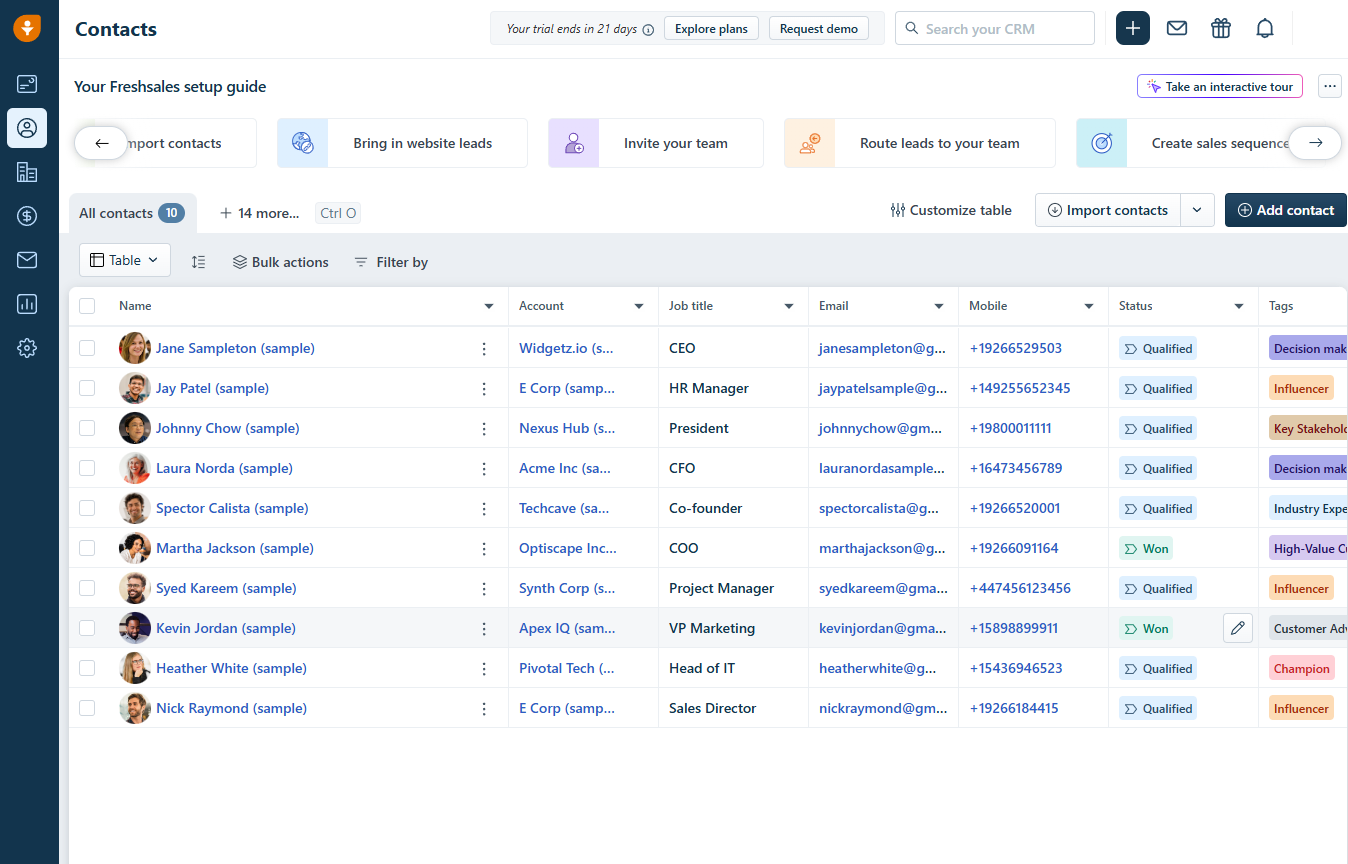
Using the screenshots shown at the top of this review as reference points, these are the views you should evaluate because they answer the real question: will reps actually use this every day?
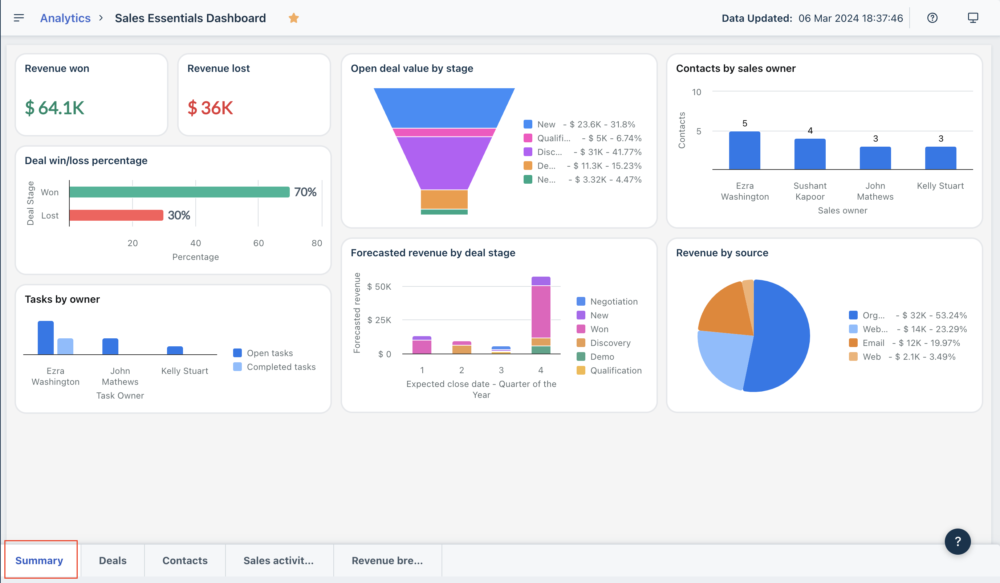
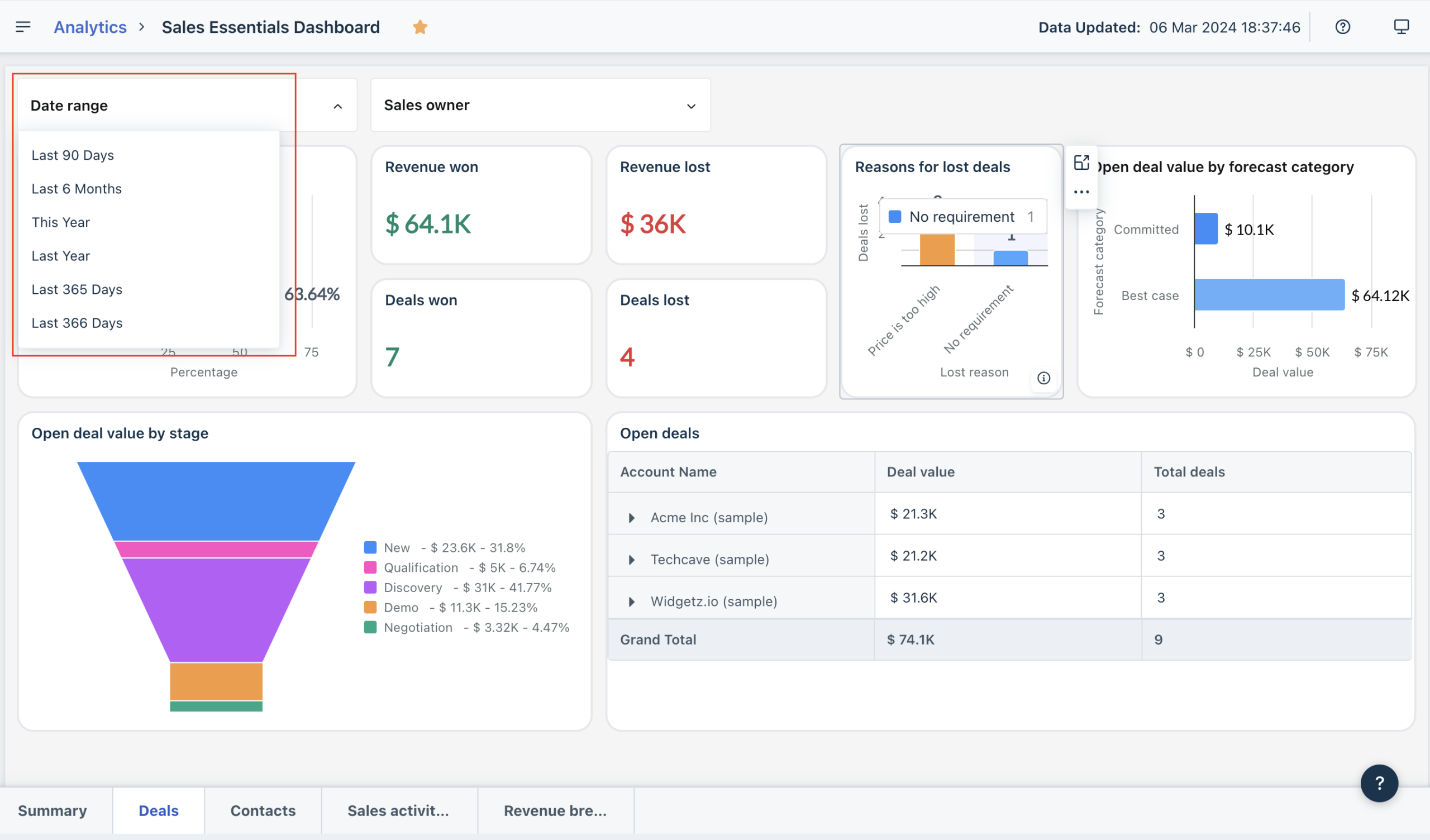
- Dashboard view: clean tiles and charts for pipeline metrics and performance (useful for managers and reps)
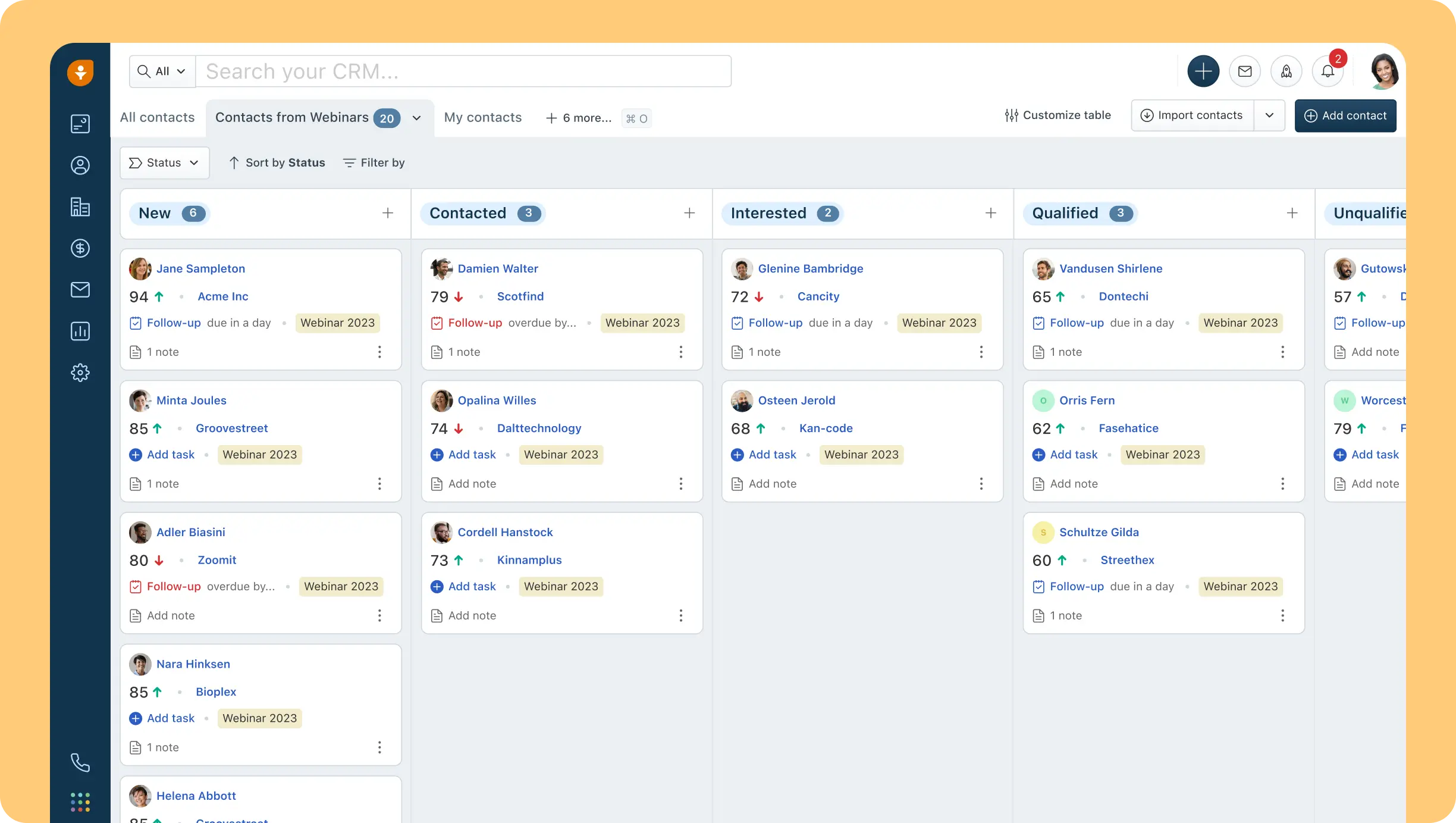
- Pipeline/Kanban view: deal cards organized by stage, supporting fast updates and “at a glance” health checks
- Freddy AI context: AI positioning around forecasting, insights, and productivity assistance
- Mobile app: built for field reps, with quick access to records and activity logging
Learning curve: new users vs experienced CRM users
Freshsales tends to be easier for new users than complex enterprise CRMs because:
- The pipeline metaphor is straightforward (cards, stages, owners)
- Common tasks (logging activity, moving deals, adding notes) are front-and-center
- Automation can start simple (a few workflows) and scale over time
For experienced CRM users, the learning curve depends on your previous system:
- If you’re coming from Pipedrive, Freshsales will feel familiar in pipeline flow but broader in platform ambition.
- If you’re coming from HubSpot, you may find Freshsales simpler in some areas but potentially less expansive in ecosystem breadth.
- If you’re coming from Salesforce, you’ll likely find Freshsales lighter and faster—but less infinitely customizable.
Customization options (what you can realistically tailor)
Even in CRMs that advertise “customization,” there are three levels:
- Cosmetic: rearranging sections, hiding fields
- Operational: custom fields, required fields, stage rules
- Architectural: custom objects/modules, deep workflows, complex permissions
Freshworks’ ecosystem and user feedback suggest Freshworks products are customizable enough for many SMB/mid-market deployments, though not as endlessly customizable as Salesforce.
Practical guidance: when you evaluate Freshsales customization, don’t ask “Can it be customized?” Ask:
- Can we enforce required fields at stage transitions?
- Can we model our pipeline(s) without hacks?
- Can we segment by region/product/team cleanly?
- Can we restrict visibility appropriately?
- Can we report on what leadership actually cares about?
If the answer to those is “yes,” you’re in good shape.
Mobile app experience
Freshsales provides an iOS/Android mobile app with offline capabilities. Support documentation describes offline usage, including caching records, attaching files and voice notes, and syncing back once online. Mobile app listings also highlight offline access (“unique offline mode”) for staying productive with poor connectivity.
From an operational perspective, this matters most for:
- Field sales
- On-site services with upsell motions
- Teams selling in regions with inconsistent connectivity
If your sales motion is desk-based, mobile quality is still useful—but not usually a deciding factor.
Core features breakdown (deep dive)
Freshsales is a CRM, but the “CRM” label is too vague to be useful. What matters is how the system supports the actual mechanics of selling.
Below is a structured breakdown of core feature categories—and how to evaluate them in real-world scenarios.
1) Contact and account management (your system of record)
What it is: the contact/account layer is your foundation: names, emails, roles, firmographics, relationship history, and associated deals.
What “good” looks like in practice:
- You can quickly answer: Who is this person? What do they care about? What’s happened so far?
- Activity history is centralized (emails, calls, notes, meetings)
- Ownership is unambiguous
- You can segment cleanly (industry, region, lifecycle stage, lead source)
How to evaluate Freshsales here:
- Create a contact manually and see how many clicks it takes
- Associate the contact to an account and a deal
- Add notes and tasks
- Confirm the timeline view is genuinely helpful
Common pitfalls to watch for:
- Over-customizing fields early (leads to low adoption)
- Not defining required fields (leads to messy data)
- Not deciding what the account object represents (company vs location vs division)
2) Lead capture and management (where revenue starts)
Freshsales positions itself around capturing leads and closing deals faster—so lead management is central.
A practical lead workflow you should be able to support:
- Capture lead (form, import, inbound chat, manual)
- Assign ownership (round-robin or rules)
- Qualify using a consistent framework (BANT, MEDDICC-lite, etc.)
- Convert to contact/account/deal at the right time
- Trigger follow-ups automatically
- Prevent leads from going stale (SLA timers, tasks, sequences)
Where teams win or lose: lead routing. If your routing rules are unclear, you’ll leak leads no matter how good the CRM is. Freshsales automation (workflows) can help here—more on that below.
3) Deal and pipeline management (the beating heart)
Most teams buy a CRM because they need a pipeline that leadership can trust.
What Freshsales pipeline management should enable:
- Visual deal flow through stages (Kanban-style)
- Stage definitions that match how your business sells
- Clear next steps
- Deal health indicators (even if simple)
- Forecast categories and forecasting rollups (depending on tier)
Real-world scenario test: create a deal, move it across stages, assign probability/forecast category, add stakeholders/tasks/next meeting, then pull a forecast report. If that takes 2 minutes and feels intuitive, adoption will be high. If it takes 10 minutes and feels like form-filling, adoption will be low.
4) Activities, tasks, and follow-ups (where CRMs usually fail)
Sales success is mostly follow-through. CRMs must reduce friction here.
A strong CRM will help you:
- Create tasks quickly
- Tie tasks to deals/contacts
- Trigger tasks automatically
- Ensure overdue tasks don’t vanish silently
Freshsales is frequently praised for automation and follow-up support, which suggests this is a strength area.
5) Communication: email, phone, and chat (selling in context)
Freshworks emphasizes built-in engagement channels. Even the Free plan description references email templates, built-in phone, and live chat.
This matters because sales teams hate context-switching:
- Email in Gmail
- Calls in a dialer
- Notes in a doc
- Tasks in a separate tool
- Deals in a CRM
Freshsales’ value proposition is that your communication and CRM context can be closer together—reducing the “I’ll update the CRM later” problem.
How to evaluate this in a demo/trial:
- Send an email from a record
- Log a call and attach notes
- Trigger a follow-up task automatically
- Confirm the activity timeline tells the full story
If Freshsales becomes the “home base” of the conversation, you will get better data and better forecasting.
6) Workflow automation (the productivity multiplier)
This category determines whether your CRM becomes a system of action or just a system of record.
Freshsales documentation describes workflows as automation that triggers actions “as soon as an event trigger occurs or at a specific date/time,” including actions like updating fields, sending email alerts, creating follow-up tasks, and notifying third-party apps via webhooks.
A concrete workflow example:
Use case: Send an automated welcome email to new prospects created each day.
- Trigger: New lead created
- Conditions: Lead source = Website AND Industry is not empty
- Actions:
- Send email template “Welcome + discovery CTA”
- Create task “Call lead within 1 business day”
- Update field “Lifecycle stage = Engaged”
This is exactly the kind of automation that drives ROI because it reduces manual work and increases lead response speed.
The scaling question: how many workflows will you need? If you run one sales motion, you might need 5–10 workflows. If you run multiple segments (SMB vs mid-market, multiple regions, multiple products), it can become 30–80 workflows quickly—where workflow add-on cost becomes relevant.
7) Sales sequences (structured follow-up that doesn’t feel robotic)
Sales sequences matter because they standardize outreach without forcing reps to remember every step. Freshworks defines sequences as structured multi-step actions combining automated and personalized interactions (emails, calls, social messages, meetings) to guide prospects through the buying process.
A strong sequence capability should let you:
- Create multi-step outreach
- Pause/branch based on engagement
- Notify reps when a prospect replies
- Avoid sending “Step 4” after a reply (basic, but crucial)
Evaluation tip: Ask whether sequences can branch by behavior (opens, replies, meeting booked) and whether reporting is strong enough to optimize sequences.
8) Reporting, dashboards, and forecasting (where leadership lives)
Reporting requirements vary by maturity:
- Early stage: “How many deals are in each stage?”
- Scaling: “What’s our conversion rate stage-to-stage?”
- Ops-led: “What’s pipeline coverage by segment? Forecast by rep? Attribution by source?”
Freshsales is often praised for pipeline clarity and time savings, but some user feedback suggests limitations in analytics and exports depending on use case and tier.
Practical advice: Before buying, define the 10 reports you must have. Then confirm:
- Can Freshsales generate them without manual exports?
- Can they be scheduled or shared?
- Can leadership access dashboards without admin friction?
Advanced features, automation, AI, and integrations
This is where Freshsales becomes more than “pipeline software.”
1) Freddy AI for Sales (AI assistant + productivity layer)
Freshworks positions Freddy AI as an assistant that helps find potential customers, create personalized emails, and provide insights to close deals faster.
From a buyer’s perspective, the important question is not “Does it have AI?”—it’s:
- Is AI embedded into workflows reps already do?
- Is pricing predictable enough to scale?
- Does it improve output (meetings booked, deals progressed) or just produce text?
Freshworks’ pricing model clarifies bot sessions and trial sessions, and published pricing references per-pack costs for session scaling. Plan AI costs intentionally if you expect heavy usage.
2) CPQ: Configure, Price, Quote (quote-to-cash acceleration)
Freshsales CPQ is positioned to help sales teams create documents from templates and product catalogs, standardize documentation, and avoid outdated catalog sprawl. The add-on is listed in pricing documentation at $19 per license/month.
Who needs CPQ most:
- Teams selling multi-line quotes
- Hardware + services bundles
- Subscription + implementation fees
- Multi-currency + tax complexity
Who can skip CPQ:
- Simple “one product, one price” motions
- Teams already standardized on a dedicated CPQ tool and not looking to consolidate
3) API, webhooks, and developer ecosystem
If you care about integrations deeply, Freshsales looks stronger when you evaluate its developer surface area. Freshworks provides developer documentation describing REST APIs and OAuth flows for secure access.
Why this matters: Even if you don’t plan to build custom apps today, a robust API layer reduces vendor lock-in and makes it easier to sync CRM to a warehouse, trigger automations from external tools, and build custom “business glue” integrations.
If API limits become a bottleneck, published pricing includes an API Extension add-on (often overlooked until teams hit a ceiling).
4) Integration ecosystem (native + marketplace + practical setups)
Freshworks emphasizes integrations and a broader marketplace ecosystem. Freshsales also supports migration from competing CRMs (Salesforce, Pipedrive, Zoho, Insightly), which is a different kind of “integration”—but still part of your ecosystem strategy.
Top integrations to consider (buyer-oriented table)
Availability can vary by region, plan, and marketplace listings, so treat this as a shortlist to validate during trial—not a guarantee.
| Integration / Tool | Why it matters | Typical Freshsales use case |
|---|---|---|
| Slack | Collaboration on deals | Deal war-room channel, handoffs, approvals |
| Google Calendar / Outlook Calendar | Scheduling + activity history | Meetings logged to contacts/deals (validate in trial) |
| Gmail / Outlook | Email sync + templates | Track outreach in-context (validate in trial) |
| Zoom (or meeting tools) | Meeting execution | Create/join meetings and log activity (validate configuration) |
| Freshdesk | Sales-support context | Share context across tickets and CRM records (suite advantage) |
| Salesforce / Pipedrive / Zoho / Insightly | Migration | Admin migration path supports these sources |
| Data warehouse / ETL (custom) | Analytics + BI | Use REST APIs; consider API extension if needed |
| Webhooks (custom) | Event-driven automation | Workflows can notify third-party apps via webhooks |
If you want to take integrations seriously (and you should), build a “must-have” list and test these during trial:
- Does the sync work both ways?
- Are mappings configurable?
- Are there delay/latency issues?
- Does it break when you change field names?
- Is error logging visible to admins?
Performance, reliability, and security
Reliability and uptime transparency
Freshworks provides status pages for product availability and incidents. Freshsales also has a dedicated status page showing real-time status and incident history.
From an operations standpoint, the existence of a clear status page is an underrated positive. It’s not the same as an SLA guarantee, but it is a real indicator of operational maturity and transparency.
Scalability considerations
Freshsales scales in the obvious way—more seats, more pipelines, more automation, more integrations. The less obvious scaling constraints to watch:
- API usage (possible need for the API extension add-on)
- Workflow complexity (possible per-workflow add-on costs)
- AI session consumption if you rely heavily on bots
If you plan for those early, scaling is smoother.
Security and compliance posture
Freshworks provides a Trust/Compliance posture through published trust information noting audits and compliance efforts (including ISO 27001, SOC 2, and other compliance audits at least annually), and a Trust Center for cybersecurity certifications and documents.
Freshworks also publishes GDPR messaging stating its products are GDPR compliant and include features to support compliance needs. Freddy AI trust documentation references alignment with frameworks such as SOC 2, ISO 27001, HIPAA, GDPR, and directs users to the Trust hub for details.
Practical guidance for buyers (especially mid-market and up):
- Request the latest SOC 2 report via the Trust Center process
- Confirm data residency/region hosting requirements
- Validate SSO requirements and identity provider compatibility
- Confirm audit logging needs (if your industry requires it)
Customer support and learning resources
Support channels and availability
Freshworks’ Freshsales pricing page states 24x5 support (notably even in the Free plan description). However, user sentiment on support is mixed: some users describe strong resources and helpful support, while others report poor experiences depending on context and tier.
Operational takeaway: If support responsiveness is mission-critical, consider premium support options documented in Freshworks’ price list, and don’t treat support as “free” in the total cost model.
Documentation, learning, and community
Freshworks provides multiple layers of resources:
- Product support documentation (workflows, imports, mobile offline mode)
- Freshworks University courses and certifications
- Developer documentation and SDK/APIs
- Community resources (including deeper dives into sequences and automation)
If you’re a buyer trying to reduce implementation risk, this resource stack is meaningful.
Pros and cons
Pros
- Strong value for money relative to many CRMs, especially at Growth/Pro pricing tiers
- Usable Free plan for up to 3 users (good for startups and pilots)
- Workflow automation with webhooks for practical ops use cases
- Clear migration path from major CRMs (Salesforce, Pipedrive, Zoho, Insightly)
- Credible AI model with explicit session-based scaling (predictable if you model it)
- Developer-friendly REST APIs and OAuth support for integration work
- Mobile offline capability (excellent for field teams)
Cons
- Add-ons can materially increase TCO (CPQ, workflows, AI sessions, API extension, phone credits)
- Support quality is inconsistently reviewed (plan for premium support if needed)
- May not satisfy extreme enterprise customization needs compared to Salesforce-class platforms
- Some operational limitations reported (exports/limits, add-on pricing concerns) depending on use case
User reviews and ratings summary
Aggregate ratings snapshot
Freshsales generally maintains strong aggregate ratings across major review portals. Review counts and ratings can shift over time, but the directional signal is typically consistent: strong usability, solid feature coverage for SMB/mid-market needs, and some recurring complaints around support quality and limits.
Common praise themes (what users like)
- User-friendly interface and faster adoption
- Automation that saves time and improves follow-through
- Pipeline visibility (clear view of stages and progress)
- Integrations and configurability sufficient for many SMB/mid-market teams
Common complaint themes (where expectations break)
- Support dissatisfaction (some users report poor support experiences)
- Pricing friction when you add features/add-ons or scale seats
- Operational limits (exports/quotas in some contexts)
Trends over time
Freshworks continues to invest in the broader suite and AI. Third-party coverage and product messaging highlight ongoing updates and cross-product integration improvements, especially for teams expanding beyond “CRM only.”
Alternatives and comparisons
Freshsales is a strong default for SMB/mid-market teams, but you should still compare it against the major decision branches in the CRM market.
Top competitors (and when they win)
1) Salesforce Sales Cloud
Best for: enterprises needing deep customization and massive ecosystem depth.
Choose Salesforce when you need complex object modeling, extensive customization, and you have admin/RevOps capacity (or budget for partners).
Choose Freshsales instead when you want faster adoption and lower total cost of ownership—and you don’t want to build a CRM platform from scratch.
2) HubSpot Sales Hub
Best for: teams that want CRM + marketing alignment with strong inbound workflows and ecosystem breadth.
Choose HubSpot when marketing + sales alignment is your center of gravity and you want a large app marketplace and strong inbound tooling.
Choose Freshsales instead when you want Freshworks suite synergy (support/IT) or prefer a simpler sales-first deployment and pricing structure.
3) Zoho CRM
Best for: cost-conscious teams needing broad CRM capabilities and strong customization for the price.
Choose Zoho when you want extensive suite breadth inside Zoho’s ecosystem and strong customization at lower price points.
Choose Freshsales instead when you prefer Freshworks’ UI/UX approach and built-in comms emphasis, and you want Freshworks platform expansion options.
4) Pipedrive
Best for: pipeline-first teams that want speed, simplicity, and strong sales motion focus.
Choose Pipedrive when your CRM needs are straightforward and pipeline execution is the priority.
Choose Freshsales instead when you want broader platform capabilities (AI, suite expansion, deeper automation + comms) and a Free plan for micro-team pilots.
5) “Suite-first” CRMs (Freshsales Suite, etc.)
Freshworks markets Freshsales Suite as a combined sales + marketing CRM approach. If you want sales and marketing in one unified platform, evaluate Freshsales vs Freshsales Suite early—because the decision impacts data model, workflows, and total cost.
Side-by-side comparison table (high-level)
| Platform | Best for | Starting price (publicly listed) | Complexity | My quick take |
|---|---|---|---|---|
| Freshsales | SMB → mid-market sales teams that want speed + automation | Free (up to 3 users), paid starts $9/user/mo (annual) | Low → Medium | Strong balance of usability + power; watch add-ons at scale |
| Salesforce | Enterprise customization + ecosystem | $25/user/mo (Starter Suite) | High | Best when you can invest heavily in admin + ops |
| HubSpot Sales Hub | Inbound-driven teams + ecosystem | Free tier; paid tiers published (per seat) | Medium | Great for marketing-led growth stacks |
| Zoho CRM | Suite breadth + cost efficiency | Free tier exists; pricing varies by region | Medium | Strong value; customization-friendly |
| Pipedrive | Pipeline simplicity | $14/seat/mo billed annually (Lite) | Low | Excellent for pure pipeline execution |
Who is Freshsales best for (and who should avoid it)?
Best for
Freshsales is a strong fit if you are:
- A small team scaling into repeatable sales: you need pipeline discipline and follow-up automation without overhead.
- A mid-market team that wants “enough CRM” without enterprise complexity: you value adoption and speed over infinite customization.
- A Freshworks customer: you want shared customer context across support, sales, and other functions.
- A team that wants built-in engagement + AI: you want CRM + productivity assistance in one system.
Who should avoid (or at least be cautious)
You should be cautious if you are:
- An enterprise needing extreme customization and complex governance: Salesforce-class platforms may fit better.
- A team with heavy add-on requirements: CPQ + AI sessions + API extension + workflow add-ons can change the cost curve materially.
- A team that needs premium support guarantees: user sentiment on support is mixed; consider premium support or validate SLAs carefully.
Final verdict and recommendations
Overall score: 8.7/10
Here’s a transparent scoring breakdown (buyer-oriented):
- Core CRM & pipeline execution: 9/10
- Automation & workflows: 9/10 (powerful and well-documented; watch workflow scaling costs)
- AI & advanced features: 8.5/10 (clear positioning and pricing model; costs scale with usage)
- Integrations & extensibility: 8/10 (strong API/dev story; validate specific integrations)
- Pricing & value: 9/10 (especially vs major competitors; watch add-ons)
- Support & resources: 7.5/10 (great documentation/university; mixed user sentiment on support quality)
Key takeaways (what you should remember)
- Freshsales is built for adoption. If your reps hate CRMs, usability matters more than feature count.
- Automation is the ROI lever. Workflows + sequences turn “best intentions” into consistent execution.
- Model total cost, not just seat cost. AI sessions, CPQ, workflow add-ons, phone credits, and API extensions can reshape your budget.
- Freshworks ecosystem is strategic. It’s a real advantage if you want sales-support-marketing alignment over time.
Recommendation
If you are an SMB or mid-market team choosing a CRM in 2025 and you want a platform that balances ease of use, automation, built-in engagement, and credible AI, Freshsales should be on your shortlist—and it’s worth running a structured pilot.
Action plan: Start with the Free plan (if eligible) or the 21-day trial, and test three things during evaluation:
- Can your reps run their daily workflow without friction?
- Can your manager get a forecast without begging for updates?
- Can you automate follow-ups and lead routing without building a Rube Goldberg machine?
FAQ
- Is Freshsales free?
Yes. Freshsales offers a Free plan for up to 3 users, positioned for small teams starting out. - How does the Freshsales 21-day trial work?
Freshworks states that when you sign up, you get immediate access to the full CRM for 21 days; you’re notified when the trial expires and can then choose a plan to continue. - What does Freshsales cost per user?
Paid tiers start at $9/user/month billed annually (Growth), with higher tiers at $39 and $59 billed annually (Pro and Enterprise). Monthly billing is higher (e.g., $11, $47, $71 respectively). - What are the biggest hidden costs in Freshsales?
Common cost drivers include Freddy AI session packs, CPQ add-on licenses, workflow add-ons, API extensions, phone credits/number charges, and onboarding/premium support options. - Does Freshsales have workflow automation?
Yes. Freshsales documentation describes workflows that trigger actions based on events or time, including field updates, email alerts, task creation, and webhook notifications. - Does Freshsales support sales sequences?
Yes. Freshworks positions sales sequences as structured multi-step actions across channels to guide prospects through the buying process. - Can I migrate from another CRM?
Freshsales supports migration from CRMs including Salesforce, SalesforceIQ, Pipedrive, Zoho CRM, and Insightly via an admin migration overlay. - Does Freshsales have an API?
Yes. Freshworks provides REST API documentation for Freshsales and developer resources for building integrations and apps. - Does Freshsales support offline mobile access?
Yes. Freshsales documentation describes offline mode, cached records, and syncing data back to CRM once online. - How are Freddy AI bot sessions counted?
Freshworks explains that a bot session is a unique interaction between an end-user and a bot; on chat, all interactions in a day count as one session lasting up to 24 hours, and only customer-facing AI bot features consume sessions. - Is Freshsales GDPR compliant?
Freshworks states its products are GDPR compliant and include features supporting compliance needs. - What security frameworks does Freshworks reference?
Freshworks references audits and compliance including ISO 27001 and SOC 2 (among others), and provides a Trust Center for cybersecurity documents. - Where can I check Freshsales uptime incidents?
Freshsales provides a status page showing real-time status and incident history; Freshworks also maintains an overall product status page. - Is Freshsales better than Salesforce?
It depends. Freshsales typically wins on speed-to-adoption and cost simplicity; Salesforce wins on enterprise-grade customization and ecosystem depth. - Is Freshsales better than Pipedrive?
If your priority is pure pipeline simplicity, Pipedrive is strong. If you want broader suite potential, built-in engagement emphasis, and credible automation + AI, Freshsales can be the better long-term platform.








By clicking Sign In with Social Media, you agree to let PAT RESEARCH store, use and/or disclose your Social Media profile and email address in accordance with the PAT RESEARCH Privacy Policy and agree to the Terms of Use.