
Freshmarketer Review: The Hits, Misses, and Why It Could Replace Your Marketing Stack
Marketing automation has a recurring failure mode: teams buy a “powerful” platform, spend weeks wiring it up, and still end up sending the same generic newsletters—because the real work isn’t the email editor. It’s the data model, the segmentation logic, the lifecycle journeys, the channel mix (email + SMS + WhatsApp), and the operational discipline to keep campaigns shipping.
Freshmarketer (by Freshworks) aims to make that lifecycle marketing stack feel less like an engineering project and more like a system you can actually run—especially if you’re in e-commerce or a fast-moving SMB/mid-market environment where “time-to-value” matters. The product positions itself around multichannel engagement (email, SMS, WhatsApp, social), lead capture (landing pages, web forms, chatbots), and automation (customer journeys), with AI-assisted capabilities such as send-time optimization.
FreshmarketerOverall verdict (short version): 8.4/10
Best for: SMB and mid-market teams (especially e-commerce) that want to run core lifecycle flows (welcome, browse abandonment, cart abandonment, post-purchase, win-back) in a single Freshworks-native system—and value a straightforward UI over endless configuration.
Not ideal for: teams that need enterprise-grade orchestration across many business units, teams buying primarily for “deep CRO analytics at scale” as their main goal, or teams that want a meaningful long-term free plan for ongoing marketing (the free tier constraints are real).
Freshmarketer is at its best when you want a single Freshworks-native place to run lifecycle marketing and you value a clean, operational UI. It’s not trying to out-HubSpot HubSpot or out-Klaviyo Klaviyo—but for many teams, that’s a feature, not a bug.
Freshmarketer
Freshmarketer is a Conversion Rate Optimization (CRO) tool. In Freshmarketer visitors are counted based on the information stored in cookies. Until the cookie expires, Freshmarketer doesn’t count the returning visitors. Freshmarketer creates cookies for every new and unique visitors to record their information and to spot out returning visitors from the already existing information. Freshmarketer collects data instantly and provides variation(s) based data as and when visitors visit the website. Integrating Freshmarketer with Universal Analytics (UA) allows users to view web metrics tracked by UA for each variation in an experiment (running on Freshmarketer), view reports in UA by filtering…
• Hesitation time report: Identify form fields where visitors are hesitant to fill in
• Freshmarketer’s form refill report helps to identify the erroneous and ambiguous form fields
• Net Promoter Score
• Field level analytics: Get conversion critical information of every form field by just providing URL of the form page
• Session replay: Provide detailed information based on customer interactions
• WYSIWYG visual editor: Make changes to your page with a wide array of editing options to choose from
• Garden - $99 / month
• Net Promoter Score
• Field level analytics: Get conversion critical information of every form field by just providing URL of the form page
• Session replay: Provide detailed information based on customer interactions
• Solve onboarding challenges: Identify interest drop-offs, thus reducing churn
• Identify bad UX designs: Detect the areas of the website that exerts a cognitive load on visitors and eliminate them
• See what visitors see: Track more than just conversions and bounce rates
Here’s what this review covers
- Introduction
- Overview and company background
- Pricing and plans (with tables + add-ons)
- Setup and onboarding experience
- UI and ease of use
- Core features (campaigns, segmentation, journeys, landing pages, chat, CRO)
- Advanced features and integrations (Shopify, Segment, Zapier, webhooks, attribution)
- Performance, reliability, and security
- Customer support and learning resources
- Pros and cons
- User review themes and ratings
- Alternatives and comparisons
- Who it’s best for (and who should avoid it)
- Final verdict + recommendations
- FAQ (15 common questions)
Introduction
The real problem: marketing automation fails on operations, not features
Most teams don’t fail because they can’t design an email. They fail because they can’t operationalize the full loop: instrumentation → segmentation → journey logic → multichannel execution → measurement → iteration. Freshmarketer’s product strategy is to reduce that operational burden—especially for teams that need speed, not a months-long marketing ops project.
What “good” looks like: you should be able to run 2–3 lifecycle journeys end-to-end (with real segmentation and reporting) in weeks, not quarters.
Overview and company background
What Freshmarketer is (and who it’s for)
Freshmarketer is Freshworks’ marketing automation product, frequently positioned as a “Marketing CRM” for multichannel engagement. In practical terms, it’s built to help you:
- Capture leads using landing pages, web forms, and chatbots
- Organize contacts and build segments based on attributes and behavior
- Run campaigns across email and social, and (on paid tiers) WhatsApp and SMS/MMS
- Automate lifecycle journeys using triggers, delays, conditions, and actions
- Improve conversions with CRO capabilities (A/B testing, heatmaps, session replay) as part of the broader feature set and/or add-ons
The platform is particularly relevant if you’re:
- A small or mid-sized team that needs marketing automation without heavy ops overhead
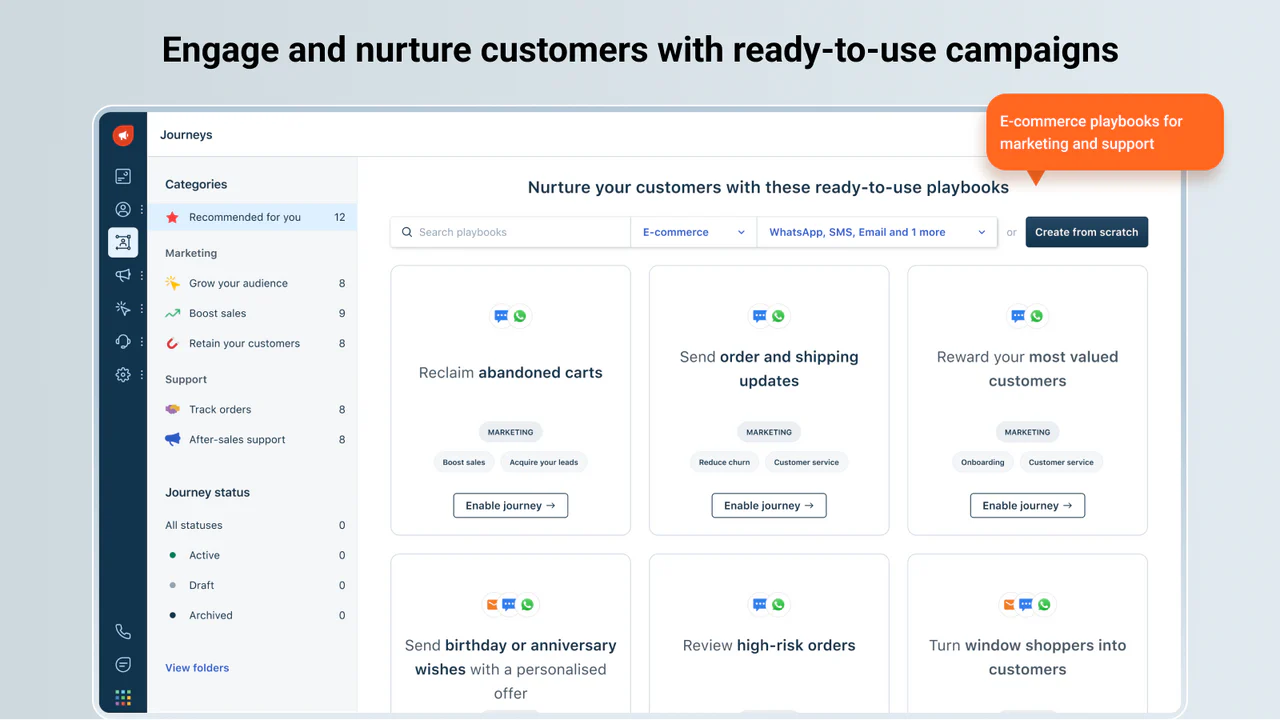
- An e-commerce business that wants abandoned cart, post-purchase, and win-back flows across multiple channels (email + WhatsApp + SMS + chat)
- Already using Freshworks (Freshsales/Freshdesk/Freshchat) and want tighter lifecycle alignment
Company context: Freshworks and the Freshmarketer origin story
Freshworks started as Freshdesk in 2010 and later rebranded to Freshworks in 2017 to reflect a broader multi-product suite.
Freshmarketer’s early identity is closely tied to conversion optimization. Freshworks acquired Zarget in 2017 and rebranded its CRO toolset under the Freshmarketer name.
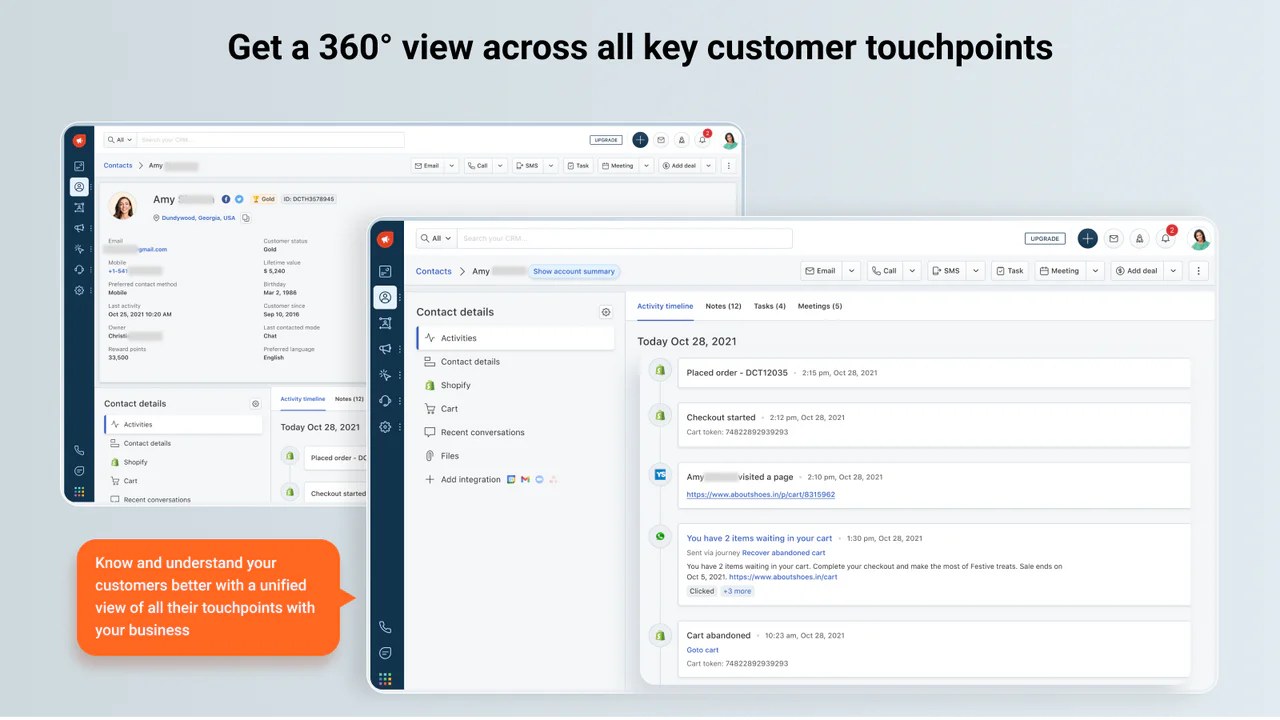
From a platform strategy standpoint, Freshworks later emphasized a unified CRM approach that brings sales (Freshsales) and marketing automation (Freshmarketer) together to support a 360-degree customer view.
High-level differentiators (what Freshmarketer does differently)
At a high level, Freshmarketer stands out in three ways:
- Multichannel by design (especially for e-commerce): email plus WhatsApp/SMS (paid), plus chat, plus social audience syncing—without forcing you into five different tools.
- A practical journey builder: oriented toward real lifecycle flows, not just blast campaigns.
- Freshworks ecosystem alignment: if sales and support already live in Freshworks, marketing fits naturally into that operating model.
Pricing and plans
Freshmarketer pricing is relatively simple at the surface—Free and a paid tier (shown as Enterprise on the pricing page, and Growth on the comparison page). But the real cost picture includes billing frequency (monthly vs annual) and add-ons (marketing contacts, CRO, messaging agents, bot sessions, Freddy AI agent sessions).
2.1 Plan comparison table (official plan-level pricing)
Key note on naming: Freshworks labels the paid tier as “Enterprise” on the Freshmarketer pricing page, while the plan comparison page labels the paid tier “Growth” at the same $15/agent/month (billed annually). In this review, those are treated as the same paid tier for evaluation.
| Plan | Price (Annual billing) | Price (Monthly billing) | Included marketing contacts | Email send limits | Channels | Automation | Support |
|---|---|---|---|---|---|---|---|
| Free | $0 | $0 | 100 | Up to 500 monthly email sends | Email + Social | Basic segmentation | 24x5 support |
| Paid tier (Enterprise / Growth) | $15 / agent / month | $18 / agent / month | 500 | Up to 20x monthly email sends | Email, Social + (WhatsApp, SMS/MMS, Chat) | Journeys + advanced segmentation + attribution | 24x5 support |
Sources: pricing page for features/limits and annual price; Freshworks price list PDF for monthly billing price.
2.2 What’s actually included (feature-level reality check)
Free plan includes (high-signal items):
- Contact and list management
- Basic segmentation
- Web tracking and forms
- Email marketing campaigns
- Social media campaigns
- Marketplace integrations
- Live chat
- 24x5 support
This is a workable sandbox for evaluating workflows and UI. But the two hard constraints are:
- 100 marketing contacts
- Up to 500 monthly email sends
That send limit is low enough that most real businesses will treat the Free plan as a trial environment, not a long-term tier.
Paid tier adds the capabilities that make Freshmarketer “marketing automation” rather than “basic email tool”:
- WhatsApp + SMS/MMS marketing
- Freddy AI features
- Transactional emails
- Advanced segmentation
- Automated customer journeys
- Landing pages
- Conversion and revenue attribution
- Advanced webhooks
- Custom reports/dashboards
- Custom roles/permissions
- 500 bot sessions and 1 messaging agent
2.3 Hidden costs and add-ons (the part many buyers miss)
Freshworks explicitly lists add-ons such as: additional marketing contacts, conversion rate optimization, dedicated IP address, Freddy AI agent session packs, and messaging agents.
The Freshworks Price List (June 13, 2025) provides concrete pricing for several Freshmarketer add-ons. Selected examples:
| Add-on | How it’s priced | Annual-billed monthly price | Monthly-billed price | Notes |
|---|---|---|---|---|
| Freddy AI Agent sessions | 1,000 session pack | $100 | $100 | Pack pricing appears consistent across billing cycles |
| Marketing contacts | 1 unit = 5,000 contacts (tiered) | $100 / unit (1–5 units) $75 / unit (6–20 units) $50 / unit (21+ units) |
$100 / unit (1–5 units) $75 / unit (6–20 units) $50 / unit (21+ units) |
Volume discounts at higher tiers |
| CRO (Conversion Rate Optimization) | Monthly unique visitors (tiered) | Starts at $219 (tier shown) | Starts at $219 (tier shown) | Tiered pricing; verify your traffic band with sales |
| Messaging Agent add-on | Per agent | $19 (Growth) / $49 (Pro) / $79 (Ent) | $23 / $59 / $95 | Relevant if you centralize chat/SMS/WhatsApp handling |
Also: Freshworks defines bot sessions as unique interactions between an end-user and a bot within a 24-hour window.
2.4 Value-for-money analysis (how to think about ROI)
Freshmarketer’s value depends heavily on whether you can consolidate tooling:
- If you’re paying separately for email marketing + SMS/WhatsApp tooling + landing pages + basic automation, the paid tier can become cost-effective quickly—especially if you actually use journeys and segmentation rather than just blasts.
- If you primarily want best-in-class e-commerce segmentation and deliverability tuning (Klaviyo-style), you may pay more elsewhere—but you may get deeper specialization.
- If your website traffic is high and you need CRO at scale, CRO add-on tiers can be a budget surprise—plan for it early.
Who each tier fits best:
- Free: solo founders, tiny shops, or teams evaluating Freshworks CRM + marketing alignment.
- Paid tier: SMB/mid-market teams that want lifecycle automation + multichannel messaging without the operational complexity of heavier platforms.
Setup and onboarding experience
3.1 Getting started: trial mechanics
Freshworks offers a 21-day free trial with access to the “fully-loaded CRM,” after which you choose a plan or your account is suspended.
That encourages a structured evaluation approach:
- Week 1: instrument tracking + import contacts
- Week 2: build 2–3 real journeys (welcome, abandoned cart/browse, post-purchase)
- Week 3: validate reporting + attribution + multichannel sending
3.2 Data model concept: “marketing contacts”
Freshmarketer distinguishes “marketing contacts” from your broader contact database: marketing contacts are those targeted in campaigns (email, WhatsApp, SMS). Free includes 100; paid includes 500, with the option to purchase more via add-on.
Operational implication: keep your full database (including dormant/never-market), and promote only the right cohort into “marketing contacts.” This nudges better hygiene and intentional reactivation logic.
3.3 Migration and onboarding help
Freshworks positions Freshmarketer as having “frictionless migration” with a dedicated onboarding team at no cost.
In practice, your onboarding effort will be dominated by:
- Event tracking (what you track drives what you can segment and automate)
- Template system (email + WhatsApp templates)
- Channel compliance (consent, deliverability, WhatsApp message template approvals)
3.4 A realistic time-to-first-campaign estimate
Assuming you already have a clean list of contacts and at least one lead-capture form or Shopify integration in mind, a realistic schedule looks like:
- Same day: create a one-time email campaign draft
- 1–3 days: set up tracking + segments + first automation journey
- 1–2 weeks: multichannel flows + reporting discipline + iteration
The main hurdles usually aren’t UI; they’re compliance and data readiness (domain/IP warmup, consent, WhatsApp template approvals). Freshworks’ guidance calls out warmup as part of campaign readiness.
UI and ease of use
Freshmarketer’s UI philosophy is consistent with the broader Freshworks suite: clear navigation, modular sections, and sensible defaults. Multiple review sources describe it as modern and easy to navigate.
4.1 What you’ll notice quickly
- Campaign workflows are structured: email creation is broken into steps (Configure → Style → Design → Review), including sender verification and personalization fields.
- Journeys are treated as first-class objects: lifecycle thinking is pushed early, not bolted on later.
- Segmentation is accessible without being simplistic: segment by fields, list membership, activity, page visits, and journey status.
4.2 Learning curve: new vs experienced users
- New users: can get productive quickly using templates and guided campaign creation flows.
- Experienced lifecycle marketers: will spend most time in segmentation logic, journey orchestration, attribution/reporting, and channel ops (WhatsApp templates, compliance, STO strategy).
4.3 Customization (quiet “enterprise” features)
On the paid tier, Freshmarketer includes custom roles/permissions plus custom dashboards/reports. This matters once you have marketers building assets, managers reviewing performance, and support/sales teams consuming lifecycle context.
Core features breakdown
To keep this review practical, Freshmarketer is evaluated as a toolkit for running lifecycle marketing across the jobs teams actually need to do:
- Capture leads
- Organize contacts + segment
- Execute campaigns
- Automate journeys
- Expand into multichannel messaging
- Measure what worked
- Improve conversion on-site
5.1 Contact management, lists, and segmentation
Segmentation supports multiple “event types” for segment definitions, including:
- Contact fields (default + custom fields)
- Journey events (entered/exited)
- Lists (includes/excludes)
- Email activity
- Page visit
This is baseline for real lifecycle marketing. Without behavioral segments, automation becomes guesswork.
Practical example segment: “VIP buyers at churn risk”
Spent > $300 lifetime
No purchase in last 60 days
Opened at least 1 email in last 30 days
Strengths
- Flexible segmentation categories (fields + behavior + journey status)
- Designed to power journeys and campaigns, not just static lists
Weaknesses / watch-outs
- If you don’t instrument events well (Shopify/WooCommerce events, site behavior), segments become “thin” and automation underperforms.
5.2 Email marketing campaigns (one-time, journey, and transactional)
Freshmarketer explicitly distinguishes three campaign types:
- One-time emails (announcements, time-bound offers)
- Journey emails (triggered sequences inside customer journeys)
- API-triggered transactional emails (password resets, confirmations, reminders, statements)
That separation reflects how mature teams operate: marketing campaigns and transactional messaging have different goals, compliance constraints, and reporting expectations.
Practical pattern: “Launch email + fallback resend”
- Send launch email to a segment
- After 48 hours, follow up to non-openers with a different subject line/creative
Freshmarketer includes A/B testing capabilities and campaign metrics to support this iteration loop.
Deliverability note: domain/IP warmup is not optional if you’re scaling sends. Warmup discipline is often the difference between “automation works” and “everything lands in Promotions/Spam.”
5.3 Customer journeys (automation)
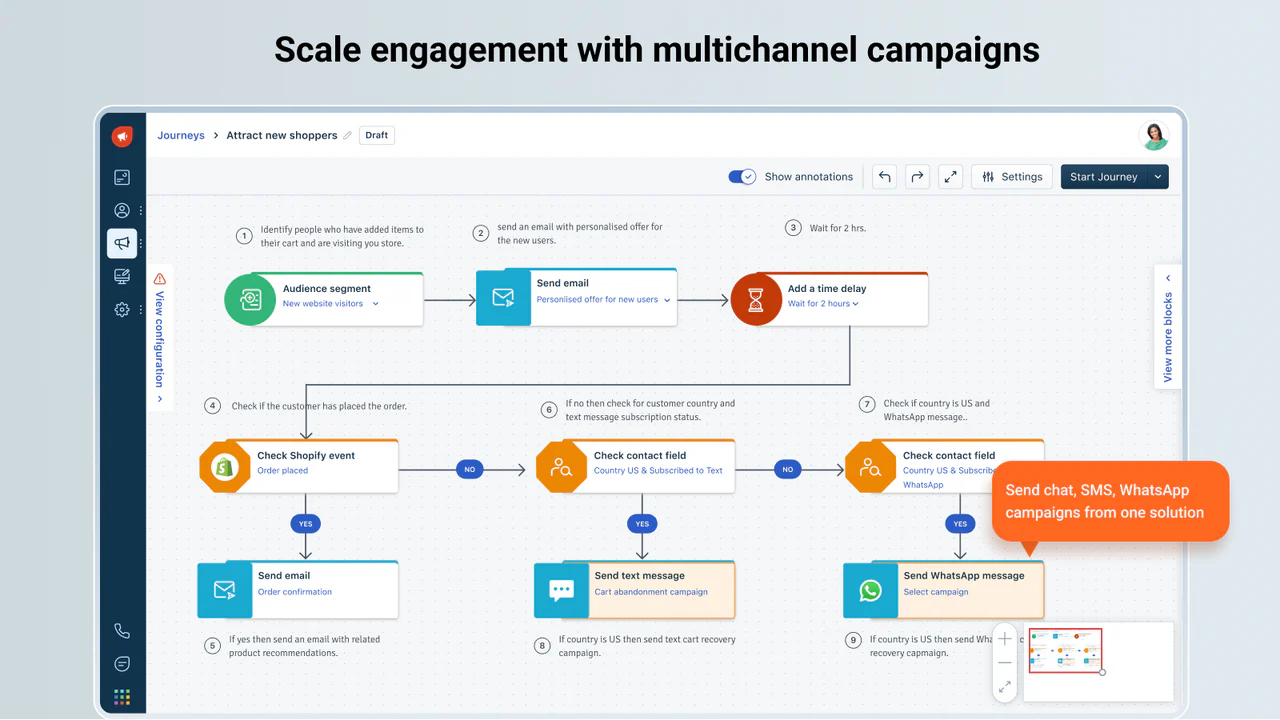
Freshmarketer’s paid tier includes automated customer journeys and positions them as a core differentiator. Journeys are where Freshmarketer becomes a lifecycle system rather than “email tool plus extras.”
Multichannel abandoned cart flow (realistic example):
- Trigger: cart abandoned (Shopify event)
- Wait: 1 hour
- Action: send email reminder + product image
- Condition: if no purchase after 24 hours → send WhatsApp reminder (template-approved)
- Condition: if still no purchase → send SMS with limited-time incentive
- Exit: purchase completed or unsubscribed
Strengths
- Journeys align with standard lifecycle patterns (welcome, retention, reminders)
- Multichannel journey actions reduce the need for separate SMS/WhatsApp automation stacks
Weaknesses / watch-outs
- WhatsApp requires operational steps (business verification, enablement, template approvals) and strict content rules; promotional templates may be rejected.
5.4 Landing pages, forms, and web tracking
Freshmarketer positions lead capture as a central capability (landing pages, web forms, chatbots). This matters because lead capture is the input layer that feeds segmentation and journeys. If it’s disconnected, you typically get broken attribution, delayed follow-up, duplicated contacts, and messy consent records.
On the paid tier, landing pages are explicitly included.
5.5 Conversational marketing (chat + bot sessions)
Freshmarketer includes live chat on Free and paid tiers; paid includes bot sessions plus a messaging agent.
Freshworks defines a bot session as a unique interaction between an end-user and a bot within a 24-hour period. If you plan to use chatbots for lead capture (“drop your email for a discount”), bot session accounting becomes part of your cost model.
5.6 Conversion Rate Optimization (CRO): heatmaps, session replay, A/B testing
Freshmarketer’s feature positioning includes CRO tools such as A/B testing, heatmaps, and session replay.
Practical CRO loop:
- Use heatmaps to identify where users stop interacting
- Use session replay to understand why (confusing copy, broken CTA, form errors)
- Run an A/B test with an alternative layout or message
- Feed winning variants into landing page templates and re-run campaigns
Watch-out: some user reviews mention CRO instrumentation/reliability issues (e.g., CRO section not responding after installing the snippet) and support friction in that context. If CRO is a key buying reason, validate instrumentation early in the trial.
Advanced features and integrations
6.1 Freddy AI: Send Time Optimization (STO) and more
Freshmarketer’s paid tier includes Freddy AI and explicitly lists Send Time Optimisation (STO) by Freddy AI. STO is positioned as a way to personalize send time by reader, accounting for factors such as timezone, country, and industry, to improve opens and engagement.
STO supports two scheduling modes:
- Best day and time: over a week (useful for campaigns that can run across a date range)
- Best time (on specified day): for date-specific campaigns (e.g., holiday messages)
Documentation notes STO availability may be in beta and may require enablement through a customer success manager or support.
Freshmarketer6.2 Attribution and reporting
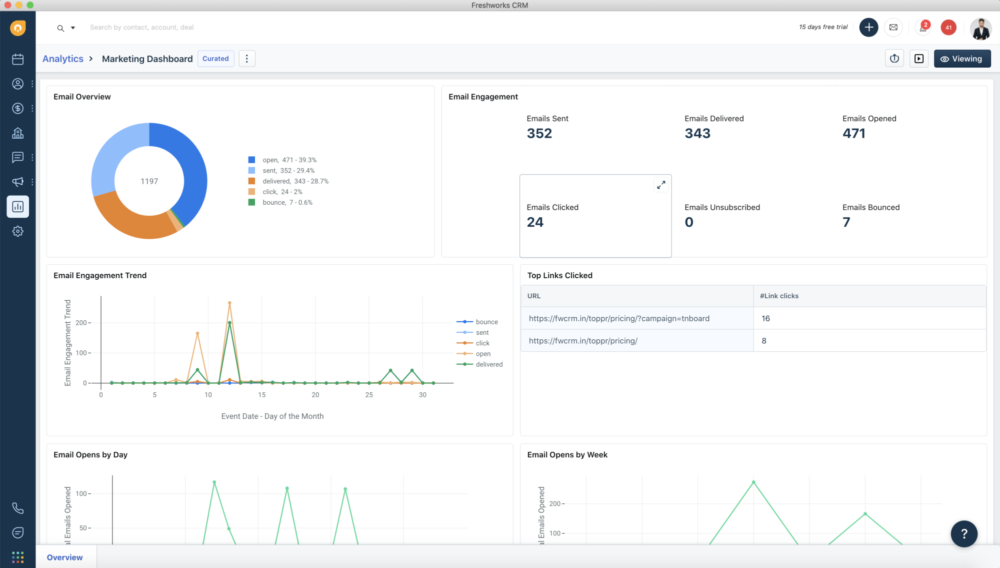
Freshmarketer’s paid tier includes conversion & revenue attribution plus custom reports and dashboards. This is essential if you want to defend spend internally. Automation without measurement becomes activity, not performance.
6.3 Integrations ecosystem: marketplace + key connectors
Freshworks emphasizes marketplace integrations and notes “100+ marketplace apps” on the pricing page feature list.
In practice, Freshmarketer’s integration story has three layers:
- E-commerce: Shopify and WooCommerce
- Data routing/CDP: Segment
- Automation glue: Zapier
- Freshworks suite: Freshsales and broader CRM alignment
6.4 Top integrations table (practical shortlist)
| Integration | Best for | Why it matters |
|---|---|---|
| Shopify | E-commerce automation | Abandoned cart + post-purchase flows; segmentation using order data |
| WooCommerce | E-commerce automation | Order-driven journeys and lifecycle automation |
| Segment | Data routing + trait syncing | Improves identity and event consistency across tools |
| Zapier | No-code automation | Connect Freshmarketer to many other services via triggers/actions |
| Freshsales | Sales + marketing alignment | Unified view of activities across sales/marketing touchpoints |
| WhatsApp Business (via Freshworks) | Conversational messaging | Template-controlled outbound + journey actions |
| Custom Audiences (Facebook/Instagram) | Paid social targeting | Sync audiences based on segmentation (paid tier) |
| Webhooks (advanced) | Engineering-led pipelines | Push events to downstream tools / custom stacks |
| Transactional email APIs | Product-led growth + system emails | Trigger confirmations, reminders, statements via backend APIs |
| Live chat + bot sessions | Lead capture and support | Convert browsing visitors and capture intent |
Performance, reliability, and security
7.1 Reliability and scale considerations
Freshmarketer is part of the broader Freshworks cloud platform. While this review does not present independent load testing, practical scale evaluation typically comes down to:
- Whether journeys and segments stay manageable as marketing contact counts grow
- Whether analytics supports weekly/monthly performance reviews
- Whether governance features exist (roles/permissions, dashboards, admin controls)
Freshmarketer’s paid tier includes custom roles/permissions and reporting—typical requirements as teams scale.
7.2 Security and compliance posture (what to validate)
Freshworks maintains formal security and privacy resources (security pages and trust materials). If you’re in a regulated industry or enterprise procurement path, validate the controls you require—do not assume.
Practical security checklist:
- Encryption in transit and at rest
- Identity controls (SSO/SAML, 2FA)
- Role-based access control
- Auditability and administrative controls
- GDPR readiness (consent and deletion workflows, DPAs)
7.3 Channel compliance as “security adjacent”
Two areas function like security controls even though they’re marketing ops:
- Email deliverability warmup guidance (domain/IP warmup)
- WhatsApp template approval + restrictions (updates/alerts/transactional messaging; promotional content may be rejected)
These reduce the risk of account penalties and protect sender reputation.
Customer support and learning resources
8.1 Support coverage
Freshmarketer plans list 24x5 support, including on the Free plan. Freshworks also provides a support contact pathway ([email protected]) on the pricing page.
8.2 Documentation quality (the operational advantage)
Freshmarketer documentation includes step-by-step operational articles for:
- Email campaigns and types (one-time vs journeys vs transactional APIs)
- Send-time optimization logic and usage (Freddy STO)
- Segmentation event types and creation patterns
- WhatsApp connection and template management
- Zapier integration guidance
- WooCommerce integration steps
That breadth matters: platforms often fail not because they lack features, but because they lack operational guidance.
8.3 A realistic view: support quality can vary
User reviews include both positive impressions and complaints about responsiveness in specific contexts (notably CRO). If CRO matters, make support evaluation part of your trial: open a ticket about instrumentation and see how it resolves.
Pros and cons
Pros (what Freshmarketer does well)
- Simple plan structure that’s easy to understand and trial quickly
- Lifecycle orientation: journeys + segmentation are central, not secondary
- Multichannel capabilities on paid tier (WhatsApp, SMS/MMS, chat, social audiences)
- Clear documentation for key workflows (campaign types, STO, WhatsApp templates, segmentation)
- E-commerce-friendly integrations (Shopify, WooCommerce) and connectors (Segment, Zapier)
- CRO toolkit exists (A/B testing, heatmaps, session replay) for teams that want on-site behavior insight in the same ecosystem
Cons (where you should be cautious)
- Free tier is constrained (100 marketing contacts + low monthly sends), so you outgrow it quickly
- WhatsApp operational overhead (verification, templates, approvals, restrictions) can slow time-to-value if you expect “instant messaging blasts”
- CRO reliability concerns appear in some user reviews; validate instrumentation early
- Add-on costs can surprise you as you scale contacts, bot sessions, messaging agents, and CRO traffic tiers
- Some competitors offer deeper e-commerce segmentation/deliverability tooling (especially Klaviyo), depending on your maturity
User review themes and ratings summary
10.1 Aggregate ratings (directional, not definitive)
- Capterra: 4.4/5 (25 reviews)
- GetApp: value-for-money rating is commonly reported around low-4 range in UI summaries
10.2 Common praise themes
- “Easy to use” and generally fast to navigate
- Helps simplify email marketing campaigns
- Includes additional tools like A/B testing and heatmaps for understanding visitor engagement
10.3 Common complaint themes
- Free option is limited
- Pricing can feel expensive as needs grow (often due to add-ons)
- Specific complaints about CRO reliability and difficulty reaching support in that context
How to use review data: if you’re buying Freshmarketer for email + journeys + multichannel, sentiment tends to align with “usable and fast to operate.” If you’re buying primarily as a CRO replacement, do deeper technical validation during trial.
Alternatives and comparisons
Freshmarketer competes across two overlapping markets:
- Email + marketing automation platforms (HubSpot, ActiveCampaign, Brevo)
- E-commerce lifecycle messaging platforms (Klaviyo, Omnisend)
The fastest route to clarity is to decide what you’re optimizing for:
- Depth: best-in-class segmentation, deliverability, ecosystem
- Speed: fast setup, simple operations
- Consolidation: marketing + chat + WhatsApp + basic CRO in one stack
11.1 Top competitors shortlist
- HubSpot Marketing Hub
- ActiveCampaign
- Klaviyo
- Brevo (Sendinblue)
- Omnisend
11.2 Side-by-side comparison table (high-signal criteria)
| Platform | Best for | Pricing signal | Strength vs Freshmarketer | When Freshmarketer wins |
|---|---|---|---|---|
| Freshmarketer | Multichannel lifecycle in Freshworks | $15/mo annual; $18/mo monthly (paid tier) | Freshworks alignment + multichannel journeys | When you want consolidation + simplicity |
| HubSpot Marketing Hub | Inbound + CRM-heavy marketing ops | Cost curve increases significantly at higher tiers | Deep inbound/CRM ecosystem | When HubSpot is too heavy/expensive |
| ActiveCampaign | Automation-first email marketing | Ranges vary by plan and contact count | Automation depth and broad integrations | When you want Freshworks-native multichannel + simpler ops |
| Klaviyo | E-commerce segmentation + email/SMS | Email+SMS starts around $20/month (varies) | Best-in-class e-commerce segmentation | When you want Freshworks alignment + WhatsApp journey support |
| Brevo | Budget-friendly email + transactional | Low entry tiers; pricing varies by volume/features | Entry price + transactional tooling | When you want journeys + WhatsApp + Freshworks ecosystem |
| Omnisend | E-commerce email/SMS automation | Often priced by contact/message volume | E-commerce prebuilt workflows | When you need broader Freshworks CRM alignment |
11.3 A decision rule that actually works
- Choose Klaviyo if segmentation depth and e-commerce personalization are top priorities.
- Choose HubSpot if you want a broader inbound engine and can justify the cost curve.
- Choose ActiveCampaign if you want automation depth and can support marketing ops complexity.
- Choose Freshmarketer if you want multichannel lifecycle campaigns that are straightforward to run and you value Freshworks ecosystem alignment.
Who is Freshmarketer best for (and who should avoid it)
Best for
- E-commerce teams building lifecycle automation: especially if you want email + WhatsApp + SMS + chat around cart abandonment, post-purchase, win-back.
- SMB/mid-market teams that value speed: if you want “3 journeys running” without a major implementation project.
- Freshworks-first organizations: reduces silos and supports shared customer lifecycle context.
- Teams that want basic CRO signals connected to campaigns: if your CRO needs are “find friction + run a handful of tests,” it can be attractive—validate early.
Not ideal for
- Enterprise-grade orchestration across many business units: you may outgrow the simplicity and need heavier governance.
- Deep CRO analytics at scale as the primary need: specialist CRO platforms may offer deeper reporting and fewer reported instrumentation issues.
- Teams seeking a meaningful long-term free tier: contact/send constraints are restrictive for ongoing programs.
Final verdict and recommendations
Overall rating: 8.4/10
Freshmarketer’s main value is running lifecycle marketing as a system (segments → journeys → multichannel execution → measurement), with Freshworks-native alignment as the strategic advantage for teams already in that ecosystem.
Score breakdown (practical view)
| Category | Score | Why |
|---|---|---|
| Features | 8.6/10 | Strong coverage across journeys, segmentation, multichannel, and reporting |
| Ease of use | 8.7/10 | Structured workflows and docs reduce ramp time |
| Integrations | 8.1/10 | Shopify/WooCommerce + Segment + Zapier cover most SMB/mid-market needs |
| Value for money | 8.2/10 | Base tier is straightforward; add-ons can increase spend materially |
| Support & resources | 7.9/10 | 24x5 support and strong docs; mixed feedback in specific areas (CRO) |
| Security posture | 8.2/10 | Formal trust/security resources exist; validate against your requirements |
Key takeaways
- Freshmarketer’s value is operational: lifecycle marketing as a repeatable system, not “email plus extras.”
- WhatsApp messaging is powerful, but operationally constrained (templates, approvals, policy restrictions).
- Treat add-ons (contacts, CRO, bot sessions, messaging agents) as part of your real budget, not edge cases.
My recommendation (what to validate in the 21-day trial)
If you are an SMB/mid-market team (especially e-commerce) that wants a pragmatic, Freshworks-aligned marketing automation tool with multichannel capabilities, Freshmarketer is a strong shortlist candidate. Start with the trial and validate three things quickly:
- Your data model: contacts, events, consent, and “marketing contacts” hygiene
- One complete lifecycle journey: end-to-end (trigger → segmentation → messaging → exit conditions)
- CRO instrumentation: if CRO is a key buying reason, test snippet install and reporting early
Freshmarketer
Freshmarketer is a Conversion Rate Optimization (CRO) tool. In Freshmarketer visitors are counted based on the information stored in cookies. Until the cookie expires, Freshmarketer doesn’t count the returning visitors. Freshmarketer creates cookies for every new and unique visitors to record their information and to spot out returning visitors from the already existing information. Freshmarketer collects data instantly and provides variation(s) based data as and when visitors visit the website. Integrating Freshmarketer with Universal Analytics (UA) allows users to view web metrics tracked by UA for each variation in an experiment (running on Freshmarketer), view reports in UA by filtering…
• Hesitation time report: Identify form fields where visitors are hesitant to fill in
• Freshmarketer’s form refill report helps to identify the erroneous and ambiguous form fields
• Net Promoter Score
• Field level analytics: Get conversion critical information of every form field by just providing URL of the form page
• Session replay: Provide detailed information based on customer interactions
• WYSIWYG visual editor: Make changes to your page with a wide array of editing options to choose from
• Garden - $99 / month
• Net Promoter Score
• Field level analytics: Get conversion critical information of every form field by just providing URL of the form page
• Session replay: Provide detailed information based on customer interactions
• Solve onboarding challenges: Identify interest drop-offs, thus reducing churn
• Identify bad UX designs: Detect the areas of the website that exerts a cognitive load on visitors and eliminate them
• See what visitors see: Track more than just conversions and bounce rates
FAQ (15 common questions)
1) Is Freshmarketer free?
Yes. There is a Free plan with 100 marketing contacts and up to 500 monthly email sends.
2) How much does Freshmarketer cost?
The paid tier is listed at $15/month (billed annually) on the pricing page, and the Freshworks price list shows $18/month for monthly billing.
3) What are “marketing contacts”?
Marketing contacts are the contacts you target in campaigns (email, WhatsApp, SMS). Free includes 100; paid includes 500, with add-ons available for more.
4) Does Freshmarketer support WhatsApp campaigns?
Yes, on paid tiers, and Freshworks provides documentation for connecting WhatsApp, creating templates, and using WhatsApp campaigns inside journeys.
5) Can I send promotional WhatsApp messages?
WhatsApp templates must be approved and WhatsApp may reject promotional templates. Documentation emphasizes WhatsApp for updates/alerts/transactional-style messaging and policy-controlled templates.
6) Does Freshmarketer support transactional emails?
Yes—Freshworks documentation describes API-triggered transactional emails (e.g., password resets, invoices, confirmations).
7) Does Freshmarketer have A/B testing, heatmaps, and session replay?
Freshmarketer’s feature positioning includes conversion optimization tools including A/B testing, heatmaps, and session replay.
8) Is there built-in send-time optimization?
Yes. Freddy Send Time Optimization can schedule personalized send times and supports “best time” or “best day and time” modes (noting beta/enablement language in documentation).
9) Does Freshmarketer integrate with Shopify?
Yes—Freshworks provides Shopify integration resources and a Shopify app listing describing multichannel automation and abandoned cart recovery.
10) Does Freshmarketer integrate with WooCommerce?
Yes—Freshworks documentation describes WooCommerce integration setup from the marketplace apps section.
11) Can I integrate Freshmarketer with Segment?
Yes—Freshworks provides documentation for Segment integration and syncing contacts/traits.
12) Can I connect Freshmarketer to other tools without coding?
Yes—Freshworks documentation describes using Zapier triggers and actions to connect Freshmarketer to other services.
13) What support do you get?
Freshmarketer includes 24x5 support, including on the Free plan, and Freshworks lists a support contact email on the pricing page.
14) Is Freshmarketer good for small teams?
Yes—especially if you want quick setup and manageable operations. But the Free plan limits (contacts/sends) mean many teams upgrade quickly if they’re running ongoing programs.
15) When should I choose Klaviyo or HubSpot instead?
Choose Klaviyo if you want deep e-commerce segmentation and specialization. Choose HubSpot if you want a broader inbound marketing system and can support the cost curve at higher tiers.








By clicking Sign In with Social Media, you agree to let PAT RESEARCH store, use and/or disclose your Social Media profile and email address in accordance with the PAT RESEARCH Privacy Policy and agree to the Terms of Use.