
Freshdesk Review: Pricing, Features, AI, Pros & Cons
If you’ve ever tried to run customer support out of a shared inbox, you already know the failure mode:
- One customer emails twice, and you answer the older thread.
- Two agents reply at the same time with different answers.
- “Where are we on this?” turns into Slack archaeology.
- Reporting becomes a debate instead of a dashboard.
That’s the real problem Freshdesk aims to solve: centralize customer conversations into a structured ticketing system, then add the workflows (automation, SLAs, routing, self-service, analytics, and now AI) that help a support team scale past “hero support” and into something predictable.
Freshdesk is Freshworks’ customer support/helpdesk platform designed for teams that need a practical, configurable support stack without the overhead and admin burden that can come with heavyweight enterprise suites.
FreshdeskOverall verdict: Freshdesk is at its best when you want a modern, streamlined helpdesk with strong automation, solid omnichannel foundations, and a large integrations ecosystem—and you’re willing to accept that deep customization and advanced AI economics may require careful planning.
Freshdesk
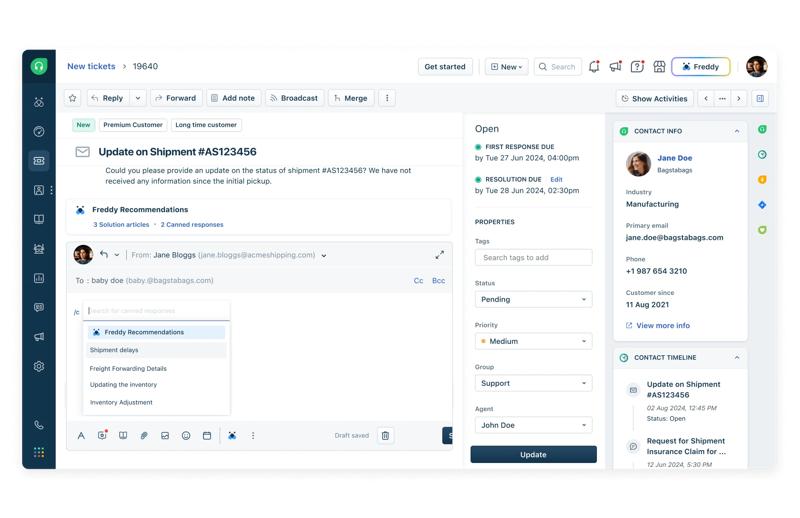
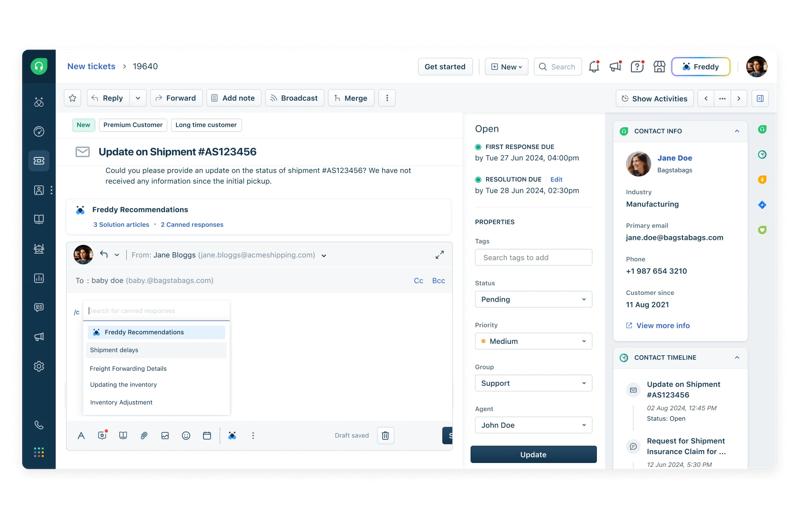
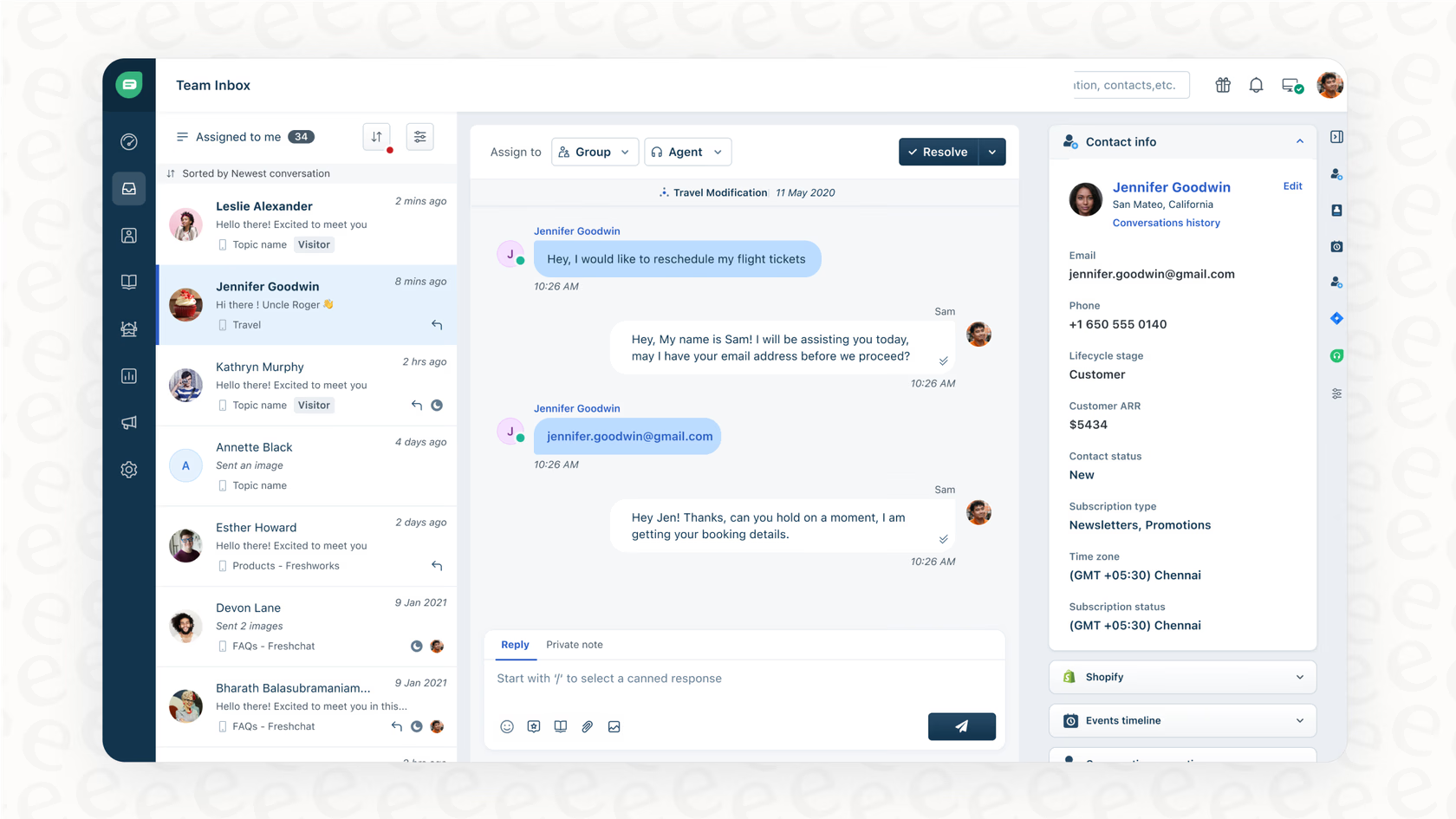
Freshdesk is a support suite that has collaborative-focused features like consolidated correspondence, team huddle, and team inbox. Ticket Information, properties and correspondence from multiple channels is visible in just one screen laid out in a simple, intuitive interface. The Team Inbox gives a view of the ticketing queue along with information on who is assigned to the ticket, ticket topic and priority level. Service level agreements per priority can be customized is automatically applied by Freshdesk to received tickets. Freshdesk also has a mobile app for Android and Iphone allowing the support team to respond to tickets anywhere. Freshdesk supports…
• Powerful Ticketing
• Multichannel Support
• Productivity & Engagement
• Self-Service Portal
• Global Customer Support
• Secure Helpdesk
• Reporting and Analytics
• Apps
Billed Monthly
• Sprout – Free (3agents, 100 assets)
• Blossom - $25/agent/month
• Garden - $44/agent/month
• Estate - $59/agent/month
• Forest- $99/agent/month
Billed Yearly
• Sprout – Free (3agents, 100 assets)
• Blossom - $19/agent/month
• Garden - $35/agent/month
• Estate - $49/agent/month
• Forest- $89/agent/month
• Powerful Ticketing
• Multichannel Support
• Productivity & Engagement
•Collaborate with your team using Freshdesk’s shared inbox and resolve issues smoothly
•Set, manage, and meet customer expectations by setting up service level agreements (SLAs) for support
•Manage multiple support email address in a single place
Here’s what this review covers
- Overview and company background
- Pricing and plans (with tables and “hidden costs”)
- Setup and onboarding experience
- UI and ease of use (plus screenshot guidance)
- Core feature breakdown (ticketing → automation → self-service → reporting)
- Advanced features, AI, and integrations (with top apps table)
- Performance, reliability, and security
- Customer support and learning resources
- Pros and cons
- User review trends and ratings
- Alternatives and comparisons
- Who it’s best for (and who should avoid it)
- Final verdict
- FAQ (15 questions)
Overview and company background
Freshworks in a nutshell
Freshdesk is part of the Freshworks product portfolio—software focused on customer service and service management. Freshworks positions itself as enterprise-grade but designed to be simpler to deploy and operate than many legacy suites.
Company timeline and milestones
- Freshworks was initially incorporated in August 2010 as FreshDesk Inc.
- In June 2017, the company rebranded/changed its name to Freshworks Inc.
- Freshworks has continued expanding beyond the original helpdesk product into a broader suite (customer service, CRM, ITSM, etc.).
On acquisitions and AI-related expansion:
- Freshworks acquired AnsweriQ (AI/ML-focused customer service tooling) as part of building out its AI capabilities (Freddy AI ecosystem).
- More recently, Freshworks has been active in acquisitions tied to service operations, including a deal to acquire FireHydrant and a prior acquisition of Device42 (not Freshdesk-specific, but relevant to Freshworks’ platform expansion).
Target audience and market positioning
Freshdesk is typically a fit for:
- Small businesses moving off shared inboxes
- Mid-market support teams that need routing, SLAs, self-service, and reporting
- Multi-team support organizations (support + success + operations) that need permissions, auditability, and standardized workflows
- Teams that want to scale with automation and AI assistance, without committing to a full enterprise service suite on day one
High-level differentiators
Freshdesk’s differentiators tend to come from a few practical areas:
- Fast time-to-value: Freshdesk emphasizes quick setup and day-one usefulness (ticketing + portal + reports).
- Automation depth without heavy admin overhead: Mature automation concepts (creation rules, event rules, time rules) plus strong “routing + SLA” foundations.
- Large integrations marketplace: Freshdesk Marketplace highlights popular apps (Slack, Teams, Google Calendar, etc.) and a broad ecosystem.
- A clear AI packaging story: Freddy AI Agent, Copilot, and Insights are positioned as distinct layers (self-service automation, agent assist, leadership insights).
Pricing and plans
Freshdesk’s pricing is simple at first glance—then becomes more nuanced once you factor in AI usage, add-ons, and “suite vs. product” decisions.
Freshdesk plans at a glance (official)
Freshdesk publishes three primary paid tiers:
- Growth: $15/agent/month billed annually
- Pro: $49/agent/month billed annually
- Enterprise: $79/agent/month billed annually
Freshdesk also offers:
- A 14-day free trial that starts you on the Enterprise plan.
- A “start free” free program: $0 for 1–2 agents for 6 months, no credit card required, with “essential helpdesk features such as ticketing, a knowledge base, and pre-built reports.”
Important nuance: Freshworks has adjusted “free plan/program” positioning over time. Public discussion indicates the long-standing “free forever” concept has changed for some customers. Treat “free” as a current offer with eligibility/term conditions, not a permanent guarantee.
Pricing comparison table
| Plan | Price (annual billing) | Positioning (Freshworks description) | Best fit |
|---|---|---|---|
| Free program | $0 (1–2 agents, 6 months) | Essential ticketing + KB + pre-built reports | Very small teams validating process |
| Growth | $15/agent/mo | Ticketing, portal, reports, “and more” | Small support teams getting structured |
| Pro | $49/agent/mo | Customizable portals, custom objects, advanced ticketing, custom reporting, routing mechanisms | Scaling teams needing advanced workflow + analytics |
| Enterprise | $79/agent/mo | Audit logs, approval workflows, skills-based assignment, additional security features | Regulated teams, complex ops, stronger governance |
Monthly billing: Freshworks shows a monthly vs. annual toggle on the pricing page; monthly pricing is typically higher than annual, but the exact monthly numbers can change by region and promotion—verify on the live pricing page for your locale.
AI pricing and add-ons (where “hidden costs” often live)
Freshdesk’s AI is not “one feature.” It’s packaged as:
- Freddy AI Agent (self-service/agentic automation)
- Freddy AI Copilot (agent assistance)
- Freddy AI Insights (analytics/leader insights)
Key cost mechanics shown on the pricing FAQ:
- Freddy AI Agent sessions:
- “First 500 sessions included” (for Pro and Enterprise plans as a one-time allowance per account), then $49 per 100 sessions.
- For email AI agents, “every AI agent response is counted as one session.”
- Freddy AI Copilot:
- Copilot GA pricing cited publicly as $29/agent/month billed annually (as described in Freshworks’ own Copilot announcement).
- Copilot does not need to be purchased for all agents—it can be assigned to selected agents only.
What this means in practice: If you’re budgeting Freshdesk for the long term, you should estimate:
- Your baseline agent licensing (Growth/Pro/Enterprise).
- Your AI add-ons (Copilot seats + AI Agent session packs).
- Any additional channel or suite costs (see next section).
Other hidden costs to watch
- Telephony/contact center needs: Freshworks has separate products/status pages and packaging for contact center offerings.
- Omnichannel suite packaging: “Freshdesk Omni” is frequently marketed alongside Freshdesk. Make sure you’re buying the product that matches your channel strategy.
- Connector app tasks: Freshworks references connector apps and “tasks consumed” when using some pre-built connectors—important if you rely heavily on sync/automation.
Value-for-money analysis (who each tier suits best)
A useful way to think about Freshdesk value is to map what breaks first as you scale:
Free program → Growth: when structure becomes non-negotiable
Move up when you need:
- Consistent assignment rules
- Visibility into ownership and backlog
- A customer portal that reduces repetitive inbound tickets
Growth is typically where Freshdesk starts feeling like “real ticketing,” not “shared inbox with labels.”
Growth → Pro: when reporting, routing, and service design matter
Pro is the jump you make when you want:
- Advanced routing mechanisms
- Custom reporting (beyond basic dashboards)
- More control over how your portal and customer experience look and feel
Pro → Enterprise: when governance and risk enter the room
Enterprise is for environments where you must answer questions like:
- “Who changed this workflow and when?” (audit logs)
- “Do we need approvals for changes or processes?” (approval workflows)
- “Can we ensure tickets route based on skills?” (skill-based assignment)
Setup and onboarding experience
Freshdesk is marketed as “quick to set up,” but a good setup is less about speed and more about not painting yourself into a workflow corner.
What setup looks like in the real world
Most teams follow a sequence like this:
- Create the account and define your helpdesk domain
You’ll choose a subdomain (or set up a vanity URL later). - Connect your channels
Email forwarding or mailbox integrations are usually first. - Define ticket structure
Ticket fields, categories, priority scheme, statuses, and tags. - Set up groups and roles
Organize who handles what (Billing, Tech Support, Renewals, etc.). - Create your initial automation
Routing rules, notifications, and SLA escalations. - Publish the portal + knowledge base
Reduce repetitive inbound volume quickly.
Freshworks’ own support portal breaks onboarding into manageable categories like getting started, channel setup, workflows, portal customization, integrations, and reporting.
FreshdeskOnboarding help and resources
Freshworks provides:
- A dedicated Freshdesk Support knowledge base with onboarding and configuration sections.
- Freshworks University training and certification tracks (admin and agent fundamentals).
- Professional Services (onboarding packages and guided deployments) if you want a structured go-live.
Common onboarding hurdles (and how to avoid them)
Here are three setup mistakes I see repeatedly in helpdesk deployments—and how to avoid them in Freshdesk:
- Creating ticket fields before you define your reporting questions
If you don’t know how you want to segment work (“Bug vs. Incident vs. How-to”), you’ll redesign fields later—and that’s disruptive.
Fix: start with a 1-page “support taxonomy” doc before building forms. - Assigning agents before defining groups
Freshdesk documentation explicitly recommends assigning Group first, then Agent when using assignment logic.
Fix: keep routing at the group level early; let agents pull from group queues. - Launching a portal without KB governance
Publishing 40 articles is easy; keeping them correct is the hard part.
Fix: assign article owners and review cadence from day one.
User interface and ease of use
Freshdesk’s UX generally aims for: low-friction ticket handling + quick access to context + obvious workflow controls.
What the agent workspace typically looks like
Based on published visuals and UI patterns:
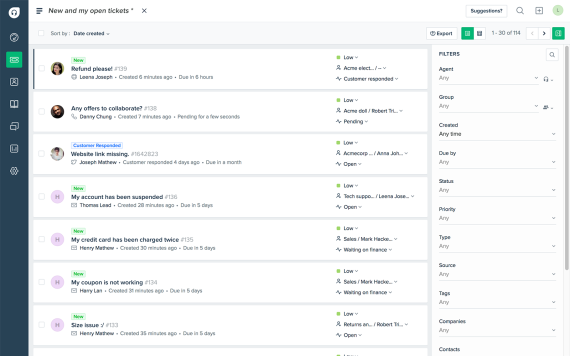
- A left-side navigation rail (tickets, contacts, analytics, admin modules).
- A ticket list view that supports filtering/sorting by status, priority, group, SLA breach risk, etc.
- A ticket detail view with conversation thread, internal notes, customer info, and metadata fields.
Freshworks also highlights “shared inbox,” “threads and tasks,” and multilingual conversations as core navigation-level concepts—suggesting these are not bolt-ons but part of the day-to-day flow.
Dashboards and navigation
Freshdesk dashboards are designed to answer the operational questions support leaders ask daily:
- How many tickets are open/unassigned/overdue?
- Where are we breaching SLAs?
- What’s happening with CSAT?
- How is workload distributed across agents and channels?
Learning curve
Freshdesk is generally rated as quick to adopt relative to enterprise-first platforms. G2 reviewers explicitly cite “easy setup” as a valued aspect, and Freshdesk is positioned as “easy to set up” in multiple sources.
That said, the learning curve tends to show up in:
- Automation design (because you can do a lot, but you need rules discipline)
- Custom reporting (powerful, but can feel like a “builder” product inside a helpdesk)
Mobile app experience
Freshworks supports iOS and Android mobile apps for Freshdesk, designed for “support on the go,” with ticket access and notifications.
Customization options (portal/UI)
Customization in Freshdesk tends to focus on:
- Customer portal branding and structure (what customers see)
- Ticket forms and fields (what agents capture)
- Views and dashboards (how teams monitor work)
Screenshot guidance (so your publication uses real, current visuals)
If you want this article to be truly “publication ready,” you’ll want your own screenshots (from your tenant) rather than relying on vendor marketing images.
Here are the best screenshots to capture:
- Agent dashboard (overview of open/unassigned/overdue + CSAT)
Caption: “Freshdesk agent dashboard showing ticket volume, SLA risk, and CSAT at a glance.” - Ticket list view (filtered by group or SLA)
Caption: “Ticket list view with filters and queue segmentation for triage.” - Ticket detail view (public reply + private note + customer context sidebar)
Caption: “Single-ticket workspace combining conversation thread, internal collaboration, and ticket metadata.” - Automation rule builder (example rule + conditions/actions)
Caption: “Automation rules for assignment and escalation reduce repetitive manual triage.” - Knowledge base structure (categories → folders → articles)
Caption: “Freshdesk knowledge base structure for scalable self-service.”
Core features breakdown
Freshdesk is a helpdesk, but your day-to-day experience comes down to a few core capabilities. Let’s break those down the way a real support org uses them.
1) Ticketing and shared inbox
What it is: Freshdesk takes customer requests from different channels and converts them into trackable tickets. Ticketing is foundational to queue management, ownership, response/resolution discipline, and reporting.
Freshworks positions “ticketing” plus “shared inboxes” as a core part of the experience.
FreshdeskHow it works in practice:
- Each inbound request becomes a ticket with metadata: requester, priority, status, group, agent, tags, and custom fields.
- Agents work tickets through a lifecycle: new → open → pending → resolved → closed (your exact statuses may differ).
- The shared inbox model helps teams centralize conversations rather than leaving them scattered across personal inboxes or chat threads.
Real-world example workflow: “billing dispute”
- Customer emails “I was charged twice.”
- Freshdesk creates a ticket, assigns it to “Billing” group, sets priority to High if amount > $X.
- Automation adds a tag billing_dispute and triggers a templated acknowledgement.
- An agent uses a “canned response” to request invoice ID, then resolves and closes.
2) Collaboration: threads, tasks, and collaborators
Support work is rarely linear. You often need:
- a teammate’s input
- an engineer’s confirmation
- a finance approval
- a vendor’s response
Freshdesk addresses that with “threads and tasks” and support for collaborators, which Freshworks positions as part of the core ticketing experience.
Where this matters most:
- Technical troubleshooting (support + engineering)
- Security requests (support + compliance)
- Refund approvals (support + finance)
3) Parent/child tickets and ticket merging
When one customer issue contains multiple sub-problems, you need structure.
Freshdesk supports “parent/child” associations during merges and explicitly describes parent-child ticketing as a way to split work into parallel sub-tickets.
Example: “Onboarding problem with 3 blockers”
- Parent ticket: “New account cannot activate.”
- Child ticket A: “SSO provisioning issue” → routed to IT
- Child ticket B: “Billing plan mismatch” → routed to Billing
- Child ticket C: “Webhook integration failing” → routed to Integrations team
This prevents a single ticket from turning into a chaotic multi-team thread.
4) Preventing duplicate replies (collision detection)
One of the most visible “support maturity” problems is two agents replying at the same time.
Freshdesk provides tools intended to prevent reply clashes—Freshworks support documentation describes multiple tools for collision prevention.
A specific Freshdesk doc explains that within a ticket you can see an “eye” icon indicating other agents viewing the ticket, and identifies this as “Agent Collision detection,” available from the Growth plan onward.
Why this matters: collision prevention improves consistency, avoids customer confusion, and reduces rework.
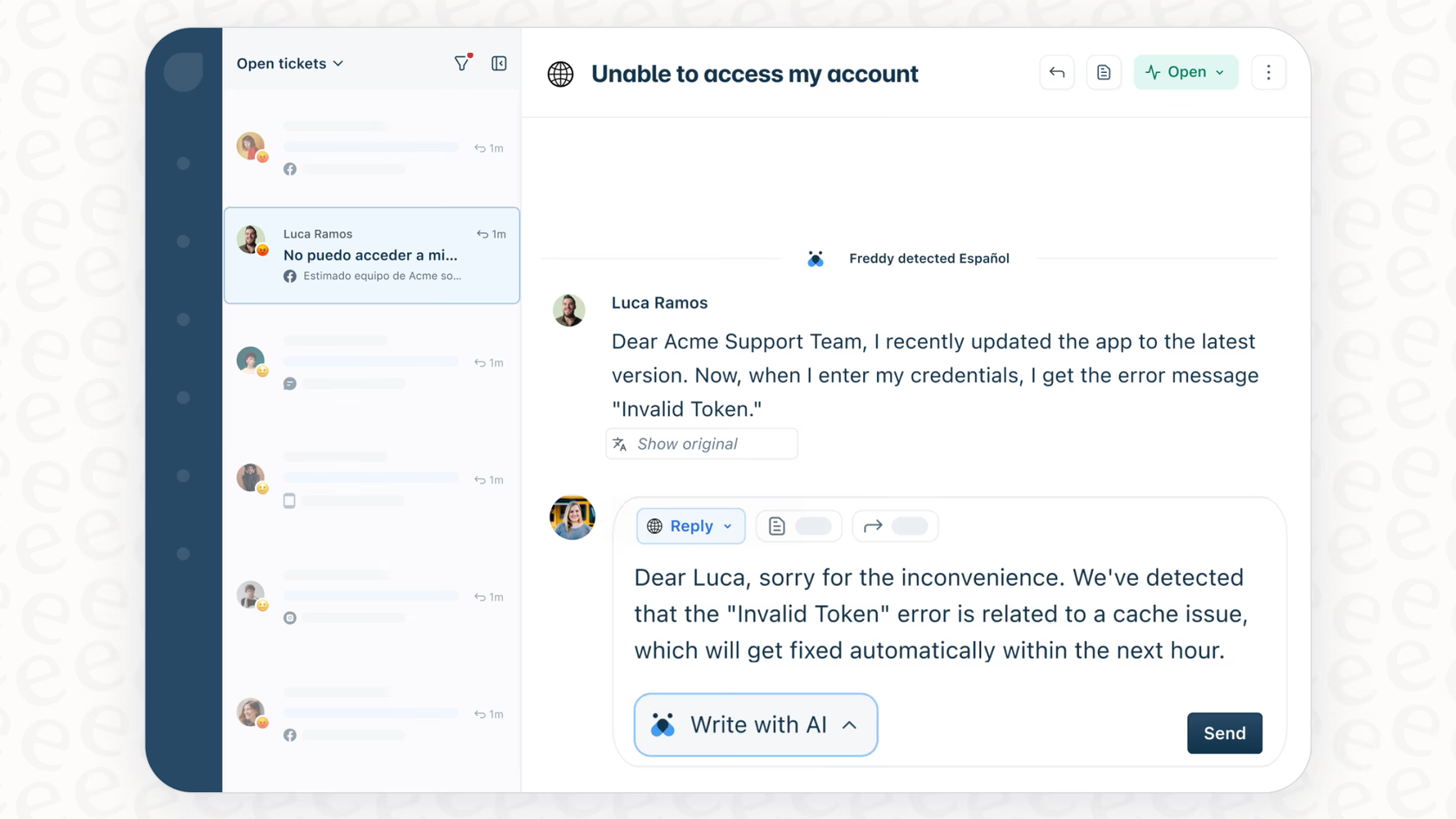
5) Automation and workflows (one of Freshdesk’s strongest areas)
Automation is where Freshdesk can go from “ticket tracker” to “support operating system.”
Freshdesk documentation describes automation rules that run based on conditions and triggers to handle repetitive work.
The practical building blocks
You can think of Freshdesk automation as three layers (naming varies by UI):
- Ticket creation rules: what happens the moment a ticket is created
- Ticket update/event rules: what happens when something changes
- Time triggers: what happens when a ticket sits too long or approaches SLA thresholds
Freshworks’ own examples for ticket creation automation include assigning based on language, priority, status, requester email, and subject—and they emphasize assigning group before agent.
Example automation rule set (copy-and-adapt)
Rule 1: Language-based routing
- IF ticket language = Spanish
- THEN assign group = LATAM Support
- THEN set priority = Medium
- THEN send acknowledgement in Spanish
Rule 2: VIP escalation
- IF requester domain = “your-biggest-customer.com”
- THEN set priority = Urgent
- THEN assign group = Tier 2
- THEN notify manager channel in Slack
Rule 3: SLA reminder
- IF status = Pending Customer AND no update in 48 hours
- THEN send reminder email + add internal note
You can implement these patterns using Freshdesk automation modules and time-based triggers.
6) SLAs, business hours, and time zones
Once you support multiple regions (or even just weekends), SLAs become impossible without business hours configuration.
Freshdesk documentation explains:
- Business hours define working hours; outside business hours, timers don’t run.
- You can configure multiple business hours and assign them to specific groups.
- Freshworks also discusses using multiple time zones and local holidays to localize SLAs.
How to implement this cleanly:
- Create business hour profiles per region (e.g., “US Support,” “EMEA Support”).
- Assign each profile to the corresponding agent group.
- Create SLA policies that reference those business hours.
- Use automation to route tickets to the right region group based on customer attributes (language, geography, account tier).
7) Self-service: customer portal, knowledge base, and community
Freshdesk includes a customer-facing portal where customers can:
- raise and track tickets
- browse knowledge base/FAQs
- engage in community forums (if enabled)
Knowledge base structure and management
Freshdesk KB content is typically structured as:
- Categories → folders → articles
Freshdesk documentation describes multilingual KB setup steps and how to organize categories/folders/articles in the primary language first.
Why self-service is not “optional”
Self-service is how you prevent ticket volume from scaling linearly with customers. The key is to:
- publish answers to repetitive questions
- link those answers directly inside agent workflows
- keep the KB accurate and searchable
8) Canned responses and placeholders
Canned responses are one of the highest ROI features in any helpdesk—because they reduce typing and standardize quality.
Freshdesk supports canned response templates, and Freshworks documentation explains using dynamic placeholders (inserted placeholders) that work across canned responses and automation notifications.
Example: “Reset password” canned response
“Hi {{requester_name}},
Here are the steps to reset your password…
If you’re still stuck, reply to this email and include your username: {{requester_email}}”
9) Reporting and analytics (pre-built + custom)
Freshworks highlights pre-defined reports/dashboards and also custom reporting capabilities.
Freshdesk support documentation describes custom reporting as a way to build reports with metrics, filters, and dimensions.
Practical metrics most teams track:
- First response time (FRT)
- Resolution time
- SLA compliance
- Reopen rate
- Backlog by group/priority
- CSAT trends
Where complexity shows up: Custom reporting is powerful, but it becomes a mini-BI tool inside the helpdesk. Some teams love it; others prefer exporting data to a dedicated BI stack once maturity grows.
Advanced features, AI, and integrations
Freddy AI: Agent, Copilot, and Insights
Freshworks positions Freddy AI as built-in and ready to use, with:
- Freddy AI Agent (AI-powered self-service experiences)
- Freddy AI Copilot (agent assist: sentiment, suggestions, KB recommendations)
- Freddy AI Insights (AI-generated insights for leaders and dashboards)
What to do before you enable AI in production
AI can be very effective—but it is only as good as your underlying:
- KB accuracy
- tagging and categorization discipline
- escalation policy for low-confidence answers
- QA process for customer-visible responses
Also: budget for AI like you budget for cloud usage. Freddy AI Agent is session-based pricing after the included sessions, so forecast usage early.
FreshdeskAPI and developer capabilities
Freshdesk provides an API (developer portal documentation exists) for use cases like:
- creating tickets from your product
- syncing contacts/companies
- building internal tools
- automating workflows beyond no-code rules
Integration ecosystem: Marketplace + top apps
Freshdesk Marketplace highlights many native apps and integrations, including widely used tools like Google Calendar, Slack, Microsoft Teams, and Office 365.
Top Freshdesk integrations (practical shortlist)
Below is a publication-friendly table of integrations you’re likely to see in real deployments, based on Marketplace “popular apps” and common support stack patterns.
| Integration | Category | Why teams use it |
|---|---|---|
| Slack | Collaboration | Ticket notifications, escalations, internal triage |
| Microsoft Teams | Collaboration | Cross-team swarming, context sharing |
| Google Calendar | Scheduling | Schedule follow-ups, sync events |
| Office 365 / Outlook | Email productivity | Ticket handling from inbox workflow |
| Google Analytics | Web insights | Understand support demand from web behavior |
| Mailchimp | Marketing | Tie support and customer communications |
| Freshsales Suite | CRM | Pull customer context into ticket handling |
| Zapier (common in practice) | Automation | Lightweight workflow glue (fast prototyping) |
| Jira (common in practice) | Engineering | Escalate bugs/issues with traceability |
| Shopify (common in practice) | Ecommerce | Order context inside tickets |
| Stripe (Marketplace example) | Payments | Subscription/payment context for billing tickets |
| Webhooks apps | Integration | Trigger downstream workflows from ticket events |
Some of the latter items (Zapier/Jira/Shopify) are common helpdesk integrations even if not visible in the small Marketplace excerpt; use the Marketplace search to confirm your exact app availability and quality.
Integration quality: what “seamless” really means
In most support orgs, integrations fall into three tiers:
- Context display integrations (show customer/order/account data inside the ticket)
- Notification integrations (push alerts into Slack/Teams)
- Bi-directional workflow integrations (create/update records across systems)
Freshdesk is strongest in tiers 1 and 2 out of the box. Tier 3 is achievable, but you’ll want to define ownership and failure-handling (what happens when the CRM is down, when a webhook fails, etc.).
Performance, reliability, and security
Reliability and uptime visibility
Freshworks operates public status pages for certain products (e.g., Freshdesk Contact Center status page) where you can see operational status and incident history.
Freshworks support documentation also references using a status page and incident history views.
What this means for buyers: You can and should operationalize uptime monitoring by:
- subscribing to incident alerts
- aligning internal comms (support status banners, macros) with platform incidents
- documenting fallback processes for critical channels (phone/chat/email)
Scalability
Freshdesk is used by a large customer base; Freshworks references being “trusted by 75,000+ businesses worldwide.”
Scalability in Freshdesk typically depends less on “can the system handle more tickets?” and more on whether your org has:
- clean taxonomy (fields/tags)
- routing discipline
- KB governance
- role-based permissions and approval workflows (Enterprise tier)
Security features (what Freshworks documents publicly)
Freshworks security pages describe:
- Encryption at rest using AES 256-bit
- Encryption in transit via HTTPS with TLS 1.2
Freshworks also provides trust/compliance statements indicating independent audits for ISO 27001 and SOC 2 (and other compliances) on a recurring cadence.
Freshdesk support documentation states Freshworks has controls aligned with ISO 27001 standards and is audited under SOC 2 Type II, and that Freshdesk is PCI compliant.
Authentication: 2FA and SSO
Freshworks documentation covers:
- How org admins can enforce 2FA policies in Neo Admin Center (Security > Default Login Methods).
- How users can enable/disable 2FA in their profile.
- SSO via SAML 2.0 with providers like Azure AD, Okta, etc.
GDPR and data processing
Freshworks provides a Data Processing Addendum (DPA) and a GDPR-focused page describing how they incorporate DPA into terms and address GDPR obligations.
Practical takeaway: If you’re in regulated environments, treat Enterprise tier governance (audit logs, approval workflows, “additional security features”) as a core requirement rather than an optional upgrade.
Customer support and learning resources
Freshworks’ ecosystem here is relatively strong, and it matters because helpdesks are operational systems: you don’t just “buy it,” you run it.
Support channels and responsiveness (what’s stated publicly)
Freshworks states 24x5 support for the free program offer.
For ongoing subscribers, the exact support channels and SLAs can vary by contract and plan; for publication purposes, note that Freshworks provides support portals, documentation, and training resources as part of the broader support model.
Documentation and knowledge base
Freshdesk Support portal includes deep documentation across:
- onboarding/setup
- ticketing channels
- configuration/workflows
- portal setup
- integrations
- reporting/analytics
Community and certifications
- Freshworks Community exists for peer discussion and product Q&A.
- Freshworks University offers courses and certifications, including Freshdesk Admin/Agent fundamentals and a “Freshdesk Product Expert Certification for Admins.”
Pros and cons
| Pros (where Freshdesk consistently performs well) | Cons (where teams often hit friction) |
|---|---|
|
|
User reviews and ratings summary
To ground this review, here are the headline rating signals from major platforms:
| Platform | Headline rating (as commonly cited) |
|---|---|
| G2 | ~4.4/5 with ~3,600+ reviews (counts vary by page/time). |
| Capterra | 4.5/5 with ~3,388 reviews (as referenced in Capterra’s Freshdesk listing). |
| TrustRadius | 8.5/10 (Freshdesk Reviews and Ratings page). |
Common praise themes
Across review ecosystems, frequent positives include:
- Easy setup and intuitive workflow (especially compared to heavier platforms).
- Automation rules that reduce manual effort and improve response times.
- Centralization: “everything in one place” effect—reduces scattered customer communication.
Common complaint themes
Common friction points include:
- Customization limits in certain areas (especially portal behavior and some UI-level constraints)
- Reporting complexity for deeper analytics
- Occasional channel/integration quirks (email handling, rules edge cases)
Trends over time
Freshdesk has clearly invested heavily in:
- AI packaging and productization (Copilot GA, AI Agent session economics).
- Changes to free offering structure over time (public discussions indicate shifts).
If you’re evaluating Freshdesk today, the “trend” story is: Freshworks is pushing toward AI-first and platform consolidation while still maintaining accessible entry pricing for core helpdesk tiers.
Alternatives and comparisons
Freshdesk’s real competitors depend on what you value most: customization, messaging, shared inbox collaboration, or cost.
FreshdeskTop alternatives
1) Zendesk (best for enterprise-heavy support orgs)
Zendesk pricing begins at $19/agent/month billed annually (per Zendesk pricing page).
Zendesk is often chosen when you need deeper enterprise capabilities, broader add-ons, and extensive ecosystem maturity—at the cost of more admin overhead.
2) Zoho Desk (best for budget-conscious teams + Zoho ecosystem)
Zoho Desk has a range of editions and supports “light users” in paid plans (useful for collaboration without full agent licensing).
Zoho Desk can be compelling if you’re already in Zoho CRM/Zoho One and want tight suite integration.
3) Front (best for shared inbox + collaboration-first teams)
Front pricing starts around $25/seat/month billed annually (Starter), with higher tiers for automation and omnichannel.
Front is often more “collaboration + inbox” than “full helpdesk,” depending on your configuration.
4) Intercom (best for messaging-first support + AI agent economics)
Intercom markets a helpdesk seat price plus Fin AI Agent pricing at $0.99 per resolution.
Intercom is a strong choice if your support is embedded in product messaging and you want AI agent economics tied to “resolved conversations.”
Side-by-side comparison table (high-level)
| Product | Starting price (as published) | Strength | Watch-outs |
|---|---|---|---|
| Freshdesk | $15/agent/mo (annual, Growth) | Fast time-to-value, automation, KB/portal, marketplace | AI usage costs; some governance gated |
| Zendesk | $19/agent/mo (annual) | Enterprise depth, ecosystem maturity | Cost and admin complexity can rise |
| Zoho Desk | Varies by edition; low-cost entry | Value pricing, Zoho ecosystem | UI/workflow preferences vary widely |
| Front | $25/seat/mo (annual, Starter) | Inbox collaboration + workflows | Less “classic helpdesk” by default |
| Intercom | $29/seat/mo + $0.99/resolution (Fin) | Messaging-first + AI agent model | Usage-based costs, not for every support model |
When to choose Freshdesk vs alternatives
Choose Freshdesk when:
- You want a classic helpdesk foundation (ticketing + portal + KB + SLAs) that scales cleanly.
- You want automation without building a custom system.
- You want a broad integration ecosystem to plug into existing tools.
Choose Zendesk when:
- You need enterprise-grade depth, big-team complexity, and you can support heavier admin operations.
Choose Intercom when:
- Your support is messaging-first and you want AI economics linked to resolved conversations.
Choose Front when:
- You want inbox collaboration as the primary workflow, especially for CX teams that don’t want “tickets everywhere.”
Choose Zoho Desk when:
- Budget and suite consolidation inside Zoho are the primary drivers.
Who is Freshdesk best for (and who should avoid it)
Best for
Freshdesk is typically an excellent fit for:
- Teams of 3–50+ agents that want structured support operations
- SMB and mid-market organizations that need routing, automation, SLAs, and reporting
- Multi-region teams needing business hours profiles and localized SLA timing
- Teams ready to invest in KB and self-service as a primary scaling lever
- Teams that want AI assistance but prefer a packaged approach (Copilot + Agent + Insights), provided they forecast usage
Not ideal for
You should be cautious with Freshdesk if:
- You need highly customized workflows that resemble an internal case management system (and you don’t want to align your process to the tool).
- You want AI capabilities bundled “all-in” with no variable economics—Freshdesk’s AI agent sessions introduce usage-based budgeting.
- You’re choosing between multiple Freshworks SKUs and you’re not sure whether you need Freshdesk vs. Freshdesk Omni—clarify channel requirements first.
Final verdict and recommendations
Rating: 8.7/10
Here’s a practical breakdown:
- Core features (ticketing, portal, automation): 9.2/10
- Ease of use and onboarding: 8.8/10
- Reporting and analytics: 8.2/10 (strong, but custom reporting can be a learning curve)
- Integrations and ecosystem: 8.8/10
- Security and governance: 8.6/10 (solid documentation; enterprise features gated)
- Value for money: 8.5/10 (excellent at Growth; Pro/Enterprise justified by advanced routing/reporting/governance)
Key takeaways
- Freshdesk is strongest when you treat it as an operating system for support, not just a place to park tickets.
- The platform can scale meaningfully via automation + knowledge base (these are the two highest ROI investments).
- AI can be valuable, but only if you model the costs (Copilot seats + AI Agent sessions) and build a basic governance loop.
Recommendation
If you’re choosing Freshdesk today:
- Start with a short proof-of-concept using the 14‑day trial (Enterprise access) to test routing, SLAs, portal, and reporting.
- Treat automation as a product: define rules, owners, and change management (especially if moving toward Enterprise governance).
- Decide early whether you’re building around Freshdesk Support Desk vs Freshdesk Omni, based on your channel stack and long-term roadmap.
Call to action: If you’re evaluating, use the trial to build three “day-in-the-life” workflows: billing dispute, technical incident, and account cancellation. That will tell you more than any feature list.
Freshdesk
Freshdesk is a support suite that has collaborative-focused features like consolidated correspondence, team huddle, and team inbox. Ticket Information, properties and correspondence from multiple channels is visible in just one screen laid out in a simple, intuitive interface. The Team Inbox gives a view of the ticketing queue along with information on who is assigned to the ticket, ticket topic and priority level. Service level agreements per priority can be customized is automatically applied by Freshdesk to received tickets. Freshdesk also has a mobile app for Android and Iphone allowing the support team to respond to tickets anywhere. Freshdesk supports…
• Powerful Ticketing
• Multichannel Support
• Productivity & Engagement
• Self-Service Portal
• Global Customer Support
• Secure Helpdesk
• Reporting and Analytics
• Apps
Billed Monthly
• Sprout – Free (3agents, 100 assets)
• Blossom - $25/agent/month
• Garden - $44/agent/month
• Estate - $59/agent/month
• Forest- $99/agent/month
Billed Yearly
• Sprout – Free (3agents, 100 assets)
• Blossom - $19/agent/month
• Garden - $35/agent/month
• Estate - $49/agent/month
• Forest- $89/agent/month
• Powerful Ticketing
• Multichannel Support
• Productivity & Engagement
•Collaborate with your team using Freshdesk’s shared inbox and resolve issues smoothly
•Set, manage, and meet customer expectations by setting up service level agreements (SLAs) for support
•Manage multiple support email address in a single place
FAQ (15 common questions)
1) Is Freshdesk worth the price?
If you’re moving off shared inbox chaos and need SLAs, routing, automation, and reporting, Freshdesk’s Growth plan is competitively priced. The bigger cost questions appear when you add AI and advanced governance tiers.
2) Does Freshdesk have a free plan?
Freshworks currently promotes a free program: $0 for 1–2 agents for 6 months. Treat eligibility and duration as offer-specific; it has changed over time.
3) How long is the free trial?
Freshdesk offers a 14-day free trial that starts on the Enterprise plan.
4) What is “Freddy AI Agent session” pricing?
Freshworks states: first 500 sessions included for Pro/Enterprise (limited), then $49 per 100 sessions, and email AI agents count each AI response as a session.
5) Do I need Freddy AI Copilot for every agent?
No—Freshworks states Copilot can be purchased and assigned to any number of agents.
6) Can Freshdesk prevent two agents replying to the same ticket?
Freshdesk documents collision detection tooling (including an “eye” icon and collision prevention tools).
7) Does Freshdesk support parent/child ticketing?
Yes—Freshdesk documents parent-child ticketing as a way to split work into sub-tickets and also supports parent/child associations during merges.
8) Can I build a multilingual knowledge base?
Yes—Freshdesk documentation covers multilingual KB setup and managing categories/folders/articles per language.
9) Can Freshdesk handle multiple time zones for SLAs?
Freshdesk supports multiple business hours profiles and Freshworks discusses localizing SLAs using multiple time zones and holidays.
10) What integrations matter most for typical teams?
Slack/Teams for collaboration and Google Calendar/Office 365 for scheduling/email workflow are common and are listed among Marketplace popular apps.
11) Does Freshdesk have an API?
Yes—Freshdesk provides API documentation via its developer portal.
12) Is Freshdesk secure?
Freshworks documents encryption at rest (AES 256) and in transit (TLS 1.2), and provides trust/compliance information.
13) Does Freshdesk support SSO and 2FA?
Yes—Freshworks documentation covers SAML SSO and 2FA enablement/enforcement through Neo Admin Center.
14) What are Freshdesk’s public ratings?
G2 shows ~4.4/5 with ~3,600+ reviews; Capterra shows 4.5/5 with ~3,388 reviews; TrustRadius shows 8.5/10.
15) Freshdesk vs Zendesk: which should I choose?
Choose Freshdesk if you want quicker implementation and strong mid-market features at a lower entry price; choose Zendesk if you need enterprise-grade depth and are prepared for higher operational complexity and add-ons.








By clicking Sign In with Social Media, you agree to let PAT RESEARCH store, use and/or disclose your Social Media profile and email address in accordance with the PAT RESEARCH Privacy Policy and agree to the Terms of Use.