
Freshchat Review: AI Chatbots and Messaging – Worth Switching to?
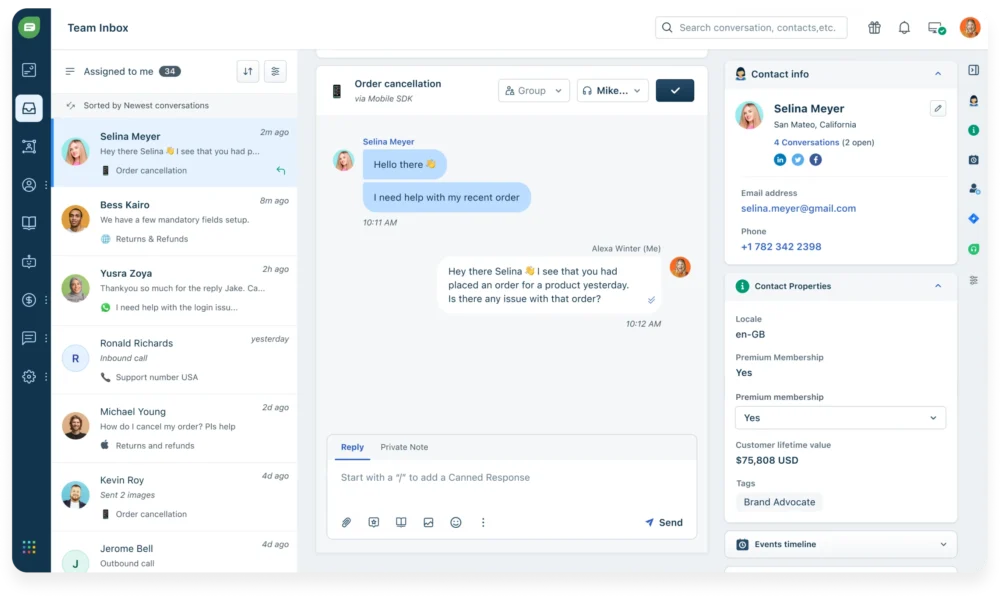
Freshchat is Freshworks’ omnichannel messaging and live chat product designed to help teams handle customer conversations across web chat and popular messaging channels from a unified workspace. It sits in the same ecosystem as Freshdesk, Freshservice, and Freshdesk Omni, which matters because a big part of Freshchat’s value comes from how well it connects to your broader support stack.
FreshchatOverall verdict (short version): 8.7/10
Best for: support and service teams that want live chat plus messaging channels, routing, SLAs, self-service content, and a scalable integrations layer—without taking on the complexity or price of a full contact center suite on day one.
Not ideal for: teams that primarily need sophisticated marketing automation, deep outbound campaign orchestration, or a standalone conversational platform that is not tied to a broader service desk ecosystem.
Freshchat
Freshchat is a modern messaging software built for teams who want to ace customer conversations, marketing, sales, or support. Freshchat offers features such as message channels, priority inbox, custom views, web messenger and team widget. Freshchat lets users engage proactively with visitors who are dropping off or are closer to making a purchase then users can allow the bot to then kick in, qualify leads, and auto-upload them into the users’ CRM. Freshchat also offers an events timeline, user information, and social profiles which lets users know who the users are talking to and what they are up to. Freshchat…
• Bring all the context from external apps and systems right inside the conversation view to help your team sound smarter.
• Measure speed of response, conversation trends, resolution time, and deep dive into any team member’s workload.
• Automatically convert incoming conversations into messages on a specific Slack channel.
• With in-app chat, real-time notifications, rich media and native FAQs, support users wherever they are.
• Filter conversations by team members, groups, and message channels, and save the views you access frequently.
• Sprout - Free
• Blossom - $ 15 per active team member
• Garden - $ 24 per active team member
• Estate - $ 39 per active team member
• Bring all the context from external apps and systems right inside the conversation view to help your team sound smarter.
• Measure speed of response, conversation trends, resolution time, and deep dive into any team member’s workload.
• A continuous, familiar messaging experience
• Engage when it matters the most and automate your lead capture.
• Auto-assign the right conversation to the right team member
Here’s what this review covers
- Overview and positioning in the Freshworks ecosystem
- Pricing and plans in 2025 (with AI add-ons + cost traps)
- Setup and onboarding (web widget → channels → workflows)
- Agent experience and inbox usability
- Core features (routing, SLAs, bots, FAQs, journeys)
- Integrations and extensibility (marketplace, connectors, APIs, BYOC)
- Security and administration (allowlists, IPs, JWT)
- Support and learning resources
- Pros and cons
- User reviews and ratings summary
- Alternatives and comparisons
- Who Freshchat is best for (and who should avoid it)
- Final recommendation
- FAQ (15 practical questions)
Introduction: why Freshchat exists, and what it is trying to fix
If you have ever tried to scale customer conversations using a mix of email, website chat widgets, social DMs, and a few messaging apps, you already know the core problem: the tools work fine until you have multiple agents, multiple channels, and multiple priorities competing at the same time.
At that point, the issues start to look familiar:
- Conversations get duplicated, ignored, or handled twice.
- Customers repeat themselves because context is missing.
- Teams cannot enforce response time expectations.
- Managers cannot confidently answer basic questions like “What is our response time on WhatsApp compared to web chat?”
- Integrations become a patchwork of one-off connections.
Freshchat positions itself as a unified messaging workspace that helps teams manage omnichannel conversations and scale service using self-service, routing, and automation. Freshworks also pushes a clear narrative: chat is the start, but complex cases often need ticketing and broader service workflows—which is why Freshchat is closely connected to Freshdesk Omni.
The most useful framing:
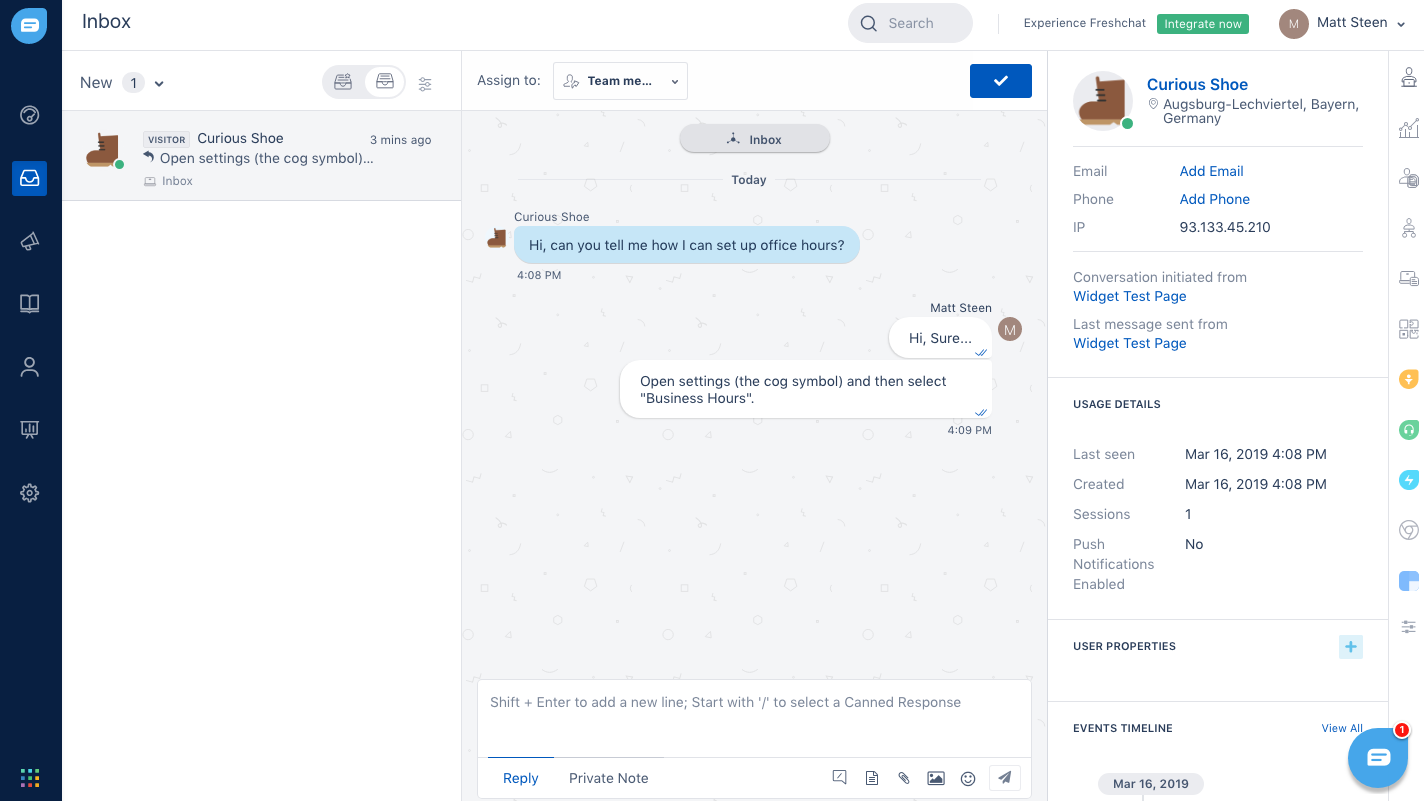
Freshchat is not just a web chat widget. It is a conversations layer with an agent inbox, routing controls, SLAs, bots, analytics, and an integrations surface that can plug into the rest of Freshworks.
Overview and positioning: where Freshchat fits in the Freshworks ecosystem
Freshchat is sold as a standalone product with its own plans and pricing. At the same time, Freshworks positions Freshdesk Omni as the broader “all-in-one” suite for modern omnichannel service—useful when you need not only chat and messaging, but also ticketing workflows, collaboration, and more advanced service operations.
In practice, this creates two common buying paths:
Path 1: Start with Freshchat for conversational support
This path makes sense when:
- You need live chat and messaging quickly.
- You want a unified agent workspace for conversations.
- You are not ready to implement full ticketing workflows yet.
- You want the option to convert conversations into tickets later.
Freshchat supports the operational basics to make this viable: an agent inbox, canned responses, attachments, FAQs, topics, and administration controls.
FreshchatPath 2: Buy Freshdesk Omni (or Freshdesk) and use messaging as part of a larger suite
This path makes sense when:
- You already run support through tickets and a knowledge base.
- You want messaging embedded into a broader service desk workflow.
- You want unified reporting across conversations and tickets.
Note on naming: you may see Freshworks documentation reference “Freshdesk Messaging” in contexts that overlap with Freshchat capabilities (e.g., multilingual messaging). In practice, this is typically the shared messaging subsystem across Freshworks products. If you are doing formal procurement, confirm plan/packaging eligibility for the exact features you need.
Pricing and plans: what you actually pay for in 2025
Freshchat’s pricing is straightforward at first glance, but total cost depends on how you deploy the platform:
- Plan tier drives channel access, routing depth, analytics, and security controls.
- AI capabilities may be add-ons with consumption-based pricing.
- Telephony is positioned as a separate line item.
- Connector tasks and campaign contacts can introduce usage-based costs depending on workflow design.
The four Freshchat plans (high-level snapshot)
| Plan | Price (annual billing) | Channel expansion highlights | Operational highlights | Best for |
|---|---|---|---|---|
| Free | $0 (up to 10 agents) | Website live chat + email | Unified agent workspace for basic conversational support | Pilots, small teams, and early-stage inbox discipline |
| Growth | $19/agent/month | Adds channels like WhatsApp + Facebook Messenger | Adds real-time dashboards and broader omnichannel operations | SMBs that need messaging channels fast |
| Pro | $49/agent/month | Omnichannel + deeper reporting surfaces | Custom dashboards, more routing mechanisms, multiple SLA policies | Teams operationalizing SLAs + structured routing |
| Enterprise | $79/agent/month | Omnichannel at scale | Skills-based assignments + additional security features | Larger teams with routing/security requirements |
Trial note: Freshworks states the 14-day free trial provides access to the Enterprise plan. This can create an evaluation bias if you prototype Enterprise-only workflows and then downgrade later.
AI pricing: Freddy AI Agent vs Freddy AI Copilot
| AI add-on | How it’s priced | Budget implication |
|---|---|---|
| Freddy AI Agent | First 500 sessions included; then $49 per 100 sessions | Treat as metered consumption if you expect high bot usage and containment goals |
| Freddy AI Copilot | $29 per agent/month (annual billing) | Assign selectively; Freshworks indicates you do not need to purchase Copilot for all agents |
Common cost traps (what teams underestimate)
- AI sessions scale with conversation volume: if bot sessions grow, costs grow.
- Connector tasks can spike: “sync everything” automations can burn through task quotas quickly if not governed.
- Campaign contacts are capped: if you use journeys/campaigns as a real engagement channel, contact entitlements can matter.
- Telephony is separate: Freshcaller is positioned as an additional line item; evaluate voice needs alongside Freshdesk Omni if voice is central.
Setup and onboarding: what implementation looks like in the real world
Freshchat is usually deployed in phases. Teams that get the best outcomes tend to implement in this order:
- Get the inbox and web widget working.
- Define Topics and routing rules.
- Add FAQs and basic self-service.
- Expand to messaging channels.
- Add SLAs and reporting.
- Add bots and automation.
- Integrate with ticketing systems and CRMs.
Step 1: Configure your web chat widget
Freshworks documentation describes creating and configuring web chat widgets via Admin Settings under Channels (Web Chat). Multiple widgets matter operationally for brands, regions, languages, and experience differences between logged-in vs anonymous users.
Practical recommendation (SaaS teams): plan at least two widgets—one for your marketing site and one embedded inside the product for authenticated customers.
Step 2: Embed the widget on your site
Freshworks provides a JavaScript snippet (Web Messenger) for embedding the widget. In strict-release environments, route this through security review early, since it introduces an external script.
Step 3: Decide whether to enforce user authentication (JWT)
Freshworks documents enforcing user authentication for web chat widgets using JWT. This decision impacts identity mapping, conversation history, and risk controls (especially in regulated environments).
If security matters: do not treat authentication as a “later” item. Plan it early, because it affects your whole conversation architecture.
Step 4: Build your conversation model with Topics
Freshworks describes Topics as the front door: they can route chats to groups, display welcome text, trigger bot flows, and vary behavior based on business hours.
A practical starting Topic set:
- Sales and pricing
- Technical support
- Billing
- Account access
Step 5: Add FAQs and lightweight self-service
Freshworks notes that Freshchat can display support articles directly in the chat widget so customers can browse FAQs before contacting your team. This is usually the fastest time-to-value lever in most deployments.
Step 6: Expand to messaging channels
Freshworks lists omnichannel support across web, email, social messengers, SMS, and digital messengers like WhatsApp and LINE (with some channels involving additional onboarding and policy steps).
Agent experience and inbox usability
A messaging platform succeeds or fails on a simple test: can agents move fast without losing context, and can managers trust that the inbox is under control?
The Team Inbox as the operational hub
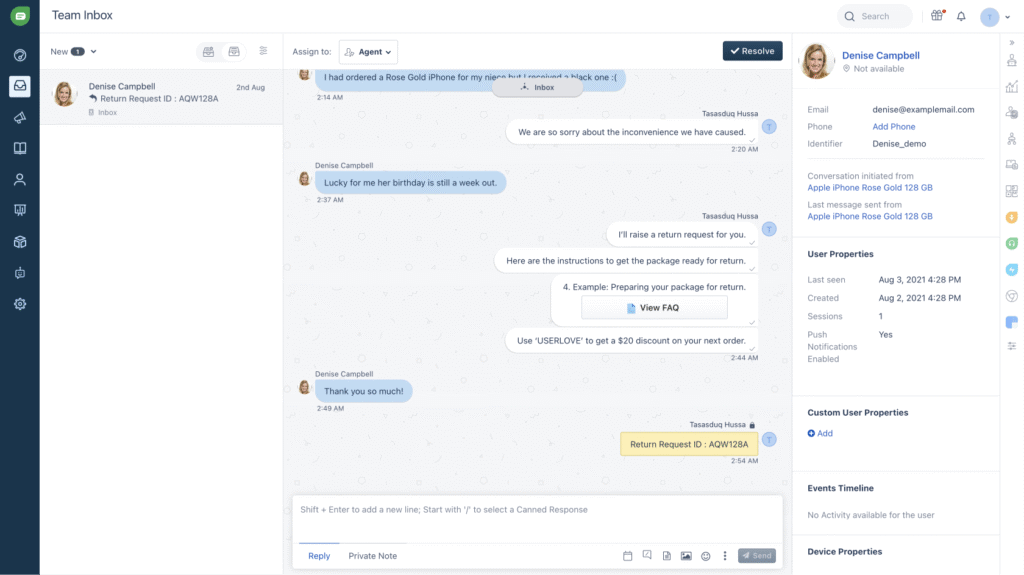
Freshchat’s workflow centers on the Team Inbox, where agents handle assignment, response composition, collaboration, resolution states, and (in mature deployments) CSAT and SLA adherence.
Reply composition, formatting, and attachments
Freshworks describes formatting options, rich media, and file sharing. In practice, these are table-stakes features—but they matter a lot in high-screenshot environments (technical troubleshooting, ecommerce order issues, SaaS UI guidance).
Canned responses + placeholders (the productivity multiplier)
Freshworks documents canned responses triggered via shortcodes and placeholders that insert customer/agent properties for personalization.
Operational requirement: if you don’t maintain your canned response library, it becomes an untrusted blob. Assign ownership and review monthly.
Context control with tags
Freshworks documentation describes using tags to filter Topics and FAQs by user type or page location (e.g., show “Expert Help” only to premium users). This is one of the highest-leverage ways to reduce misrouted chats and improve first-contact resolution.
Core features (deep dives into routing, SLAs, bots, FAQs, and journeys)
Most evaluations go wrong by treating features as checkboxes. A better lens is to evaluate Freshchat as an operating system for conversations across six capabilities:
- Channel coverage and channel governance
- Routing and workload management
- SLAs and service discipline
- Self-service and bots
- Proactive engagement and journeys
- Analytics and continuous improvement
1) Channel coverage and governance
Freshworks positions Freshchat as supporting web and mobile chat widgets, email, social messengers, SMS, and digital messaging channels such as WhatsApp, LINE, and Google Business Messages—plus multilingual support and “bring your own channel” (BYOC) for custom channel integration.
The common governance failure mode is not technical—it’s operational:
- Who owns WhatsApp as a channel—support or marketing?
- How do you prevent “channel promises” that support can’t keep?
- How do you ensure policy consistency across channels?
2) Routing and workload management (where Freshchat becomes a system)
Freshworks documents skill-based routing as a way to automatically prioritize and assign conversations to the right agents. This is typically most valuable when you have multiple languages, customer tiers, product lines, or blended sales + support inquiry types.
3) SLAs and service discipline
Freshworks describes SLA targets for first response, response wait time, and resolution, plus reporting for compliance and breaches. This is one of Freshchat’s strongest “service operations” foundations.
Implementation guidance: implement SLAs early (even generous ones). SLAs force clarity on business hours, escalation paths, and handoff rules.
4) Self-service and bots
Self-service in Freshchat typically starts with Topics and FAQs in the widget, then grows into bots (including AI-assisted flows) once you have stable knowledge content and clear intent categories.
Practical rule:
- Use structured bot flows for triage, authentication, routing, and “known path” workflows.
- Use AI answer retrieval for knowledge-base and policy questions (when the answer already exists in documentation).
5) Proactive engagement and journeys
Freshworks describes campaigns/journeys as a way to proactively engage customers using segmentation and checkpoints, then measure performance via reports.
Journeys work best when they are precise (onboarding nudges, outage updates, high-intent abandonment). They work poorly when segmentation is weak or when the team isn’t staffed to handle the response volume.
6) Analytics and reporting
Freshworks documentation references performance reporting across agents/groups, SLA compliance, and chat analytics modules with curated reports and custom reporting capabilities.
Minimum metrics to track:
- First response time by channel
- Response wait time distribution (not only averages)
- Resolution time by topic/group
- Deflection rate (FAQs/bots)
- Backlog age and agent workload
- CSAT by channel
Integrations and extensibility: where Freshchat is unusually strong for its price tier
Freshchat’s integration story has three layers: marketplace apps, connectors/low-code tooling, and developer APIs/SDKs.
Marketplace ecosystem
Freshworks positions Freshchat as integrating with hundreds of marketplace apps and promotes a large Marketplace catalog with many ready-to-install integrations.
Connector apps and consumption-based tasks
Freshworks describes connector apps as pre-built connectors for syncing data and automating workflows, with consumption-based pricing (“pay for what you need”).
Governance requirement: connector pricing is manageable when you monitor and design workflows intentionally. It becomes a surprise when you sync high-frequency events without guardrails.
High-leverage first-party integrations
- Freshdesk: convert conversations into tickets and sync FAQs/knowledge content into the widget.
- Freshservice: convert conversations into internal tickets (useful for IT/ESM intake).
Developer extensibility (APIs + SDKs + BYOC)
Freshworks provides developer surfaces for custom integrations (APIs), embedding and advanced widget control (web SDK), mobile SDKs (Android/iOS/React Native/Flutter), and BYOC patterns for integrating non-native messaging channels.
Practical guidance: BYOC is not a beginner feature. Treat it as a real integration project with engineering ownership and ongoing maintenance.
FreshchatSecurity and administration: what Freshchat offers (and what you still need to validate)
For many teams, security is the gating factor for deploying chat beyond a marketing widget. Freshchat includes several practical controls documented by Freshworks:
- Domain allowlisting and VPN access details (useful in restrictive corporate proxy environments).
- IP allowlisting and NAT IP requirements for integrating with internal systems behind firewalls.
- JWT user authentication for web chat widgets when you need secure identity mapping and controlled sessions.
- Enterprise tier security features (plus skills-based assignments) for more governed deployments.
Security checklist for procurement: encryption (in transit/at rest), SSO/SAML/2FA requirements, role-based access, auditability, data retention controls, and any regional data residency requirements your industry mandates.
Customer support and learning resources
Freshworks maintains extensive documentation across Freshchat, Freshdesk Omni, and related products, with structured admin and agent guides for inbox operations, routing, analytics, and channel integrations.
From a practical standpoint, this matters because chat platforms often fail due to lack of operational maturity, not lack of features. Strong documentation reduces dependency on vendor support for every workflow change.
Pros and cons: a balanced view based on features and operational reality
Pros
- Strong entry point: competitive plan structure including a Free tier (up to 10 agents).
- Omnichannel coverage: web chat, email, social messengers, SMS, WhatsApp, LINE, and Google Business Messages (with plan/channel nuances).
- Service discipline features: SLA targets (first response, response wait time, resolution) plus compliance reporting.
- Enterprise routing potential: skills-based routing for the right-team/right-skill assignment model.
- Agent productivity: canned responses with shortcodes + placeholders, attachments, and collaboration workflows.
- Integration depth: marketplace ecosystem plus connectors and APIs for custom builds.
- Clear upgrade path: convert conversations to tickets and align with Freshdesk/Freshservice workflows when cases become complex.
Cons / watch-outs
- AI costs can scale: Freddy AI Agent is session-based after included sessions.
- Tier-dependent maturity controls: advanced routing, automation, and security can be plan-gated.
- Channel onboarding is not uniform: some channels require formal onboarding/review steps (e.g., Apple Messages for Business).
- Connector tasks require governance: consumption-based pricing can surprise integration-heavy deployments.
- Not a complete contact center by itself: if you need voice + WFM + QM as one package, Freshchat alone won’t cover the full requirement set.
User reviews and ratings: what customers commonly praise and criticize
Review sites are imperfect, but they provide a useful directional signal on usability and reliability. Treat ratings as a signal, then validate operational fit through a pilot.
Aggregate ratings (as cited in this review draft)
- G2: 4.4/5 (based on 488 reviews).
- Capterra: 4.1/5 (based on 115 reviews; cited as of November 16, 2025).
- TrustRadius: 8.4/10 (based on 52 ratings).
Common praise themes (directional)
- Ease of use for agents.
- Strong value vs enterprise messaging suites.
- Practical workflows (assignment, canned responses, routing controls).
Common complaint themes (directional)
- Desire for deeper customization in edge cases.
- Costs increasing with AI usage, integrations, or tier upgrades.
- Operational complexity if governance is weak (SLAs/bots/routing need ownership).
Alternatives and comparisons: how Freshchat stacks up in the market
When comparing Freshchat to alternatives, focus on your operating model rather than feature lists.
If you want a premium conversational platform tied to product-led engagement
Consider: Intercom. Intercom is often strongest when chat is tightly linked to product adoption and lifecycle messaging (in-app targeting, engagement patterns). Freshchat can support proactive journeys, but Freshchat’s strongest identity is support operations + ecosystem integration value.
If you want enterprise service workflows and omnichannel operations at large scale
Consider: Zendesk. Zendesk’s suite is designed for mature enterprise workflows. Freshchat plus Freshdesk Omni can cover many similar needs; the decision often comes down to ecosystem fit, total cost, and implementation complexity.
If you want a focused website live chat tool with minimal overhead
Consider: LiveChat (or similar). These tools can be excellent for straightforward web chat and sales handoffs, but often lack deeper service discipline tooling (SLA policy depth, skills routing, broader integration patterns).
If you want a budget-friendly ecommerce-first chat + bot tool
Consider: Tidio. Tidio is often chosen for ecommerce due to quick setup and bot features. The long-term question is whether you need the routing, SLA discipline, and integration depth Freshchat can provide as you scale.
Who Freshchat is best for (and who should avoid it)
Freshchat is a strong fit if you match these scenarios
- You are scaling from basic web chat to omnichannel support: you need one inbox for web + messaging channels.
- You need operational discipline, not just conversations: SLAs, routing, and reporting matter.
- You have multiple teams or complex routing needs: Topics/tags and skills-based routing can reduce misroutes.
- You want self-service to reduce repetitive work: FAQs in-widget plus bots for containment.
- You value integrations without heavy engineering: marketplace + connectors + APIs give flexible options.
- You already use Freshdesk/Freshservice/Freshdesk Omni: ticket conversion and knowledge syncing are high leverage.
You should be cautious if you match these patterns
- Your primary goal is outbound marketing automation: Freshchat supports journeys/campaigns, but deep marketing orchestration belongs in a dedicated marketing automation platform.
- You need voice + WFM + QM as one unified package: Freshchat alone isn’t positioned as a complete contact center suite.
- You cannot invest in governance: SLAs, routing, bots, and journeys require operational ownership or you will create a chaotic inbox.
Final verdict and recommendations
Freshchat is best understood as a scalable conversations system that starts with live chat and grows into an omnichannel messaging operation with routing, SLAs, self-service, automation, and integrations.
If you are a small or mid-sized team, the Free tier can be a legitimate pilot environment, and the Growth and Pro tiers are priced competitively for the core value you get. If you are a larger team with strict routing and security requirements, Enterprise becomes relevant because Freshworks explicitly ties skills-based assignments and additional security features to that tier.
My recommendation:
- Choose Freshchat if your top priorities are inbox usability, omnichannel support, SLA discipline, and a strong integrations ecosystem.
- Plan AI add-ons carefully: model session volumes for Freddy AI Agent and decide whether Copilot should be assigned to all agents or only specialists.
- If you already use Freshdesk or Freshservice: prioritize ticket conversion and FAQ/knowledge syncing early—this is one of the highest-leverage ecosystem benefits.
Freshchat
Freshchat is a modern messaging software built for teams who want to ace customer conversations, marketing, sales, or support. Freshchat offers features such as message channels, priority inbox, custom views, web messenger and team widget. Freshchat lets users engage proactively with visitors who are dropping off or are closer to making a purchase then users can allow the bot to then kick in, qualify leads, and auto-upload them into the users’ CRM. Freshchat also offers an events timeline, user information, and social profiles which lets users know who the users are talking to and what they are up to. Freshchat…
• Bring all the context from external apps and systems right inside the conversation view to help your team sound smarter.
• Measure speed of response, conversation trends, resolution time, and deep dive into any team member’s workload.
• Automatically convert incoming conversations into messages on a specific Slack channel.
• With in-app chat, real-time notifications, rich media and native FAQs, support users wherever they are.
• Filter conversations by team members, groups, and message channels, and save the views you access frequently.
• Sprout - Free
• Blossom - $ 15 per active team member
• Garden - $ 24 per active team member
• Estate - $ 39 per active team member
• Bring all the context from external apps and systems right inside the conversation view to help your team sound smarter.
• Measure speed of response, conversation trends, resolution time, and deep dive into any team member’s workload.
• A continuous, familiar messaging experience
• Engage when it matters the most and automate your lead capture.
• Auto-assign the right conversation to the right team member
FAQ (15 practical questions)
1) Is Freshchat only for website live chat?
No. Freshworks positions Freshchat as an omnichannel conversations platform that supports web chat plus channels like email, social messengers, SMS, WhatsApp, LINE, and Google Business Messages (subject to plan and channel enablement).
2) How many agents can use the Free plan?
Freshworks lists the Free plan as $0 for up to 10 agents.
3) What is included in the 14-day trial?
Freshworks states the trial provides access to the Enterprise plan for 14 days.
4) Can I create multiple chat widgets for different parts of my site?
Yes. Freshworks documentation describes multiple widgets, which is useful for brands, regions, languages, and different customer contexts (logged-in vs anonymous).
5) Can I require authenticated users for chat?
Yes. Freshworks documents enforcing user authentication via JWT tokens for web chat widgets, which is especially relevant for secure and user-specific experiences.
6) How do Topics help in Freshchat?
Freshworks documents that Topics can route incoming messages to specific chat groups, show welcome text, trigger bot flows, and behave differently based on business hours.
7) Can customers browse help content before chatting?
Yes. Freshworks states Freshchat can display support articles/FAQs directly in the chat widget so customers can browse self-service content before contacting support.
8) How do canned responses work for agents?
Freshworks documentation describes inserting canned responses using shortcodes (e.g., slash commands) and using placeholders to personalize replies with customer and agent properties.
9) Does Freshchat support SLAs?
Yes. Freshworks documents SLA targets for first response, response wait time, and resolution, with reporting to track compliance and breaches.
10) Can Freshchat route conversations based on skills?
Yes. Freshworks documents skills-based routing as a way to assign conversations to agents based on defined skills and rules.
11) What is Freddy AI Agent pricing?
Freshworks lists the first 500 sessions included and then $49 per 100 sessions, with sessions defined as interactions within a 24-hour window from when an end user initiates the session.
12) Do I need to buy Freddy AI Copilot for every agent?
No. Freshworks indicates Copilot can be purchased and assigned to any number of agents, so you can roll it out to specialists first.
13) Can I convert chats into tickets in Freshdesk?
Yes. Freshworks documentation describes converting Freshchat conversations into Freshdesk tickets and syncing knowledge content/FAQs.
14) Can I convert chats into tickets in Freshservice?
Yes. Freshworks Marketplace describes Freshchat-to-Freshservice workflows for creating tickets from conversations (selectively or by default).
15) How strong is the integrations ecosystem?
Freshworks positions Freshchat as having deep marketplace integrations plus connector-based automation and APIs for custom integrations. The practical advantage is flexibility: install quickly for common tools, and extend with connectors/APIs when you need more control.








By clicking Sign In with Social Media, you agree to let PAT RESEARCH store, use and/or disclose your Social Media profile and email address in accordance with the PAT RESEARCH Privacy Policy and agree to the Terms of Use.