
Freshcaller Review: Hands-On Insights into Freshworks’ Cloud Phone and Contact Center Solution
If you run support, sales, or service operations, the phone channel never truly goes away. Even companies that push chat and email still end up taking calls for high urgency issues, identity verification, escalations, complex troubleshooting, billing disputes, and VIP customers.
The hard part is not receiving calls. The hard part is doing it at team scale without turning your operation into a patchwork of desk phones, personal mobiles, sticky notes, and scattered call logs. The moment you have more than a few people answering calls, you start needing the same things you expect from modern ticketing and CRM software:
- Shared visibility into who called and what happened
- Routing that gets calls to the right person fast
- Quality controls like recording, coaching, and monitoring
- Reporting that helps you manage queue health, not guess
- Integrations so calls are connected to tickets, contacts, and deals
Freshcaller (also marketed as Freshdesk Contact Center in many contexts) is Freshworks’ answer to that problem: a cloud-based phone system and voice contact center designed to be easy to set up, scalable, and tightly aligned with the Freshworks ecosystem. It covers inbound routing, recordings, post-call transcripts, and live dashboards, and it supports both buying phone numbers across many countries and Bring Your Own Carrier (BYOC) for teams that want to control telco contracts and per-minute economics.
FreshcallerOverall verdict (short version): Freshcaller is strongest when you want a modern, browser-based voice layer that plugs into Freshworks workflows (especially Freshdesk and Freshservice). It delivers core telephony plus real contact center controls (monitoring, barging, service-level dashboards, abandoned call analytics) without feeling like an enterprise-only platform.
Score: 8.5/10
Most important tradeoff: pricing complexity. The per-agent subscription is only half the story—many voice features add per-minute charges, and billing commonly rounds up to the next minute. If you model call volume and test your real workflows, Freshcaller can be an excellent fit.
Here’s what this review covers
- 1) What Freshcaller is (and what it is not)
- 2) Who Freshcaller is for
- 3) Setup and onboarding (what it feels like)
- 4) The day-to-day agent experience
- 5) Core phone and contact center features
- 6) Routing and automation
- 7) Monitoring and performance management
- 8) Analytics and reporting
- 9) AI capabilities (voice bots, transcripts, speech IVR)
- 10) Integrations and extensibility
- 11) Mobile apps
- 12) BYOC (Bring Your Own Carrier)
- 13) Security and compliance considerations
- 14) Pricing (what it really looks like)
- 15) What real users say (reviews snapshot)
- 16) Strengths and tradeoffs (pros/cons)
- 17) Alternatives and comparisons
- 18) Who Freshcaller is best for (and who should avoid it)
- Final verdict and recommendations
- FAQ (15 questions)
1) What Freshcaller is (and what it is not)
At a high level, Freshcaller is a cloud-based contact center and business phone system. Agents can take calls via a browser and a headset instead of desk phones. That “browser-first” approach is why Freshworks emphasizes remote readiness and quick setup.
Freshcaller is also increasingly framed as Freshdesk Contact Center. In review sites and some Freshworks materials, you’ll often see it listed as “Freshdesk Contact Center (Formerly Freshcaller).” If you’re researching documentation, integrations, or reviews, this naming matters.
Freshcaller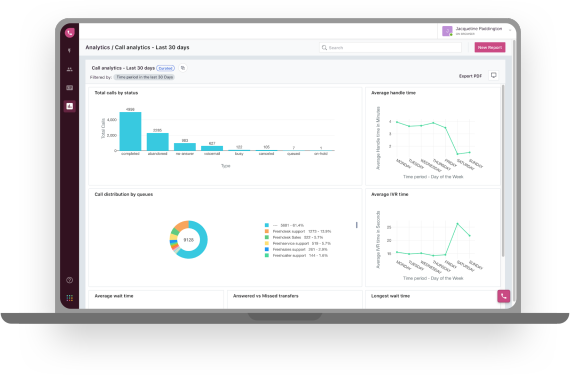
What Freshcaller is best described as
Freshcaller sits in the space between:
- A basic VoIP line (simple and cheap, but limited visibility and reporting)
- A full enterprise contact center (powerful, but complex and expensive)
It aims for the middle: contact-center-grade voice features (queues, IVR, monitoring, dashboards) without requiring the operational overhead of the most heavyweight suites.
What Freshcaller is not
If you require advanced enterprise contact center functionality—workforce management, highly specialized QA scoring workflows, deep outbound predictive dialing at scale, or extremely bespoke multi-site compliance controls—Freshcaller may feel lighter than top-tier enterprise platforms.
2) Who Freshcaller is for
Freshcaller is typically a strong match for:
- Support teams that need voice + ticketing: If you already use Freshdesk, Freshcaller becomes especially compelling because voice can live inside the helpdesk experience and calls can be converted into tickets.
- IT and internal service desks: If you run internal support in Freshservice, voice-to-ticket workflows (missed calls and voicemails becoming trackable work) can materially improve follow-through.
- Sales teams that want a structured calling workflow: Browser calling, call logs, recordings, and integrations can help standardize sales follow-up.
- Distributed or hybrid teams: Browser-based calling plus supervisor dashboards support modern team structures.
Who should be cautious
- If you want a single fixed monthly cost and do not want per-minute charges layered on top
- If your IVR/routing logic needs to be extremely bespoke beyond common queue and IVR patterns
- If your calling is primarily mobile-first and you need the most mature mobile dialing and reporting experience
3) Setup and onboarding: what it feels like to get started
Freshworks often positions Freshcaller as a quick deployment. In practice, that can be realistic for a basic setup (buy a number, create a queue, assign agents, publish simple greetings). The deeper work is making sure the call flow reflects how your team actually operates.
A practical onboarding path
- Decide your number strategy
You typically choose between buying numbers through Freshcaller (local/toll-free in supported regions) or using BYOC to preserve existing carrier contracts and pricing. - Build the call flow
Start with business hours routing, a simple IVR that routes to the correct queue, and clear fallback actions (voicemail, escalation, callback). - Assign agent roles and statuses
Like most contact centers, agent availability/status determines routing outcomes. - Validate call quality and network readiness
Browser calling makes network stability and headset quality part of your “contact center infrastructure.” Treat this like a real-time comms rollout, not a typical SaaS login.
Implementation reality: Freshcaller is easy to turn on, but the “good” implementation work is in call flow design, queue design, fallback handling, and cost modeling (recording, monitoring, conferencing, and rounding rules).
4) The day-to-day agent experience
Freshcaller’s agent experience is largely defined by two environments:
- The Freshcaller web app (calling, call logs, metrics, admin controls)
- The Freshdesk voice/phone experience (if you run voice inside Freshdesk)
If your agents live in Freshdesk, “voice inside the helpdesk” is a real advantage: it reduces context switching and increases the chance that calls become trackable work rather than tribal knowledge.
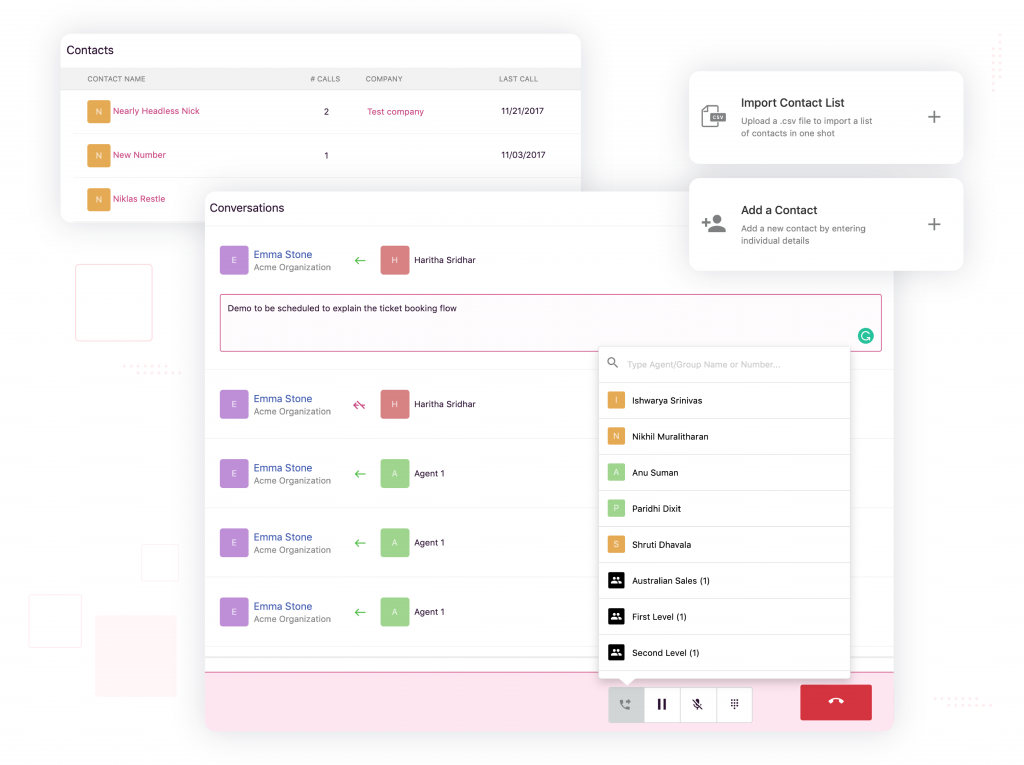
What agents should be able to do during calls
- Make and receive inbound calls with queue visibility
- Add call notes and tags that become usable operational data
- Warm transfers, cold transfers, conferencing, and queue transfers
- Manage recordings (including pausing/resuming where supported)
Why notes and tags matter more than most teams expect: Structured notes make handoffs faster, improve follow-ups, increase coaching quality, and make reporting meaningful.
5) Core phone and contact center features
Phone numbers and global coverage
Freshcaller supports buying phone numbers in many regions and also supports BYOC. For international operations, local presence can affect answer rates, trust, and accessibility.
Call queues (and what happens when they overflow)
Queues are the operational heart of voice support. The key evaluation is not “do you have queues?” but “how do you handle overload?” Look for:
- Clear fallback actions (voicemail, escalation, callback)
- Supervisor visibility into queue health
- Abandonment tracking and root-cause reporting
IVR (Phone Trees)
Freshcaller supports IVR, and higher tiers introduce more sophisticated experiences, including speech-enabled options in some packaging. Practically:
- Keep IVR simple so customers do not abandon
- Use IVR to route, not to block access
- Pair IVR with escalation/callback so it is not a dead end
Transfers, conferencing, and parallel calling
These features separate “a phone line” from “a support operation.” Parallel calling is particularly useful for escalation patterns: call an internal specialist while keeping the customer engaged and informed.
Call recording (and recording economics)
Recording supports compliance, dispute resolution, QA/coaching, and knowledge capture. But recording can also change your cost model if it adds per-minute charges. If you default to “record everything,” assume most of your call minutes will be recorded minutes.
Voicemail and voicemail transcription
Voicemail is an operational safety net for after-hours or overflow. Voicemail-to-ticket workflows are especially valuable when paired with structured follow-up rules. If transcription is charged per minute, treat it as a measured feature—not automatically enabled everywhere.
6) Routing and automation: where Freshcaller differentiates
Most VoIP tools can receive and forward calls. Freshcaller becomes more interesting when you apply routing logic that matches real operational failure modes (busy agents, overloaded queues, off-hours coverage, skill routing, and escalation).
Smart escalations
Smart escalation is a structured fallback: if the usual path fails (no agents available, queue overload), calls route to another queue, an external number, or a specific agent. This can reduce abandonment without immediately hiring more agents.
Queue callback (virtual hold)
Callback is one of the most meaningful “contact center maturity” upgrades. Instead of waiting on hold, callers reserve a spot and get called back when an agent becomes available. This reduces perceived wait time and typically lowers abandonment on high-volume queues.
Data-driven routing via custom actions
Freshcaller supports advanced routing patterns where routing can depend on data (e.g., validate an order number, detect VIP status, route by region/subscription tier/language). This becomes most valuable when you have developer capacity and strong system-of-record data.
7) Monitoring and performance management
A contact center becomes “manageable” when supervisors can see what is happening in real time and intervene when needed.
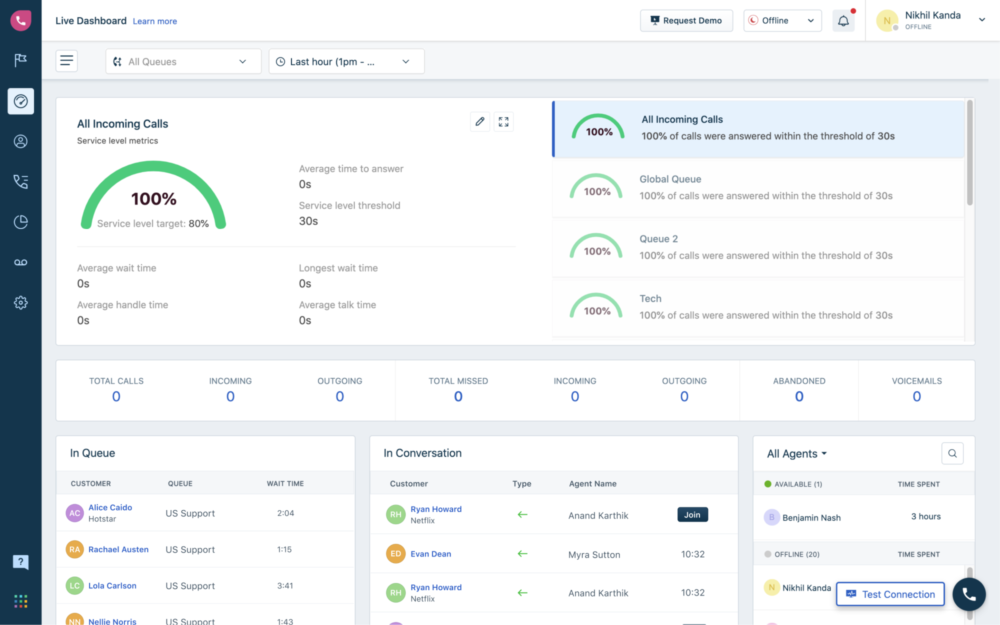
Live dashboards and active call visibility
Look for dashboards that show active calls, queue load, wait times, and what agents are doing now—not just after-the-fact reporting.
Monitoring and barging
Call monitoring and barging enable real-time coaching and difficult-call intervention. If your QA program includes live monitoring, remember to model the per-minute economics (monitoring minutes can become a real cost line item).
Service level monitoring and abandoned call analytics
Service level views (answered within a target threshold) and abandonment stage analytics help you understand whether customers are failing in IVR, in wait queues, or in callback attempts. This is operationally actionable reporting.
8) Analytics and reporting
Freshcaller reporting typically matures in value when:
- Your call taxonomy is consistent (queues, tags, outcomes)
- Your team measures what matters (service level, abandonment, handle time, queue health)
- You have the plan level that supports the depth of reporting you need
A practical success pattern is to design reporting backwards from management questions, then build tags/queues to support those metrics.
9) AI capabilities: voice bots, transcripts, and speech-enabled IVR
Freshcaller’s AI story often includes voice bots, speech-enabled IVR, and post-call transcripts. AI can be a force multiplier—but only when tested on real calls and controlled with good escalation paths.
A grounded evaluation checklist:
- Are voice bots reducing agent workload, or creating customer friction?
- How accurate are transcripts for your accents, terminology, and noise levels?
- Does speech input make IVR faster, or more error-prone?
- Do you have a safe “escape hatch” to a human for low-confidence interactions?
10) Integrations and extensibility
Freshcaller is significantly stronger when it is not a standalone phone system, but an integrated voice channel inside your service desk and CRM workflows.
Freshdesk integration
Freshdesk + Freshcaller is the most natural pairing if your support operations already run on Freshworks. The operational goal is straightforward: calls should become tickets (or attach to existing tickets) so voice is visible, searchable, reportable, and auditable.
Freshservice integration
For internal service desks, voice-to-ticket workflows (including missed calls/voicemails converting to tickets) can drive accountability and reduce “lost work” that typically happens in phone-based IT support.
Marketplace apps and APIs
If you need deeper customization, Freshcaller supports APIs and integration patterns that enable:
- Syncing call data into custom dashboards or BI tools
- Enriching call routing with CRM/account data
- Building workflow glue via low-code/automation platforms (e.g., Zapier) where appropriate
11) Mobile apps: useful, but not always the strongest story
Freshcaller offers iOS and Android apps, which can be useful for availability management, basic calling, and monitoring. However, Freshcaller is primarily designed around a browser-based workflow. If your team is mobile-first (field sales, on-the-go service teams), you should treat mobile as a first-class evaluation track during your trial.
Practical recommendation: In your pilot, run a “mobile-only day” for 2–3 agents and see whether call quality, usability, and reporting visibility meet your operational needs.
12) BYOC (Bring Your Own Carrier): powerful, but more technical than expected
BYOC is strategically valuable because it can preserve existing telco contracts and reduce per-minute costs. But BYOC is also where “simple SaaS” becomes an IT/telecom coordination effort.
If you plan to use BYOC, involve network/telecom stakeholders early and validate prerequisites like SIP forwarding support, codec alignment, and IP whitelisting requirements before you commit your rollout timeline.
Freshcaller13) Security and compliance considerations
Voice systems handle personal data and sensitive conversations. For regulated environments, your evaluation should explicitly confirm:
- Call recording storage, retention, and access controls
- Role-based permissions for recordings and monitoring
- Data residency requirements
- How voice workflows align with your compliance posture (including PCI if relevant)
Treat voice as part of your security surface area, not as a “channel add-on.”
14) Pricing: where the real evaluation happens
Freshcaller pricing is straightforward at first glance and more nuanced in real life. The key idea is simple:
Total cost = agent licenses + usage (minutes) + feature-driven per-minute charges + behavioral effects (record everything, monitor a lot, conference a lot) + rounding rules.
Plan tiers at a glance (headline)
| Plan | Agent license (billed annually) | Included minutes (as commonly presented) | Key reality check |
|---|---|---|---|
| Free | $0 per agent/month + pay per minute | No meaningful “included minutes” assumption | Good for basic testing; costs are usage-driven |
| Growth | $15 per agent/month + pay per minute | Up to 2,000 minutes/month (account-level policy nuance applies) | Solid baseline; model recording and rounding effects |
| Pro | $39 per agent/month + pay per minute | Up to 3,000 minutes/month (account-level policy nuance applies) | Best fit for callback/routing maturity and reporting depth |
| Enterprise | $69 per agent/month + pay per minute | Up to 5,000 minutes/month (account-level policy nuance applies) | Best fit for service-level and abandonment analytics at scale |
Important nuance: “Included” or “free incoming” minute policies often depend on region, number type (local vs toll-free), call attendance mode (browser vs other methods), and whether you are in trial. Treat included minutes as policy-bound benefits—not as “all minutes are covered.”
Per-minute charges you should explicitly model
- Call recording minutes (if recording adds a charge)
- Supervisor monitoring/barging minutes
- Conference minutes (can multiply fast in team-based troubleshooting)
- SIP-related per-minute costs (if applicable in your setup)
- Voicemail transcription minutes (if enabled)
- Billing rounding: if calls are rounded up to the next minute, short calls can become disproportionately expensive
A realistic way to estimate total cost
- Estimate call minutes by type (incoming/outgoing, local/toll-free, browser-attended vs other)
- Decide policy choices (record everything vs record selectively; QA monitoring intensity; conferencing frequency)
- Apply agent licenses (agents × plan price)
- Apply per-minute charges and rounding behavior
- Validate assumptions using real usage data during your pilot/trial
15) What real users say (G2, Capterra, and app stores)
No review platform is perfect, but patterns across them are useful. The most consistent themes for Freshcaller tend to cluster around ease of setup, core queue functionality, cost surprises from per-minute charges, and mixed sentiment on mobile experience and advanced reporting depth.
Ratings snapshot (as commonly referenced)
| Platform | Headline rating signal | What to look for in the comments |
|---|---|---|
| G2 | ~4.1/5 (review count varies over time) | Reliability, call quality, pricing surprises, integration depth |
| Capterra | ~4.0/5 (review count varies over time) | Reporting limitations, call drops/latency, Freshdesk “seamlessness” expectations |
| App Stores | Mobile sentiment can be uneven | Whether mobile supports your core workflow (status, transfers, reporting, QA) |
How to use reviews correctly: Filter for reviews that match your size and use case (support vs sales, call volume, regions, browser vs mobile). The “wrong” peer group will produce misleading conclusions.
16) Strengths and tradeoffs
| Where Freshcaller is strong | Where you need to be careful |
|---|---|
|
|
17) Alternatives and how to think about them
If Freshcaller is not the right fit, the best alternative depends on your core requirement:
- If you want a simpler sales calling stack: consider SMB-oriented cloud calling tools with strong CRM integrations.
- If you need enterprise contact center depth: evaluate contact center suites with workforce management and advanced QA tooling.
- If you are committed to Freshworks for service/CRM: Freshcaller’s ecosystem advantages can outweigh feature gaps elsewhere—especially for voice-to-ticket workflows.
18) Who Freshcaller is best for (and who should avoid it)
Best for
- Freshdesk-based support teams that want calls to become tickets automatically and keep context inside the service desk
- Freshservice IT teams that want missed calls/voicemails/recordings to become trackable work
- Hybrid teams that want browser-based voice plus supervisor monitoring tools
- Teams that need to reduce abandonment with callback and escalation patterns
- Organizations that want BYOC and have the technical capacity to implement it properly
Avoid or be cautious if
- You need a predictable flat-cost model with minimal per-minute variability
- You require the most advanced mobile-first experience for field teams
- Your voice workflows require extreme customization beyond typical contact center patterns
- You expect highly advanced analytics without moving to higher tiers or building external reporting
Final verdict and recommendations
Freshcaller is a strong, practical voice contact center for teams that want a modern phone system with real operational controls—especially when paired with Freshdesk or Freshservice. It gets the fundamentals right, adds important queue health features like escalation and callback, and provides supervisor visibility through dashboards and monitoring.
The success factor is disciplined cost evaluation. Do not choose Freshcaller based only on per-agent licensing. Model your minutes, recording policy, monitoring behavior, and regional call patterns—and validate assumptions with real usage data during the trial/pilot.
FreshcallerFinal score: 8.5/10
Practical pilot recommendation: During the trial, run three “day-in-the-life” call scenarios: (1) billing dispute, (2) complex technical troubleshooting with escalation, (3) after-hours voicemail follow-up. Measure cost-per-resolved-call, abandonment rate, and supervisor visibility.
FAQ (15 questions)
1) Is Freshcaller the same as Freshdesk Contact Center?
In many contexts, Freshcaller is presented as “Freshdesk Contact Center (formerly Freshcaller).” This naming is common in review ecosystems and in Freshworks materials.
2) Can agents take calls in the browser?
Yes. Freshcaller is designed as a cloud-based, browser-first voice system, and it is commonly deployed with a headset-based calling workflow.
3) Does Freshcaller support IVR?
Yes. Freshcaller supports IVR (phone trees). Higher tiers typically unlock more advanced IVR and routing capabilities, including speech-enabled options in some packaging.
4) Does it support call recording?
Yes. Call recording is supported, and some environments allow additional recording controls (like pausing/resuming) depending on workflow and configuration.
5) Are there extra costs for recording?
Often, yes. Many contact center systems treat recording as a per-minute cost driver. Treat recording as an explicit cost assumption and model it in your forecast.
6) Does Freshcaller support call monitoring and barging?
Yes. Supervisor monitoring and barging are common contact center features, enabling real-time coaching and intervention. These can also introduce additional per-minute usage costs in some pricing models.
7) What is queue callback (virtual hold)?
Queue callback lets callers reserve their place in line and hang up. When an agent becomes available, the system calls the customer back. It reduces perceived wait time and typically lowers abandonment in high-volume queues.
8) What are smart escalations?
Smart escalations are fallback routing rules—when the primary queue cannot answer (busy/unavailable/overloaded), calls can route to another queue, a specific agent, or an external number.
9) Can Freshcaller create tickets from calls?
Yes—especially when integrated with Freshdesk. The operational goal is for calls to become tickets or attach to existing tickets so voice becomes structured, reportable work.
10) Does it integrate with Freshservice?
Yes. Freshservice integration is commonly used to connect voice to internal IT/service desk workflows, including converting missed calls and voicemails into trackable tickets.
11) Does Freshcaller offer APIs?
Yes. API availability matters if you want custom dashboards, workflow enrichment, or data-driven routing logic integrated into your broader systems.
12) Can I keep my existing phone carrier?
Yes, via BYOC (Bring Your Own Carrier). BYOC can preserve existing telco contracts and pricing, but it typically introduces telecom/network implementation requirements (SIP forwarding, codecs, and whitelisting).
13) How do “included/free incoming minutes” typically work?
Included/free minute policies often reset monthly and can be constrained by region, number type (local vs toll-free), and attendance mode (browser vs other). Treat “included minutes” as policy-bound benefits and validate applicability for your geography and workflow.
14) Are calls billed in exact seconds?
Many voice billing models round up to the next minute. If rounding applies, short calls can become disproportionately expensive—so you should include rounding behavior in your cost model.
15) Is Freshcaller secure for business use?
Freshworks positions its products for business use with standard SaaS security practices and compliance posture. For regulated teams, confirm recording retention controls, role-based access to recordings, data residency, and audit expectations during vendor review.








By clicking Sign In with Social Media, you agree to let PAT RESEARCH store, use and/or disclose your Social Media profile and email address in accordance with the PAT RESEARCH Privacy Policy and agree to the Terms of Use.