
Keap Review: An automation first CRM that tries to run your follow ups for you
You know the feeling.
A lead fills out a form. You mean to reply fast. Then a client pings you. A team member asks where a file is. You jump into a meeting. You come back and that lead is now a cold memory and a faint guilt.
Keap is built for that moment.
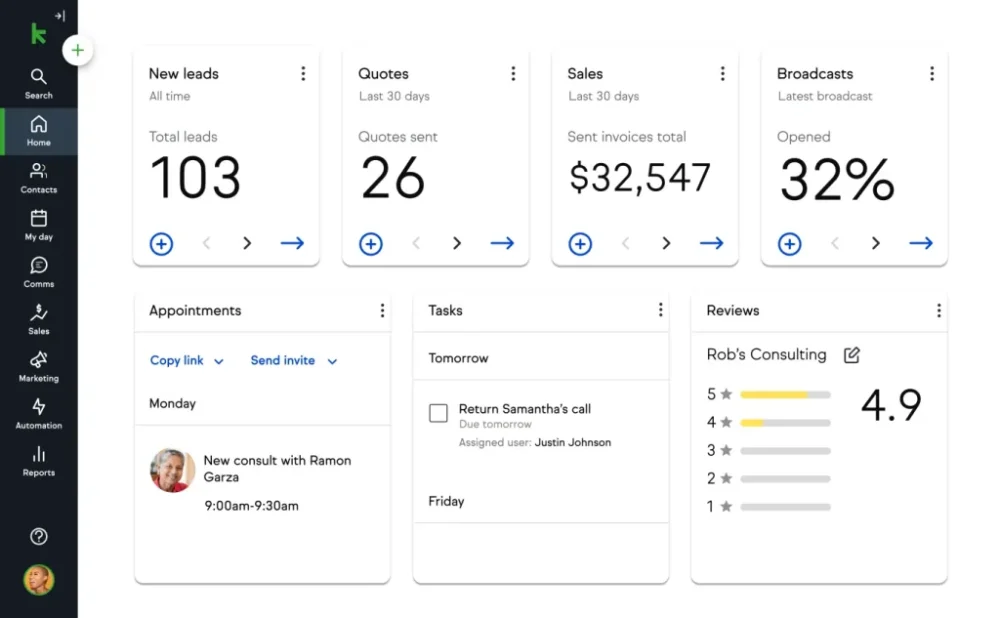
It is a small business CRM and automation platform that combines contact management, sales pipeline tracking, email marketing, text marketing, appointments, and payments in one place. It comes from a long lineage too. The company started in 2001, launched a new Keap product in 2018, then rebranded from Infusionsoft to Keap in January 2019. More recently, Keap was acquired by Thryv and is now positioned as a Thryv brand.
KeapMy overall take: Keap is powerful, particularly if your business lives or dies by consistent follow up and you want automation plus payments plus scheduling under one roof. But it is not a casual tool. It is pricey, it benefits from structured onboarding, and some public review signals (especially on Trustpilot) highlight frustration around support and cancellation experiences.
Rating: 7.8 out of 10
Features: 8.7 out of 10
Automation depth: 9.0 out of 10
Ease of use: 7.1 out of 10
Integrations: 8.2 out of 10
Value for money: 7.0 out of 10
Support experience (based on stated availability and user sentiment): 7.0 out of 10
Here is how this review is organized
- Overview and company background
- Pricing and plans, including hidden costs
- Setup and onboarding experience
- User interface and ease of use
- Core features breakdown
- Advanced features and integrations
- Performance, reliability, and security
- Customer support and learning resources
- Pros and cons
- User reviews and ratings summary
- Alternatives and comparisons
- Who Keap is best for, and who should avoid it
- Final verdict and recommendations
- FAQ
Overview and company background
A quick timeline that matters for buyers
Keap is not a brand new startup experimenting in public. It has been around long enough to build strong automation DNA, and long enough to accumulate some legacy complexity.
From Keap’s own timeline:
- 2001: the company that later became Infusionsoft begins as a custom software company called eNovasys
- 2003: name changes to Infusion Software and the first product launches
- 2018: launches Keap as a brand new product
- January 2019: Infusionsoft rebrands to Keap, and new Keap products launch in the spring
Then the more recent structural change:
- October 31, 2024: Thryv announced the closing of its acquisition of Infusion Software, Inc. (Keap) for $80 million in cash, subject to adjustment
Keap’s own FAQ states “Keap is now part of Thryv” and positions the combined story as continued Keap CRM plus access to Thryv tools
If you are evaluating Keap today, that acquisition context matters. It affects product roadmaps, support org structure, branding, and sometimes account management practices.
Who Keap is for
Keap frames itself as a platform built for entrepreneurs and small businesses that want a repeatable growth system. On the About page, Keap explicitly calls out consultants, marketing agencies, coaches, startups, and other growth focused small businesses.
In plain language: Keap fits teams that have leads coming in, offers to sell, follow ups to manage, and a need to get paid without stitching together five separate tools.
KeapMarket positioning
Keap competes in a busy zone:
- CRM platforms for small business
- Marketing automation tools
- Sales pipeline tools
- Appointment scheduling tools
- Payment and invoice tools
The pitch is consolidation: fewer integrations to babysit, fewer tabs to keep open, fewer “Who owns this lead?” conversations.
On G2, Keap is listed as “Keap” by Thryv and described as a small business CRM and automation platform with lead capture, sales automation, marketing automation, email automation, and text marketing.
Key differentiators, at a high level
When Keap works well, it tends to stand out in a few ways:
- Automation is not an add on. It is the point.
You are meant to build a system where leads trigger follow ups automatically. - Sales plus marketing plus payments in one place.
Quotes, invoices, checkout forms, and payment flows appear as first class features in the platform feature list. - A mature partner and marketplace ecosystem.
Keap pushes certified integrations, developer partners, and a marketplace for apps and services. - A “business line” style messaging add on.
Keap includes text marketing tiers and minutes, which is not standard in many CRMs.
Now let’s talk about the part that usually decides the shortlist: price.
Pricing and plans
Keap’s pricing story is simple on the surface and more nuanced once you read the fine print.
The headline price
Keap’s pricing page shows a single starting price:
- $299 per month billed monthly
- $2,988 per year billed annually (which works out to $249 per month if you do the math)
The same page also states “Say goodbye to feature based plans” and frames pricing around what you need, rather than a ladder of feature tiers.
On G2, Keap’s “pricing provided by Keap” section lists starting at $249.00 and references 1500 contacts in the pricing snippet.
Important nuance: Keap’s own site uses interactive elements for users and contacts, and those values may not render cleanly in a text scrape. So you should treat the exact included user count and contact count as “variable by package,” then confirm in the live pricing UI or a quote.
The not so small onboarding cost for annual plans
If you plan to pay annually, Keap’s pricing page includes a footnote that a required implementation package is needed for annual contracts.
When you click through to implementation packages, Keap shows a “Fast Track Implementation” option described as:
- One time investment: $500
- Shows a “you save $1,000” callout from $1,500
This matters for budgeting. In year one, an annual subscription plus a required onboarding package can move the true first year cost meaningfully higher than the clean “$249 per month” mental model.
Additional contact costs
Keap also discloses pricing for additional annual contacts in tiered blocks:
- Tier 1 to Tier 10: $30 per year per 500 contacts
- Tier 10 to Tier 25: $25 per year per 500 contacts
- Tier 25 to Tier 50: $20 per year per 500 contacts
- Tier 50 plus: $15 per year per 500 contacts
That kind of sliding scale is good news if you grow a large list. It is also a reminder that Keap’s economics can shift as your database grows.
KeapText marketing pricing and overages
Keap includes text marketing as part of the platform narrative, but it is tiered.
From the pricing footnotes:
- Text marketing Tier 1 includes 500 messages and 100 minutes
- Tier 2 add on: $34 per month for 2000 messages and 200 minutes
- Tier 3 add on: $84 per month for 5000 messages and 500 minutes
- Overage: $0.03 per message and $0.06 per minute
If your business does high volume SMS reminders or campaigns, those overages are not theoretical. They show up fast.
Payment processing and merchant account costs
Keap supports several payment processors. Their merchant accounts documentation lists integrated processors such as Stripe, PayPal, Authorize.Net, and eWay.
That same resource also provides example fees for some processors (for example Stripe at 2.9% plus $0.30 per transaction for the US).
Two reminders:
- These fees are primarily driven by the processor, not Keap.
- You still need to include them in your unit economics if you plan to invoice and collect payments through Keap.
Cancellation terms and friction costs
Keap’s pricing footnotes include a few items that can catch teams off guard:
- Annual contract early termination fee: $299
- Cancellation is described as requiring you to call support and confirm email, rather than a self serve cancel button inside the product.
That aligns with some Trustpilot reviewer complaints about difficulty canceling. Trustpilot shows a TrustScore of 1.2 (labeled “Bad”) with 488 reviews on the Keap profile page at the time captured.
You should not base a purchase decision purely on Trustpilot. But you also should not ignore the signal, especially if contract flexibility is important to you.
Free trial details
Keap advertises a 14 day free trial with no credit card required on the integrations page.
However, the pricing page footnotes note trial limits:
- Trial can send 25 emails
- Trial does not include payments
- Trial does not include text marketing
So your trial is more of a UI and workflow trial than a full end to end revenue workflow trial.
Pricing comparison table
Below is a practical comparison that matches how Keap actually sells today: one core subscription price plus add ons and scaling costs.
| Component | Price | Billing cadence | What it covers | Who it fits |
|---|---|---|---|---|
| Keap base subscription (monthly) | $299 | Monthly | Core CRM and automation platform | Teams that want flexibility and might switch tools |
| Keap base subscription (annual) | $2,988 | Annual | Same platform, lower effective monthly rate | Teams committed to Keap for at least a year |
| Required implementation package (annual contracts) | $500 | One time | Fast Track Implementation onboarding | Teams that want guided setup and are paying annually |
| Additional annual contacts | $15 to $30 per 500 contacts | Annual | Scales contact database | Teams with list growth |
| Text marketing Tier 2 | $34 | Monthly | 2000 messages and 200 minutes | Teams doing moderate SMS |
| Text marketing Tier 3 | $84 | Monthly | 5000 messages and 500 minutes | Teams doing heavier SMS |
| SMS overage | $0.03 per message, $0.06 per minute | Usage based | Overages beyond tier limits | Teams with bursty campaigns |
Value for money: the honest read
Keap can be a bargain or a budget strain. It depends on your workflow.
Keap tends to be worth it when:
- A single saved client per month pays for the tool
- Your leads fall through the cracks today
- You sell higher value services, retainers, programs, or recurring billing
- You need both CRM and automation, not just one
Keap tends to feel expensive when:
- You mainly need a simple pipeline tracker
- Your email marketing is light and you do not need complex automation
- You have a small list and low conversion complexity
- You are early stage and still changing your offer every month
The real value is not in the feature checklist. It is in building a reliable follow up machine that runs when you are busy.
Setup and onboarding experience
Let’s talk about what it feels like to go from “We signed up” to “This is running our day.”
Signing up and first steps
Keap promotes a 14 day free trial on its integrations page, no credit card required. That lowers risk, but the trial limits are important: 25 emails, no payments, no text marketing.
So a sensible first session looks like this:
- Create the account and choose the starting configuration (users and contacts)
- Connect your email provider or plan your email sync
- Import contacts
- Define your pipeline stages
- Choose one business process to automate first (lead capture, consultation booking, quote follow up, unpaid invoice chase)
If you try to automate everything on day one, you will get lost. Most teams do.
Implementation packages and the onboarding reality
Keap makes implementation a formal part of the annual purchase path. The Fast Track Implementation option is priced at $500 one time.
In practice, that is a signal: Keap expects many customers to benefit from guided setup. That is not a bad thing. It is just a different style of product.
Some tools are plug and play. Keap is more like “plug and plan.”
Data migration
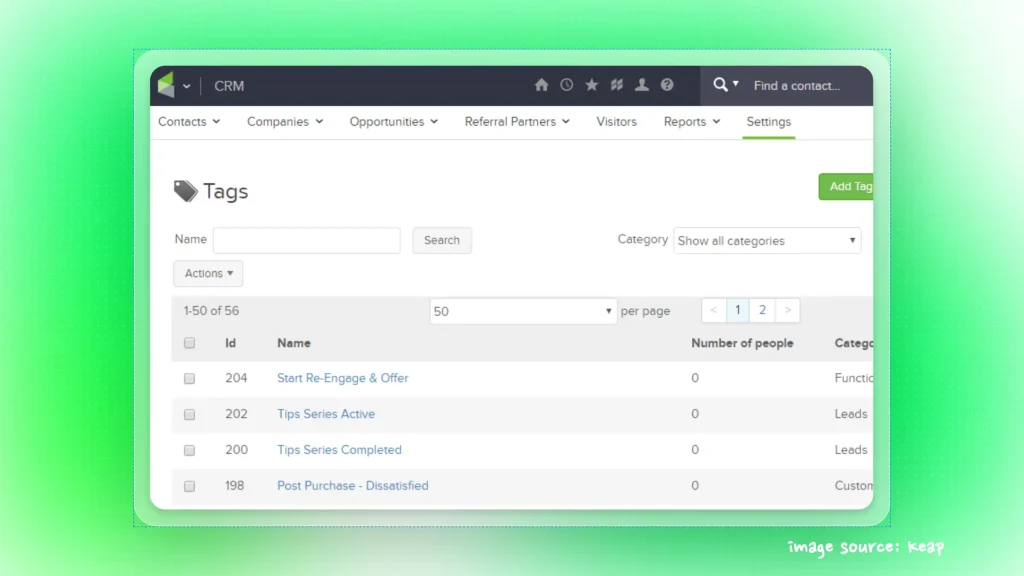
Keap is built around structured contact records with tags, custom fields, and automation triggers. Migration usually involves:
- CSV import of contacts
- Mapping fields (name, email, phone, company, custom fields)
- Tag strategy setup (lead source, persona, service interest, lifecycle stage)
- De duplication rules and cleanup
This is the part people skip. Then six weeks later they wonder why segments are messy.
If you want Keap to feel sharp, invest in data hygiene early.
How long to get started
A realistic timeline:
- Day 1: basic account setup, contact import, pipeline stages
- Week 1: first automation that captures leads and sends immediate follow up
- Week 2: add appointment scheduling and reminders
- Week 3 to Week 4: add payments, invoices, and post purchase follow ups
- Month 2: expand into multiple campaigns, refine segmentation, add reporting habits
Can you go faster? Sure.
But “fast” often means “fragile,” and fragile automations are worse than no automation.
Common hurdles
From both product structure and user sentiment, common friction points include:
- Learning the tag based logic and how it impacts automation paths
- Understanding what should be a pipeline stage versus a tag versus a custom field
- Building emails that actually deliver and do not trigger spam filters
- Connecting payment processors and reconciling accounting workflows
- Coordinating internal task assignment and permissions
One more practical hurdle: the free trial does not include payments or text marketing. If those are key to your use case, plan on evaluating them via demos, documentation, or a paid period.
User interface and ease of use
You can have the best automation engine in the world. If the UI feels like a puzzle, your team will not use it.
What the UI tries to do
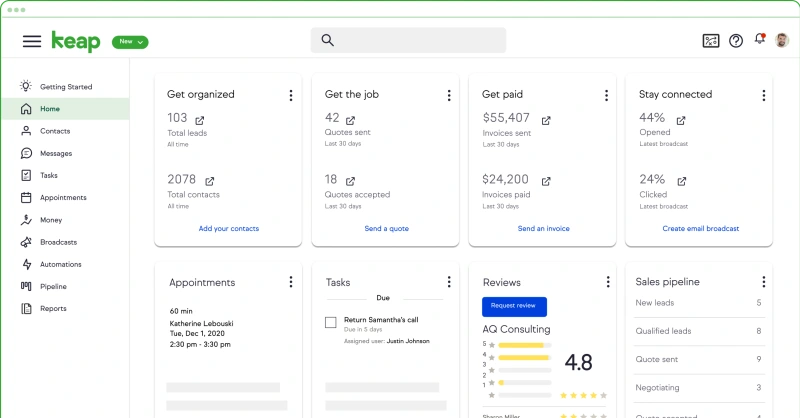
Keap’s interface is designed around the daily rhythm of a small business:
- Contacts and their history
- Deals and pipelines
- Tasks and follow ups
- Campaigns and automations
- Appointments
- Payments and invoices
- Reports
On the pricing page’s feature list, Keap calls out things like custom user roles, campaign automation, lead capture and lead management, appointment scheduling, quotes and invoices, and reporting.
That mix is why Keap appeals to owners. It is trying to be the “home base.”
Learning curve: new users versus power users
Keap has two personalities.
For a new user doing basic CRM tasks:
- Adding a contact, tagging them, logging notes, creating a task, moving a deal stage feels approachable.
- It resembles other CRMs.
For a power user building automations:
- The logic expands quickly.
- Tiny decisions compound.
- You will need naming conventions and a folder structure for campaigns.
This is why teams either love Keap or feel overwhelmed by it. The platform rewards systematic thinking.
If you have ever enjoyed organizing a messy closet, you will probably enjoy setting up Keap. If that sounds like your personal nightmare, plan for help.
Mobile app experience
Keap notes that its mobile app is available in the United States, Australia, Canada, the United Kingdom, and New Zealand.
What matters for mobile is not “does it exist.” It is “does it support the one thing I need on the go.”
For most small teams, the mobile essentials are:
- Look up a contact fast
- Call or message from a business number
- Check today’s appointments
- Add notes after a call
- Move a deal stage during a busy day
Keap’s feature focus suggests it aims to cover those flows, but if mobile is central for you (field sales, home services), validate mobile workflows before you commit.
Customization options
Keap’s customization tends to be functional rather than cosmetic.
You customize by:
- Creating custom fields and tags
- Defining pipelines and stages
- Building automation sequences and templates
- Setting roles and permissions (Keap lists “custom user roles” and “custom roles” in its platform features)
If your goal is theme colors and fancy UI skins, Keap is not that kind of tool. It is more about shaping data and workflows.
Core features breakdown
This is where Keap either clicks for you or it does not.
I am going to break it down by how a real small business operates, not by marketing categories.
1) Contact management: the spine of the system
Every Keap workflow begins and ends with contacts.
A good CRM record should answer:
- Who is this person?
- How did they find us?
- What did they ask for?
- What did we send them?
- What did they buy?
- What should happen next?
Keap’s automation and segmentation are built to make those answers actionable.
Strengths
- Tag driven segmentation can be extremely flexible
- Automation triggers can be tied to contact behavior
- When integrated with email and appointments, the contact timeline becomes meaningful
Weaknesses
- Tag systems can get messy fast without governance
- Two people can label the same thing differently unless you set rules
- Cleanup work compounds over time
Practical advice
Before you build a single automation, write down:
- Your top 10 tags you will use no matter what
- Your naming convention (for example: Source: Website Form, Stage: New Lead, Interest: Coaching, Customer: Active)
- Who is allowed to create new tags
It sounds boring. It saves you later.
2) Lead capture: turning interest into a tracked pipeline
Keap includes lead capture and landing page style features in its core platform list.
The key is not the form itself. It is what happens one second after the form is submitted.
A strong Keap lead capture flow usually:
- Creates or updates the contact record
- Applies tags based on the form and answers
- Creates a deal and places it in a pipeline stage
- Sends an immediate confirmation message
- Assigns an internal task if human follow up is required
- Starts a nurture sequence if the lead is not ready
This is the moment Keap earns its keep.
3) Sales pipeline: visibility and momentum
Keap lists “sales pipeline automation” and “pipeline management” in the features shown on its pricing page.
Most small businesses need two things:
- Visibility: where deals stand
- Momentum: what happens next, automatically
A typical pipeline setup might include stages like:
- New lead
- Contacted
- Discovery booked
- Proposal sent
- Negotiation
- Won
- Lost
Keap’s value is connecting those stages to actions. Move a deal to “Proposal sent” and an automation can:
- Send the proposal email
- Create a follow up task for three days later
- Send a reminder SMS if the proposal is unopened
- Notify the owner if the deal is above a certain value
You do not need all of that on day one. But you can build toward it.
Where Keap tends to shine
- Follow up automation tied to pipeline stages
- Reducing “I forgot to check that lead” moments
Where teams stumble
- Using pipeline stages to represent too many concepts
- Forgetting to train the team to update deal stages consistently
4) Email marketing: sequences, broadcasts, and behavioral follow up
Keap’s feature list includes email features like:
- Broadcast email
- Automated email campaigns
- Email analytics
- Deliverability health dashboard
That last one is a quiet but important point. Deliverability is where many small businesses bleed money without noticing.
Keap’s approach is built around automations rather than one off newsletters. Yes, you can send broadcasts. But the platform really wants you to build sequences.
A simple real world example
- A lead downloads a guide.
- Immediate email: “Here is the guide”
- Day 2: “How to use it in 15 minutes”
- Day 4: “Common mistake and how to avoid it”
- Day 7: soft call to action to book a consult
You can make that sequence once and run it for a year.
This is the “system” part that many business owners want.
5) Text marketing: useful, but budget it properly
Keap supports text marketing tiers and makes it part of the automation toolkit.
SMS works best for:
- Appointment reminders
- Quick confirmations
- Short follow ups after a consult
- Payment reminders (careful with tone)
- Simple broadcasts for engaged lists
Keap includes Tier 1 in text marketing with 500 messages and 100 minutes, and sells higher tiers as add ons.
Two cautions:
- SMS overages can sneak up on you.
- Compliance is real. You need proper consent and opt out handling.
6) Appointments: a practical win for service businesses
Appointments are one of those features that feel small until you use them daily.
Keap includes appointment scheduling in the core list.
In the Keap marketplace, Keap publishes native appointment integrations that sync with:
- Google Calendar: Keap Appointments
- Microsoft Outlook Calendar: Keap Appointments
- Zoom: Keap Appointments, for automatic meeting links
That tells you the intended workflow: booking plus calendar sync plus meeting link, then automate reminders and post meeting follow up.
If you sell consultations, discovery calls, onboarding calls, coaching sessions, or recurring service meetings, this can be a daily time saver.
7) Payments, invoices, and simple ecommerce
Keap includes ecommerce and payment focused features on its pricing page, including:
- Checkout forms
- Invoices and quotes
- Promo codes
- Upsells and order bumps
- Payment plans and recurring payments
This matters because payments are often where automation tools stop.
Many CRMs help you track deals. Fewer help you collect money without duct tape.
Keap also documents supported payment processors like Stripe, PayPal, Authorize.Net, and eWay.
A practical Keap payment automation might:
- Send an invoice automatically after a proposal is accepted
- Trigger reminders if unpaid after a certain time
- Tag the contact as “Customer: Active” when payment clears
- Start a post purchase onboarding sequence
- Schedule a check in task for the team
That is the promise: money comes in, the next steps happen, no manual chasing.
8) Reporting and analytics
Keap lists reporting features such as:
- Sales pipeline reporting
- Revenue attribution reporting
- Team and sales performance reporting
This is where many small businesses mature. Not because dashboards are fun, but because you start seeing patterns:
- Which lead sources convert
- Which sequences drive replies
- Which stage deals stall in
- Which products drive repeat purchases
If you never look at reports, Keap still helps you run follow ups. If you do look, you can start improving your business like an engineer.
KeapAdvanced features and integrations
If core Keap is “follow up reliably,” advanced Keap is “follow up intelligently.”
Keap AI: content and automation assistance
Keap advertises AI features such as:
- AI Content Assistant
- AI Automation Assistant
From Keap’s AI page, the assistants are positioned to help generate content for things like sales emails, follow ups, and campaign messaging, and to speed up automation creation.
Here is the realistic take:
- AI can help you get unstuck when writing a first draft
- AI can suggest structures and wording for follow ups
- AI does not replace knowing your audience or your offer
- AI can also create “generic sounding” copy if you do not guide it
If your team struggles to write consistent follow ups, AI assistance can have real value. If your team already has strong messaging, it may be a convenience rather than a game changer.
Integration ecosystem: native apps, marketplace, Zapier, and API
Keap’s integration story has four layers:
- Native apps and marketplace apps
- Zapier connectivity
- Developer partners
- Open API
Keap’s integrations page explicitly states: Connect Keap to 5,000 plus apps using Zapier.
It also highlights the ability to integrate anything with Keap’s open API.
That gives you a lot of flexibility. It also means you need to decide how you want to integrate:
- If you want reliability and lower maintenance, prefer native apps and well supported marketplace apps
- If you want speed and breadth, Zapier is a common path
- If you need custom logic or higher scale, API work is the route
Top integrations table
Below is a practical list of integrations and adjacent tools that show up frequently in small business stacks, with evidence from Keap’s marketplace and docs.
| Integration | Type | What it does | Best for |
|---|---|---|---|
| Zapier | Connector | Connects Keap to 5,000 plus apps | Broad integration coverage |
| QuickBooks Online: Keap Sync | Native marketplace app | Sync products, contacts, invoices from QuickBooks Online | Accounting plus CRM alignment |
| Gmail: Keap Email Sync | Native marketplace app | Connect Keap with Gmail | Email tracking and 1 to 1 workflows |
| Microsoft Outlook: Keap Email Sync | Native marketplace app | Connect Keap with Outlook email | Outlook based teams |
| Google Calendar: Keap Appointments | Native marketplace app | Sync appointments with Google Calendar | Scheduling workflows |
| Microsoft Outlook Calendar: Keap Appointments | Native marketplace app | Sync appointments with Outlook Calendar | Scheduling workflows |
| Zoom: Keap Appointments | Native marketplace app | Auto create Zoom links for appointments | Remote consults |
| Shopify integration via Connect My Sales | Marketplace app | Brings Shopify customer and order data into Keap, triggers automations | Ecommerce segmentation and abandoned cart |
| WordPress user sync via FuseWP | Marketplace app | Sync WordPress users, leads, customers, and members with Keap | Membership and course businesses |
| WooCommerce support via FuseWP | Plugin capability | Sync WooCommerce customers and status into Keap | WordPress ecommerce |
| MemberPress support via FuseWP | Plugin capability | Sync membership status to Keap | Membership businesses |
| LearnDash support via FuseWP | Plugin capability | Sync course enrollments to Keap | Course creators |
| LifterLMS support via FuseWP | Plugin capability | Sync LMS data | Course creators |
| Easy Digital Downloads support via FuseWP | Plugin capability | Sync purchases and customer records | Digital products |
| PayPal | Payment processor | Collect payments via supported processor | Businesses already on PayPal |
| Stripe | Payment processor | Collect payments via supported processor | Card payments and subscriptions |
| Authorize.Net | Payment processor | Collect payments via supported processor | Businesses using Authorize.Net |
| eWay | Payment processor | Collect payments via supported processor | Regional processor needs |
| Open API | Developer option | Build custom integrations | Custom workflows at scale |
This mix highlights something about Keap: it expects you to connect the dots across sales, marketing, scheduling, and finance. It is designed to be a hub.
How seamless are the integrations?
In general:
- Native Keap apps (email sync, calendars, Zoom, QuickBooks sync) are the cleanest experiences.
- Marketplace apps vary by vendor and support quality
- Zapier connections are flexible but can become a “spaghetti automation” problem if you do not document them
- API builds can be excellent, but require engineering skill
A good rule: start simple, then expand.
Performance, reliability, and security
This section is where marketing claims meet operational reality.
Speed and uptime signals
Keap’s public status page is hosted on Thryv Status (status.keap.com redirects to a Thryv status domain). It displays “All Systems Operational” and lists uptime over the past 90 days for multiple components, with many showing 99.93 to 100 percent uptime in the captured view.
This is useful because it is a public transparency tool. It also appears to reflect a broader platform context, likely tied to Thryv operated services.
Known issues and real world glitches
Keap also maintains a Known Issues site, which lists active and historical issues with dates and status.
Two things I like about this:
- It is direct. No spin.
- It gives teams something concrete to reference when something feels off.
If your business depends on automated email, a known issues feed can be more valuable than a glossy uptime promise.
KeapScalability for growing teams
Keap’s model scales along two axes:
- Users
- Contacts
The pricing UI suggests those dimensions are configurable, and Keap discloses additional contact pricing tiers.
Functionally, Keap scales well for small and midsize teams that need consistent processes. The bigger constraint is usually organizational: can your team agree on process, naming, and ownership?
Keap does not magically fix messy operations. It exposes them.
Security: 2FA and compliance cues
One clear security policy signal: a Thryv help center article states that Two Factor Authentication will be mandatory on August 7, 2025.
Keap also has GDPR oriented documentation. A Keap help resource references GDPR and the company’s approach to data protection and compliance.
Beyond that, you should validate specifics (data residency, encryption details, audit logs, SSO, SOC reports) during procurement if you have compliance requirements. Keap’s public marketing pages do not always surface deep security documentation in a single, easy to cite page.
Customer support and learning resources
Support is a deciding factor for automation platforms, because you will hit edge cases.
Support channels and availability
Keap’s contact page lays out support and sales availability clearly:
- Sales reps available Monday to Friday, 7 a.m. to 4 p.m. MST
- Customer Support phone availability Monday to Friday, 6 a.m. to 6 p.m. MST
- Chat with support: available 24/7 inside the Keap app
It also points users to:
- Help center
- Training for customers via Keap Academy
- Keap user community
From a buyer standpoint, that is a solid coverage model: live help plus learning paths plus community.
The reputation gap: availability versus user sentiment
Now the harder part.
Trustpilot shows a low TrustScore (1.2) with 488 reviews and includes repeated complaints about billing issues and cancellation friction.
At the same time, Capterra’s Keap profile shows a 4.1 rating across 1,295 reviews and positions Keap as strong in automation and campaign email, while also calling out technical glitches and instability in its pros and cons synthesis.
So what do you do with that?
You treat support as something to validate during evaluation:
- Ask to see support in action during trial or demo
- Ask about onboarding resources and response expectations
- Read recent reviews, not just averages
- Clarify cancellation policy, billing terms, and contract details upfront
If your business cannot tolerate downtime or billing surprises, put those topics on the table early.
Pros and cons
Here is the blunt version.
Pros
- Strong automation capability, built into the platform’s identity
- Combines CRM, marketing automation, appointments, and payments in one system
- Solid integration story: Zapier 5,000 plus apps, marketplace apps, and open API
- Native integrations for QuickBooks Online, Gmail, Outlook, calendars, and Zoom exist in the marketplace
- Clear published support hours and 24/7 in app chat
- Transparent contact scaling pricing tiers (useful for forecasting)
- Public status and known issues pages increase operational clarity
Cons
- High starting price compared to many SMB tools
- Annual contracts may require a paid implementation package, raising year one cost
- Trial limitations prevent full validation of payments and text marketing
- Cancellation process and early termination fee may frustrate some customers
- Some users report technical glitches and instability in Capterra’s synthesized review insights
- Trustpilot sentiment is strongly negative, which you should weigh if support experience is a top priority
User reviews and ratings summary
If you want a quick market read, look at three angles: pro review platforms, consumer complaint platforms, and the vendor’s own testimonials.
G2
G2’s Keap listing shows:
- 4.0 out of 5 stars
- 9 reviews
- “Keap” by Thryv
The low review count on G2 is worth noting. It may reflect listing structure, categorization, or profile management rather than product adoption. Use it as one signal, not the only one.
Capterra
Capterra’s Keap software review page shows:
- 4.1 rating
- 1,295 reviews
- Last updated on September 25, 2025
Capterra’s analysis highlights strong automation benefits while also summarizing that many reviewers mention bugs and instability disrupting workflows.
Trustpilot
Trustpilot’s Keap profile shows:
- TrustScore 1.2
- Labeled “Bad”
- 488 reviews
Many visible recent reviews focus on billing, cancellation difficulty, and dissatisfaction with support outcomes.
The pattern behind the numbers
Across platforms, the themes tend to cluster:
Common praise:
Automation power and the ability to keep data in one place
Common complaints:
- Cost relative to small business budgets
- Friction around cancellation and contract processes
- Bugs or workflow disruptions
This is a classic “high capability, high expectations” product pattern.
KeapAlternatives and comparisons
Keap is not the only way to build automated follow up. Here are several credible alternatives that show up frequently in the same buyer conversations.
A quick competitor snapshot
From G2’s “Top Rated Alternatives” section on the Keap page:
- ActiveCampaign: 4.5 out of 5 (13,936)
- Zoho CRM: 4.1 out of 5 (2,725)
- LocaliQ: 4.5 out of 5 (1,031)
From Capterra’s alternatives section (with ratings and starting prices shown in the captured view):
- HubSpot Marketing Hub: 4.5 (6,195), starting price $20 per user per month
- Bitrix24: 4.2 (976), starting price $61 per user per month
- Omnisend: 4.7 (834), starting price $16 per user per month
Keap’s own base pricing starts at $299 per month billed monthly or $2,988 per year billed annually.
Side by side comparison table
| Product | Best at | Typical fit | Rating signal | Pricing signal in sources |
|---|---|---|---|---|
| Keap | Automation plus CRM plus payments | Service businesses, agencies, coaches, SMBs with high follow up needs | Capterra 4.1 (1,295) | $299 monthly or $2,988 annually; G2 shows starting at $249 |
| ActiveCampaign | Marketing automation depth | Email and behavior based marketing teams | 4.5 out of 5 (13,936) on G2 | Not provided in captured sources |
| Zoho CRM | Broad CRM suite value | SMBs that want a wide suite and flexibility | 4.1 out of 5 (2,725) on G2 | Not provided in captured sources |
| HubSpot Marketing Hub | Ecosystem plus modular growth | Teams that want a wide HubSpot platform | 4.5 (6,195) on Capterra | Starting at $20 per user per month |
| Omnisend | Ecommerce focused email and SMS | Online stores with campaign needs | 4.7 (834) on Capterra | Starting at $16 per user per month |
| Bitrix24 | CRM plus collaboration | Teams wanting an all in one workspace | 4.2 (976) on Capterra | Starting at $61 per user per month |
When to choose Keap versus alternatives
Choose Keap if:
- You want CRM, automation, appointments, and payments tied together
- Your business needs consistent follow up more than fancy dashboards
- You are willing to invest in setup and process design
- You prefer a system that can run a service business end to end
Choose ActiveCampaign if:
- You mainly want marketing automation and email journeys, and you prefer a tool known primarily for that lane
Choose HubSpot Marketing Hub if:
- You want a large ecosystem and potentially lower entry pricing for marketing tools, then scale into more hubs later
Choose Omnisend if:
- Your primary need is ecommerce marketing rather than service pipeline management
Choose Zoho CRM if:
- You want a broader CRM ecosystem and are comfortable building your own structure inside it
Who Keap is best for, and who should avoid it
Best for
Keap is usually a strong match for:
- Service businesses that sell consultative offers
Agencies, consultants, coaches, and professional services teams that need lead capture, pipeline tracking, scheduled calls, proposals, and invoices in one flow. - Owners who want a repeatable growth system
If you are tired of reinventing follow up every week, Keap’s automation focus fits. - Teams with enough deal value to justify the platform
When one retained client covers the monthly subscription, the math feels different. - Businesses that want to unify email, SMS, and payments
Especially if you plan to use SMS tiers and recurring billing features.
Who should avoid
Keap is a weaker fit if:
- You want the cheapest possible CRM
Keap’s pricing starts in the hundreds per month. - You have no appetite for setup work
Automation tools require structure. Keap even formalizes implementation packages for annual contracts. - You need full self serve cancellation and low contract friction
Keap’s pricing footnotes indicate a call required for cancellation, and Trustpilot sentiment shows frustration in this area. - Your business is primarily ecommerce marketing and you do not need pipeline or service workflows
You may get more value from tools dedicated to ecommerce messaging.
Final verdict and recommendations
Keap is a serious tool for small businesses that want to run follow up like a system, not like a scramble.
It combines CRM, automation, scheduling, and payments in a way that can reduce the daily chaos that kills small business momentum. It also carries real cost and real complexity. The requirement for an implementation package on annual contracts and the extra layers of contact scaling and SMS tiers mean you should budget thoughtfully.
Overall rating: 7.8 out of 10
My recommendation, in one paragraph
If your business has steady lead flow and your revenue depends on consistent follow up, Keap can be worth the money because it turns good intentions into repeatable action. If you are early stage, price sensitive, or you mainly need a lightweight CRM, you may be happier with a simpler or cheaper platform, then upgrade later when you have more process clarity.
What I would do if I were evaluating Keap this week
- Use the trial to validate navigation, pipeline, contact records, and basic automation structure.
- Ask for a demo focused on your single most important workflow: lead to booked call to paid invoice.
- Get clarity on: included users, included contacts, required onboarding, contract terms, and cancellation steps.
- Decide if you will use SMS and payments, then price those realistically.
- If you move forward, start with one automation that matters, not ten automations that almost work.
FAQ
1) Is Keap worth the price?
It can be, if automation prevents even a few missed follow ups per month or helps you close one additional deal. Keap’s starting price is $299 billed monthly or $2,988 billed annually, with additional costs possible for implementation, contacts, and text marketing.
2) Does Keap have a free plan?
Keap promotes a 14 day free trial, but it does not mention a permanent free tier in the captured sources. The trial has limits such as 25 emails and no payments or text marketing.
3) How long is the free trial?
Keap’s integrations page mentions a 14 day free trial.
4) Can I test payments during the trial?
Not fully. Keap’s pricing footnotes state the trial does not include payments.
5) Can I use SMS in Keap?
Yes. Keap includes text marketing tiers, including Tier 1, and sells higher tiers as add ons with stated overage fees.
6) What does Keap integrate with?
Keap supports Zapier connections to 5,000 plus apps, an open API, and marketplace integrations such as QuickBooks Online sync, calendar sync, email sync, and Zoom appointment links.
7) Does Keap integrate with QuickBooks Online?
Yes. The Keap marketplace lists “QuickBooks Online: Keap Sync” as a native app that syncs products, contacts, and invoices.
8) Does Keap work with Gmail and Outlook?
Yes. The Keap marketplace lists Gmail: Keap Email Sync and Microsoft Outlook: Keap Email Sync.
9) Does Keap support appointment scheduling with Zoom links?
Yes. The marketplace lists a Zoom integration for Keap Appointments that can create a unique Zoom meeting link for each appointment.
10) What are the main hidden costs to watch for?
Common ones include the one time implementation package for annual contracts, additional contacts, SMS add ons and overages, payment processor fees, and early termination fees for annual contracts.
11) Do I need an implementation package?
Keap’s pricing page states a required implementation package is needed for annual contracts.
12) What support options does Keap offer?
Keap lists phone support hours Monday to Friday, and 24/7 in app chat support, plus resources like training and community.
13) Is two factor authentication available?
A Thryv help center resource indicates two factor authentication becomes mandatory on August 7, 2025.
14) Is Keap good for ecommerce?
Keap includes ecommerce and payment features like checkout forms, order bumps, and recurring payments, and it has marketplace integrations for platforms like Shopify via third party apps.
15) What is the biggest reason people churn from Keap?
Based on public review sentiment and pricing disclosures, the most common churn drivers appear to be cost, complexity, and frustration with billing or cancellation experiences.







By clicking Sign In with Social Media, you agree to let PAT RESEARCH store, use and/or disclose your Social Media profile and email address in accordance with the PAT RESEARCH Privacy Policy and agree to the Terms of Use.