
Landbot Review: The Standout Features, Pricing Realities, and Why Teams Love (or Outgrow) -The no code chatbot builder

If you have ever stared at a website form report and felt your stomach sink, you are not alone. The traffic looks fine. The clicks look fine. Then the form conversion rate sits there like a flat tire.
That is the problem Landbot aims to fix.
Landbot is a no code platform for building chatbots and AI assisted conversation flows that you can publish on the web, WhatsApp, Facebook Messenger, and, on higher tiers, through an API channel. Instead of pushing visitors into a rigid form, you can guide them through a structured conversation that feels lighter, faster, and more human. The platform also puts a lot of energy into lead workflows for revenue teams, with AI blocks and native integrations that help you route, qualify, and sync data without writing code.
LandbotMy overall verdict: 8.4 out of 10.
Landbot is excellent at one thing: turning your “please fill out this form” moments into interactive conversations you can actually control. Where it gets tricky is cost management, especially once you add seats, increase chat volume, or move into WhatsApp where Meta fees enter the picture.
Here is what you will get in this review:
- Overview and market positioning
- Pricing and plans with a comparison table and the fine print
- Setup and onboarding
- Interface and ease of use
- Core features, broken down by real use cases
- Advanced features, AI, automation, and integrations
- Performance, reliability, and security
- Customer support and learning resources
- Pros and cons
- User reviews and rating trends
- Alternatives and comparisons
- Who Landbot fits best, and who should skip it
- Final verdict with a scoring breakdown
- FAQ for common buying questions
Overview and company background
What Landbot is
Landbot sits in the “visual chatbot builder” space, but the current product story is really about hybrid workflows:
- Structured, block based flows for predictable paths like lead capture, qualification, and bookings
- AI steps and AI agent blocks for open ended questions, FAQ style handling, and more flexible conversation moments
- Integrations and routing to push outcomes into CRMs, spreadsheets, calendars, and automation tools
That hybrid approach is not just marketing language. It shows up in how Landbot talks about its platform: a mix of “linear flow builder” control plus native AI steps, plus multi channel publishing (web and WhatsApp are repeatedly emphasized).
Landbot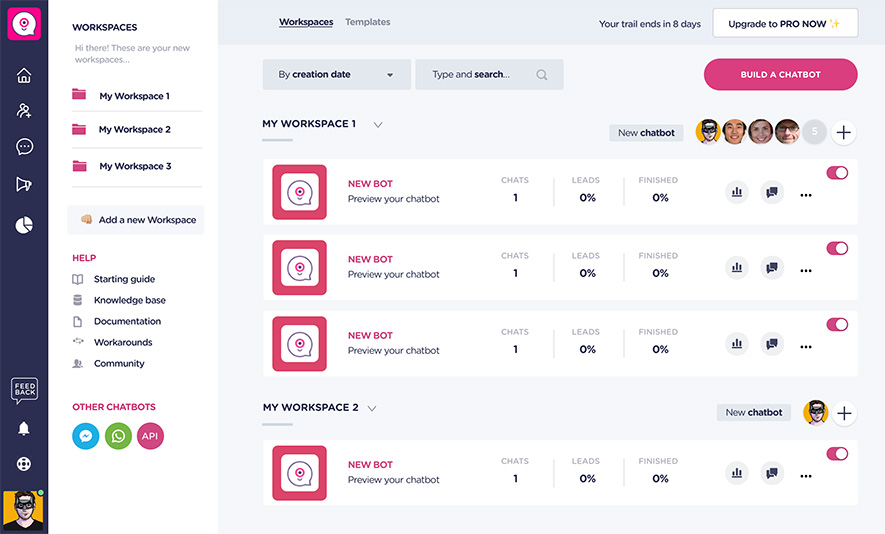
Who it is for
Landbot repeatedly positions itself toward:
- Marketing and growth teams that want more qualified leads
- Sales teams that want faster booking and better routing
- Ops and support teams that want fewer repetitive questions
- Agencies building bots for clients
You can see this in both product descriptions and in user review categories. On G2, Landbot appears under chatbots, lead capture, conversational marketing, and AI agent builders.
A recent milestone: Landbot 4
In December 2025, Landbot announced Landbot 4, a platform rebuild that highlights:
- AI Copilot
- AI Agent block
- Hybrid AI approach
- OpenAI integration
- n8n integration
The key takeaway is not just “new features.” The announcement frames Landbot 4 as a foundation upgrade focused on faster building, a more trustworthy interface, easier workflows, and more bidirectional native integrations.
That matters because many chatbot builders age poorly. They start clean, then turn into an awkward pile of blocks, half integrations, and settings that feel like a maze. Landbot is clearly trying to prevent that outcome by rebuilding rather than patching.
High level differentiators
From a buyer perspective, Landbot’s standout traits are:
- A strong visual builder with conversion oriented flow logic (conditions, tests, structured routing)
- Multi channel focus with a serious WhatsApp angle (including opt in tooling and campaign features on WhatsApp plans)
- A wide integration surface: native integrations, automation platforms, webhooks, and API and SDK routes depending on your tier and needs
Pricing and plans
Landbot pricing is where you should slow down and read carefully. Not because it is intentionally confusing, but because the platform mixes:
- subscription tiers
- seat counts
- chat volume limits
- AI chat usage
- and, on WhatsApp, separate Meta messaging fees
Landbot also states that prices shown do not include taxes.
The main tiers (web and Messenger)
Landbot offers a free “Sandbox” tier and paid tiers such as Starter, Pro, and Business. The pricing page and the plan comparison section show the structure clearly.
WhatsApp tiers (and why they behave differently)
Landbot also offers WhatsApp oriented plans, including:
- WhatsApp Starter (shown as a distinct plan on the pricing page)
- WhatsApp Pro (shown in the plan comparison table and explained in the pricing model article)
WhatsApp is not “just another channel.” You have messaging categories, policy rules, opt in mechanics, and Meta’s pricing. Landbot warns that WhatsApp fees may vary according to Meta’s price list.
LandbotPricing comparison table
Prices and inclusions change, so treat this as a snapshot based on Landbot’s pricing page and Landbot’s pricing model explainer article.
| Plan | Base price (monthly) | Discounted monthly price (annual billing) | Seats included | Channels (high level) | Chats included (web and Messenger) | AI chats included | WhatsApp notes |
|---|---|---|---|---|---|---|---|
| Sandbox | Free | Free | 1 | Web | 100 per month | 0 | No WhatsApp |
| Starter | 40 EUR | 32 EUR | 2 | Web, Facebook Messenger | 500 per month | 100 | No WhatsApp |
| Pro | 100 EUR | 80 EUR | 3 | Web, Facebook Messenger, API | 2,500 per month | 300 | WhatsApp as add on fee in Business, separate in WhatsApp Pro |
| Business | Starting at 400 EUR | Custom | 5 | Web, Facebook Messenger, API, WhatsApp (add on) | Custom | 1,000 | Dedicated success manager and priority support |
| WhatsApp Starter | 80 EUR (also shown as 85 USD) | Not shown in the same way | 2 | WhatsApp, Web, Messenger | 500 per month | 100 | 5,000 WhatsApp messages per month |
| WhatsApp Pro | 200 EUR | 160 EUR | 3 | WhatsApp, Web, Messenger, API | 2,500 per month | 500 | Includes WhatsApp service chats and 1 number |
Sources for the table details: pricing page comparison section and plan cards, plus Landbot’s own pricing model explainer.
Hidden costs and “quiet” line items to watch
This is where many teams get surprised.
1) Extra seats cost money
Landbot lists an extra seat cost on the pricing comparison table (for paid tiers), shown as a monthly add on with a cheaper effective rate on annual billing.
If your workflow involves marketing building flows plus sales taking over chats, seat creep is real. Two seats can feel generous until the third person asks for access.
2) Extra chats and chat packs
Landbot shows extra chat pricing as a pack based model in the comparison table (for example, 25 EUR per 500 chats).
That does not look scary in isolation, but it changes behavior: teams start policing chat usage, removing “nice to have” paths, or pushing users to email earlier. Sometimes that is a smart trade. Sometimes it breaks the whole point of conversational UX.
3) AI chat usage and overages
Landbot’s plan comparison table lists AI chat inclusions per plan and a per AI chat overage price marked as a lower price.
Practical advice: treat AI steps as a resource. Use them where they add value (open ended questions, complex intent detection, fast FAQ coverage). Keep deterministic routing for the rest.
4) WhatsApp messaging fees: Landbot plus Meta
WhatsApp is the big one.
On WhatsApp Starter, Landbot shows 5,000 WhatsApp messages per month and then lists extra WhatsApp message fees by message type, plus Meta cost.
Landbot’s own pricing explainer adds more detail for WhatsApp Pro, including WhatsApp service chat inclusions, extra service chat cost, and the cost of an additional WhatsApp number.
Also note: WhatsApp policy and opt in matter. Landbot’s help content for the Contact Subscribe block references WhatsApp’s Business Messaging Policy and describes opt in requirements for marketing templates.
Bottom line: WhatsApp is not “one more channel you toggle on.” It is a mini ecosystem with its own billing logic.
Value for money: who each plan fits
Sandbox: best for learning, prototyping, or a small internal project. It is not meant for serious production scale, but it is enough to understand the builder.
Starter: best for small businesses that want a live web bot and some basic integrations, but do not need API publishing or high scale.
Pro: best for agencies, growing teams, and workflows where integrations and API publishing matter. It is also the first tier with live chat support in Landbot’s pricing model explainer.
Business: best for larger teams that need custom limits, deeper support, and governance. It explicitly includes a dedicated success manager and priority support.
WhatsApp Starter and WhatsApp Pro: best if WhatsApp is central to your customer journey and you are willing to manage Meta pricing and compliance alongside Landbot’s subscription.
LandbotSetup and onboarding experience
Landbot tries to reduce the “blank canvas panic” in a few ways: templates, academy content, and guided building tools.
Signing up and initial configuration
The pricing page consistently pushes “Try Landbot free” and “Start Free Trial” calls to action, and the Sandbox plan is free forever.
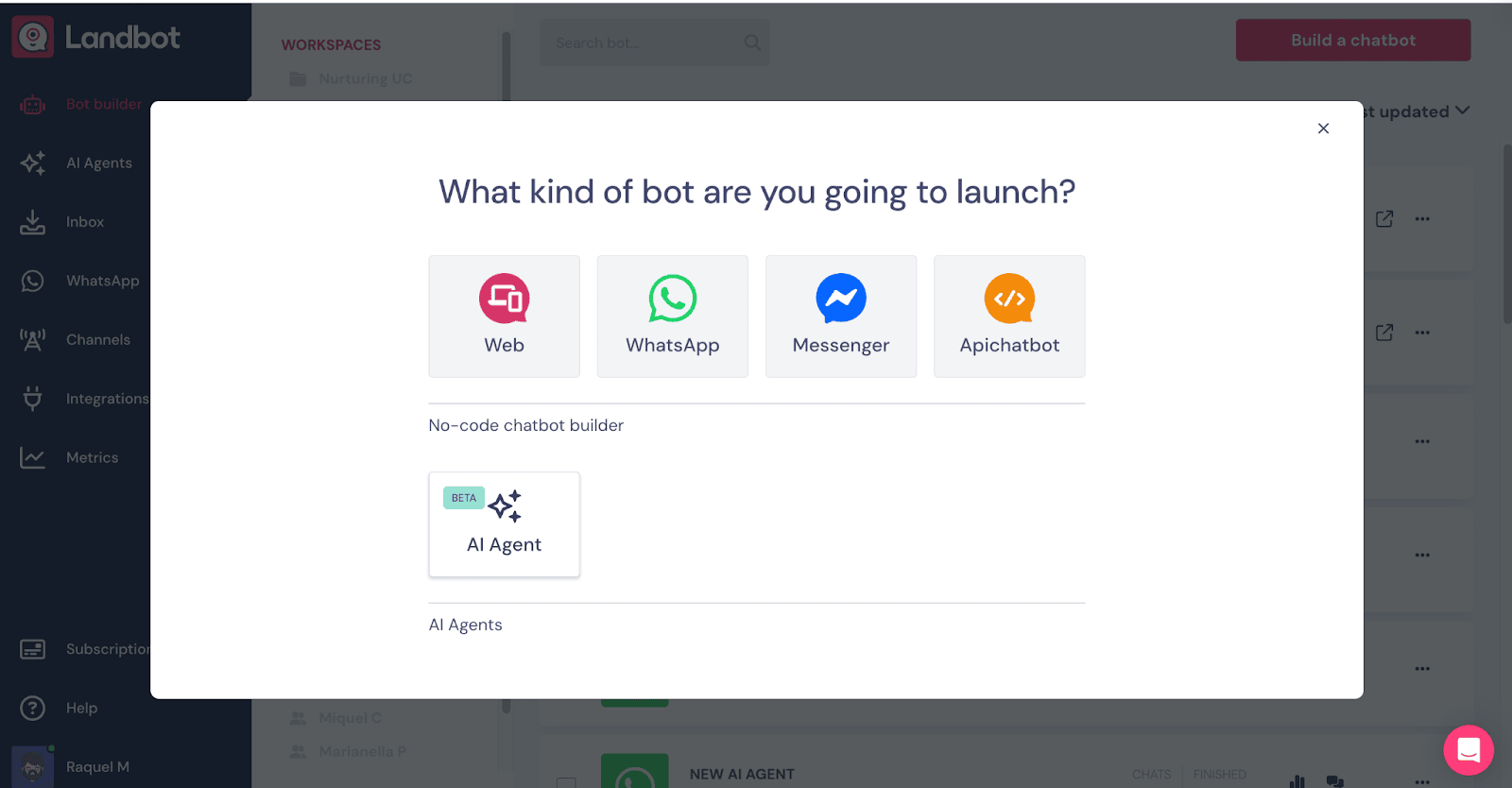
In practice, the first key choice you will make is channel:
- Web
- Facebook Messenger
That choice matters because WhatsApp setup involves more steps, including number registration and compliance requirements.
Onboarding content: Academy and Knowledge Center
Landbot highlights its help docs, knowledge center, academy tutorials, and community as learning channels.
If you are new to chatbot building, the academy approach is helpful because it is closer to “build alongside me” than “read 12 pages of docs.”
Data migration and importing
If you are coming from another bot tool, do not assume you can import everything cleanly.
Landbot explicitly says it does not support importing chatbots via JSON files. Instead, it suggests using its “Build It For Me” approach by summarizing logic in natural language and generating a bot you can then edit in the visual builder.
That is not a perfect migration story, but it is honest. And it is often faster than trying to untangle an exported JSON flow anyway.
Time to get started: realistic expectations
A simple lead capture bot on web: you can build and publish in a day if you keep scope tight.
A qualification and booking bot with CRM sync: plan for a few days because you will iterate on logic, data fields, and routing.
A WhatsApp bot with campaigns: plan for additional time because opt in design, messaging templates, and compliance steps will shape your flow.
User interface and ease of use
Landbot’s UI reputation is one of its biggest strengths in user reviews. G2’s “generated from real user reviews” pros and cons section repeatedly surfaces “ease of use” and “intuitive” as common positives.
The builder experience
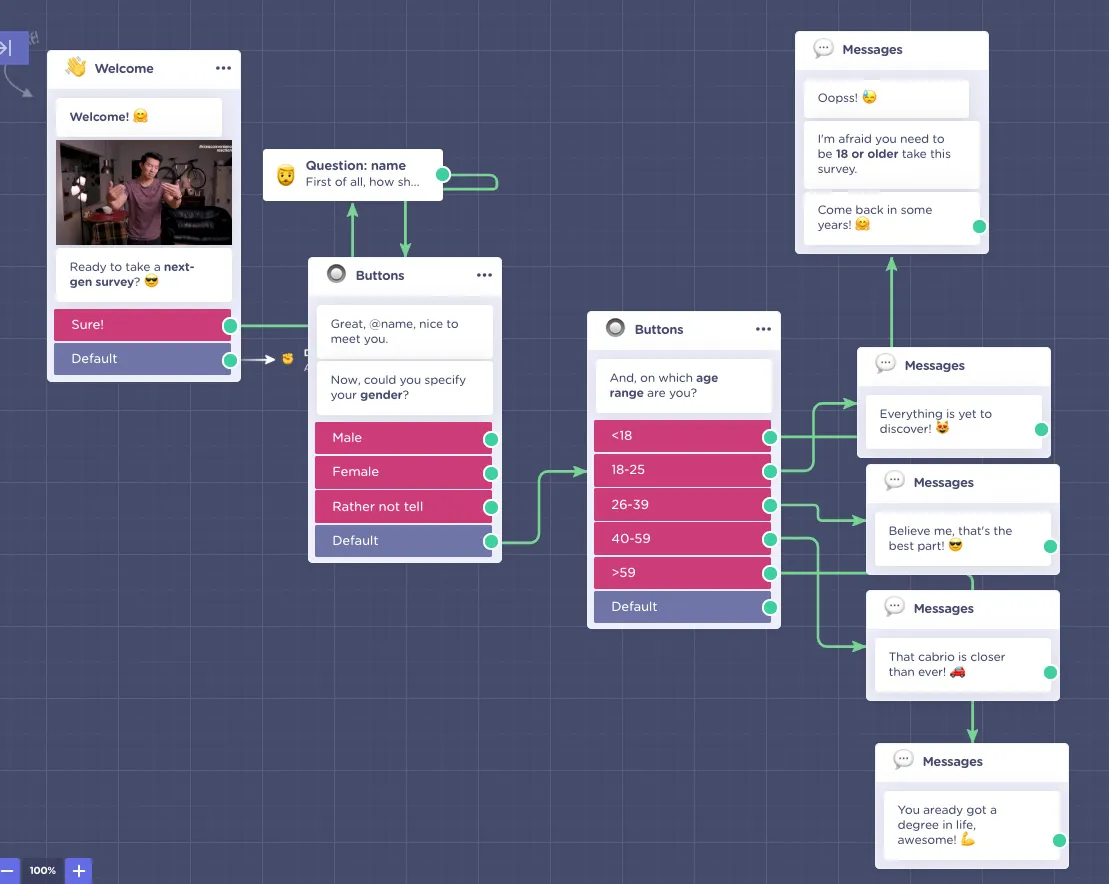
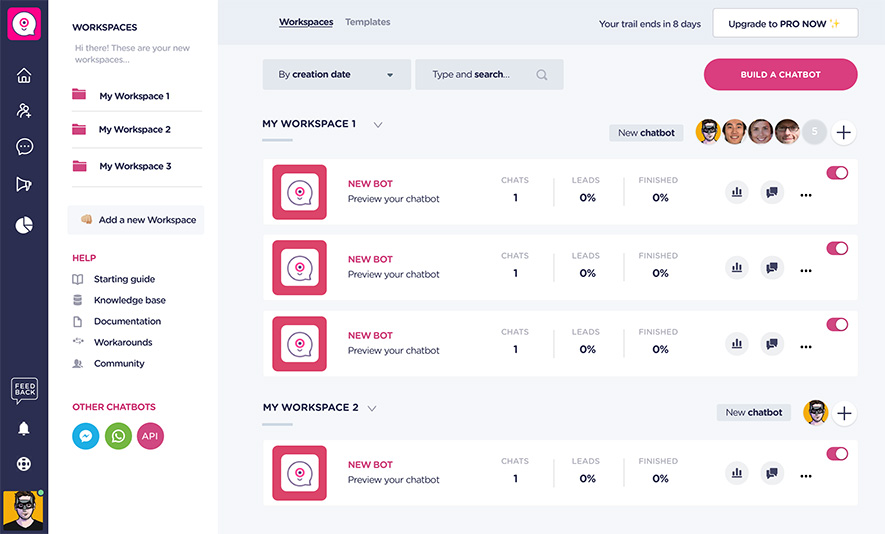
Landbot is built around a visual flow canvas:
- blocks for messages, questions, logic, integrations
- connectors that represent transitions
- configuration panels where you set rules and map fields
Landbot also notes a terminology shift: “Variables” are now called “Fields.” You will see that wording in recent platform communications and product notes.
This matters because it hints at maturity: Landbot is standardizing language so teams can reason about data consistently.
Learning curve: beginners vs experienced builders
Beginners usually struggle with two things: flow logic and data mapping. Not because the UI is bad, but because building a good conversation is a design problem.
Experienced builders tend to move fast, then slow down when they hit integration edge cases, routing rules, or WhatsApp policy constraints.
Landbot 4 specifically calls out “workflows that are easier and faster to build” as a customer need they addressed.
LandbotCustomization options
Landbot includes custom code options, including CSS and JS customization, in its paid tiers.
This is one of those features that looks niche until you need it. Then it becomes the difference between a bot that feels native to your site and a bot that screams “third party widget.”
Core features breakdown
Landbot’s feature set is broad, so I will break it down by what teams actually do with it.
1) Ticketing and conversation handling: Team Inbox and human takeover
Landbot includes Team Inbox as a feature even on Sandbox and Starter.
It also highlights “Human Takeover” as a basic power up in the Sandbox tier.
In real terms, this is the “escape hatch” that keeps your bot from becoming a dead end.
A practical pattern looks like this:
- Bot collects basic intent and key details
- Bot tries to solve the easy path (FAQ, qualification, booking)
- If the user asks something messy or sensitive, the bot offers a handoff
- A human agent takes over inside the Team Inbox
Strengths:
- prevents the bot from harming the experience when it cannot answer
- allows marketing and sales to keep momentum without forcing email
Weak spots:
- if you do not define routing rules well, takeover becomes chaotic
- seat limits can bite if many operators want access
2) Visual flow operations: conditions, tests, formulas, and structured logic
Landbot’s Starter plan highlights upgraded flow operations such as conditional logic and A/B tests.
This is where Landbot stops being a “cute chat widget builder” and becomes a conversion tool.
Use cases that benefit from structured flow logic:
- lead qualification: route based on budget, company size, location
- form replacement: show different questions based on earlier answers
- campaign routing: different flows for paid traffic vs organic
- support triage: route to self serve content vs human takeover
A simple example:
- Ask: “What are you looking for today?”
- If user chooses “Pricing,” route to pricing explanation and offer booking
- If user chooses “Support,” route to knowledge prompts and takeover option
- If user chooses “Partnership,” route to an email capture plus CRM tag
That is basic. But it scales. You can add A/B testing on opening message copy, CTA placement, or the order of qualification questions.
3) Data capture: Fields and structured lead collection
Landbot’s terminology shift from variables to fields is not cosmetic. It signals that Landbot is treating bots like data collection systems, not just chat scripts.
Good Landbot flows treat fields like a schema:
- name
- company
- intent
- qualification score
- routing flag
- campaign tag
When you do that, integrations become straightforward because you are mapping clean fields into CRM properties or spreadsheet columns.
4) AI features: AI agents, AI blocks, and AI Copilot
Landbot’s platform messaging is now heavily AI focused, but it is not “replace everything with an LLM.” The Landbot 4 release frames AI as something you combine with controlled workflows.
Key AI related elements highlighted in Landbot 4 include:
- AI Copilot
- AI Agent Block
- Hybrid AI
- OpenAI integration
What this looks like in a real workflow:
- A structured flow asks the qualifying questions you cannot afford to get wrong.
- An AI block handles the messy middle, like “tell me what you need in your own words.”
- Then you route back to structured steps for booking, tagging, or handoff.
This hybrid design is the right way to use AI in revenue workflows. It avoids the nightmare scenario where the bot improvises its own promises.
LandbotCost note: AI chats are metered by plan, and there is a per AI chat price beyond what is included.
5) Multi channel publishing: web, WhatsApp, Messenger, and API
Landbot’s plan comparison table lists channel availability by tier. In short:
- Sandbox: web
- Starter: web and Facebook Messenger
- Pro: web, Messenger, API
- WhatsApp Pro: WhatsApp plus web, Messenger, API
- Business: web, Messenger, API, WhatsApp as an add on fee
If you are deciding between web and WhatsApp, ask yourself one blunt question:
Do your customers already live in WhatsApp?
If yes, WhatsApp bots can outperform web forms by a wide margin because the conversation continues where people already chat. If no, a web bot is simpler, cheaper, and easier to iterate.
6) WhatsApp specific tools: opt in, campaigns, and compliance
Landbot’s WhatsApp Starter plan highlights opt in tools and campaigns.
But WhatsApp is not just features. It is rules.
Landbot documentation for the Contact Subscribe block points to WhatsApp’s Business Messaging Policy and describes opt in requirements, including the use of marketing templates for opt in messaging.
If you ignore this, you can build a beautiful WhatsApp bot that you cannot legally or safely message people with.
7) Payments inside the bot: Stripe integration
Landbot offers a native Stripe integration. The integration page describes processing one time payments inside chatbot conversations, and Landbot’s help doc notes the Stripe integration is SCA ready and supports 3D Secure within the bot.
That is useful for:
- deposits for appointments
- paid consultations
- simple checkout style flows
Limitations to consider:
- One time payments are the headline. If you need complex subscription billing inside chat, expect extra work or external handling.
Advanced features and integrations
This is where Landbot becomes more than a standalone widget.
Integration ecosystem: native apps and key third party tools
Landbot’s integrations page lists a strong set of native connectors and publishing integrations, including:
- Zapier
- Webflow
- WordPress
- Stripe
- Slack
- Shopify
- Calendly
- Segment
- SendGrid
- Dialogflow
- Google Sheets
- HubSpot
- Mailchimp
- Airtable
- Carrd
- n8n
That is a practical list. It covers most real world needs for marketing teams and small to mid size orgs.
Top integrations table: what they are good for
Here is a quick map of the most useful integrations and why teams use them.
Landbot| Integration | Category | What it helps you do |
|---|---|---|
| HubSpot | CRM | Sync captured fields into contacts, deals, and properties |
| Google Sheets | Data and ops | Log leads, registrations, survey answers, simple pipelines |
| Calendly | Scheduling | Book meetings in flow after qualification |
| Stripe | Payments | Collect one time payments inside chat |
| Slack | Team alerts | Notify sales or support when a high intent lead arrives |
| Mailchimp | Email marketing | Push opt ins and tags into campaigns |
| Airtable | Data layer | Structured tables for lead routing, inventory, or workflows |
| SendGrid | Email delivery | Trigger emails from bot actions |
| Segment | Analytics | Track events and user journeys for downstream tools |
| Zapier | Automation | Connect to thousands of apps without custom code |
| n8n | Automation | More flexible automation and two way logic, emphasized in Landbot 4 |
Automation and webhooks: where the “no code” story stretches
Landbot supports webhooks and related tooling for sending and receiving data in real time.
It also documents MessageHooks, which function as internal endpoints you can use to hit external services and keep your bot flow updated.
This is the moment where non technical teams often bring in help.
Not because you must code, but because webhook workflows require you to think like a system designer:
- what data is sent
- what responses are expected
- how errors are handled
- what happens when the external service is slow or down
Landbot 4 also highlights n8n integration as part of the product’s push toward stronger integrations.
API and SDK routes
Landbot offers API and SDK documentation and positions this as a way to build, ship, and scale conversational experiences.
If you are technical, API publishing is how you bring Landbot into a larger system:
- trigger flows from your app
- push conversation events into your stack
- maintain consistent identity across sessions
If you are not technical, Pro tier API availability may still matter because it gives you future flexibility. You might not use it today. You will be happy it is there later.
Performance, reliability, and security
Speed and uptime signals
Landbot maintains a public service status page and an incident history page.
In late 2025, the incident history page lists items such as:
- degraded bot conversations using agent knowledge bases
- degraded performance for dashboard
- backlog of chat creation
That does not mean Landbot is unreliable. It means two things:
- they operate like a serious SaaS vendor with public status reporting
- if you run mission critical automation, you should design fallbacks (like human takeover and alternative contact paths)
Scalability for growing teams
Landbot’s scalability is largely a pricing and design question:
- chat quotas scale by plan, with custom volume on Business
- seats scale with add on pricing and Business tier support
- integration limits and advanced features expand in Pro and Business
If you expect growth, Pro is usually the realistic starting point. Starter can work, but teams outgrow it once they need deeper integrations and more complex governance.
LandbotSecurity posture and compliance
Landbot highlights a dedicated Trust Center for privacy and security information, including:
- compliance overview
- controls
- sub processors
- resources such as a SOC 2 report available through NDA
- updates and notifications
Landbot’s Trust Center also lists SOC 2 Type II and GDPR related information as part of its compliance posture.
If you are in a regulated space, the practical next step is to request the SOC 2 report through the NDA path described in Landbot’s Trust Center help article.
Customer support and resources
Support is often where chatbot tools win or lose long term.
Landbot’s own pricing model explainer spells out support levels by plan:
- Sandbox and Starter: email support, no live chat support
- Pro and WhatsApp Pro: live chat support included
- Business: dedicated success manager plus priority support, team training, and custom documentation review
Landbot also promotes learning resources such as its knowledge base and academy.
My read: if your bot is central to revenue or support operations, Pro tier support is not a luxury. It is a sanity tool.
Pros and cons
Pros
- Strong no code visual builder with serious flow logic, including conditions and A/B testing
- Multi channel publishing with real WhatsApp depth, not just a checkbox
- Human takeover and Team Inbox provide a clean fallback path
- Wide integration ecosystem: native connectors plus automation tools and webhooks
- Stripe payment flows support SCA and 3D Secure within the bot for one time payments
- Clear investment in product evolution, highlighted by Landbot 4 and its AI Copilot and AI Agent block roadmap
Cons
- Costs can rise fast: seats, chat volume, AI usage, and WhatsApp message fees add up
- WhatsApp complexity is real: opt in, message categories, and Meta pricing require careful setup
- Migration is not “import your old bot.” Landbot does not support JSON import, so rebuilding is common
- Some user feedback points to uneven support experiences, depending on plan and expectations
User reviews and ratings summary
Ratings are not truth, but they are signals.
Here is what major platforms show:
- G2: 4.7 out of 5 stars, based on 333 reviews
- Capterra: 4.4 out of 5, based on 70 reviews
- Trustpilot: 2.2 out of 5, based on 10 reviews (small sample, but notably low)
- TrustRadius (product score in a comparison context): 7.0 out of 10, with 7 reviews
Common praise themes
Across G2 and Capterra content, repeated positives include:
- ease of use and intuitive builder feel
- flexibility and creative control in building flows
- integrations and analytics usefulness
Common complaint themes
The friction points show up as:
- pricing sensitivity, especially for teams and operators
- support dissatisfaction in some reviews and a low Trustpilot score
- setup feeling difficult for some users, especially when expectations are “done for me”
Trends over time
The most obvious trend is product modernization and AI expansion.
Landbot 4 is positioned as a rebuild aimed at faster building, better UI trust, and easier AI and integration implementation.
So even if older reviews complain about setup complexity or missing integration depth, the platform direction is clearly moving toward smoother workflows.
Alternatives and comparisons
Landbot is not the only strong option. Your best choice depends on channel, team, and workflow complexity.
Top competitors to consider
I will keep this comparison focused on tools that buyers regularly consider in the same category clusters (chatbots, conversational marketing, AI bots).
| Tool | Best for | Rating snapshot | Notes |
|---|---|---|---|
| Landbot | Web and WhatsApp lead workflows with hybrid AI plus structured control | G2: 4.7 out of 5 (333) | Strong builder, strong integrations, watch pricing |
| Drift | B2B site conversations and sales oriented chat | G2: 4.4 out of 5 (1,254) | Often used by sales teams for site conversion |
| Manychat | Social messaging automation | G2: 4.5 out of 5 (156) | Strong for messaging channels and automations |
| Fin by Intercom | AI support style automation inside Intercom ecosystem | G2: 4.5 out of 5 (3,686) | Best if you already live in Intercom |
| Tidio | SMB friendly live chat plus bot workflows | Capterra: 4.7 (589) | Often attractive on budget and simplicity |
A useful rule:
If WhatsApp is a primary channel, Landbot deserves serious attention because it is built to operate there, not just “support it.”
If you want website sales chat and pipeline tooling, Drift can be a better fit.
If you want Instagram and messenger automation, Manychat is often the direct choice.
If you want support automation inside Intercom, Fin by Intercom is naturally aligned.
If you want a lighter weight SMB option, Tidio is frequently compared on value.
Who Landbot is best for and who should avoid it
Landbot is best for
1) Marketing teams tired of form drop off
If your main KPI is lead volume and lead quality, Landbot’s structured flow logic and integrations are a good match.
2) Teams that want WhatsApp as a serious revenue channel
Landbot supports WhatsApp plans, campaigns, opt in tooling, and pricing structures designed around WhatsApp realities.
3) Agencies building bots for clients
Pro tier seat counts and integration breadth are aligned with agency life, especially when you standardize templates and reuse flow patterns.
4) Teams that want control, not only AI
Landbot’s hybrid story is attractive if you want AI assistance without losing deterministic routing.
Who should avoid Landbot
1) Teams that want a fully managed “we do it for you” chatbot
Landbot is builder centric. Even with templates, someone on your team must own the flow design.
2) Buyers with tight budgets who expect unlimited usage
Chat quotas, AI usage, and seats can push cost higher than expected.
3) WhatsApp buyers who do not want to deal with Meta pricing and compliance
If you want WhatsApp benefits but hate WhatsApp complexity, consider managed providers or simpler tooling. Landbot will still require policy and pricing awareness.
Final verdict and recommendations
Score breakdown
Features: 9.0 out of 10
Ease of use: 8.8 out of 10
Integrations and automation: 8.6 out of 10
Value for money: 7.6 out of 10 (strong value when scoped well, expensive when usage grows without guardrails)
Support and resources: 8.0 out of 10 (improves materially at Pro and Business tiers)
Security and trust posture: 8.5 out of 10 (Trust Center, SOC 2 Type II, GDPR information)
Overall: 8.4 out of 10
Key takeaways
Landbot is one of the stronger no code builders for teams that want conversion oriented conversations and real workflow control.
The WhatsApp side is powerful, but you must treat messaging fees and opt in rules as first class requirements.
The platform is actively evolving. Landbot 4 is a real signal that the company is investing in AI, integrations, and UI foundations.
My recommendation
If you are choosing Landbot, do this first:
- Pick one primary outcome (lead capture, booking, support deflection).
- Build one tight flow and publish it.
- Add integrations only after the flow works end to end.
- If WhatsApp is your plan, design opt in and messaging templates early, not after you build everything.
From there, scale with discipline.
If you want to move forward, start with the free Sandbox to learn the builder, then trial Starter or Pro based on your integration and support needs.
LandbotFAQ
1) Is Landbot free?
Yes. Landbot offers a free Sandbox plan that is listed as free forever with a monthly chat limit and 1 seat.
2) What channels does Landbot support?
By plan, Landbot supports web, Facebook Messenger, WhatsApp (on WhatsApp plans or add ons), and an API channel on Pro and above.
3) Does Landbot support WhatsApp campaigns?
Landbot’s WhatsApp Starter plan highlights opt in tools and campaigns as included features.
4) How does WhatsApp pricing work with Landbot?
You pay Landbot’s subscription, plus WhatsApp message fees which include Landbot listed per message fees and Meta cost, with variation based on Meta pricing.
5) Do I need user opt in on WhatsApp?
Yes. Landbot’s help documentation references WhatsApp Business Messaging Policy and describes opt in requirements for marketing templates.
6) Can Landbot take payments?
Yes. Landbot has a native Stripe integration and its help documentation notes SCA readiness and 3D Secure support within the bot.
7) Does Landbot integrate with HubSpot?
Yes. HubSpot is listed among Landbot’s native integrations.
8) Does Landbot integrate with Google Sheets?
Yes. Google Sheets is listed among Landbot’s native integrations.
9) Can I automate workflows with Zapier or n8n?
Yes. Landbot lists Zapier and n8n among its integrations, and Landbot 4 highlights n8n integration improvements.
10) Does Landbot support webhooks?
Yes. Landbot provides webhook capabilities for sending and receiving data.
11) Does Landbot support importing bots from JSON?
No. Landbot explicitly states it does not support importing chatbots via JSON files.
12) How good are Landbot reviews?
Landbot scores 4.7 out of 5 on G2 (333 reviews) and 4.4 out of 5 on Capterra (70 reviews). Trustpilot shows 2.2 out of 5 from 10 reviews, which is a small but cautionary data point.
13) Is Landbot secure enough for business use?
Landbot maintains a Trust Center and references compliance items including SOC 2 Type II and GDPR related information, with resources such as a SOC 2 report available under NDA.
14) Should I choose Starter or Pro?
Choose Starter if you want web and Messenger bots with smaller scale and basic integrations. Choose Pro if you need more integrations, API channel support, higher chat volume, and live chat support.
15) What is the simplest way to get value fast?
Build one flow that solves one pain point, publish it, and iterate based on what users actually ask. Then add AI blocks and integrations where they remove friction instead of adding complexity.







By clicking Sign In with Social Media, you agree to let PAT RESEARCH store, use and/or disclose your Social Media profile and email address in accordance with the PAT RESEARCH Privacy Policy and agree to the Terms of Use.