
QuickBooks Review: From Bookkeeping to Taxes – Game-Changer for Entrepreneurs Look at Intuit’s Accounting Platform
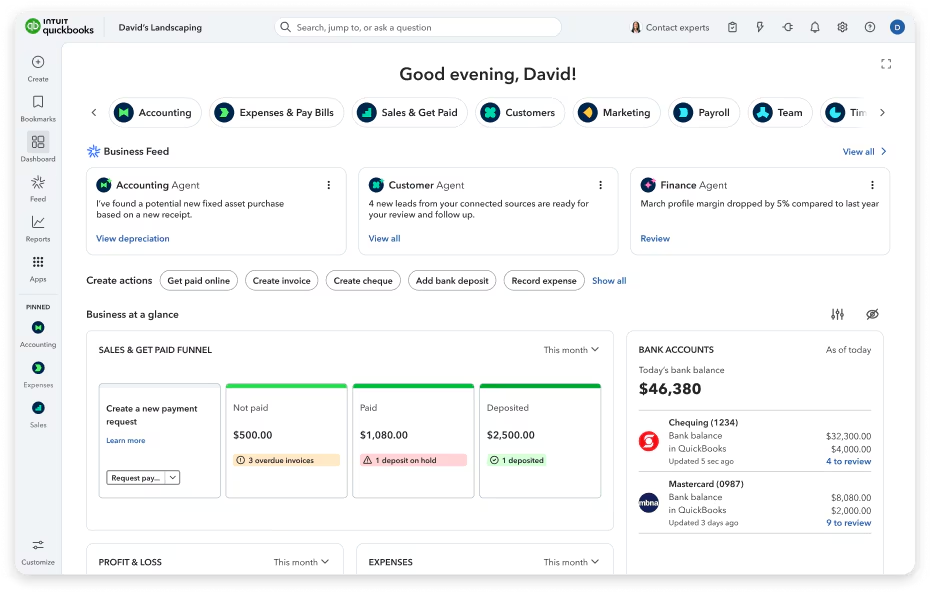
If you have ever tried to “just keep up” with bookkeeping using a folder of receipts, a spreadsheet that keeps drifting out of sync, and a bank account that never seems to match your records, you already know the real problem.
It is not the math.
It is the messy middle: payments that arrive late, expenses that land without context, sales tax rules that change by province, and that sinking feeling when you realize you have to reconcile three months of transactions before a deadline.
QuickBooks is built for that messy middle.
QuickBooks (especially QuickBooks Online) is Intuit’s cloud accounting system aimed at freelancers, small businesses, and scaling teams that want a single place to track income, expenses, invoicing, sales tax, reporting, and more. In Canada, the platform is positioned as a flexible “choose your plan” product, with clear tiers based on complexity, collaboration needs, and operational features like inventory and project costing.
QuickBooksMy overall verdict (QuickBooks Online, Canada)
Rating: 8.7 / 10
QuickBooks is not perfect. Support quality can feel uneven depending on your issue and plan, and pricing can move over time. But if you want mainstream accounting software with deep bank connectivity, strong reporting foundations, a large integration ecosystem, and broad accountant familiarity, QuickBooks remains one of the safest picks for Canadian small businesses.
QuickBooks
QuickBooks enables you to quickly design an invoice template to represent your brand, or modify one of pre-installed online invoice templates. It also allows you to send your invoices with a Pay Now link so your customers can make online credit card payments instantly and easily. You can also track when invoices are sent, viewed, and paid. QuickBooks lets you stay in-sync with your bank by automatically downloading, categorizing, and reconciling bank and credit card transactions. QuickBooks helps you track and record expenses making it easy to reference during tax reconciliation and filing. It allows you to take a photo…
• Accounting software
• Invoicing software
• Cloud-based
• Online payments
• Mobile integration
• Self-Employed – $4.99/month
• EasyStart– $10.40/month
• Essentials – $18.90/month
• Plus – $24.00/month
• Inventory management
• Time tracking
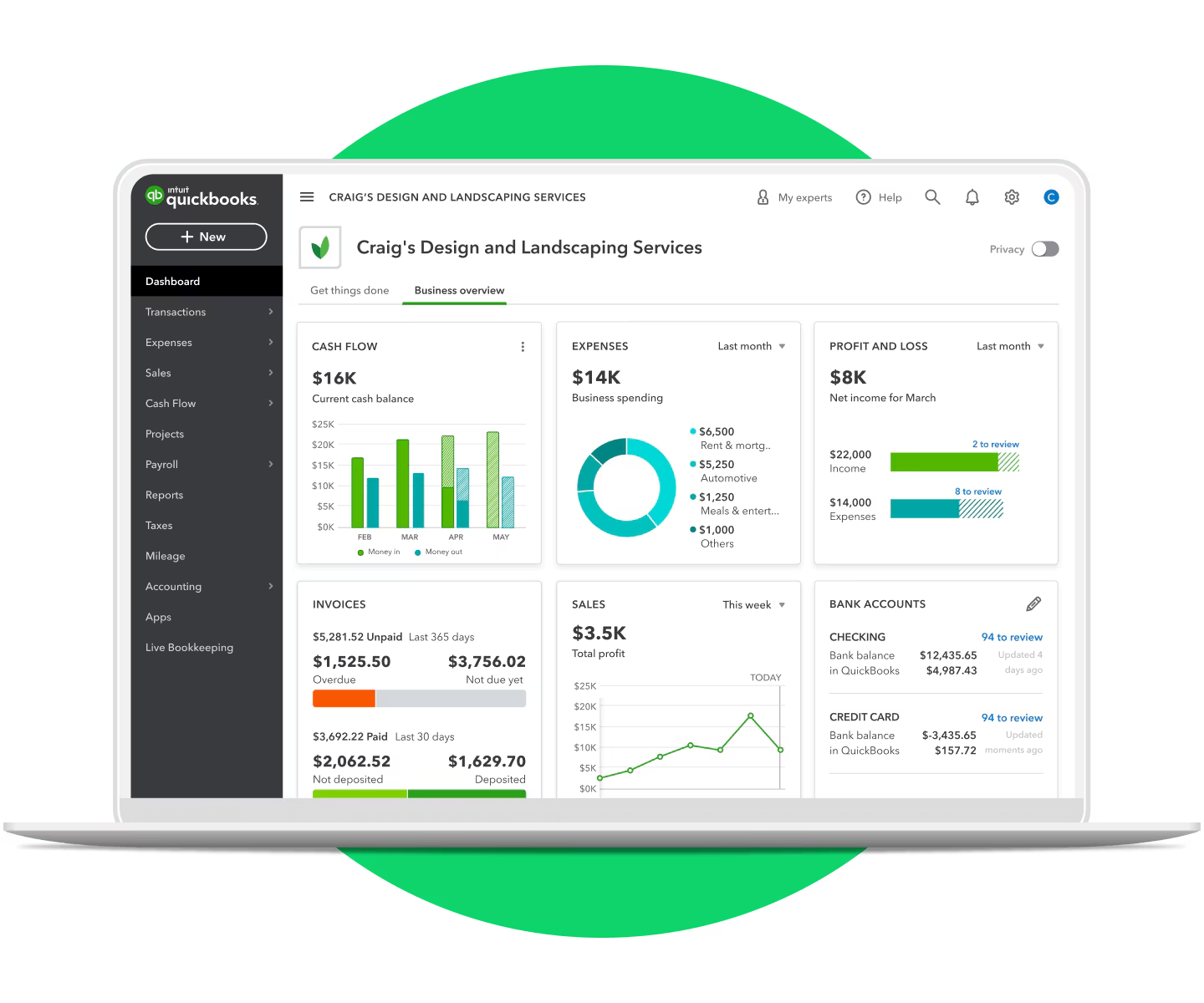
• Reporting dashboards
• Get paid faster by accepting credit card, debit card, and bank transfer payments
• Track invoice status, send payment reminders, and match payments
• Create professional custom invoices with your logo
What this review covers
Here is how the rest of this review is structured:
- Overview and company background
- Pricing and plans (with a detailed comparison table)
- Setup and onboarding experience
- User interface and ease of use
- Core features breakdown (the real day to day work)
- Advanced features and integrations (automation, apps, APIs, AI)
- Performance, reliability, and security
- Customer support and learning resources
- Pros and cons
- User reviews and ratings summary
- Alternatives and comparisons
- Who QuickBooks is best for (and who should avoid it)
- Final verdict and recommendations
- FAQ (15 common questions)
Overview and Company Background
A quick history lesson
(the kind that actually matters)
Intuit is not new to the finance software world. The company was founded in 1983 by Scott Cook, with origins tied to building personal finance tools for everyday people.
QuickBooks itself has been around for a long time. In Intuit’s own filings, QuickBooks is described as being first introduced in April 1992, built for small business users with an easy-to-use approach that does not require deep familiarity with traditional accounting mechanics.
Why does that history matter today?
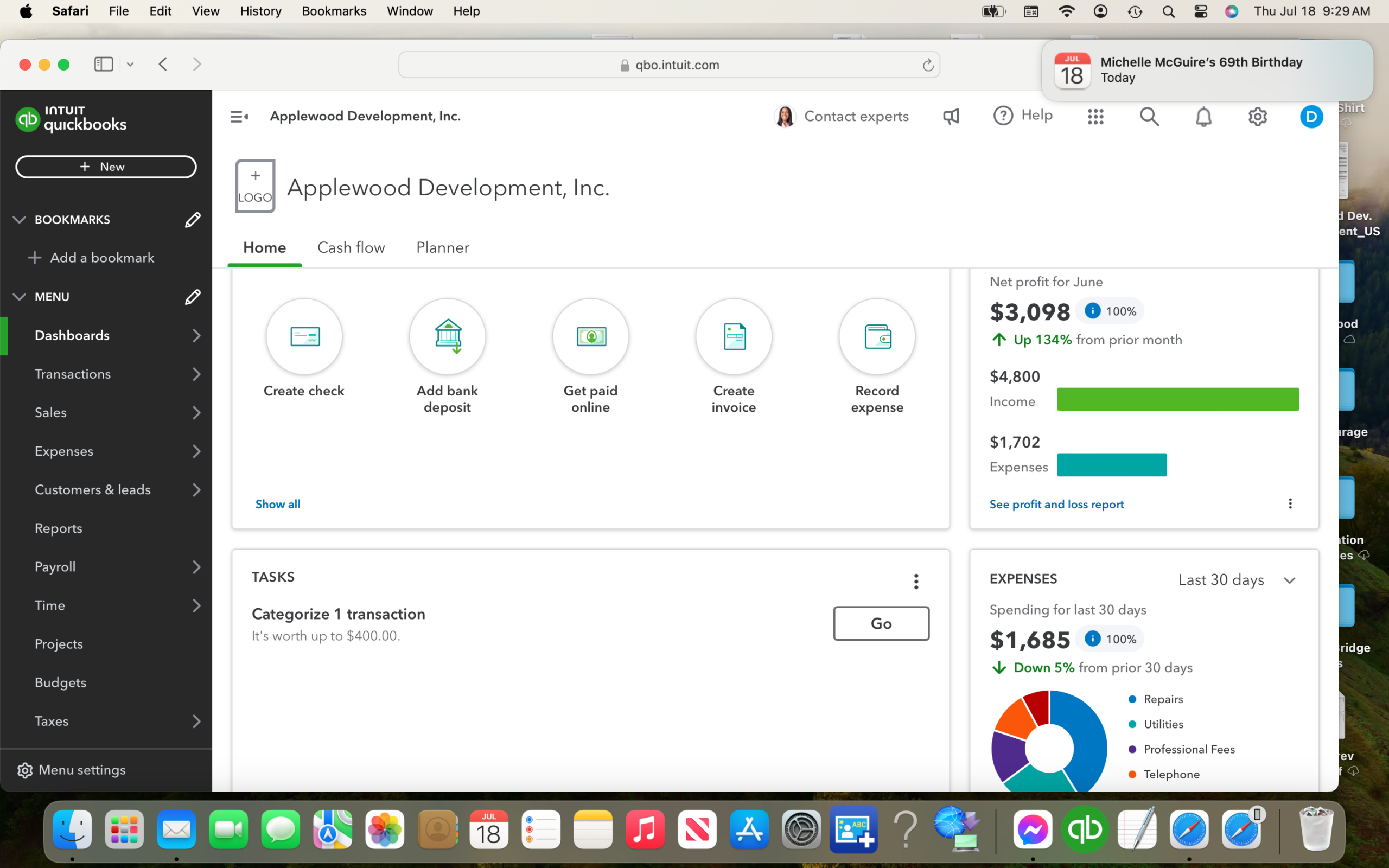
Because QuickBooks still behaves like a product designed for owners first, accountants second. You can feel it in the layout, the workflows, and the way it tries to translate accounting into common business actions: get paid, pay bills, track tax, see profit.
Major ecosystem moves
(acquisitions and platform direction)
QuickBooks also sits inside a broader Intuit ecosystem that has expanded aggressively over the last few years.
Two well-known examples:
- Mailchimp: Intuit announced an agreement to acquire Mailchimp in 2021, adding a marketing platform to the wider business toolkit.
- Credit Karma: Intuit completed its acquisition of Credit Karma in December 2020.
Even if you never touch those products, the strategy is clear: Intuit wants QuickBooks to be the financial “core” connected to other business functions.
QuickBooksTarget audience and market positioning
In Canada, QuickBooks Online is positioned as the flagship cloud accounting product, offered in tiered plans built around:
- business size and complexity
- number of users who need access
- feature needs such as inventory, project costing, budgeting, and automation
The same Canadian guidance also points out that QuickBooks Canada offers adjacent products like QuickBooks Self-Employed and QuickBooks Payroll, which is useful because not every business needs full accounting plus payroll on day one.
High level differentiators
(what QuickBooks does better than many competitors)
Here are the big themes that separate QuickBooks from a lot of smaller accounting tools:
- Plan flexibility: You can start lean and scale into inventory, project costing, automation, and advanced reporting without switching platforms.
- Bank connectivity first: The product heavily emphasizes connected accounts and automated transaction import.
- Integration depth: The QuickBooks ecosystem supports a large app marketplace and broad third party connectivity. In Canada, QuickBooks highlights connections to more than 450 business apps.
- Accountant familiarity: Many bookkeepers and accountants already know QuickBooks workflows. That matters when you want someone else to help you clean things up.
Pricing and Plans
(Canada)
Let’s talk about the part everyone worries about.
QuickBooks Online pricing in Canada is tiered. Intuit also runs frequent promotions (for example, the Canadian apps page displays a “75% off for 6 months” promotion).
For stable comparison, the most useful official reference is Intuit’s Canada subscription guide, which clearly states that its pricing information was accurate as of April 4, 2025 and is subject to change.
QuickBooks Online plans at a glance
QuickBooks Online Canada offers four core plans:
- EasyStart
- Essentials
- Plus
- Advanced
Unlike many SaaS tools, QuickBooks Online is generally priced per company file, not per seat, but plans include user limits.
Pricing comparison table
(typical pricing, Canada)
Pricing below comes from Intuit’s QuickBooks Canada subscription guide and is labeled “typical” pricing.
| Plan | Typical monthly price (CAD) | Typical annual price (CAD) | Effective monthly if annual | User limit | Best fit | Standout features |
|---|---|---|---|---|---|---|
| EasyStart | From $24/mo | From $255/yr | ~$21.25/mo | 1 | freelancers, solo service businesses | invoicing, GST/HST tracking, bank connectivity |
| Essentials | From $54/mo | From $580/yr | ~$48.33/mo | up to 3 | small teams, service businesses with billing and payables | bills + payments tracking, multi currency, time tracking |
| Plus | From $80/mo | From $860/yr | ~$71.67/mo | up to 5 | product businesses, project based teams | inventory, budgeting, project profitability, job costing |
| Advanced | From $160/mo | From $1,730/yr | ~$144.17/mo | up to 25 | larger teams needing control, automation, deeper reporting | advanced reporting, batch invoicing, custom fields, workflow automation, priority support |
Add ons and hidden costs to plan for
QuickBooks can be great value, but only if you budget for the “real” stack you will end up using.
Here are the common add-on costs:
1. Payroll
(sold separately)
QuickBooks Online Payroll in Canada is a separate subscription with its own pricing model and per employee fees.
From Intuit’s Canadian subscription guide:
- Payroll Core: $50/mo + $6 per employee per month
- Payroll Premium: $85/mo + $9 per employee per month
- Payroll Elite: $130/mo + $11 per employee per month
If you have even a small team, payroll can quickly become a major part of your monthly spend. Worth it for many businesses, but you should go in with open eyes.
2. Time tracking
(QuickBooks Time)
QuickBooks Time is presented as a separate time tracking product that works alongside QuickBooks Online. Intuit’s Canadian guide lists Time Premium and Time Elite starting prices and gives an example with user based fees.
If you are a field services team, time tracking can be a make or break feature. If you are a solo consultant billing fixed-fee projects, you may never need it.
3. Apps and integrations
The QuickBooks Online app ecosystem is large, but many apps are paid.
Intuit explicitly states that QuickBooks Online apps vary in price, including free, one-time fee, and monthly subscription models.
Translation: if you build your workflow around apps, your “QuickBooks cost” is not just QuickBooks.
4. Payments processing
QuickBooks Payments requires eligibility and approval, and a QuickBooks Online subscription is required.
Processing fees vary by payment type and region. The fees are not usually the surprise. The surprise is that once you rely on embedded payments, switching systems can feel harder.
5. Pricing changes over time
Pricing changes are a reality in this market. Reuters reported that Intuit implemented price increases for its online and payroll subscription services in connection with AI agent rollouts.
You do not need to panic about that, but you should treat accounting software as an ongoing operating cost, not a fixed cost.
Value for money analysis
(which plan makes sense)
Here is how I would think about the tiers in real life.
EasyStart
best for clean, simple workflows
Choose EasyStart if:
- you sell services
- you have one owner-operator
- your main needs are invoicing, expense tracking, sales tax tracking, and basic reporting
If you later add employees or start managing vendor bills seriously, Essentials becomes more attractive.
Essentials
the “small team” comfort zone
Essentials is the plan where QuickBooks starts to feel like a system, not just a ledger.
You get:
- bills and payments tracking
- multi-currency
- time tracking
- up to 3 users
If you collaborate with a bookkeeper plus an admin, that user count matters.
Plus
where product businesses and project costing become real
Plus adds the features that tend to separate “basic bookkeeping” from “operational finance.”
Plus adds:
- inventory management (also explicitly shown as available in Plus and Advanced)
- budgeting
- project profitability
- job costing
If you sell physical products, Plus is often the first plan that feels complete.
Advanced
built for control and scale
Advanced adds:
- advanced reporting
- batch invoicing
- custom fields
- workflow automation
- priority support
- up to 25 users
This is a stronger fit when you have departments, approvals, recurring billing at volume, or non-trivial reporting needs.
Setup and Onboarding Experience
QuickBooks is not hard to start, but it can be easy to start wrong.
That is not a contradiction. It is a warning.
Signing up and first time configuration
QuickBooks Online typically pushes you through:
- business details (industry, business type)
- tax setup choices
- linking bank accounts
- optional imports and integrations
The Canadian subscription guide emphasizes bank connectivity as a core feature even in EasyStart, so the platform clearly expects you to connect accounts early.
Time to get started
If you have clean banking and a simple chart of accounts, you can be functional in a single afternoon.
If your data is messy, you will spend time on three things:
- categorizing transactions correctly
- deciding how to structure income and expense accounts
- setting up sales tax properly for your province and filing needs
Onboarding support
QuickBooks Canada promotes a support hub with help articles, tutorials, and community resources on its pages, plus sales phone support hours.
If you are an accountant or bookkeeper, QuickBooks Online Accountant is positioned as free for the firm with tooling for practice management and client access.
User Interface and Ease of Use
QuickBooks Online has a design goal that is both helpful and occasionally frustrating.
It tries to feel friendly.
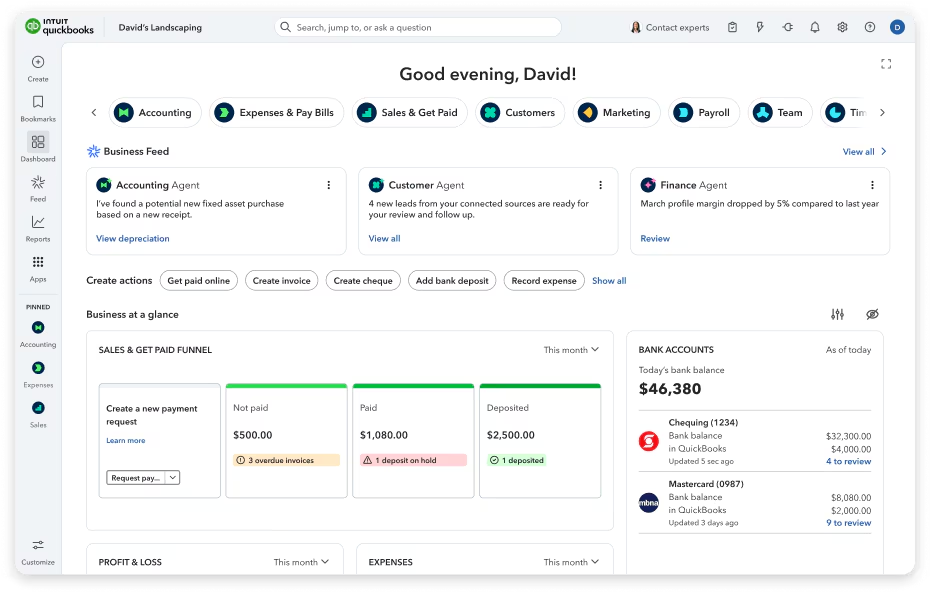
That means it often prioritizes workflow language (Sales, Expenses, Banking) over pure accounting language. For many owners, that is a relief. For trained accountants, it can feel a bit “guided.”
Navigation and layout
Most users will spend time in a handful of core areas:
- Banking (imported transactions, rules, reconciliation)
- Sales (invoices, customers, payments)
- Expenses (vendors, bills, receipts)
- Reports (profit and loss, balance sheet, cash flow)
- Taxes (GST/HST tracking and reporting)
Even the entry plan highlights invoicing, GST/HST tracking, reporting, and bank connectivity, so these areas are foundational rather than advanced extras.
Learning curve
QuickBooks is usually easier than “traditional accounting software,” but there is still a curve.
The most common learning friction points:
- sales tax setup and mapping
- deciding between cash and accrual thinking
- handling owner draws, shareholder loans, and retained earnings
- cleaning up duplicate bank transactions or mis-categorizations
If you are brand new, a short session with a bookkeeper can save you many hours later.
Mobile experience
QuickBooks pushes mobile access as part of the ecosystem, and it is commonly used for quick actions like invoicing, receipt capture, and checks on cash flow. The exact feature depth varies by plan and region, but mobile support is clearly treated as part of the product story across QuickBooks pages.
Customization options
Customization in QuickBooks is practical rather than aesthetic:
- custom fields in Advanced
- workflow automation in Advanced
- reporting flexibility increases as you move up tiers
If you want deep UI theming, QuickBooks is not that kind of tool. If you want operational control, Advanced is where that starts to show up.
Core Features Breakdown
(The Day to Day Work)
This is the heart of the review.
QuickBooks is not about fancy dashboards. It is about the repeatable routines that keep your books clean.
1. Income and expense tracking
(the baseline)
Even EasyStart includes income and expense tracking, with categorization as the core workflow.
What that means in practice:
- You import or enter transactions
- You categorize them into accounts (income, expense, asset, liability)
- You review and correct
- Your reports become meaningful
This is where QuickBooks lives or dies for many teams. If you keep up weekly, QuickBooks feels calm. If you ignore it for three months, it becomes a weekend-eating monster.
2. Bank connectivity and transaction import
Bank connectivity is explicitly listed as a core EasyStart feature: connect bank accounts and credit cards to import transactions automatically.
Why this matters:
- It reduces manual entry
- It gives you near real time visibility
- It makes reconciliation realistic, not aspirational
A simple workflow that works well for many businesses:
- Connect bank and credit cards
- Review imported transactions daily or weekly
- Use rules for repeating vendors
- Reconcile monthly
If you do that, month end becomes a routine, not a crisis.
3. Invoicing
(getting paid without chaos)
QuickBooks highlights invoicing as a core feature even in EasyStart, including the ability to create professional invoices, send them, track status, and send reminders.
Practical use cases:
- Consultants billing per milestone
- Trades sending invoices on job completion
- Agencies invoicing retainers monthly
- Subscription style billing (especially with Advanced batch invoicing)
A good invoicing system does two things:
- makes it easy for the customer to pay
- makes it easy for you to track who has not paid
QuickBooks tends to do both reasonably well, especially when paired with payments.
4. Sales tax
(GST/HST tracking and reporting)
For Canadian businesses, this is non-negotiable.
QuickBooks lists GST/HST tracking and reporting as a key EasyStart feature.
In plain terms, QuickBooks is trying to help you:
- record tax collected on sales
- track tax paid on eligible expenses
- produce reporting that supports filing
Sales tax is also one of the easiest places to make a painful mistake. If you are unsure about your setup, get advice early. Fixing sales tax later is possible, but it is rarely fun.
5. Reporting
(profit, cash, and reality checks)
EasyStart includes basic reporting like profit and loss and balance sheet reporting.
Advanced goes further with advanced reporting and more customization.
My take: most small businesses underuse reporting. They look at the bank balance and guess.
QuickBooks gives you the chance to do better, if you actually run the reports:
- Profit and loss monthly
- Balance sheet quarterly
- A/R aging if you invoice
- Expense trends by vendor
- Sales tax liability checks before filing
You do not need to become an accountant to do this. You just need a habit.
6. Bills and vendor management
(Essentials and up)
Essentials adds bill tracking and payment scheduling.
This is the upgrade that matters when you:
- have multiple vendors
- want to track payables properly
- need to avoid missed payments and late fees
If you are still paying vendors from email reminders, Essentials can be a clean step up.
7. Multi-currency
(Essentials and up)
Essentials includes multi-currency support for businesses working across borders.
If you buy from US suppliers, get paid in USD, or work with clients outside Canada, this reduces spreadsheet juggling.
QuickBooks8. Time tracking
(Essentials and up, plus deeper with QuickBooks Time)
Essentials includes time tracking, which helps service businesses billing hourly.
For more robust time tracking, Intuit positions QuickBooks Time (formerly TSheets) as the dedicated time solution, with mobile and web time tracking, GPS tracking, job costing, and integration with QuickBooks Online.
If you run a field team, this can be a strong pairing.
9. Inventory management
(Plus and Advanced)
Inventory is a big dividing line in accounting software.
QuickBooks clearly states that inventory tracking is available in QuickBooks Online Plus and QuickBooks Online Advanced.
The Plus plan in the Canadian guide also highlights inventory management and stock monitoring, along with alerts and deeper profitability tooling.
Inventory features generally help you:
- track what you have on hand
- reduce stockouts
- understand margins and COGS more accurately
If you sell physical goods and inventory matters, you will almost always want Plus or Advanced.
10. Project profitability and job costing
(Plus and up)
Plus adds project profitability and job costing.
This is gold for:
- construction
- agencies
- consultants running multi phase work
- any business where “revenue happened” is not the same as “profit happened”
A simple example:
If a project billed $20,000, you want to see:
- subcontractor costs
- materials
- internal labour allocation
- travel
- overhead allocation (if applicable)
QuickBooks can help you track enough of this to make better pricing decisions next time.
Advanced Features and Integrations
Advanced features
(QuickBooks Online Advanced)
Advanced includes a bundle of features aimed at scale and control:
- advanced reporting
- batch invoicing
- custom fields
- workflow automation
- priority support
- up to 25 users
This is the tier where QuickBooks starts to feel less like “software for the owner” and more like “software for the business.”
QuickBooksAI and automation direction
Intuit has been vocal about AI agents in the QuickBooks suite, and broader reporting suggests these changes are also tied to pricing moves and product strategy.
The best way to evaluate these features is not hype. It is workflow impact:
- Does it reduce categorization time?
- Does it flag tax risks early?
- Does it help forecast cash flow more accurately?
If the answer is yes, AI is useful. If it just produces polished text, it is decorative.
Integration ecosystem
(how big is it, really?)
In Canada, the QuickBooks apps page says QuickBooks connects to more than 450 business apps.
That matters because many businesses build a stack like:
- ecommerce platform
- payment processor
- CRM
- expense management
- reporting add-ons
- payroll and time tracking
QuickBooks can sit in the middle of that.
App pricing reality check
Intuit also makes it clear that apps vary widely in cost: free, one time, or monthly subscription.
So yes, integrations are a strength.
No, they are not “free.”
Top integrations to consider
(practical list)
Below is a curated list of common QuickBooks integration types and examples. Availability can vary by region, but these are widely referenced as QuickBooks Online integrations through vendor documentation and QuickBooks app listings.
| Category | Integration examples | What it helps with |
|---|---|---|
| Automation | Zapier (QuickBooks integrations) | Connect QuickBooks to many tools without custom code |
| CRM sync | HubSpot and QuickBooks Online data sync | Sync contacts, products, invoices, billing context |
| Ecommerce | WooCommerce connector (QuickBooks) | Sync orders, customers, products into accounting |
| Payments and payout reconciliation | Stripe connectors for QuickBooks | Bring Stripe sales and fees into QuickBooks |
| Payment account sync | PayPal sync supported (QuickBooks apps FAQ) | Pull PayPal charges, refunds, fees into bookkeeping |
| Inventory and order ops | Inventory apps in QBO ecosystem | Better inventory workflows beyond core tools |
| Time tracking | QuickBooks Time | Timesheets, GPS, job costing, payroll alignment |
APIs and developer ecosystem
If you are more technical (or you work with a developer), QuickBooks has a real platform.
The Intuit Developer status dashboard lists QuickBooks Online API and Webhooks as platform components and reports uptime metrics (example shown as 100% uptime over the past 90 days at the time of viewing).
That is not just trivia. It signals maturity. A lot of accounting tools simply do not have this depth.
Performance, Reliability, and Security
Speed and reliability
QuickBooks Online is a large, widely used cloud service, and Intuit operates a public status page for QuickBooks.
At the time of review, the QuickBooks status page showed scheduled maintenance for QuickBooks Online on December 22, 2025, with an expected potential disruption of up to 30 minutes during a maintenance window.
That is normal for SaaS. The key point is visibility and communication.
Scalability for growing teams
QuickBooks scales in two ways:
- plan upgrades (EasyStart to Advanced)
- ecosystem expansion (apps, payroll, time tracking, integrations)
Advanced supports up to 25 users, which is enough for many mid sized businesses before they consider ERPs.
Security features and compliance
Intuit publishes a formal compliance page listing:
- PCI DSS (payment card security standard)
- SOC 2 reports (covering controls around security, availability, and process integrity)
- ISO 27001 information security standard
For access security, Intuit documentation describes two step verification (2FA) for Intuit accounts as an opt-in setting using a one time passcode at sign in, with options including SMS and authenticator apps.
QuickBooksQuickBooks also describes encryption and secure transport practices in its security messaging (for example, SSL encryption and secure login principles are referenced in QuickBooks security content).
If your business is serious about security, I would treat 2FA as mandatory. Set it up, document it, and make sure admin access is controlled tightly.
Customer Support and Resources
Support is where software reviews get honest.
Because when things break, you stop caring about feature lists.
Support channels
QuickBooks pages promote:
- sales phone lines and published sales hours
- a support hub with articles and tutorials
- community resources
Advanced also includes priority support as a plan feature.
Self serve learning
QuickBooks points users to tutorials and a “Learn and Support” section, explicitly acknowledging that many customers are not accountants.
That tone matters. It shows the product expects beginners.
Accountant ecosystem support
If you work with an accountant or you are one, QuickBooks Online Accountant is positioned as free for the firm, with client access and tooling.
This is one of QuickBooks’ strongest real world advantages: you can hire help easily.
Pros and Cons
Pros
- Strong entry to advanced plan ladder with clear feature progression (inventory, job costing, automation, reporting).
- Bank connectivity is core, even at entry level.
- Sales tax support is positioned as a baseline feature for Canada (GST/HST tracking and reporting).
- Large integration ecosystem (more than 450 apps highlighted in Canada).
- Payroll tiers are clearly defined, with CRA remittances and T4 automation described in the Canadian guide.
- Strong external ratings across multiple review sites (details below).
Cons
- Total cost can climb once you add payroll, time tracking, and paid apps.
- Pricing can change over time, including reported price increases for online and payroll subscriptions.
- Support experience varies in user reviews, with some frustration around cost and changes (see review summary).
- Inventory is locked behind Plus or Advanced, so product sellers will usually outgrow entry tiers quickly.
User Reviews and Ratings Summary
To keep this grounded, I looked at three major review sources that publish both ratings and review counts.
Capterra
Capterra shows QuickBooks Online with an overall rating of 4.3 and 8,286 reviews, with the page indicating a last updated date of December 19, 2025.
Common praise themes you see in reviews like these:
- strong feature coverage
- wide accountant familiarity
- helpful reporting when set up correctly
Common complaint themes:
- pricing frustration
- occasional support dissatisfaction
- learning curve for non-accountants
TrustRadius
TrustRadius lists QuickBooks Online with a score of 8.1 out of 10 and 2,163 reviews.
This score level typically signals “solid, broadly useful” with a few consistent pain points.
G2
G2 shows a QuickBooks product listing with 4.4 out of 5 stars and 331 reviews at the time of viewing.
G2 reviews tend to be more workplace oriented, so you often see comments about collaboration, workflows, and cost justification.
Trends over time
A pattern that shows up across review ecosystems, and in recent reporting, is concern about pricing changes as the product evolves. Reuters explicitly mentioned price increases alongside AI agent rollouts.
This does not mean QuickBooks is “bad value.”
It means you should re-check your plan yearly and make sure you are using what you pay for.
Alternatives and Comparisons
QuickBooks is a top tier contender, but it is not the only option.
Below are common alternatives and how they compare in plain language.
Top competitors to consider
- Xero: Strong for bank reconciliation and accounting workflows, popular globally. Often praised for clean UI.
- Zoho Books: Good value in the Zoho ecosystem, often strong for automation if you use other Zoho tools.
- Sage Accounting: Longtime accounting brand with products that fit some Canadian businesses well.
- FreshBooks: More invoicing and service business oriented, lighter accounting depth in some areas.
- Wave: Very budget friendly for basic invoicing and bookkeeping, but less depth for complex needs.
Quick comparison table
(high level)
| Product | Best for | Strengths | When it loses to QuickBooks |
|---|---|---|---|
| QuickBooks Online | broad SMB needs, accountants involved | plan ladder, integrations, payroll ecosystem, inventory and project costing in higher tiers | can feel pricey once stacked with add-ons |
| Xero | accounting-first teams | reconciliation, clean workflows | may require add-ons for similar breadth in some areas |
| Zoho Books | cost sensitive teams already in Zoho | automation and value | accountant availability can be narrower in some markets |
| Sage | certain traditional industries | accounting pedigree | UI and integrations can feel less modern depending on setup |
| FreshBooks | service businesses | invoicing and client facing workflows | may not match QuickBooks depth for inventory and advanced reporting |
| Wave | micro businesses | cost | limited depth for scale, inventory, complex reporting |
Who Is QuickBooks Best For
(And Who Should Avoid It)
QuickBooks is best for
- Canadian freelancers and solo service businesses that want clean invoicing and tax tracking (EasyStart).
- Small teams that need bills, time tracking, and multi-currency (Essentials).
- Product businesses that need inventory and better margin visibility (Plus).
- Growing teams that need automation, batch invoicing, custom fields, and deeper reporting (Advanced).
- Businesses that want a large app marketplace and integration options.
You might want to avoid QuickBooks if
- you want a very low cost tool and your needs are basic (Wave can be appealing)
- you hate subscriptions and want a one time purchase model
- you run complex multi entity operations that are closer to ERP territory than accounting software
- you do not want add-ons and would rather have payroll, time, payments, and expenses bundled in one fixed price
Final Verdict and Recommendations
QuickBooks Online is popular for a reason.
It covers the fundamentals well, scales up through clear plan tiers, and has a deep ecosystem around it. If you are serious about running clean books, it is one of the most defensible choices you can make, especially in Canada where GST/HST tracking is built into the entry tier and payroll options are clearly mapped out.
Rating breakdown
| Category | Score |
|---|---|
| Core accounting features | 9.2 / 10 |
| Reporting | 8.6 / 10 (strong basics, stronger in Advanced) |
| Ease of use | 8.3 / 10 |
| Integrations | 9.1 / 10 |
| Value for money | 8.0 / 10 (depends heavily on add-ons) |
| Support | 7.9 / 10 (improves in Advanced with priority support) |
| Overall | 8.7 / 10 |
Recommendation
If you are choosing QuickBooks today, I would use this simple rule:
- EasyStart if you are solo and want clean invoicing, expense tracking, and sales tax basics.
- Essentials if you manage bills, collaborate, track time, or use multi-currency.
- Plus if you sell products or need project profitability and job costing.
- Advanced if reporting, automation, and access control matter, or if you have a larger team.
If you want to try it first, QuickBooks Canada references free trial terms, including a 30 day trial offer (subject to Intuit’s conditions and automatic billing after trial).
QuickBooks
QuickBooks enables you to quickly design an invoice template to represent your brand, or modify one of pre-installed online invoice templates. It also allows you to send your invoices with a Pay Now link so your customers can make online credit card payments instantly and easily. You can also track when invoices are sent, viewed, and paid. QuickBooks lets you stay in-sync with your bank by automatically downloading, categorizing, and reconciling bank and credit card transactions. QuickBooks helps you track and record expenses making it easy to reference during tax reconciliation and filing. It allows you to take a photo…
• Accounting software
• Invoicing software
• Cloud-based
• Online payments
• Mobile integration
• Self-Employed – $4.99/month
• EasyStart– $10.40/month
• Essentials – $18.90/month
• Plus – $24.00/month
• Inventory management
• Time tracking
• Reporting dashboards
• Get paid faster by accepting credit card, debit card, and bank transfer payments
• Track invoice status, send payment reminders, and match payments
• Create professional custom invoices with your logo
FAQ
(15 Common Questions)
1. Is QuickBooks worth the price?
Often, yes, if you use it consistently. The return comes from time saved on transaction entry, faster invoicing, cleaner tax tracking, and easier reporting. The value drops if you buy a high tier plan and use it like a spreadsheet.
2. Which QuickBooks plan should I choose first?
Start with the lowest plan that matches your workflow. If you have inventory, start at Plus. If you manage bills, start at Essentials. If you want automation and advanced reporting, look at Advanced.
3. Does QuickBooks support GST/HST in Canada?
Yes. GST/HST tracking and reporting is listed as a key feature even in EasyStart.
4. Is payroll included?
No. Payroll is sold separately in Canada and has tiered pricing plus per employee fees.
5. How much does QuickBooks Payroll cost in Canada?
Typical pricing in Intuit’s Canadian subscription guide lists:
- Core: $50/mo + $6 per employee
- Premium: $85/mo + $9 per employee
- Elite: $130/mo + $11 per employee
6. Does QuickBooks handle multi-currency?
Yes, Essentials includes multi-currency support.
7. Can multiple users access QuickBooks Online?
Yes, with plan-based limits:
- EasyStart: 1 user
- Essentials: up to 3
- Plus: up to 5
- Advanced: up to 25
8. Does QuickBooks Online include inventory tracking?
Inventory tracking is available in QuickBooks Online Plus and Advanced.
9. Can QuickBooks integrate with PayPal?
Yes. QuickBooks’ Canadian apps FAQ states you can synchronize PayPal charges, purchases, fees, and refunds in QuickBooks Online.
10. How many integrations does QuickBooks support?
QuickBooks Canada highlights that QuickBooks connects to more than 450 business apps.
11. Are integrations free?
Not always. Intuit states apps vary in price, including free, one-time fee, and monthly subscription fee models.
12. Does QuickBooks have two-factor authentication?
Intuit documentation describes two-step verification (2FA) as an opt-in Intuit Account setting using one-time passcodes, with authenticator app support.
13. How reliable is QuickBooks Online?
Intuit operates a public status page. At the time of viewing, it showed scheduled maintenance windows and logged incidents transparently.
14. Is QuickBooks good for freelancers?
Yes, especially EasyStart or QuickBooks Self-Employed depending on how complex your needs are. The Canadian guide positions Self-Employed starting at $10/month.
15. When should I choose an alternative like Xero instead?
If you prefer a more accounting-native UI, or you already work with a finance team that likes Xero workflows, it can be a great fit. If you want the broad “business operating core” with many app connections and a wide accountant ecosystem, QuickBooks is usually the safer default.








By clicking Sign In with Social Media, you agree to let PAT RESEARCH store, use and/or disclose your Social Media profile and email address in accordance with the PAT RESEARCH Privacy Policy and agree to the Terms of Use.