
Buddy Punch Review: The Straightforward Time Clock That Tries Hard to Stop Time Theft
Someone forgot to clock out. Someone else swears they were there at 7:00, not 7:12. A manager has three locations and a glovebox full of paper timecards. And then there is the classic move: a coworker clocks in for a friend who is still in traffic.
If any of that sounds familiar, you are exactly who Buddy Punch was built for.
Buddy Punch is a cloud based time tracking and scheduling platform designed to replace paper timesheets and manual spreadsheets with a clean time clock, automated calculations, and guardrails that make “buddy punching” harder to pull off. The product is geared toward small and mid sized teams with hourly staff, remote workers, or field crews who need simple punch workflows, location controls, and payroll ready exports.
BuddypunchOverall rating: 8.6/10
Bottom line: Buddy Punch earns high marks for ease of use, punch method flexibility, and strong anti time theft controls. The tradeoffs: the base fee can sting for tiny teams, several premium capabilities live behind add-ons, phone support is not the default, and some reviewers mention occasional glitches and the lack of an offline mode.
Here’s what this review covers
- Overview and company background
- Pricing and plans (with a comparison table + real cost math)
- Setup and onboarding
- Interface and ease of use (including mobile)
- Core feature breakdown (time clock → controls → approvals → reports)
- Advanced features: integrations, SSO, API, automations
- Performance, reliability, and security posture
- Support and learning resources
- Pros and cons
- User review patterns and ratings
- Alternatives and comparisons
- Who Buddy Punch fits best (and who should pass)
- Final verdict with scoring breakdown
- FAQ (15 questions)
Overview and company background
Buddy Punch has one of those origin stories that feels painfully believable: paper time cards, multiple locations, illegible punches, and employees clocking in for coworkers.
The company narrative describes building Buddy Punch as a web app that calculates hours automatically and reduces buddy punching without requiring dedicated time clock hardware. It also positions itself as a bootstrapped team and claims the product supports 10,000+ organizations.
Target audience and market positioning
Buddy Punch is typically a fit for businesses that:
- Pay hourly staff
- Need fewer time theft disputes and fewer “forgot to clock out” corrections
- Want payroll exports that reduce spreadsheet cleanup
- Have mobile workers clocking in from job sites (not a shared physical time clock)
High-level differentiators
- Multiple punch methods without hardware: username/password, kiosk PIN, QR codes, and iOS Face ID supported facial recognition.
- Anti time theft controls: GPS coordinates on punches, geofences, webcam photos on punch, and optional real-time GPS (add-on / included in Enterprise).
- Modular pricing: scheduling, payroll, real-time GPS, extended data retention, and custom reporting can be added when you need them.
- Enterprise options (paid): API access and SSO options (Okta/OneLogin/SAML 2.0, etc.).
Pricing and plans
Buddy Punch pricing is simple on the surface, then more nuanced once you include the monthly base fee and add-ons.
Buddy Punch promotes a free trial (commonly positioned as no credit card required). There is no free plan advertised in the core pricing structure.
Plan comparison table
Prices below are per user per month, plus a monthly base fee. Buddy Punch shows both monthly billing rates and discounted annual billing rates on its pricing page.
| Plan | Monthly billing (per user) | Annual billing (per user) | Base fee | Best for |
|---|---|---|---|---|
| Starter | $5.49 | $4.49 | $19/month | Basic time tracking, payroll exports, job tracking |
| Pro | $6.99 | $5.99 | $19/month | Teams that want scheduling + stronger punch controls (kiosk/QR/photos) |
| Enterprise | $11.99 | $10.99 | $19/month | Larger orgs needing API + SSO + priority support |
Add-ons and “hidden costs” to watch
- Payroll add-on: $6/user/month + $39 base fee/month
- Scheduling add-on: $1/user/month (included in Pro + Enterprise)
- Real Time GPS add-on: $2/user/month (included in Enterprise)
- Data retention add-on: $2/user/month + $39 base fee/month (extends retention to 6 years)
- Custom reporting add-on: $2/user/month (included in Pro + Enterprise)
Real cost math (three realistic examples)
Example 1: 10 employees, Starter, monthly billing
- Users: 10 × $5.49 = $54.90
- Base fee: $19
- Total: $73.90/month
Example 2: 50 employees, Pro, annual billing
- Users: 50 × $5.99 = $299.50
- Base fee: $19
- Total: $318.50/month (billed annually)
Example 3: 25 employees, Pro (monthly), plus Payroll add-on
- Pro users: 25 × $6.99 = $174.75
- Pro base fee: $19
- Payroll users: 25 × $6 = $150
- Payroll base fee: $39
- Total: $382.75/month
Refunds and cancellation nuance
Buddy Punch states it will refund the full amount if you cancel within 72 hours for monthly billing or within 30 days for annual billing. It also warns that after cancellation you lose access to prior information and your data is deleted—so export reports before cancelling.
Setup and onboarding
Buddy Punch onboarding is designed for busy operators: get punches flowing quickly, then refine rules and reporting once you have real data.
A practical onboarding path
- Add employees (manual add or bulk upload support workflow).
- Choose punch methods (username/password vs kiosk PIN vs QR vs mobile).
- Configure rules (overtime, rounding, breaks, punch restrictions).
- Set approvals (timecard submission + manager approval).
- Run payroll exports (validate your reporting and export format for a full pay period).
What to validate during the trial
- Field connectivity: test punch-in/out at real job sites (offline mode is commonly cited as a limitation).
- GPS/geofence accuracy: confirm boundary behavior and employee UX.
- Payroll workflow: verify exports match your provider’s import requirements.
Interface and ease of use
Buddy Punch’s UI is intentionally simple: it’s trying to reduce “how do I clock in?” friction, not become a full HR suite.
Core screens most teams use daily
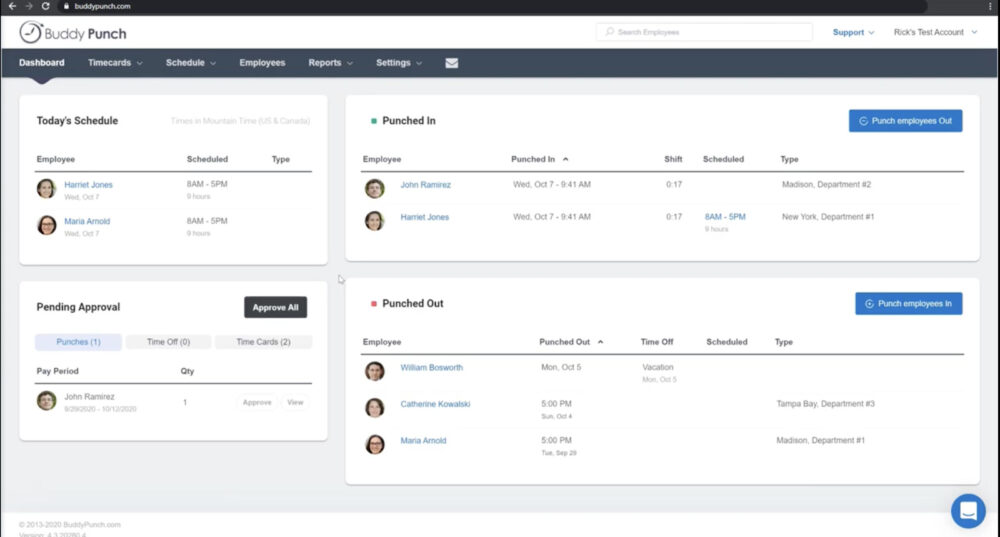
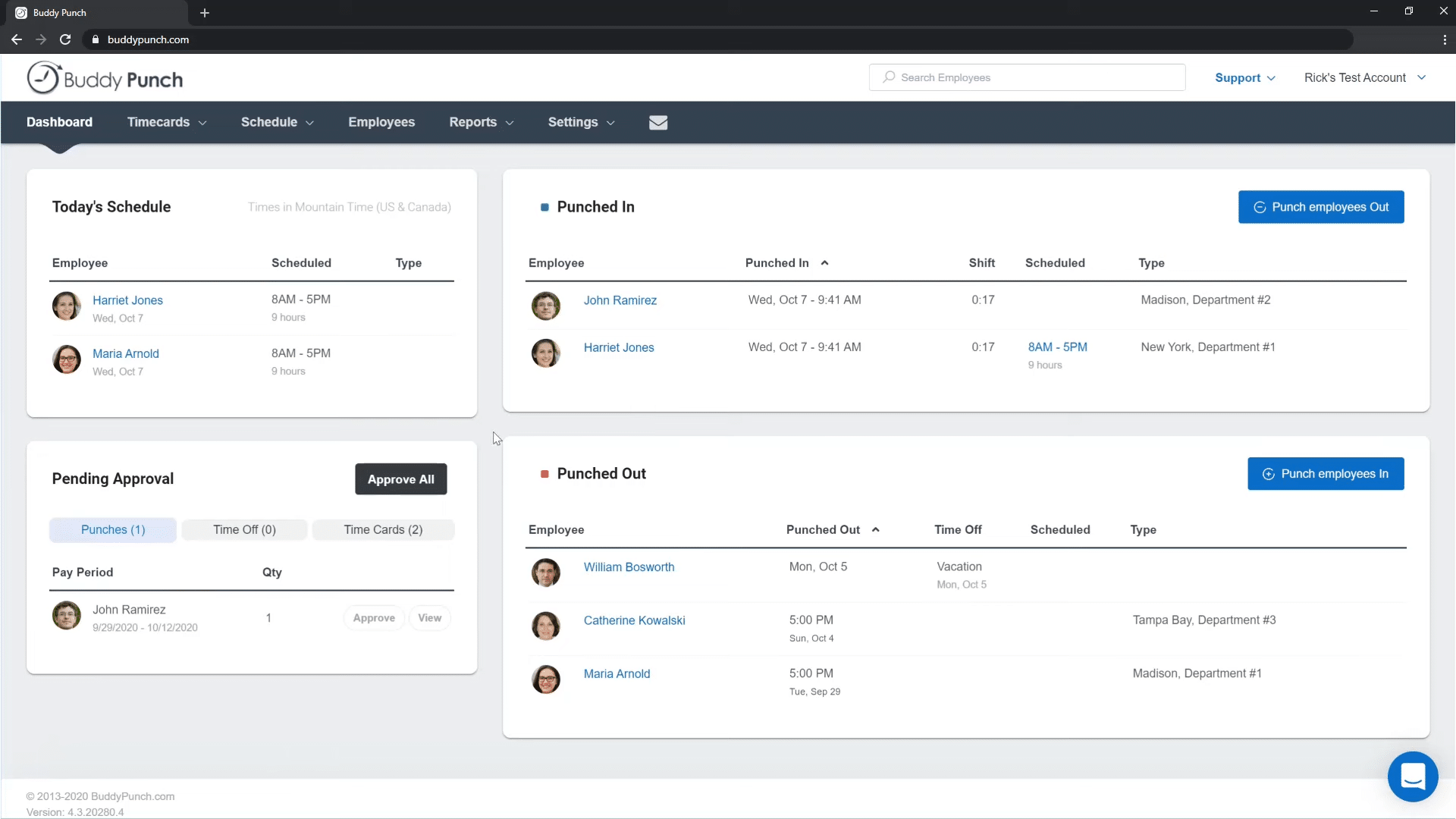
- Dashboard: who is punched in now
- Time Entry: punch in/out flow for employees
- Time Cards: pay period review + edits + approvals
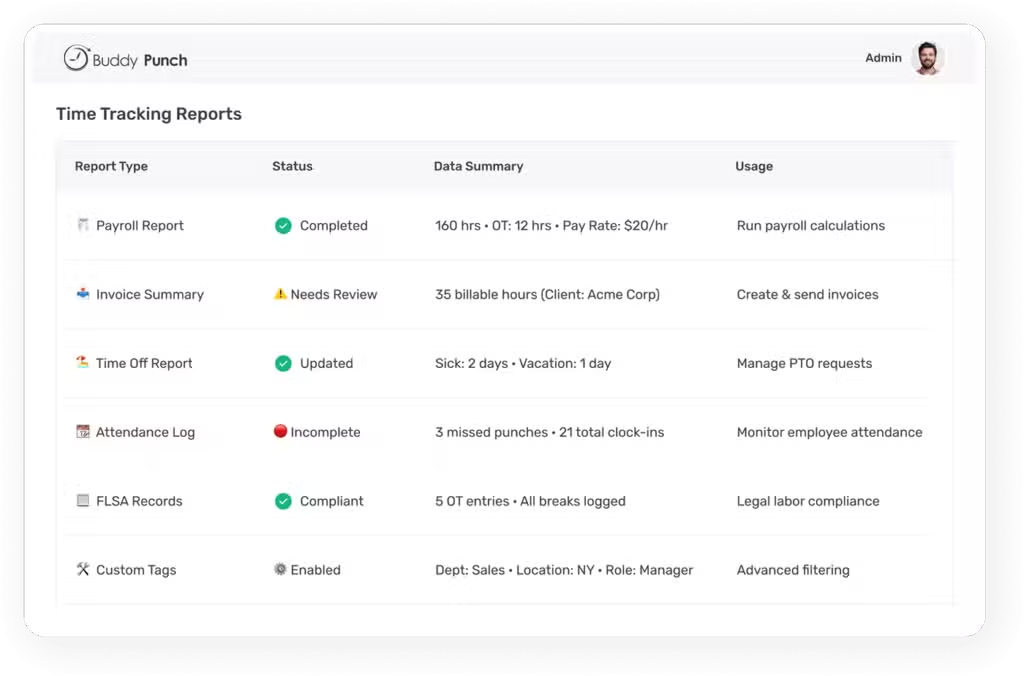
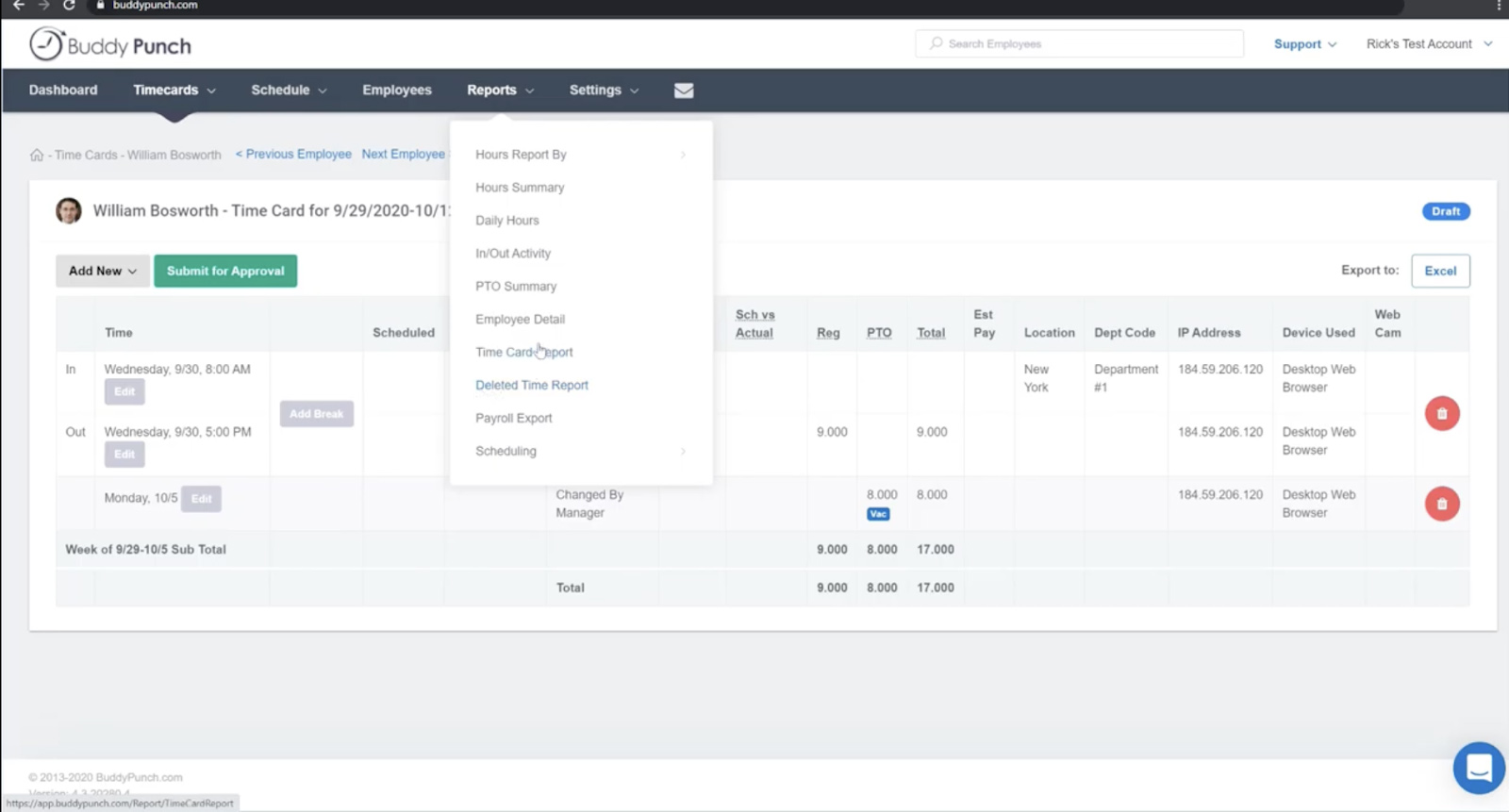
- Reports: payroll exports and audit reports
Mobile experience (important nuance)
Mobile is a first-class workflow for Buddy Punch when you use GPS or geofencing. If you assign geofences, employees typically must use the mobile app to punch from job sites.
Practical warning: If your workforce regularly works without reliable internet (rural areas, basements, large concrete facilities), treat “no offline mode” as a real requirement check during trial.
Core feature breakdown
Buddy Punch is best understood as a set of building blocks: capture time → verify it → approve it → export it → report on it.
1) Time tracking and timesheets
- Punch in/out time clock
- Automatic overtime calculations (daily/weekly rules)
- Punch rounding
- Automatic breaks (policy-driven deductions)
- Timecard approvals (audit trail for payroll disputes)
2) Punch methods and identity verification
Buddy Punch supports multiple punch methods so office staff, kiosk environments, and field crews can all use the same system:
- Username and password
- PIN/Kiosk punch
- QR code scanning
- iOS Face ID supported facial recognition
- Webcam photos on punch (Pro) for stronger verification
Operational note: Verification features can feel invasive if rolled out poorly. The best implementations are transparent: explain the “why,” document the policy, and start with the minimum controls you need.
3) GPS tracking and geofencing
For field teams, location controls are one of Buddy Punch’s biggest strengths:
- GPS coordinates recorded on punches
- Geofences to restrict where punches can happen
- Offsite punch attempts can be reviewed in reporting
Geofences are configurable (required for everyone, required for specific employees, or optional). That “optional” mode can be useful in rural areas with spotty coverage.
4) Scheduling
Scheduling is an add-on that is included in Pro and Enterprise. It typically covers:
- Drag-and-drop schedules, templates, recurring shifts
- Shift trades/covers
- Availability and preferred times
- Attendance vs schedule reporting (early/late/absent)
- “Limit punches to scheduled shifts” and auto punch-outs (policy-driven)
5) Time off tracking (PTO)
- Vacation/sick/time off request workflows
- Accrual rules and PTO approvals
- Automatic addition of paid time off hours into timecards (policy-driven)
6) Job, location, and department tracking
If you need job costing, client billing, or multi-site labor analysis, Buddy Punch supports tracking time by job/location/department using codes and reporting.
7) Accountability controls (anti time theft toolkit)
- Limit punches to time-of-day rules
- Device locks
- IP address locking for web punches
- Automatic punch-outs
- Error logs and exception visibility
8) Reporting and payroll exports
Reports are where Buddy Punch pays for itself: fewer spreadsheet hours, fewer payroll disputes, cleaner exports.
- Payroll export report
- Hours summary and employee detail reports
- Timecard reports with punch-level detail and CSV export options
Advanced features and integrations
Integration ecosystem (native + payroll providers)
Buddy Punch lists a broad set of payroll/accounting integrations. Common examples include:
- QuickBooks Online / QuickBooks Desktop
- ADP Workforce Now
- Gusto
- Paychex
- Paycor / Paylocity
- Rippling
- Workday
- Zapier (automation)
Top integrations table (15 practical picks)
| Category | Integration | Why teams use it |
|---|---|---|
| Accounting | QuickBooks Online | Push time data into accounting quickly |
| Accounting | QuickBooks Desktop | Time-to-payroll workflow for desktop environments |
| Payroll | ADP Workforce Now | Payroll processing at scale |
| Payroll | Paychex | Common SMB payroll stack |
| Payroll | Gusto | Modern payroll + HR workflows |
| Payroll | Rippling | HR + payroll ecosystem |
| Payroll | Workday | Enterprise HR suite compatibility |
| Payroll | Paylocity | Payroll + HR suite workflows |
| Payroll | Paycor | Payroll + HR suite workflows |
| Payroll | Justworks | PEO and payroll stack |
| Payroll | iSolved | Payroll + HCM |
| Payroll | SurePayroll | SMB payroll workflows |
| Payroll | TriNet Payroll | HR/payroll via TriNet ecosystem |
| Project/Payroll | Deltek | Contractor / project-based labor workflows |
| Automation | Zapier | Glue-code automation across tools |
SSO and identity management
Buddy Punch supports SSO paths such as Google SSO, and Enterprise tiers add deeper SSO options (Okta, OneLogin, SAML 2.0, etc.). It also documents SCIM provisioning options for automated user lifecycle management.
API access (gated)
Buddy Punch offers APIs for employee, time, and scheduling use cases, but API access is typically gated behind the Enterprise plan and requires enabling/approval.
Performance, reliability, and security posture
Reliability expectations
Time tracking is payroll-critical. A broken punch flow becomes a payroll dispute fast. Buddy Punch maintains a status page for real-time and historical service visibility (useful for internal comms when there’s an incident).
Scalability signals
- Unlimited administrator users at no extra cost
- Group limits increase by plan (Starter → Pro → Enterprise)
- Enterprise adds API access + SSO + priority support
Security posture (practical view)
Buddy Punch describes common SaaS security controls such as encryption, role-based access control, MFA, and standard platform security practices. If your procurement requires formal attestations (SOC 2 / ISO), confirm directly during vendor review rather than relying on third-party claims.
Data retention and audit readiness
Buddy Punch offers a paid Data Retention add-on that extends records to 6 years for timecard and related records. For regulated industries, this is often the difference between “acceptable” and “we can’t use it.”
BuddypunchSupport and learning resources
Support model
Buddy Punch support is primarily live chat and email. Phone support is not part of the default model (sales calls may be available by appointment).
Decision tip: If your organization requires phone support as a policy, Buddy Punch can be a mismatch. If chat/email is acceptable, this model can be efficient because issues are documented and account context can be referenced.
Documentation and self-serve resources
Buddy Punch maintains an extensive Help Center with quick start guidance and detailed articles on punch methods, approvals, reports, integrations, and SSO—useful for onboarding hourly teams without creating an internal support burden.
Pros and cons
| Pros | Cons |
|---|---|
|
|
User review patterns and ratings
Buddy Punch is generally rated strongly across major review sites. A common pattern: teams praise ease of use and control features, while complaints cluster around connectivity/offline constraints and occasional performance quirks.
Ratings snapshot (as commonly cited in roundups)
| Platform | Headline rating signal |
|---|---|
| Capterra | ~4.8/5 (varies by time) |
| G2 | ~4.8/5 (varies by time) |
| TrustRadius | ~8.5/10 (varies by time) |
| GetApp | ~4.8/5 (varies by time) |
Common praise themes
- Easy setup and straightforward day-to-day workflow
- Reduced time theft disputes due to verification and location controls
- Payroll exports reduce admin work
Common complaint themes
- Occasional glitches (reported by some users)
- No offline mode (serious for field teams)
- Rounding behavior can surprise employees if not communicated
Alternatives and comparisons
Buddy Punch is strong, but alternatives can win depending on what you value most: QuickBooks-native workflows, deeper remote productivity tracking, or a free tier for very small teams.
Practical shortlist of alternatives
- QuickBooks Time: best when your accounting/payroll center of gravity is QuickBooks
- Hubstaff: common when orgs want stronger remote workforce visibility
- Timeero: solid for field teams and location-based time tracking
- Connecteam: all-in-one employee app positioning, often appealing for ops teams
- Jibble: frequently considered when budget is the dominant constraint
Side-by-side snapshot (high-level)
| Tool | Best for | Why you’d pick it | Watch-outs |
|---|---|---|---|
| Buddy Punch | SMB time tracking + anti-theft controls | Great enforcement options without hardware | Base fee + add-ons + no offline mode |
| QuickBooks Time | QuickBooks-centric businesses | Suite alignment for accounting/payroll | May trade off enforcement flexibility vs Buddy Punch |
| Hubstaff | Remote workforce visibility | More “productivity visibility” options | Can feel surveillance-heavy culturally |
| Connecteam | Ops teams wanting an employee app | Broader employee comms and ops features | Time clock may not be as enforcement-focused |
| Jibble | Budget-sensitive teams | Often evaluated for free-tier positioning | Compare controls, integrations, and governance needs |
Who Buddy Punch is best for (and who should avoid it)
Best for
- Hourly SMB teams that want a clean time clock with approvals and reporting
- Field staff and multi-location operations that need GPS/geofencing controls
- Teams tired of time theft disputes that want kiosk/QR/photos/Face ID options
- Payroll admins who want reliable exports and integrations
- Organizations that like modular pricing (add features as needed)
Avoid or be cautious if
- You have a tiny team and strongly dislike base fees
- You require phone support as a standard vendor policy
- Your workforce routinely operates with unreliable internet and needs offline punching
- You need API access on a lower tier
Final verdict and recommendations
Rating: 8.6/10
Buddy Punch wins by being practical. It is not trying to be a full HR suite. It is trying to make time tracking accurate, defensible, and less annoying—with clear paths into payroll.
What matters most: if you have field crews or multiple locations, test geofencing + punch verification in the real places people work. If you have a payroll-heavy workflow, do one full pay period in parallel so your export and approvals process is proven before you commit.
My score breakdown:
- Features: 8.7/10
- Ease of use: 9.0/10
- Scheduling: 8.2/10 (good SMB coverage; not enterprise workforce optimization)
- Integrations: 8.8/10
- Reporting: 8.4/10
- Security and admin controls: 8.3/10
- Support and documentation: 8.1/10 (strong docs; chat/email model)
- Value: 8.0/10 (great at scale; base fee + add-ons matter)
Call to action: Run a 1-pay-period pilot. Treat it like a payroll system, not a “nice to have” app. You’ll learn fast whether geofences, approvals, and exports match your real-world constraints.
FAQ (15 questions)
1) Does Buddy Punch have a free plan?
Buddy Punch promotes a free trial, but its published pricing structure is paid plans plus add-ons. A free plan is not part of the core offering.
2) How does Buddy Punch pricing work?
Plans are priced per user per month plus a monthly base fee. Buddy Punch also shows separate rates for monthly billing versus annual billing.
3) What is the difference between Starter and Pro?
Pro includes everything in Starter plus features like basic geofencing, QR code scanning, PIN/kiosk punching, webcam photos on punches, and it includes the Scheduling add-on.
4) Does Buddy Punch support geofencing?
Yes. Buddy Punch supports creating geofences around job sites and restricting punches when geofencing is required.
5) How big can a geofence be?
Buddy Punch describes configurable geofence sizes (commonly shown as diameter settings within a defined meter range in product guidance).
6) Can Buddy Punch track time by job or project?
Yes. Buddy Punch supports job/location/department tracking using codes and reporting.
7) What punch methods does Buddy Punch support?
Common methods include username/password, PIN/kiosk punching, QR code scanning, and iOS Face ID supported facial recognition.
8) Does Buddy Punch take a photo when employees punch in?
Pro includes webcam photos on punches, designed to capture a photo at each punch for identity verification.
9) Can I require approvals before payroll?
Yes. Buddy Punch supports a timecard approval workflow where employees submit timecards and managers/admins approve them.
10) Does Buddy Punch integrate with QuickBooks?
Yes. Buddy Punch lists integrations for QuickBooks Online and QuickBooks Desktop and positions them for transferring time data into accounting workflows.
11) What payroll providers does Buddy Punch integrate with?
Buddy Punch lists a broad range of payroll providers, including common SMB options and larger suites (for example: ADP, Paychex, Gusto, Rippling, Workday, and others).
12) Does Buddy Punch have built-in payroll?
Buddy Punch offers payroll as an optional add-on with its own per-user fee and an additional base fee.
13) Does Buddy Punch support SSO?
Yes. Buddy Punch supports SSO options and expands SSO capabilities on higher tiers (Enterprise) for organizations that need stronger identity governance.
14) Is there an API?
Yes, but API access is typically gated behind the Enterprise plan and requires enabling/approval.
15) What happens if I cancel Buddy Punch?
Buddy Punch describes that subscriptions renew until cancelled, and after cancellation you lose access to prior information and your data may be deleted—so download reports you need before cancelling.








By clicking Sign In with Social Media, you agree to let PAT RESEARCH store, use and/or disclose your Social Media profile and email address in accordance with the PAT RESEARCH Privacy Policy and agree to the Terms of Use.