
Quo Review: How the Former OpenPhone Handles Calls, Texts, Sona AI, and Scaling
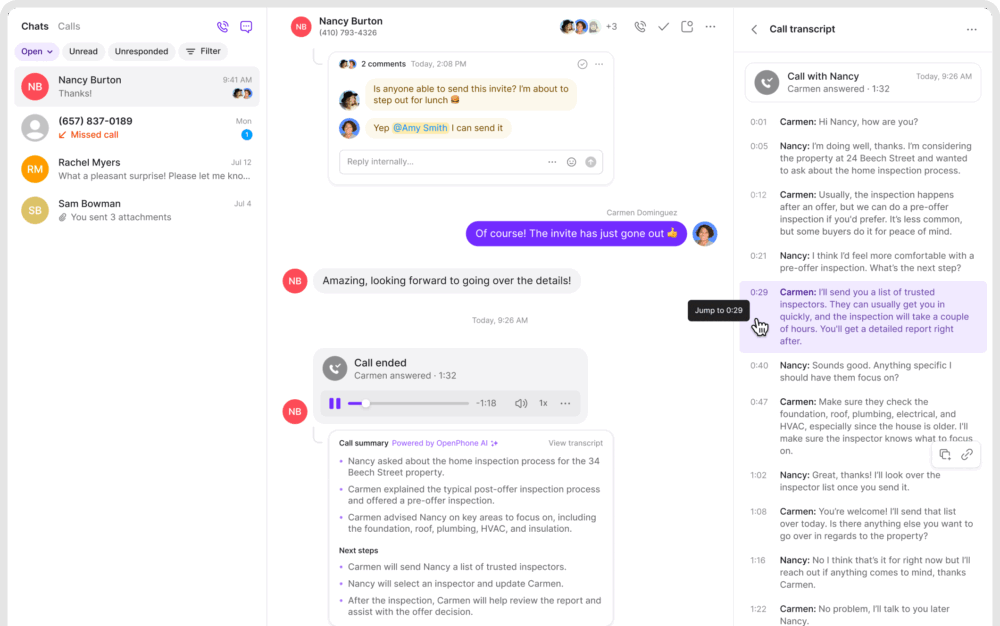
If you have ever tried to run customer conversations across personal cell numbers, shared inboxes, and a pile of sticky notes, you already know the failure mode. Calls get missed. Text threads get lost. A teammate follows up without context. And the customer experience starts to feel accidental instead of intentional.
Quo (formerly OpenPhone) is built for exactly that problem. It is a cloud-based business phone system that turns calls, texts, voicemails, and contact context into a shared workspace your team can actually operate from. It is designed for modern teams who want to sound professional without buying hardware, managing complex PBX setups, or forcing everyone to carry a second phone.
QuoOverall verdict: 8.7/10
Bottom line: Quo is one of the cleanest, most collaboration-friendly business phone systems in its class. It shines when you want a shared team number, fast setup, strong day-to-day usability, and increasingly capable AI support through Sona. The main tradeoffs tend to show up when you want deeper contact center functionality, more advanced enterprise administration, or you have heavy compliance and carrier registration needs for high-volume SMS.
Best for: SMB teams that need shared numbers, shared context, and fast adoption (sales, service businesses, support teams, recruiting, and operations).
Not ideal for: organizations that need full contact center depth (advanced queueing/WFM/QM), very strict enterprise administration requirements, or SMS programs that rely heavily on short codes/verification-code reliability.
Here’s what this review covers
- Introduction and positioning
- Overview and company background
- Pricing and plans (plus hidden costs)
- Setup and onboarding experience
- User interface and ease of use
- Core feature breakdown
- Advanced features and integrations
- Performance, reliability, and security
- Customer support and learning resources
- Pros and cons
- User reviews and ratings summary
- Alternatives and comparisons
- Who Quo is best for (and who should avoid it)
- Final verdict and recommendations
- FAQ (15 common questions)
Introduction and positioning
Most teams don’t set out to build a “phone system.” They just start answering customers however they can: personal cell numbers, ad-hoc forwarding, shared inboxes, and scattered notes. That approach works until it doesn’t—usually right when you start growing.
Quo’s positioning is simple: take the messy reality of calls and texts and turn it into a shared, trackable workspace. Instead of one person “owning the phone,” Quo treats business communication like a team inbox—complete with conversation history, internal notes, assignments, and increasingly, AI assistance through Sona.
A useful mental model:
Quo is less “PBX software” and more “a shared communication workspace for your business number.”
Overview and company background
What Quo is
Quo is a business phone platform for teams. It gives you one or more business numbers (local or toll-free), and lets you call and text from those numbers on desktop and mobile. The differentiator is not just VoIP calling—it’s the way Quo organizes communication into shared conversation threads, with internal notes and lightweight CRM-style contact context so teammates can collaborate.
Who it’s for
Quo targets small and mid-sized businesses that want to:
- Separate personal and business communication without extra hardware.
- Share a phone number across multiple teammates like a shared inbox.
- Maintain conversation history across calls, texts, and voicemails.
- Route and respond faster with less internal back-and-forth.
- Add AI support for call handling, summaries, and tagging.
Product evolution: OpenPhone → Quo
Quo is the product formerly known as OpenPhone. The rebrand (announced in September 2025) came with a renewed emphasis on expanding AI capabilities through Sona and positioning Quo as more than “just VoIP.”
Procurement note: rebrands often bring packaging/pricing and policy changes over time. Treat any pricing or limits in this review as “as-of” and confirm on Quo’s pricing page at purchase time.
Pricing and plans (plus hidden costs)
Quo’s pricing is relatively transparent and structured around three core tiers, plus a 7-day free trial. The “real” cost picture depends on your add-ons (extra numbers), messaging registration requirements, international usage, and automation volume.
Plans at a glance
| Plan | Price/user/month (annual) | Price/user/month (monthly) | Best for | Key inclusions | Key gaps |
|---|---|---|---|---|---|
| Starter | $15 | $19 | Solo users and very small teams | 1 number/user, US/Canada calling + messaging, voicemail transcripts, API access, ticket support, Sona included | No HubSpot/Salesforce integration, no phone menus, no analytics/reporting, fewer admin controls |
| Business | $23 | $33 | Teams that need routing, reporting, and CRM sync | AI call summaries/transcripts, group calling, transfers, ring orders, HubSpot + Salesforce integrations, phone menus, analytics/reporting, auto recording, live chat support | No AI call tags; less premium onboarding/support than Scale |
| Scale | $35 | $47 | Growing teams that want stronger AI and priority support | AI call tags, dedicated onboarding, priority chat/email support, inbound phone support | Higher seat cost; still not a full contact center suite |
What every plan includes (the day-one essentials)
- One new or ported number per user (local or toll-free).
- Calling and messaging to US and Canadian numbers.
- Voicemail transcripts.
- Quo API access.
- Email ticket support.
- Sona AI agent included (with credits/usage limits).
Sona AI agent credits (how to budget it)
Sona is included on all plans, but it operates on a credit model. Quo states that 1 Sona call equals 100 credits, and that each plan includes 1,000 free automation credits (i.e., 10 calls). Additional credit tiers can be purchased monthly.
Practical budgeting guidance:
- If you use Sona as coverage for missed calls, included credits can be meaningful.
- If you expect Sona to answer a large share of inbound calls, treat it like consumption-based pricing and forecast call volumes.
Hidden costs and add-ons to watch
| Potential cost driver | What it is | Why it matters |
|---|---|---|
| Additional phone numbers | Extra numbers beyond the included 1 number per user (example pricing: $5/month billed annually) | Common when you want separate lines for Sales, Support, Billing, Recruiting, or regions |
| Carrier registration (US/CA messaging) | Messaging campaigns may require registration fees (example range: $1.50–$3/month via The Campaign Registry depending on use case) | If SMS is core, registration is a real implementation step, not a checkbox |
| International calling/messaging | Outside US/Canada, usage is typically billed per minute or per message | Important for global contractors and international customer bases |
| Automated messaging | Automations via Zapier/API can carry micro-costs (example: $0.01 per outgoing text message via Zapier; $0.01 per segment via API) | At volume, “small” per-message costs can compound quickly |
| Fair usage policy / taxes | Usage can be subject to fair usage, and taxes/fees may be added | Important for forecasting all-in monthly spend |
Value for money: which plan tends to fit in practice?
- Starter is strong if you want a clean business line and don’t need analytics, phone menus, or CRM integrations.
- Business is the value tier for most teams: routing + reporting + CRM sync + recording and summaries tend to become “table stakes” once multiple people share a number.
- Scale is for teams that want tighter operational control: AI call tags, higher-touch onboarding, and phone support access.
Recommendation if you’re unsure: pilot the Business plan first for any multi-person deployment. It unlocks routing/reporting features that most teams eventually need.
Setup and onboarding experience
Sign-up and first-time setup (what to expect)
Quo’s sign-up process is designed to be quick, but it is not completely frictionless because verification is often required (a common pattern in business communications tools). A realistic setup flow looks like this:
- Create an account and verify your email.
- Enter basic workspace details (name and account type).
- Complete identity verification via a mobile number (receive a code).
- Choose a new number or start the number porting path.
- Select a plan to begin the free trial and add payment details (with reminders before billing begins).
Number provisioning vs porting
If you want speed, start with a new local or toll-free number. If you are migrating an established customer-facing line, porting is the part to plan carefully.
Best-practice porting plan:
- Create your Quo workspace and set up a temporary number.
- Configure routing, voicemail, business hours, and any call menus.
- Invite the team and validate call flows internally.
- Submit the port request and run parallel operations until completion.
- Update customer-facing materials only after the port is confirmed complete.
Two common reasons onboarding stretches from hours into days:
- Number porting timelines (carrier processes, weekend/holiday freezes).
- Messaging registration requirements (especially for higher-volume SMS programs).
User interface and ease of use
Quo’s interface is one of its strongest competitive advantages. It is built to feel less like a telecom admin panel and more like a collaboration tool.
How the product is organized
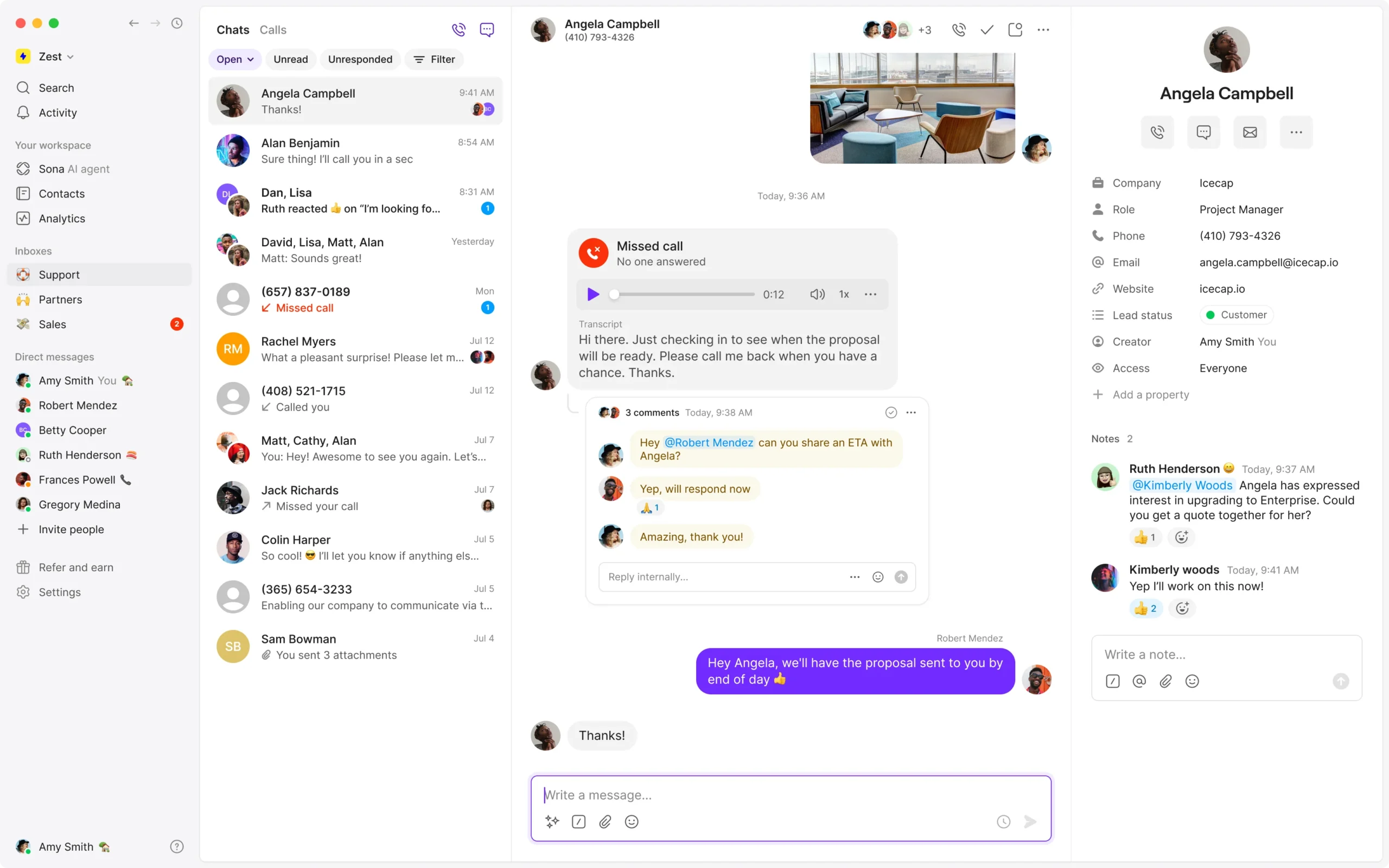
- Threaded conversations: calls, texts, voicemails, and internal notes live in one place per contact.
- Shared numbers: behave like shared inboxes where multiple teammates can see and respond.
- Lightweight contact context: reduces the need to jump into another system just to answer basic customer questions.
Learning curve: where it’s easy vs where it gets “real”
For everyday usage (calling, texting, replying, adding notes), the learning curve is typically gentle. Complexity usually appears in configuration:
- Phone menus and routing design (especially multi-department call flows).
- SMS compliance and registration workflows.
- Scaling reporting and oversight for supervisors.
Desktop vs mobile experience (a practical limitation to note)
Quo is designed to keep conversations synced across devices, which is central to its value proposition. However, certain analytics/reporting features are often positioned as web/desktop-first. If mobile reporting is critical for managers, validate the current experience before committing.
Core feature breakdown (what matters in real operations)
To keep this practical, I’m evaluating Quo through the jobs teams actually need a business phone system to do:
- Own one or more business numbers as a team.
- Answer and place calls reliably.
- Text customers in a compliant, deliverable way.
- Route calls without chaos.
- Preserve context across teammates (so customers don’t repeat themselves).
- Track performance and follow-up discipline.
1) Business numbers and shared ownership
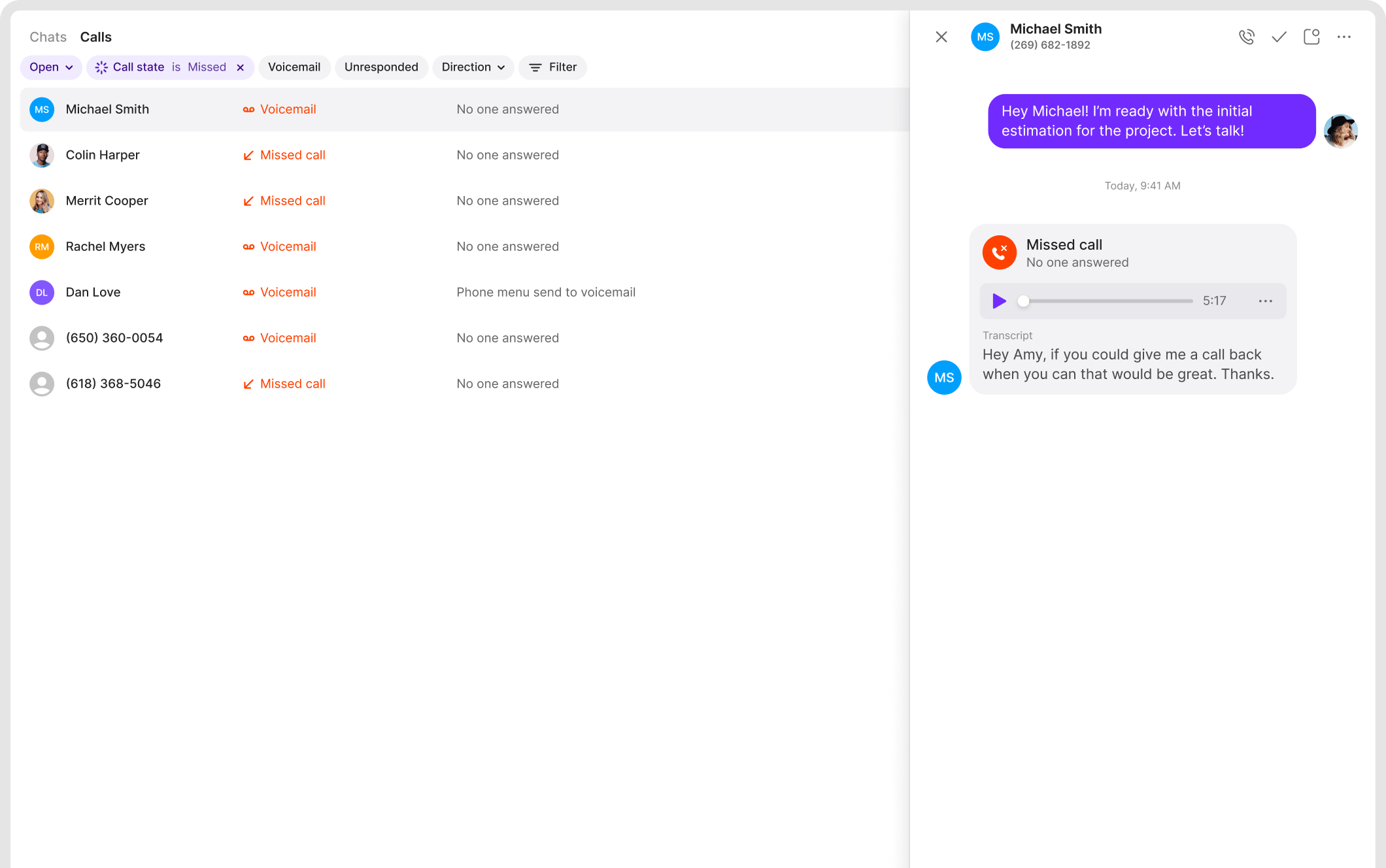
Quo gives each user a business number (new or ported), and supports shared numbers so multiple teammates can manage inbound calls and texts from the same line. The value is not the number—it’s the shared context. Conversation history and internal notes help teams avoid the “who talked to them last?” problem.
2) Calling capabilities (and what changes by plan)
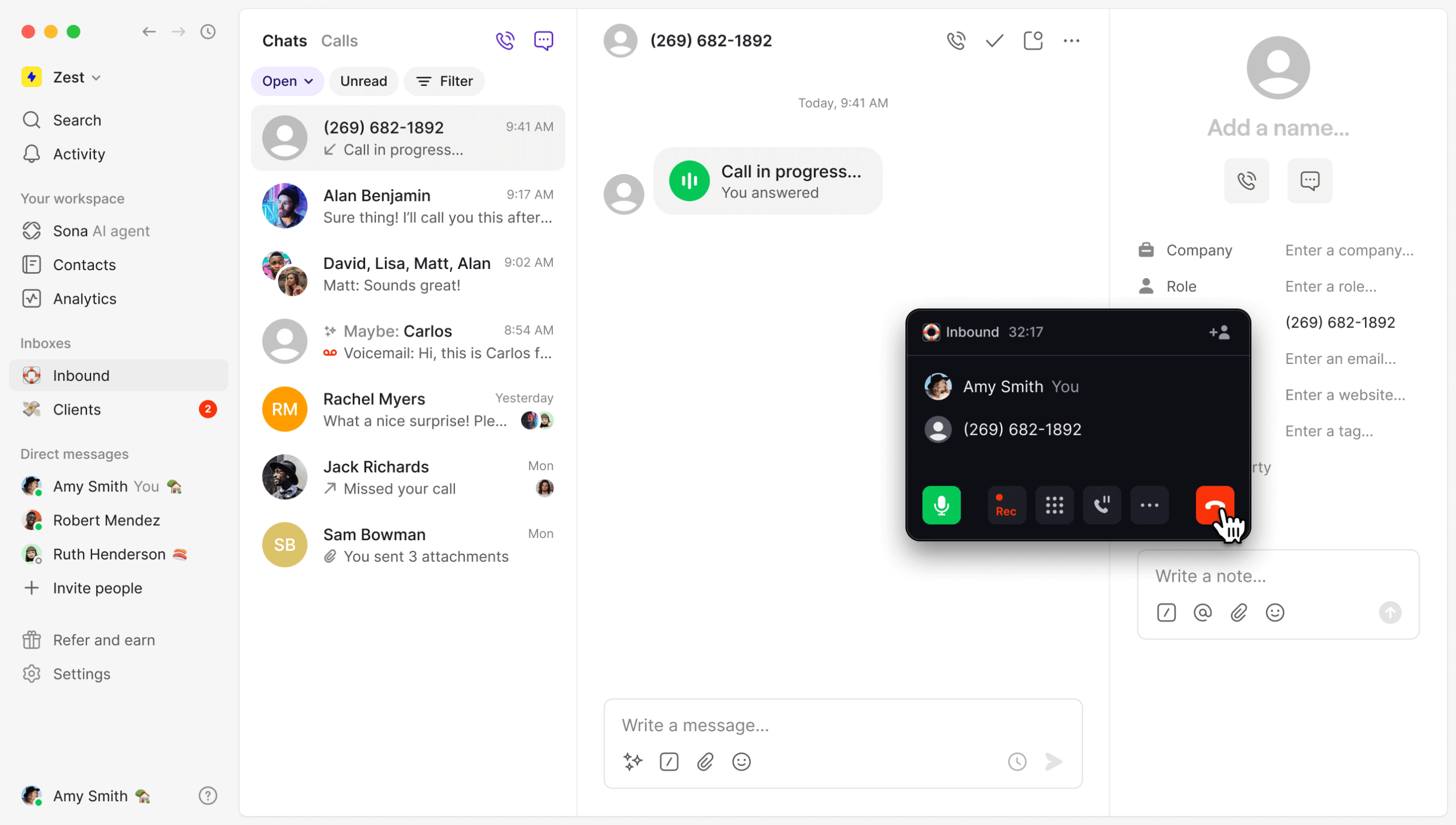
Core inbound/outbound calling exists across tiers, but the platform becomes more operationally useful on higher tiers where you get capabilities like group calling, call transfers, auto call recording, and analytics/reporting.
Reality check (VoIP): call quality still depends on network conditions. Pilot Quo under real conditions (home Wi‑Fi, office networks, VPN use, mobile hotspots) before rolling out company-wide.
3) Text messaging (SMS/MMS): powerful, but compliance-heavy
Texting is a major growth lever for many SMBs—but in the US it’s not just a feature. It’s a compliance and deliverability environment.
- Consent matters: obtain permission before messaging and follow opt-in/opt-out practices.
- Carrier filtering is real: deliverability can be affected by content, sending patterns, and registration status.
- MMS constraints: attachments have size limits (Quo guidance often references limits such as 5 MB).
Common edge case to test early: some verification services and short codes may not behave reliably with virtual numbers. If your workflows depend on automated verification texts, validate those edge cases during trial.
4) Phone menus and routing
Routing is where a business phone tool becomes a system. On plans that include phone menus, you can route calls to sales/support/billing, create simple “press 1 / press 2” flows, and route by business hours.
Small team guidance: keep menus short. A phone menu should reduce friction, not become a maze.
5) Voicemail and transcription
Voicemail transcription is included across plans and often improves follow-up discipline simply because it lowers the effort of reviewing messages. Scanning a transcript is faster than listening to a queue of voicemails.
6) Collaboration features (the real differentiator)
Quo’s collaboration model is built around shared visibility and shared context: shared numbers, threaded history, internal notes, and lightweight contact context. This reduces duplicated work and makes handoffs much smoother.
7) Analytics and reporting
Analytics is typically a plan-gated capability. For managers, reporting should answer questions like inbound volume, missed-call rates, response times for messages, and department/number performance. If you need contact-center-grade reporting (queue metrics, deep agent occupancy, QA workflows), validate whether Quo’s reporting depth matches your requirements.
QuoAdvanced features and integrations
Sona AI agent (the “front office layer”)
Sona is central to Quo’s recent positioning. In practical terms, you should evaluate Sona in three layers:
- Coverage: when it answers and what it handles well.
- Control: how you guide it (scripts, escalation rules, constraints).
- Cost model: credits, included volume, and overage tiers.
High-ROI use case: treat Sona as insurance against missed calls. If it converts even a small number of missed calls into booked work or qualified leads, it can pay for itself quickly—provided you set clear escalation rules.
CRM integrations (where “Business” becomes the practical tier)
Quo’s strongest CRM integration value shows up when calls/texts are logged into your CRM automatically, and AI summaries reduce manual note-taking. HubSpot and Salesforce integrations are positioned as Business-tier (and above) capabilities, which is why Business is often the safest pilot tier for teams.
Integration ecosystem: native + connectors + developer tools
Quo’s ecosystem is typically a blend of native integrations and integration enablers such as Zapier, Make, webhooks, and an API. This combination matters because it lets you start fast (native) and still extend deeply (API/webhooks) when your workflows demand it.
Top integrations shortlist
| Integration | Type | Best use case |
|---|---|---|
| HubSpot | Native | Sync contacts + activity for sales workflows |
| Salesforce | Native | Log calls/texts, attach summaries and recording links |
| Slack | Native | Notify teams of missed calls, voicemails, and priority texts |
| Zapier | Connector | No-code automations (follow-ups, reminders, lead alerts) |
| Make | Connector | Multi-step automations across a broad app library |
| Webhooks | Developer | Real-time event triggers into internal systems |
| Quo API | Developer | Custom workflows, deeper integration with internal tools |
Three integration setups that deliver ROI quickly
- CRM logging + follow-up task creation: log inbound calls automatically; create tasks for missed calls; attach AI summaries to reduce manual notes.
- Slack escalation for shared numbers: notify a channel for voicemails after hours; route to on-call owners.
- Automated appointment reminders: trigger confirmation and reminder texts from your scheduling system (monitor per-message automation costs at volume).
Performance, reliability, and security
Uptime and reliability signals
Quo publishes system status with uptime metrics. In the period referenced in the draft (Sep–Dec 2025), reported uptime numbers include:
- Calling: 99.71% uptime
- Voicemail: 100% uptime
- Text messaging: 99.74% uptime
Why this matters: public uptime reporting doesn’t eliminate risk, but it is a positive signal of operational maturity for a communications platform.
Scalability: when Quo is “enough” vs when you should look elsewhere
Quo scales well for collaborative teams that want shared numbers and shared context. If you need advanced contact center capabilities (deep queue management, workforce management, quality management programs, and complex compliance tooling), you may outgrow Quo and should compare it to more enterprise-focused UCaaS/contact center platforms.
QuoSecurity posture (as stated in the draft)
Quo’s support documentation is positioned as SOC 2 compliant, and references standard encryption practices (TLS 1.2+ in transit and AES‑256 at rest), with cloud infrastructure hosted on major providers.
HIPAA considerations (if relevant)
If you operate in healthcare-adjacent workflows, HIPAA posture and BAA support can be decisive. In the draft, HIPAA compliance options are positioned at higher tiers (Business/Scale) with a BAA requirement. If HIPAA is in scope, treat this as formal procurement: confirm admin controls, access controls, retention settings, and audit requirements.
Customer support and learning resources
Quo’s support model varies by tier, which is typical for business communications software. The key procurement question is not “do they have support?” but “is the support channel you need available on the tier you plan to buy?”
- Email/ticket support: baseline across tiers.
- Live chat support: positioned for higher tiers (and typically more responsive for day-to-day needs).
- Inbound phone support: positioned as available on the highest tier with specified business hours.
If phone-based vendor support is a requirement: Scale is the safest fit. If you can operate with chat/tickets, Business is typically sufficient.
For self-service learning, Quo points users to its resource center and documentation for setup, messaging compliance/deliverability, analytics, and API guidance.
Pros and cons
Pros
- Excellent shared “inbox-style” collaboration for calls and texts (shared numbers, shared context, internal notes).
- Clean UI and fast adoption for non-technical teams.
- Business tier is operationally strong: phone menus, analytics, call recording, CRM integrations, and AI summaries.
- Sona can add real leverage for missed calls and inbound coverage (if credits are modeled properly).
- Integration surface is credible: native integrations + Zapier/Make + API/webhooks.
- Public uptime reporting is a positive signal for a communications vendor.
Cons / watch-outs
- SMS can require carrier registration and ongoing fees depending on use case.
- Verification code / short code limitations can affect specific workflows (test early if this matters).
- Analytics may be web/desktop-first depending on plan/features; validate mobile reporting if required.
- AI is credit-based, so costs can rise with call volume if Sona becomes a primary coverage layer.
- Not a full contact center suite: teams needing deeper queue/WFM/QM capabilities may want more enterprise-focused platforms.
User reviews and ratings summary
A useful way to interpret review sites is not to chase a single “star rating,” but to look for recurring operational themes: usability, reliability, support responsiveness, and SMS friction.
Ratings snapshot (from the draft)
- Capterra: 4.2 rating (60 reviews), page marked last updated December 14, 2025.
- Other summaries report strong ratings across sites (with G2 commonly in the high‑4 range and Trustpilot showing substantial volume).
Common praise themes
- Fast setup and gentle learning curve.
- Threaded visibility across calls, texts, and notes (shared context).
- Support responsiveness (especially chat support) in many user accounts.
Common complaint themes
- Intermittent call quality/connectivity issues (often environment-dependent).
- SMS registration/deliverability complexity (carrier filtering, prohibited categories).
- Support expectations (some users want phone support on lower tiers).
- Rebrand reactions (name change sentiment, even if product remains strong).
Alternatives and comparisons
Quo competes in the business phone space alongside products like Google Voice, Dialpad, RingCentral, Nextiva, and Phone.com. The right choice depends on whether you want a collaboration-first shared workspace (Quo) versus a broader UCaaS suite or a more contact-center-oriented platform.
Comparison table: Quo vs common alternatives
| Product | Starting price signal (annual) | Strengths | Tradeoffs | Best for |
|---|---|---|---|---|
| Quo | $15/user/month | Shared collaboration model, clean UI, CRM integrations at Business tier, Sona AI layer | SMS compliance overhead, AI credits can add cost, less contact center depth | SMB teams that want a shared number and strong context |
| Google Voice | $10/user/month (Starter) | Low friction, Google ecosystem alignment, simple plan structure | Typically less collaboration depth vs Quo’s threaded team workflow | Google Workspace teams that want straightforward basics |
| Dialpad | $15/user/month (Standard) | AI positioning across calling, broader communications suite | Can become more complex across tiers/features | Teams that want AI-first UCaaS positioning |
| RingCentral | $20/user/month (Core) | Mature UCaaS suite, broad feature coverage | Heavier platform than many SMBs need | Organizations that want a single suite for voice/messaging/meetings |
| Nextiva | ~$15/user/month (varies by package) | Business comms plus CX orientation in higher tiers | Packaging can vary; evaluate bundles carefully | Teams that want more CX-suite direction |
When to choose Quo over alternatives
Choose Quo when you need a shared number that behaves like a shared inbox, conversation history your whole team can see, fast adoption by non-technical teammates, and an AI agent layer to reduce missed-call losses.
When an alternative may be better
- You need a deeper enterprise UCaaS suite with advanced admin/compliance.
- You need contact-center-grade queue management, WFM, and QA tooling.
- You have heavy international telephony requirements.
- Your workflows rely on highly specific SMS behaviors (short codes, verification code reliability).
Who Quo is best for (and who should avoid it)
Best-fit profiles
Quo is an excellent fit for:
- Service businesses (contractors, property management, local services) that need a shared main line.
- Sales teams that want calls/texts logged with context and summaries.
- Support teams that want to reduce missed calls without investing in a full contact center.
- Remote or hybrid teams that need consistent communication across mobile and desktop.
Who should be cautious
- You need complex contact center tooling (advanced queues, WFM, QA, deep compliance tooling).
- You operate in heavily regulated messaging environments where carrier filtering/prohibited categories limit SMS value.
- You need guaranteed phone-based vendor support on every plan tier.
- You rely on receiving many automated verification texts for core workflows.
Final verdict and recommendations
Overall rating: 8.7/10
Quo is built for teams that want a shared business number without shared chaos. Its biggest advantage is collaboration: shared numbers, threaded history, and internal notes reduce miscommunication and speed up response. The Business tier is typically where Quo becomes a fully operational tool, thanks to routing, reporting, CRM integrations, recording, and AI summaries.
My recommendation:
- Pilot Business if more than one person will share a number.
- Validate SMS early (registration, consent workflows, deliverability, and edge cases like short codes/verification codes).
- Model Sona usage like any usage-based feature: forecast call volumes and plan credits accordingly.
- If porting a primary business number: run parallel operations with a temporary number until the port is complete.
FAQ (15 common questions)
1) Is Quo the same product as OpenPhone?
Yes. Quo is the new name for OpenPhone, announced in September 2025.
2) Does Quo offer a free plan?
Quo offers a free trial (7 days), but its pricing structure is paid tiers.
3) How much does Quo cost per user?
As presented in the draft: Starter $15/user/month billed annually ($19 monthly), Business $23 annually ($33 monthly), and Scale $35 annually ($47 monthly). Confirm current pricing before purchase.
4) What is Sona and how does pricing work?
Sona is Quo’s AI agent. The draft describes a credit model where 1 Sona call equals 100 credits and each plan includes 1,000 credits (10 calls), with additional credit tiers available monthly.
5) Can my whole team share one business number?
Yes. Shared numbers and shared context are a core part of Quo’s collaboration model.
6) Does Quo work on mobile and desktop?
Yes. Quo is designed to work across mobile and desktop and keep conversations synced across devices.
7) Can I port my existing number to Quo?
Yes. Quo supports porting, and the recommended approach is to use a temporary number while the port completes.
8) Does Quo support phone menus and call routing?
Yes—phone menus and routing are positioned as Business-tier (and above) capabilities in the draft.
9) Does Quo include call recording?
Auto call recording is positioned as a Business-tier inclusion in the draft.
10) Does Quo integrate with HubSpot and Salesforce?
Yes. HubSpot and Salesforce integrations are positioned as included at the Business tier and above in the draft.
11) What are the most common hidden costs with Quo?
Common add-ons include additional numbers, international calling/messaging rates, carrier registration fees for certain messaging use cases, and per-message costs for automated texting via Zapier/API.
12) Can Quo handle international calling and texting?
Yes, but international calling and messaging are typically billed per minute or per message outside of US/Canada inclusions. Check destination rates early if this matters.
13) Does Quo support receiving verification codes from banks or short codes?
Quo’s documentation (as referenced in the draft) flags that some verification services and short codes may not function reliably. If this is mission-critical, test during trial.
14) Is Quo HIPAA compliant?
The draft notes HIPAA compliance options and a BAA pathway at higher tiers (Business and Scale). If HIPAA is in scope, confirm contractual and administrative controls during procurement.
15) Does Quo provide uptime reporting?
Yes. The draft references a public status page with uptime metrics for services such as calling, voicemail, and text messaging.








By clicking Sign In with Social Media, you agree to let PAT RESEARCH store, use and/or disclose your Social Media profile and email address in accordance with the PAT RESEARCH Privacy Policy and agree to the Terms of Use.