
ProductionCrate Review: All‑in‑One VFX, Audio, Graphics, 3D, and Plugin Ecosystem
If you’ve ever been deep in an edit and realized you’re missing one ingredient—an impact hit, a clean muzzle flash, a believable dust puff, a cinematic whoosh, or a quick hologram overlay—you know the awkward reality of modern post-production:
- You can create everything from scratch… but that’s rarely the schedule (or budget).
- You can hunt the internet for freebies… but the licensing uncertainty and inconsistent quality often isn’t worth the risk.
- You can subscribe to stock libraries… but many “generalist” libraries aren’t built around the way VFX and compositing workflows actually happen.
ProductionCrate positions itself as the go-to toolbox for creators who need practical, production-focused assets—VFX, motion graphics, sound effects, music, graphics/textures, and 3D models—plus workflow helpers like a desktop “Portal” app and a growing suite of After Effects/Premiere plugins (LaForge).
The big question is whether ProductionCrate is just “a lot of stuff,” or whether it’s a system you’ll actually keep using once the honeymoon phase is over.
This review answers that in detail.
ProductionCrateOverall verdict (short version): 8.7/10
Best for: indie filmmakers, YouTubers, editors, motion designers, and small teams who need ready-to-drop VFX elements, solid audio, and a broad asset library intentionally designed around real post workflows (transparent alpha where it matters, multiple formats, drag-and-drop organization via Portal).
Not ideal for: studios that already have a mature internal pipeline + dedicated asset management, or teams that need very specific, high-end niche assets (e.g., only photoreal pyro plates, only AAA game-ready hero models) and prefer best-in-class specialists over an all-in-one library.
ProductionCrate
ProductionCrate is the webs #1 archive of production-ready assets serving 400,000+ happy producers around the globe. Whether it's music, graphics or visual effects, ProductionCrate can cover it all with ease. ProductionCrate is the source of all production-ready assets at an affordable price. Thousands of professionally built video assets, sound elements and tools are helping users save time, perfect their projects & earn the recognition they deserve. ProductionCrate provides several HD & 4K formats. Users can download the VFX as pre-keyed MOV files, or as MP4 files on greenscreen. The sounds and music can be downloaded as either WAV files or…
• Buttons and Icons: Call to Actions, Social Media builders
• Change the feel of a shot with easy to use textures and overlay filters
• Mograph & editing: Typography kits and fluid colors
• Aspect Ratio Toolkits, Facebook & YouTube Templates, Film & Video Helpers
• Material maps for realistic surface projection
• Production-Ready HD Image Effects
• Pro - $49 / year
• Pro Lifetime - $799
• Buttons and Icons: Call to Actions, Social Media builders
• Change the feel of a shot with easy to use textures and overlay filters
• Mograph & editing: Typography kits and fluid colors
• Post-Production Tutorials: Improve production skills with tips, tricks, and step by step instructional videos
• Holiday Themed: Drag & Drop Video Elements for seasonal media & promotions
• Bring It All Together: Convince the audience without being a distraction
Here’s what this review covers
- Introduction
- What ProductionCrate actually is (and why the naming matters)
- The “why”: what problem ProductionCrate is trying to solve
- Company background and ecosystem maturity
- A tour of the ecosystem: what you get access to
- FootageCrate (VFX & motion graphics)
- SoundsCrate (SFX & music)
- GraphicsCrate (graphics, images, textures)
- RenderCrate (3D models/materials/environments)
- Plugins & workflow tools (Portal, Connect, LaForge, Blender tools)
- Memberships and pricing
- Licensing: what you can and can’t do
- User experience: discovery, downloads, and workflow
- Strengths and weaknesses (pros/cons)
- Customer sentiment and reviews
- How to decide if ProductionCrate fits you
- Final recommendation
- FAQ (15 practical questions)
Introduction
What you should expect from this review
A lot of ProductionCrate coverage stops at “big library, decent price.” That’s not enough for real-world post-production decisions. This review focuses on what actually determines value over time:
- Whether the assets are delivered in formats that match compositing reality
- Whether the ecosystem reduces friction (discovery → download → organization → import → use)
- Where licensing is clean, and where it requires extra judgment (especially around 3D IP and AI training restrictions)
- Whether the tooling layer (Portal/Connect/LaForge) meaningfully changes day-to-day workflow
What ProductionCrate actually is (and why the naming matters)
A common point of confusion is the relationship between FootageCrate and ProductionCrate.
FootageCrate started as the VFX-focused library (founded in 2009, per ProductionCrate’s own newsroom explanation). Over time, additional libraries were added under the same umbrella:
- SoundsCrate (music + SFX)
- GraphicsCrate (graphics + textures)
- RenderCrate (3D models/materials)
ProductionCrate is the umbrella brand meant to bring “every filmmaking tool under one name,” with FootageCrate becoming one major library among the others.
A helpful mental model:
ProductionCrate is not one library. It’s a hub that stitches together multiple specialized libraries plus workflow tools.
That distinction matters because the value isn’t only “how many assets exist.” It’s whether the ecosystem reduces friction across your workflow: discovery → download → organization → import → use.
ProductionCrateThe “why”: what problem ProductionCrate is trying to solve
ProductionCrate’s core promise is practical: make it easy to produce better-looking content faster by providing assets that are:
- Built for compositing (often transparent / pre-keyed where appropriate)
- Available in multiple formats depending on your pipeline
- Compatible across common editors (Premiere Pro, After Effects, DaVinci Resolve, Nuke, and more are explicitly referenced)
- Backed by a licensing framework designed for commercial production use cases (with clear limitations, especially around redistribution)
The platform also leans into “workflow glue”: Portal (asset organization + plugin manager) and LaForge (plugins for AE/Premiere).
Company background and ecosystem maturity
ProductionCrate presents itself as a long-running creator-first business, tracing back to FootageCrate’s founding in 2009, with the brand evolution later consolidating under ProductionCrate.
That longevity shows up in two ways that matter for buyers:
- Asset depth and breadth: ProductionCrate states it hosts 10,000+ assets, and the FAQ references “over 10,000 custom made HD production resources.”
- Ongoing updates: the FAQ claims the team produces new content “nearly every day” and uploads finished items “in bulk at least once per week.”
That second point is underrated. Asset subscriptions only stay valuable if the library doesn’t go stale.
A tour of the ecosystem: what you get access to
ProductionCrate groups its universe into five major buckets:
- VFX & motion graphics (FootageCrate)
- SFX & music (SoundsCrate)
- Graphics & textures (GraphicsCrate)
- 3D models/materials/environments (RenderCrate)
- Plugins & workflow tools (LaForge suite, Portal, extensions, Blender import tools)
This section is where a lot of reviews stay superficial, so let’s go deeper—especially on the parts that affect real-world usability.
1) FootageCrate (VFX & motion graphics): the core engine
Library depth and “ready-to-composite” design
ProductionCrate describes FootageCrate as a “diverse and rich library of 10,000+ assets,” often “available with transparent backgrounds for quick drag+drop compositing.”
In practical terms, that typically includes assets like:
- Fire, sparks, smoke, dust
- Explosions and debris
- Light leaks, overlays, transitions
- Stylized energy effects, magic powers, anime FX
- Motion graphics backgrounds and UI-style elements (depending on category)
You’ll still want to sanity-check any given asset before committing to it in a client deliverable, but the framing is correct: the library is built for post-production layering, not “pretty clips for B-roll.”
ProductionCrateFormat strategy: ProRes vs MP4 vs PNG sequences
One of the more useful parts of ProductionCrate’s messaging is that it doesn’t pretend there is one perfect format for all workflows. It explicitly explains a three-format approach:
- ProRes (.MOV): best for quality, includes a pre-keyed transparent alpha background (larger files).
- MP4: best for speed & size, often includes a green/blue/black background for keying/blending (smaller files).
- PNG sequences: frame-level control and broad compatibility.
A simple rule that works well in practice:
Use ProRes with alpha when you want fast compositing and better fidelity.
Use PNG sequences when you need deterministic frame behavior and deep control.
Use MP4 when you want lightweight files for mockups or constrained hardware.
Compatibility and quality positioning
ProductionCrate states FootageCrate assets can be imported into Premiere Pro, DaVinci Resolve, Nuke, After Effects, and more, on both Windows and Mac. It also states FootageCrate videos are encoded in up to 4K resolution, and that Pro memberships can download higher-quality versions up to 4K.
The key takeaway: ProductionCrate isn’t positioning FootageCrate as “cheap stock.” It’s positioning it as compositing-first media elements that trade “shoot it yourself” time for subscription cost.
2) SoundsCrate (SFX & music): better than a “nice-to-have”
A lot of editors underestimate how often audio is the real production value multiplier.
ProductionCrate’s FAQ emphasizes that its audio components can be downloaded as WAV or MP3. That matters because:
- WAV is the default for serious sound design, mixing, and professional deliverables.
- MP3 is fine for drafts, fast content, or when file size matters.
If you’re a solo creator, a combined VFX + audio library can be more valuable than buying them separately, because you’re usually solving for speed and convenience, not just raw asset counts.
3) GraphicsCrate (graphics, images, textures): resolution where it counts
ProductionCrate’s FAQ claims its graphics/object archives host assets “up to HD‑11K,” and Pro membership includes higher-quality downloads “up to 11K on GraphicsCrate.”
This is an important differentiator versus many generalist libraries that stop at “good enough for web.” High-resolution textures and graphics are useful for:
- 4K/6K timelines
- Large-format print
- Motion graphics where you want room to pan/zoom without softness
- Texture work for 3D and compositing set extensions
4) RenderCrate (3D models/materials/environments): powerful, but read the license section carefully
Formats and interoperability
ProductionCrate’s asset pages commonly indicate 3D model downloads in formats like BLEND and FBX, and compatibility with major 3D editing software/plugins.
That’s a practical combination:
- BLEND is a natural “best path” for Blender pipelines.
- FBX is a lingua franca for interoperability across DCCs and engines.
Editorial use restrictions: the nuance most people miss
ProductionCrate’s Terms of Use include a section titled “Editorial Use Restriction for 3D Media Elements.” It explains that some 3D media elements may be subject to other parties’ intellectual property rights and limits permitted use of that other-party IP to news reporting / editorial / journalistic / newsworthy productions, unless you have written consent.
Practical takeaway: if you’re downloading anything that looks like a real brand, recognizable trademark, or iconic design language, treat it as potentially editorial-only and validate usage before monetized commercial campaigns.
ProductionCrate is explicit that you are responsible for determining the need for and obtaining any needed clearance, consent, or releases for other-party IP. This is not unique to ProductionCrate—it’s the reality of 3D asset licensing generally—but ProductionCrate is unusually direct about it in its terms.
5) Plugins & workflow tools: where ProductionCrate starts to feel like a platform
If ProductionCrate were only a download library, it would live or die on asset quality and search. But the tooling layer changes the experience:
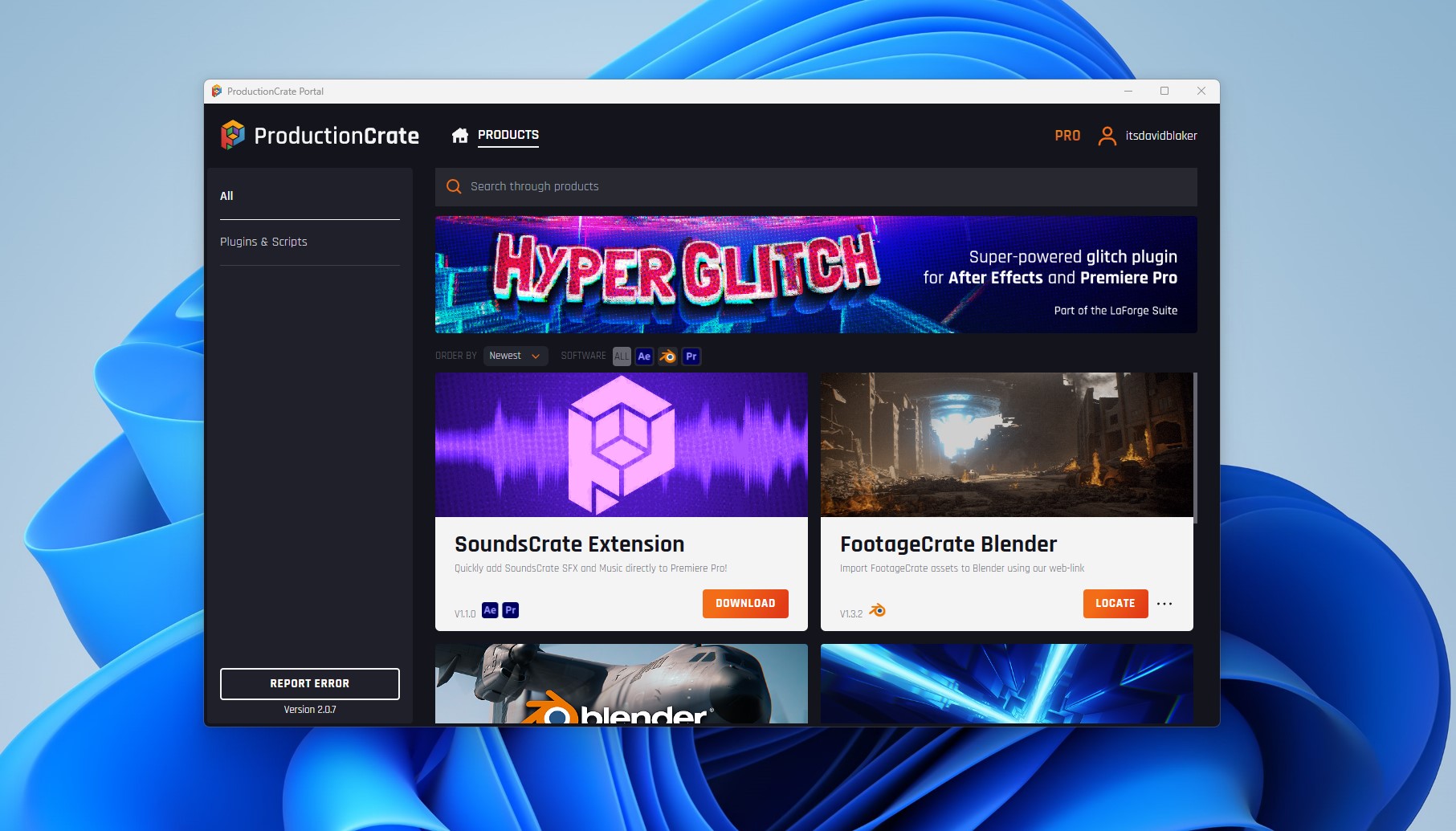
- Portal (desktop app + asset manager + plugin installer/auth)
- LaForge Suite (After Effects + Premiere Pro plugins)
- ProductionCrate Connect (browser extension for download organization)
- Blender integrations (asset import tools)
Portal: installer, authentication, and asset manager
ProductionCrate describes Portal as a way to install LaForge, manage VFX assets and authenticate software. Operationally, Portal is most valuable when you want the “managed library” experience instead of a pile of downloads.
Asset Manager: the underrated feature
Portal’s Asset Manager is presented as an organizational layer:
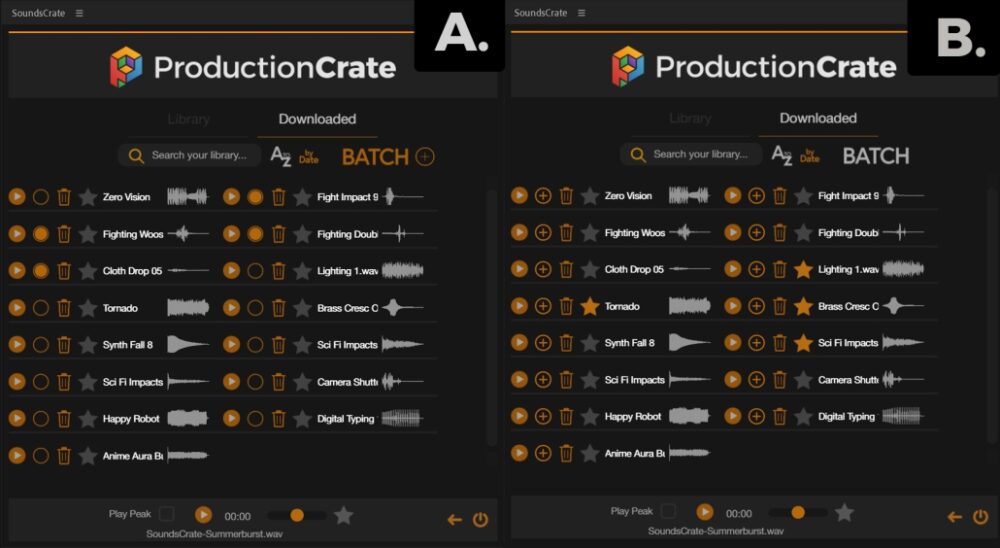
- Organize VFX, Music, Sound FX, and Graphics assets instantly.
- Choose a folder location; downloads are automatically organized in Portal.
- Preview assets in the Asset Library; VFX previews can play back in real time on hover.
- Import to software like After Effects, DaVinci, Premiere by click and drag.
If you’ve ever lost time to the “Downloads folder graveyard,” this is the kind of feature that changes whether a library becomes a habit—or stays a “sometimes” tool.
The real value isn’t just neat folders. It’s cognitive load reduction:
- You don’t need to remember where you saved an asset.
- You don’t need to build your own taxonomy system.
- You can focus on choosing the right element and moving on.
ProductionCrate Connect: browser extension for organized downloads
ProductionCrate also offers a free browser extension positioned around the same core promise: automatic organization (auto-sorting downloads into categorized folders).
If you’re evaluating ProductionCrate, a good question is: do I want a “managed library” experience (Portal), or just cleaner downloads (Connect)? Some creators will use both; many will choose one.
LaForge Suite: the plugin layer for After Effects and Premiere Pro
ProductionCrate’s LaForge Suite is presented as a collection of 25+ plugins and effects built for Adobe After Effects and Premiere Pro, installed via ProductionCrate Portal. It highlights plugins like Easy Glow, CRT Factory, ASCII, Retro Film, Hyperglitch, and Glass, plus a set of free plugins.
Free vs Pro behavior (watermarks and access)
A third-party summary (CG Channel) has described a model where free plugins are fully functional and licensed for commercial use, while other plugins in the suite can be watermarked for free users, with Pro removing watermarks and unlocking broader access. Treat pricing and packaging details as time-bound—these can change.
The business signal: active plugin development
As of December 19, 2025, Creative COW published a ProductionCrate-authored announcement about a new free After Effects plugin (“Crates Black Hole”), described as a physically-inspired, customizable black hole simulation as part of the LaForge Suite, installed via Portal.
Even if you don’t personally need a black hole generator, the signal is clear: LaForge isn’t a one-off marketing experiment. It’s an actively developed product line.
Blender import tools: more than a checkbox
ProductionCrate’s plugins page also lists Blender-related tools, including:
- RenderCrate Blender: download RenderCrate assets directly inside Blender with a built-in asset browser.
- FootageCrate Blender: import FootageCrate assets to Blender via a web-link connection.
This is meaningful because Blender users often sit outside “Adobe-first” ecosystems. ProductionCrate is attempting to reduce friction for both camps.
Memberships and pricing: what’s clear, what’s fuzzy, and what’s actually useful to know
Pricing is where many ProductionCrate discussions get messy—partly because there are promotional prices, annual references, and third-party reporting.
So instead of pretending there’s one simple answer, here’s what’s operationally useful for a buyer.
Plan overview (practical summary)
| Plan | Daily download limit (as referenced) | Quality / access highlights | Best for |
|---|---|---|---|
| Free | 5 downloads/day | Thousands of free files; PRO items marked separately | Testing formats/quality, building a small essentials library |
| Pro | Up to 50 downloads/day | Full library access; higher-quality downloads (up to 4K VFX, up to 11K graphics, HQ WAV); faster CDN | Creators shipping consistently (weekly+), small teams, production cadence |
Pricing note: ProductionCrate pricing appears to vary across promotions and time. Treat any exact number as “as-of” and verify on ProductionCrate during purchase.
Free membership: solid for testing, limited for production rhythm
ProductionCrate states you can create a free account and download thousands of professional-grade files for free, but free accounts are limited to 5 downloads per day. That’s enough to validate quality and compatibility, but it’s not enough to support a production schedule if you’re shipping weekly.
Pro membership: higher quality + more exclusives + faster delivery
ProductionCrate’s FAQ describes the Pro tier as providing full access to all libraries, higher-quality downloads (up to 4K on FootageCrate, up to 11K on GraphicsCrate, HQ stereo WAV on SoundsCrate), access to more exclusive content, and faster CDN downloads. It also references up to 50 downloads each day.
Value math that actually matters
ProductionCrate’s own framing (cost per download) is marketing, but the underlying concept is valid: if you’re downloading assets daily and shipping content regularly, subscription value compounds. If you download once a month, a subscription will feel expensive no matter how good it is.
A practical way to decide:
- Estimate how many assets you realistically use per month (not how many you could download).
- Compare that to what it would cost to buy equivalent packs individually elsewhere.
- Add the time cost of hunting, licensing verification, and organization.
- Factor in the Portal/organization layer (time cost reduction is part of the ROI).
Licensing: generous for creators, strict about redistribution (and explicitly restricts AI training)
What you can do (commercially)
ProductionCrate’s Terms of Use state its media elements can be incorporated into productions including films, commercials, video games, broadcast video, YouTube videos, audiobooks, tutorials, 3D animations, and social media content—including productions you intend to sell or collect revenue from.
The FAQ reinforces commercial usage, including films, TV broadcasts, promotional videos, commercials, YouTube/Vimeo, games, and contract work—so long as you do not redistribute the assets themselves.
Attribution / credit
ProductionCrate states it does not require attribution for productions, though it may ask free users to provide it if possible.
What you cannot do (the “don’t build a business on redistributing our files” section)
ProductionCrate’s Terms are explicit that its media elements are prohibited for:
- Re-selling or distributing the media elements for sale
- Using them in stock media content
- Incorporating them as elements of digital templates for sale/distribution
- Posting links to downloads outside their platform
- Creating competitive libraries or products
- Using them inside media editing/creation platforms (apps/filters) without a separate license
The terms state media elements may not be redistributed by any means under any circumstances, including uploading to third-party websites/servers/archives without written consent.
Explicit prohibition on AI training
Important: ProductionCrate’s Terms state media elements may not be used for training or testing machine learning / AI / deep learning / neural networks or similar technology. If your workflow includes training generative models, treat this as a hard stop unless you negotiate separate rights.
Editorial restrictions for 3D elements with other-party IP
As covered earlier, ProductionCrate includes editorial-use restrictions for certain 3D elements tied to other-party IP, limiting use to newsworthy/journalistic/editorial contexts unless you have clearance.
User experience: discovery, downloading, and actually using the assets
Discovery: categories + search + “new” workflow
ProductionCrate indicates you can search “new” to see the latest items and that VFX list pages are organized with newest items first. That’s a small feature with a big impact: it makes the platform feel alive and reduces the “where do I even start?” problem.
Downloading: formats and workflow reality
The basics are simple (preview → download), but the advanced part is choosing the right format (ProRes vs MP4 vs PNG sequences). ProductionCrate directly addresses that on its site, and in practice it’s one of the largest drivers of “asset workflow efficiency.”
Organization: Portal vs Connect (choose your workflow)
If you want the highest leverage experience, Portal’s Asset Manager is the more complete system: folder selection, automatic organization, previews, and drag-and-drop importing.
If you want a lightweight improvement with minimal workflow disruption, the Connect extension focuses on auto-sorting downloads into categorized folders.
Asset quality and how it differs from generic stock sites
ProductionCrate positions itself as avoiding “cookie cutter content,” emphasizing original assets, compositing-first delivery (pre-matted media, lossless codecs in some contexts), multiple audio formats, high-resolution graphics, and photorealistic 3D models.
Read that as positioning, not a promise that every asset will match your taste. But the differentiation is real in practice: many generic stock libraries optimize for broad appeal; ProductionCrate optimizes for usable-in-post compositing workflows (including alpha workflows and practical media formats).
Community and learning: contests + tutorials as a retention engine
ProductionCrate runs monthly contests (with prizes that can include a one-year Pro membership) and emphasizes tutorials and learning resources. This matters because the fastest way to increase the value of an asset library is to increase the user’s ability to apply it well.
Strengths and weaknesses (the practical pros/cons)
What ProductionCrate does particularly well
- Designed for compositing reality, not stock browsing fantasy: transparent/alpha workflows and multi-format downloads are central to the product.
- Workflow tooling that reduces chaos: Portal’s asset manager + drag-and-drop import is the kind of feature that keeps a library in daily use.
- A credible plugin strategy (LaForge): 25+ plugin positioning, installation via Portal, and clear free vs Pro behavior (including watermarks for locked plugins, as described in third-party coverage).
- Broad ecosystem coverage: VFX + audio + graphics + 3D under one umbrella.
- Commercial-use friendly licensing (with clear boundaries): revenue-generating productions are allowed; attribution isn’t required; redistribution is strongly restricted.
Where ProductionCrate can fall short (or require care)
- Pricing clarity can feel inconsistent: promotional pricing and third-party reporting can conflict; verify current pricing at purchase time.
- 3D/IP licensing requires judgment: editorial restrictions for certain models mean you need a review step before commercial ad use.
- Daily download caps shape the experience: free tier is 5/day; Pro references up to 50/day. Most individuals will be fine, but it’s still metered.
Customer sentiment and reviews (limited sample, but informative)
On Trustpilot, ProductionCrate (listed under footagecrate.com) shows a TrustScore around the low-4 range, but based on a very small review count (single digits in the snapshot referenced). The small sample means you should not treat the score as statistically meaningful.
ProductionCrateWhat’s more useful than the score is the theme consistency:
- The free tier is intentionally limited (download caps shape perception).
- The Pro tier is where the platform becomes a real production tool.
How to interpret reviews intelligently: treat “workflow convenience” and “usable assets” feedback as the core signal. Treat pricing complaints as a budgeting question (are you actually using the library enough?), not purely a product-quality verdict.
How to decide if ProductionCrate fits you (a practical framework)
If you’re on the fence, don’t start with “Do I like it?” Start with what kind of creator you are.
You’re likely to love ProductionCrate if…
- You publish frequently (weekly or more) and need a repeatable source of VFX/audio polish.
- Your edits benefit from overlays, compositing elements, transitions, and sound design layers.
- You want a library that supports both Adobe workflows (AE/Premiere plugins) and broader pipelines (DaVinci, Nuke, Blender).
- You value organization and speed (Portal/Connect) as much as the assets themselves.
You might skip it if…
- Your work is mostly talking-head content where VFX elements aren’t a production value driver.
- You already own large curated packs and rarely need “new” assets.
- You require highly specialized, top-tier niche elements where a specialist vendor is a better fit than an all-in-one platform.
Final recommendation
ProductionCrate is best understood as a practical production ecosystem rather than “a stock site.”
Its strongest differentiator is not just “10,000+ assets.” It’s the combination of:
- Compositing-first formats (alpha workflows, ProRes/PNG options)
- A multi-library structure (VFX + audio + graphics + 3D) under one umbrella
- Workflow tooling (Portal asset manager, Connect organization, LaForge plugins) designed to reduce friction between “finding an asset” and “shipping the edit”
If you’re a creator who ships consistently, ProductionCrate’s subscription can be easy to justify—especially when the alternative is either time-intensive DIY or scattered one-off asset purchases with inconsistent licensing.
If you’re an occasional user who downloads once a month, the free tier may be enough, and a subscription may feel like overkill.
ProductionCrateProductionCrate
ProductionCrate is the webs #1 archive of production-ready assets serving 400,000+ happy producers around the globe. Whether it's music, graphics or visual effects, ProductionCrate can cover it all with ease. ProductionCrate is the source of all production-ready assets at an affordable price. Thousands of professionally built video assets, sound elements and tools are helping users save time, perfect their projects & earn the recognition they deserve. ProductionCrate provides several HD & 4K formats. Users can download the VFX as pre-keyed MOV files, or as MP4 files on greenscreen. The sounds and music can be downloaded as either WAV files or…
• Buttons and Icons: Call to Actions, Social Media builders
• Change the feel of a shot with easy to use textures and overlay filters
• Mograph & editing: Typography kits and fluid colors
• Aspect Ratio Toolkits, Facebook & YouTube Templates, Film & Video Helpers
• Material maps for realistic surface projection
• Production-Ready HD Image Effects
• Pro - $49 / year
• Pro Lifetime - $799
• Buttons and Icons: Call to Actions, Social Media builders
• Change the feel of a shot with easy to use textures and overlay filters
• Mograph & editing: Typography kits and fluid colors
• Post-Production Tutorials: Improve production skills with tips, tricks, and step by step instructional videos
• Holiday Themed: Drag & Drop Video Elements for seasonal media & promotions
• Bring It All Together: Convince the audience without being a distraction
FAQ (15 practical questions)
1) Can I use ProductionCrate assets in commercial work?
Yes—ProductionCrate’s Terms explicitly allow use in productions including commercials and revenue-generating projects, with restrictions mainly around redistribution and certain prohibited uses.
2) Do I need to credit ProductionCrate?
ProductionCrate states attribution is not required (though it may ask free users to credit if possible).
3) What’s the free plan limit?
The FAQ states free accounts are limited to 5 downloads per day.
4) What’s the Pro plan download limit?
ProductionCrate references “up to 50 downloads each day” for Pro.
5) What’s the difference between free and Pro besides download limits?
Pro includes higher-quality downloads (up to 4K VFX, up to 11K graphics, HQ stereo WAV), access to more exclusive content, and faster CDN downloads.
6) What formats do VFX assets come in?
ProductionCrate states FootageCrate VFX assets are available in ProRes, MP4, and PNG sequences.
7) Which format should I use most often?
ProductionCrate suggests ProRes is best for quality with alpha, MP4 is best for speed/size, and PNG sequences are another option—your best choice depends on your workflow and editor.
8) What is Portal, and do I need it?
Portal is ProductionCrate’s desktop application for installing/authenticating plugins and managing/organizing assets via its Asset Manager. It’s especially relevant if you plan to use LaForge plugins.
9) What does Portal’s Asset Manager do?
It can organize downloads automatically, provide previews (including hover playback for VFX), and supports drag-and-drop importing into editing software.
10) What is ProductionCrate Connect?
A free browser extension that automatically sorts ProductionCrate downloads into categorized folders.
11) What is LaForge?
LaForge Suite is ProductionCrate’s collection of 25+ plugins for After Effects and Premiere Pro, installed via Portal.
12) Are there any free LaForge plugins?
Yes—ProductionCrate highlights free plugins on the LaForge page, and third-party coverage has reported multiple fully functional free plugins licensed for commercial use.
13) Are there restrictions on using assets for AI training?
Yes—ProductionCrate’s Terms explicitly prohibit using media elements for training/testing machine learning/AI systems.
14) What are “editorial use restrictions” on 3D assets?
ProductionCrate’s Terms include editorial-use restrictions for certain 3D elements tied to other-party IP, limiting permitted use to newsworthy/journalistic/editorial contexts unless you have clearance.
15) How often is new content added?
ProductionCrate’s FAQ states the team produces new content nearly every day and uploads finished items in bulk at least once per week.








By clicking Sign In with Social Media, you agree to let PAT RESEARCH store, use and/or disclose your Social Media profile and email address in accordance with the PAT RESEARCH Privacy Policy and agree to the Terms of Use.