
Process Street Review: A Deep Dive Into the Compliance Operations Platform (Features, Pricing, Pros/Cons, and Best Alternatives)
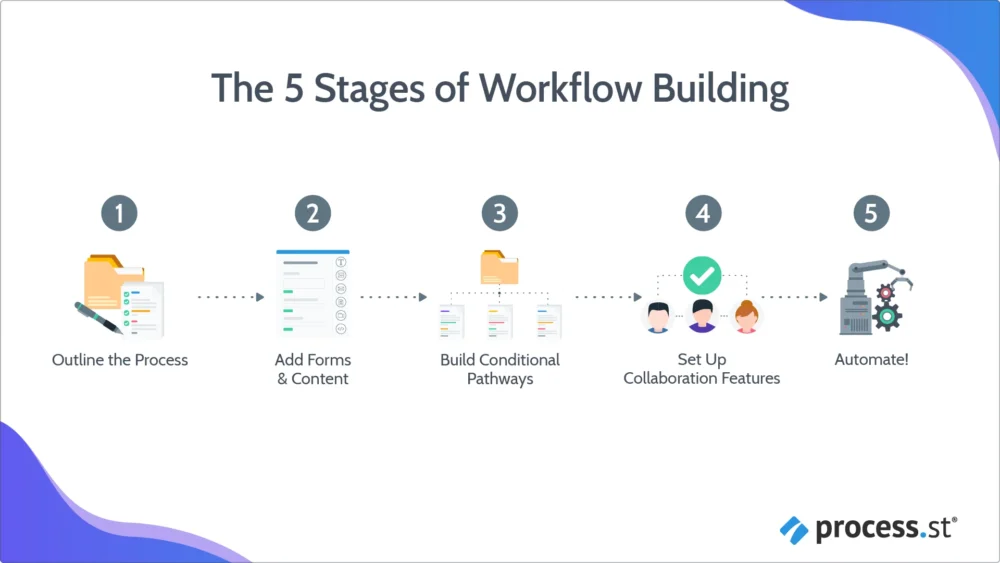
If you’ve ever tried to scale a business process using a shared Google Doc, a spreadsheet, and “just DM me when it’s done,” you already know how this story ends:
-
- Steps get skipped (especially the boring-but-critical ones).
- Ownership becomes fuzzy (“I thought you were doing that”).
- Approvals stall in inboxes.
- Audits turn into scavenger hunts.
- The process looks documented, but execution is inconsistent.
That gap between documented procedures and repeatable, provable execution is exactly where Process Street positions itself. The company describes Process Street as a “compliance operations platform” that brings compliance and operations together, combining policies (Docs), workflows (Ops), and an AI compliance agent (Cora).
This review is written for operations leaders, compliance teams, and functional managers (HR, IT, finance, customer ops) who need a system that can take recurring work from “tribal knowledge” to “runbook-grade execution,” with accountability and auditability built in.
Overall verdict (spoiler):
Rating: 8.7/10
Process Street is strongest when you need structured workflows (not loose task lists), enforcement (task order, permissions, approvals, due dates), and a credible path toward compliance-ready evidence—without buying an old-school BPM suite designed for process architects.
Biggest friction points: pricing transparency (quote-based, and small teams may hit minimums), learning curve once you move beyond simple checklists into automation + conditional logic, and some user feedback around performance or “too many clicks” in certain flows.
Process Street
Process Street is an easy to use workflow and process management software which lets users quickly create, track and schedule workflows and processes, create checklists and standard operating procedures (SOPs), collaborate with the user’s team, control permissions, use forms, and integrate with over 400+ other apps. Process Street offers features such as create procedure documents in seconds, run processes as collaborative workflows, capture structured data, rich content and media, regular workflow scheduling, search, activity feed, groups, instant visibility, collaboration and communication, data protection, tasks assignment, process control, process analysis, process management, approval process control, configurable workflow, rules-based workflow, dynamic workflow,…
• Create process template
• Run multiple instances of the template as checklists
• Track progress and collaborate with your team
• Basic $12 .50 per user per month
• Standard $25 per user per month
• Professional- $37 .50 per user per month
• Enterprise - Custom
• Create process template
• Run multiple instances of the template as checklists
• Track progress and collaborate with your team
Here’s what this review covers
- Overview & company background
- Pricing & plans (with a comparison table)
- Setup & onboarding experience
- UI & ease of use (plus recommended screenshots)
- Core features breakdown
- Advanced features & integrations
- Performance, reliability & security
- Support & learning resources
- Pros & cons
- User review patterns & ratings summary
- Alternatives & comparisons
- Who it’s best for (and who should avoid it)
- Final verdict & recommendations
- FAQ (15 common buyer questions)
Overview and Company Background
What is Process Street?
At a high level, Process Street is a platform for turning repeatable work into:
- Workflows (your standardized process templates)
- Workflow runs (each real instance of that process being executed)
- Structured data capture (forms + data sets)
- Governance and compliance artifacts (permissions, audit trails, document control concepts)
On its website, Process Street positions the platform as a way to “systemize execution” and “prove compliance,” combining workflow automation, policy control, and an AI agent for compliance and risk monitoring.
Who is it for?
Process Street’s positioning leans toward teams that need more rigor than typical project management tools especially in regulated or process-heavy environments. The product site explicitly emphasizes compliance + operations, and showcases use cases across industries like financial services, healthcare, real estate, manufacturing, and professional services.
In practice, the best-fit profiles tend to be:
- Operations teams standardizing delivery, handoffs, and internal controls
- Compliance and risk teams building audit-ready execution trails
- HR teams formalizing onboarding/offboarding and policy acknowledgments
- IT & Security teams running access provisioning, change management, vendor reviews
- Customer Ops / CS Ops running onboarding playbooks and renewals workflows
Capterra user insights also show real-world adoption in areas like workflow management, onboarding, BPM, and task/forms automation.
Company history and milestones
Process Street’s Help Center “Company Background” states the company was founded in 2013 and is based in San Francisco, CA. It also notes Process Street was ranked #1 in the AngelPad accelerator in 2015 and raised a $12M Series A in February 2020 from investors including Accel, Atlassian, and Salesforce Ventures (among others).
From a product evolution standpoint, the platform has clearly expanded from “checklists” into a broader operations/compliance suite. For example, Process Street’s own retrospective notes a naming change where “Templates and Checklists” became “Workflows and Workflow Runs,” reflecting a move toward a workflow-engine identity rather than a simple checklist tool.
Key differentiators (high level)
If you’re comparing Process Street against project management tools (Asana/ClickUp/monday) or BPM suites (Kissflow/ProcessMaker/Nintex-style tooling), Process Street’s differentiators usually land in three buckets:
- Execution enforcement (not just tracking): enforced task order, approvals, task permissions, role assignments, conditional logic, and dynamic due dates are core building blocks (and are explicitly highlighted in plan features).
- Operational + compliance positioning: marketed around audit-ready proof, policy control (Docs), and an AI compliance agent (Cora) designed to flag risks and surface gaps.
- Template-first repeatability: build the process once → run it repeatedly → measure and improve.
Pricing and Plans
The short version
Process Street currently advertises three plans:
- Startup
- Pro
- Enterprise
…and prominently states “Contact sales” rather than listing public per-user pricing on the main pricing page. It also states the Pro plan includes a 14-day free trial with no credit card required.
There’s also a separate “Pages” offering described as free forever, which matters if you’re interested primarily in documenting SOPs/policies rather than running workflows.
Finally, a Process Street help article about cost emphasizes that plans are custom quoted and depend on factors like user count and automation usage.
Pricing transparency note: Because Process Street’s official pricing page is quote-based, any fixed “$X per user” numbers you see on third-party sites may be outdated, simplified, based on older packaging, or reflective of minimum seat assumptions. Treat third-party numbers as directional buyer intel, not a contractual price sheet.
Plan comparison table (official published limits + features)
Below is a plan table based directly on Process Street’s published pricing/feature matrix.
| Plan | Public list price | Users included | Guests | Data set records | File upload limit | Automation apps | Automation actions | API access | Best for |
|---|---|---|---|---|---|---|---|---|---|
| Startup | Contact sales (quote-based) | 5 | 10 | Up to 5,000 | Unlimited storage (5MB/file) | 10 | 100/month | 50 calls/month | Small teams that need enforcement basics |
| Pro | Contact sales (quote-based) + 14-day trial | Custom | Custom | Up to 10,000 | Unlimited storage (100MB/file) | All | Custom | Custom calls/month | Scaling teams standardizing cross-functional ops |
| Enterprise | Contact sales (quote-based) | Custom | Custom | Custom | Unlimited storage (custom limit) | All | Custom | Unlimited | Regulated orgs needing governance + data residency/SSO at scale |
Source: Process Street pricing page features table.
Features included across plans (notable highlights)
Process Street lists several capabilities as part of its workflow feature set:
- Conditional logic
- Approvals
- Enforced task order
- Dynamic due dates
- Task permissions
- Role assignments
- Workflow run links
- Scheduled workflows
- Restore workflow revision
- iOS app, Android app, Slack app, Microsoft Teams app (with Enterprise Grid support called out)
Hidden costs and “gotchas” to budget for
Even when the platform price is negotiated, there are predictable cost centers buyers underestimate.
1) Automation usage ceilings (Startup plan especially)
Startup includes 10 automation apps and 100 automation actions per month. If you’re using Process Street as a true orchestration layer (create run → update CRM → post to Slack → create ticket → send email), you can burn through 100 actions quickly.
Process Street2) Integration platform subscriptions (Zapier/Make/Power Automate/Tray)
Process Street promotes connectors like Zapier, Power Automate, Tray.io, and Make—and notes those platforms connect to thousands of apps (e.g., Zapier 5,000+ apps, Make 1,500+ apps, Power Automate 400 services).
Those third-party services typically have their own pricing, which becomes a real cost if you rely on them for mission-critical workflows. Process Street’s integrations FAQ explicitly notes that third-party automation tools may require separate subscriptions.
3) Implementation and “process engineering” time
Process Street lists add-on services like workflow setup/integration services, consulting/health audits, training, custom integrations, and even fully managed workflows.
If your workflows are compliance-critical, you should budget either:
- internal ops time (best case), or
- professional services (common in enterprise rollouts).
Value for money: which plan fits which buyer?
Choose Startup if…
- You need a controlled rollout (5 users) with a handful of “golden processes.”
- Your automation needs are light (or you’re okay with mostly manual runs).
- You want enforcement features (approvals, task order, permissions) without enterprise overhead.
Watch out: 100 automation actions/month and 50 API calls/month is restrictive if you’re building a workflow-as-an-engine approach.
Choose Pro if…
- You’re scaling process ownership across departments.
- You need more headroom on automation and API usage.
- Reporting, dashboards, and richer operational analytics are moving from “nice-to-have” to “non-negotiable.”
Choose Enterprise if…
- You need SCIM user provisioning, SAML SSO, directory integrations, and/or dedicated support.
- You have data residency constraints or private cloud requirements (explicitly called out on pricing page).
- You operate under HIPAA, SOC 2 controls, ISO frameworks, or similar and want vendor posture aligned with your compliance program.
Setup and Onboarding Experience
What signup and initial setup looks like
Process Street’s onboarding path is built around quickly creating your first workflow in the “Library.” The Help Center describes creating workflows via:
- starting from scratch,
- using an AI workflow generator,
- importing an existing process document (AI workflow importer),
- selecting from a premade template gallery.
That’s a strong onboarding design choice because it matches how most teams actually adopt process software:
- Some have nothing documented and need scaffolding.
- Some have a messy SOP doc and want it turned into a runnable workflow.
- Some want plug-and-play templates to start fast.
Data migration and importing
Process Street’s help documentation states you can import workflows, data sets, and files. It also notes you can import data from a CSV to create multiple workflow runs at once.
That CSV-to-multiple-runs capability is easy to overlook, but it’s extremely useful in real operations. Examples:
- Bulk onboarding/offboarding queue
- Batch vendor risk reviews
- A backlog of audits you want to operationalize
- Client onboarding pipeline migration
Time to get started (realistic expectations)
A common misconception is that workflow software is “set it and forget it.” In reality:
- Day 1 value: you can build a simple workflow and run it immediately.
- Week 1 value: you standardize a handful of recurring processes.
- Month 1 value: you start adding conditional paths, roles, approvals, analytics, and integrations.
Process Street’s own getting-started content emphasizes staged process building and points users to guides, videos, and Process AI.
Process StreetHurdles you should expect
Based on platform design and user feedback patterns, the hurdles usually aren’t technical setup—they’re operational:
- Process clarity: if the team can’t agree on “the right way,” workflows will stall.
- Ownership: someone must be accountable for maintaining the workflow templates.
- Governance: permissions and folder structure matter once you have dozens/hundreds of workflows.
- Automation discipline: when you add integrations too early, debugging becomes the work.
A G2 review excerpt explicitly mentions “process sprawl,” where unfinished processes clutter the system if governance isn’t handled early.
User Interface and Ease of Use
The overall UI philosophy
Process Street’s interface is designed around a few core objects:
- Library: where workflows, forms, pages, and folders live
- Workflow editor: where you build and configure steps
- Workflow runs view / Reports: where you see real execution states
- Inbox / My Work: where assigned tasks show up (commonly referenced in product messaging and testimonials)
The Help Center’s “Library” doc describes a “New” button flow for creating workflows, forms, folders, and accessing workflow runs via a table icon that filters reports to that workflow.
This matters because it’s a practical UI design: it keeps “build” and “run” conceptually distinct.
Learning curve: new vs experienced users
For new users, Process Street is relatively approachable if you start with templates. Capterra reviewers frequently highlight standardization and checklist management as strengths, with conditional logic and approvals cited as valuable once you graduate to more advanced builds.
For experienced ops users, the learning curve reappears when you begin using:
- Conditional logic branches
- Role assignments at scale
- Automation integrations
- Reports that combine operational metrics with compliance evidence
G2 reviews also mention that “advanced features require a learning curve,” which aligns with the reality of any tool that goes beyond basic task management.
Mobile app experience
Process Street’s pricing page explicitly lists both an iOS app and an Android app. The mobile apps are also reflected in public app marketplace listings.
A practical expectation: mobile is typically strongest for executing assigned tasks and checking off steps, not building complex workflows. That’s consistent with how most workflow platforms prioritize mobile.
Customization options (branding + UX tailoring)
Process Street lists branding-oriented customization options:
- Logo
- Brand colors
- Cover images and icons
- Subdomain
This is useful when you want Process Street to feel like an internal system (especially if guests—clients, contractors, auditors—interact with workflows).
Recommended screenshots for publication
If you’re making this review “publication ready” with images, the highest-value screenshots usually are:
- Library view (folders + workflows)
- Workflow editor showing tasks + conditional logic
- Approval task configuration
- Reports dashboard with workflow analytics
- A workflow run showing enforced task order + assignments
- Integrations/automation setup (Zapier/Power Automate connector)
Core Features Breakdown
To keep this useful, I’ll break features into “what it does,” “how it works,” and “where it wins/loses” with real-world examples you can map to your org.
1) Workflow building (the heart of Process Street)
What it is: Workflows are your process templates—think “Employee Onboarding v3” or “SOC 2 Access Review Monthly.”
How it works: The Help Center explains that when creating a workflow, you can start blank, use the AI workflow generator, import a process document using the AI workflow importer, or select from premade templates.
Where it’s strong:
- Encourages template discipline (“build once, run many”)
- Supports structured execution features (task order, permissions, approvals)
- Integrates with forms + data sets, so workflows can become a system of record—not just a checklist
Where it can be weaker: If your team expects “project management flexibility” (move tasks around freely), Process Street will feel more rigid. That rigidity is often a benefit in compliance contexts—but it’s still a behavioral shift.
Process Street2) Workflow runs (operational execution with accountability)
What it is: Workflow runs are live instances of a workflow—e.g., each time you onboard a new hire, that’s a new run.
Key execution features: Process Street highlights workflow run links (shareable run access) and scheduled workflows (recurring automatic runs).
Example: Monthly access review
- Workflow scheduled monthly
- Roles assigned (IT owner, department head approver)
- Tasks enforced in order (collect list → validate → approvals → revoke)
- Report shows completion and timestamps for audit evidence
3) Forms and structured data capture
What it is: Forms allow you to collect information during a workflow run (or via standalone forms) and store it as structured fields.
Why this matters: This is the difference between a checklist that says “verify vendor insurance” and a workflow that stores policy expiration date, certificate attachment, reviewer name, and approval timestamp. Once data is structured, reporting becomes meaningful.
Strengths:
- Turns workflows into lightweight operational databases
- Enables better reporting and automation triggers
Weaknesses / friction points: Form design discipline becomes necessary (field naming conventions, required fields, validation rules). Without governance, teams create overlapping fields that fragment reporting.
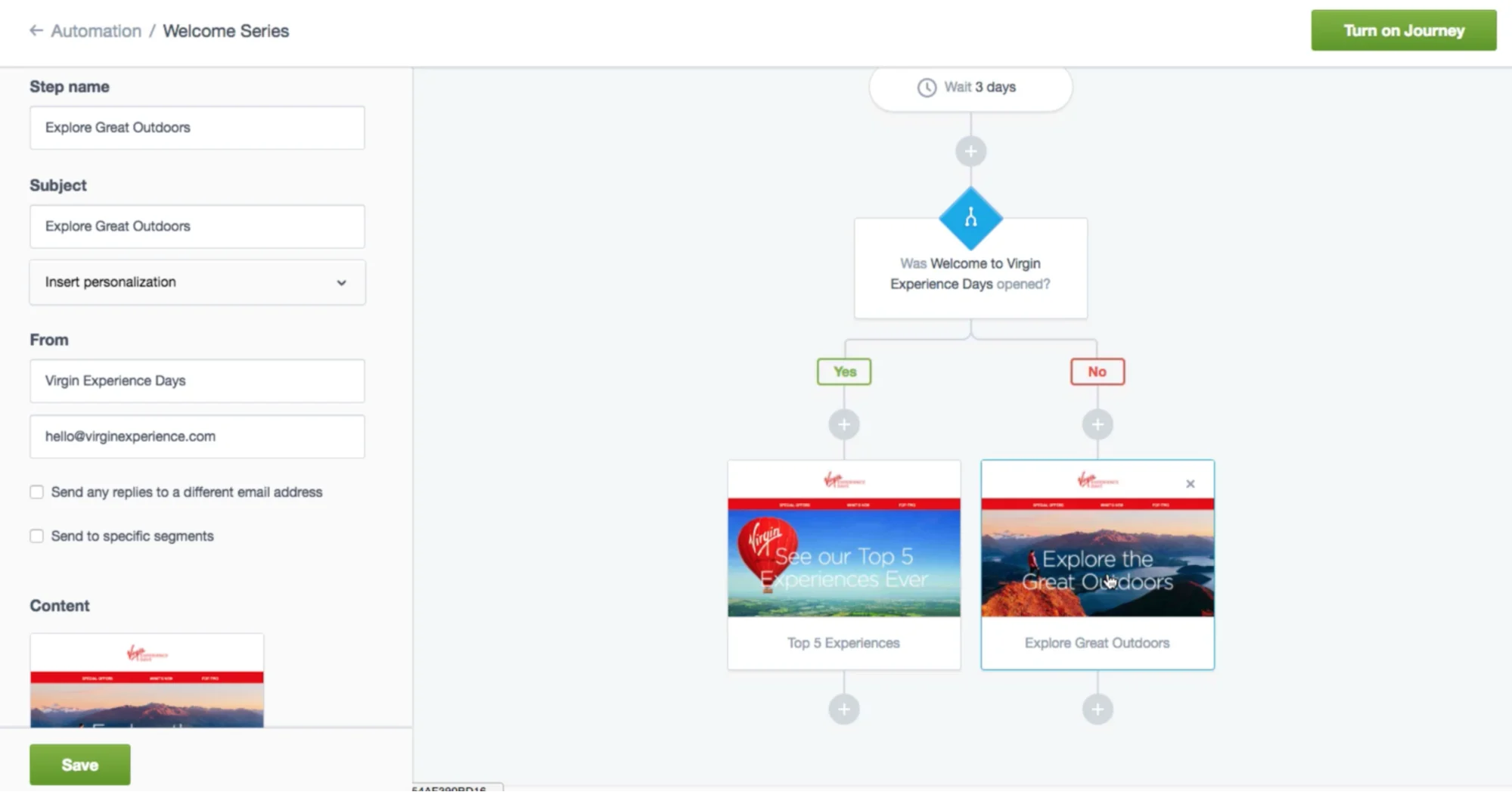
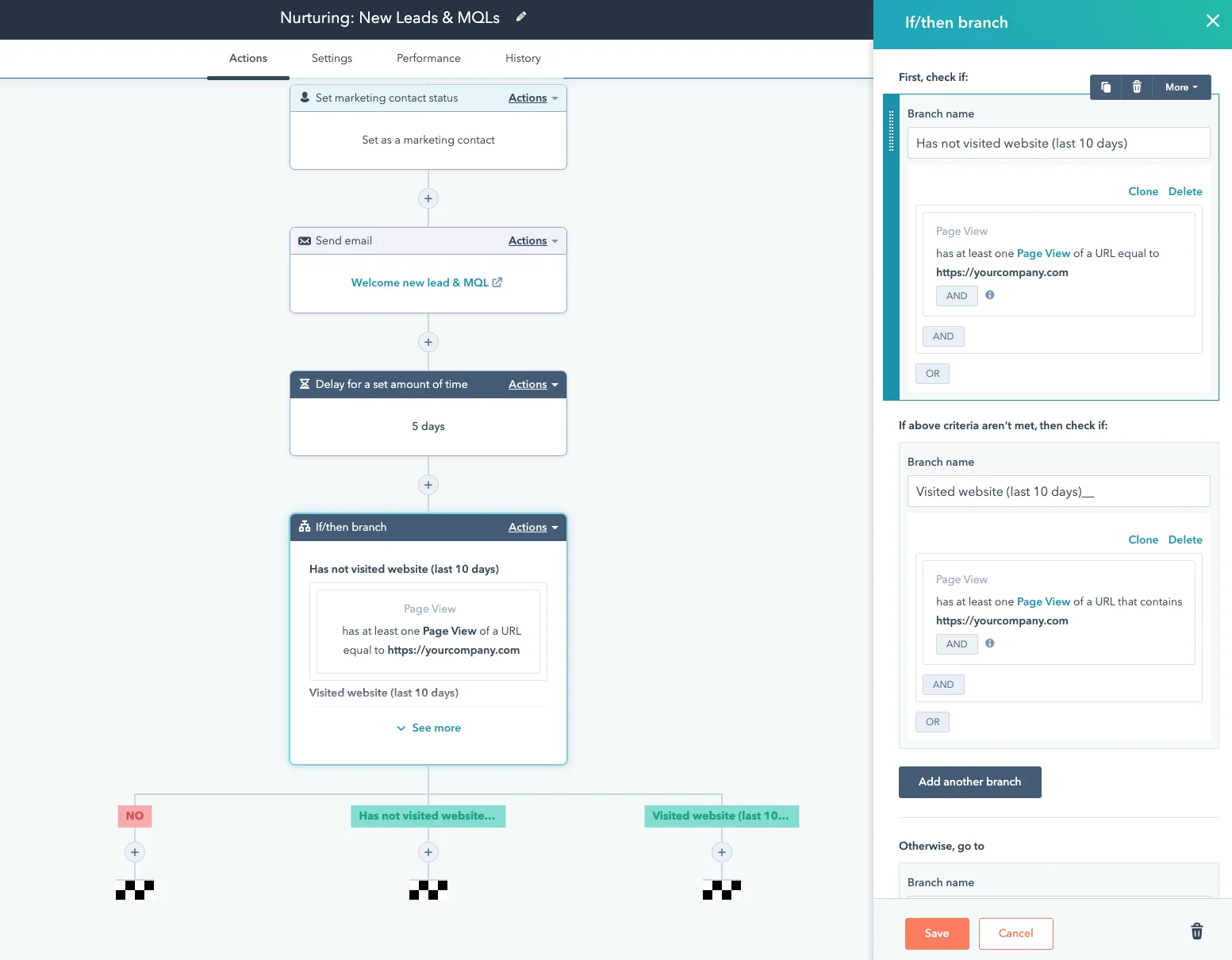
4) Conditional logic (dynamic workflows that adapt)
What it is: Conditional logic lets workflows branch based on responses—so users only see steps relevant to their scenario.
Where conditional logic wins:
- Makes one workflow handle multiple scenarios without duplicating templates
- Reduces user overwhelm (“why am I seeing 40 irrelevant tasks?”)
Where it can get messy: Deep branching becomes hard to debug without naming conventions and documentation. “Process sprawl” risk increases when teams clone workflows instead of branching thoughtfully.
5) Approvals (built-in governance gates)
What it is: Approval tasks add explicit sign-off steps—critical for compliance workflows and cross-functional handoffs.
Example: Policy update workflow
- Draft update task
- Legal approval
- Compliance approval
- Publish policy in Docs / Pages
- Trigger acknowledgment workflow for staff
Strengths: Clear audit evidence (who approved, when) and prevention of premature execution of downstream tasks.
Weaknesses: Approval bottlenecks reflect organizational behavior—software can’t fix slow approvers without escalation rules (which you can partially address with due dates + notifications).
6) Enforced task order (compliance-friendly sequencing)
What it is: Enforced task order requires tasks to be completed in sequence.
When it’s a superpower:
- Audit workflows (collect evidence before submit report)
- IT change management (approvals before implementation)
- HR onboarding (provision accounts before first-day access)
When it’s annoying: Creative work or investigations where steps aren’t linear; processes where parallel execution is normal (unless designed with parallel paths + roles).
7) Dynamic due dates (time-based automation without spreadsheets)
What it is: Dynamic due dates allow deadlines to shift based on workflow start date or form field inputs.
Example: Employee onboarding timeline
- “Send offer letter” due immediately
- “Provision laptop” due 3 days before start date
- “30-day review” due 30 days after start date
8) Task permissions + role assignments (control visibility and ownership)
What they are:
- Role assignments: assign tasks to a role (e.g., “IT Admin”) rather than a named individual
- Task permissions: control who can see/complete specific tasks
Why they matter: This is a major Process Street differentiator versus generic PM tools.
Example: Client onboarding where the client is a “guest”
- The client sees only tasks relevant to them (provide documents, schedule kickoff)
- Internal steps (pricing approvals, margin review, internal checklists) remain hidden
9) Pages / Docs (documentation and policy control)
Process Street separates “documentation” from “execution” more cleanly than many tools:
- The pricing page includes Pages as an unlimited feature across plans.
- Process Street also markets Docs as policy governance for compliance frameworks like ISO 9001, SOC 2, SOX, FDA, etc.
- A standalone “Pages” product is described as free forever, signaling a low-friction entry point for teams that want to centralize SOPs before automating.
Practical guidance: If you’re early in process maturity, start by building “source of truth” Pages/Docs first. Then convert the highest-frequency or highest-risk procedures into Workflows.
10) Data Sets (structured operational records)
What it is: Data Sets function like structured tables—useful for maintaining lists and reference records that workflows can use.
When Data Sets are valuable:
- Vendor lists for risk reviews
- Asset inventories
- Customer onboarding metadata
- Compliance control inventories
- Policy registers
Why Data Sets matter strategically: They’re a bridge between “workflow tool” and “operational system of record.” Once you have tables + workflows + automations, Process Street can serve as a lightweight ops platform without building a custom internal app.
11) Reporting & analytics (from checklists to measurable operations)
Process Street includes a “workflow analytics dashboard” and “custom reports,” with advanced data sync/BI integration called out as “custom.”
What to measure (practical KPI list):
- Onboarding workflows: cycle time, SLA adherence, drop-off points
- Compliance workflows: completion rate by period, approval lag time, exceptions/skipped steps, evidence completeness
- Operations workflows: rework rate, bottleneck tasks across teams, volume trends (runs/month)
Advanced Features and Integrations
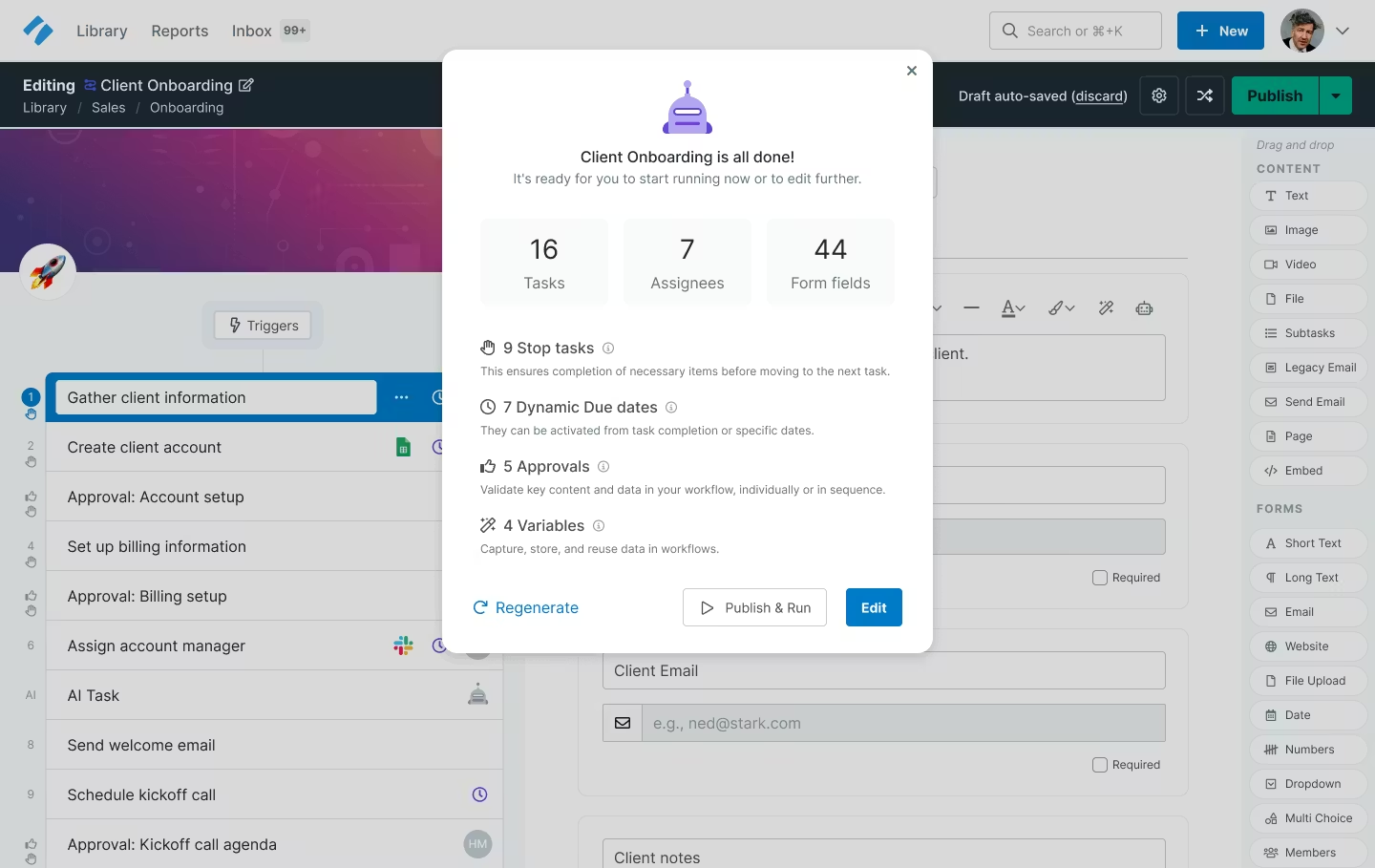
1) Process AI (AI assistance inside the workflow lifecycle)
Process Street’s ecosystem includes “Process AI,” and its platform navigation explicitly positions it as a core capability.
From the Help Center, Process AI is tied to workflow generation and workflow importing—helping users generate workflows quickly and transform existing documentation into runnable workflows.
Where AI tends to be genuinely useful:
- Drafting initial workflow structure from a process name
- Converting a messy SOP into ordered tasks
- Producing role-based variants (HR vs IT vs manager views)
- Generating checklists faster so SMEs can refine rather than author from scratch
Where you should be cautious:
- Compliance workflows: AI can draft structure, but your controls must be validated by humans.
- Over-trusting AI-generated steps: it can miss org-specific constraints.
2) Cora (AI compliance agent)
Process Street markets “Cora” as an AI compliance agent that “monitors regulations, automates work, and flags risks,” operating continuously to surface gaps before they become audit findings.
If your organization is compliance-driven, this is one of the most strategically important product directions Process Street is signaling: moving from “workflow tool” to “compliance operations system.”
3) Integration ecosystem overview
Process Street highlights several integration paths:
- Zapier connector
- Microsoft Power Automate connector
- Tray.io connector
- Make connector
- Slack app
- Microsoft Teams app
- Trigger from email
It also publishes a count-based framing of the ecosystem:
- Zapier: 5,000+ apps
- Make: 1,500+ apps
- Power Automate: 400 services
4) Top integrations table (practical buyer view)
Because many integrations are enabled through “connector platforms,” the most honest way to represent “top integrations” is by pairing Process Street with the tools teams most commonly orchestrate.
| Integration / Tool | How it connects | Best use case |
|---|---|---|
| Slack | Native app + automation platforms | Task notifications, approvals, escalation loops |
| Microsoft Teams | Native app + Power Automate | Execution inside Teams, IT/ops workflows |
| Zapier | Connector (5,000+ apps) | Fast, broad integrations across SaaS stack |
| Microsoft Power Automate | Connector (400 services) | Microsoft-first automation (SharePoint, Outlook, etc.) |
| Make | Connector (1,500+ apps) | More complex scenarios, data mapping workflows |
| Tray.io | Connector | Enterprise-grade orchestration |
| Email triggers | Trigger from email | Lightweight intake workflows (requests → run) |
| BI tools (Power BI, Snowflake, etc.) | Custom integration/data sync | Compliance reporting, exec dashboards |
| Public API | API access by plan | Deep integrations, internal systems connectivity |
Integration cost note: third-party automation tools may require separate paid subscriptions.
5) API and developer surface area
Process Street maintains API documentation, and the integration story includes public API access with plan-based limits (Startup: 50 calls/month; Pro: custom; Enterprise: unlimited).
For many mid-market and enterprise buyers, API access is the difference between:
- “workflow tool” and
- “workflow platform that can become a control layer.”
Performance, Reliability, and Security
Uptime and reliability posture
Process Street maintains a public status page (“All Systems Operational” style) and publishes incident history there. It also has help content that explains how users can determine whether the app is down, pointing to the status page approach.
A transparent status page is a baseline expectation for serious SaaS vendors; Process Street meets that expectation.
Scalability for growing teams
From a plan/limits standpoint:
- Workflows and tasks are listed as unlimited across plans.
- Data Sets have record limits that expand with plan tier (5,000 → 10,000 → custom).
- File storage is “unlimited,” but per-file limits vary (5MB → 100MB → custom).
That combination tells you how Process Street likely expects scaling usage: not by limiting workflow count, but by gating heavy data usage, automation throughput, API needs, and enterprise controls.
Process StreetSpeed and performance (what users say)
Capterra review excerpts include occasional mentions of slowness (e.g., “can be a bit slow when it comes to loading”). This isn’t definitive performance benchmarking, but it’s meaningful buyer signal: if your users are high-volume operators, performance perception matters, and you should validate with a pilot.
Security and compliance features
This is one of Process Street’s strongest “enterprise credibility” areas because the company publishes a detailed security statement.
Key published points include:
- Compliance standards: SOC 2 Type II, ISO 27001, GDPR, HIPAA, CCPA, and AWS CIS benchmark alignment (with SOC 2 report available upon request).
- Encryption and transport security: TLS 1.2+ for web connections.
- Authentication options: Google, Microsoft, or SSO; password storage using salted bcrypt when applicable.
- Data residency: default US, with support for multiple AWS regions including EU, UK, Canada, Australia, and UAE.
- Architecture notes: AWS RDS + S3, synchronous replication, snapshots stored separately for recovery.
- AI data use statement: data processed by AI features is limited to intended workflows and exclusive to workflow instances.
Buyer takeaway: If you need a workflow platform that can credibly sit inside a compliance program, these published controls are a meaningful differentiator versus lightweight checklist tools.
Customer Support and Resources
Support channels and service tiers
Process Street’s pricing page lists email & chat support and also mentions optional services such as:
- workflow setup & integration services
- dedicated success manager
- priority support
- fully-managed workflows
- custom integrations
- bulk document import
- consulting/health audits
- personalized team training
On the marketing site, Process Street also claims an “average response time” of 5 minutes and a 98% customer rating for support. Treat that as vendor-claimed performance rather than independently verified—but it signals an emphasis on responsiveness.
Self-serve resources (docs, templates, community)
Process Street maintains:
- a Help Center with getting started guides and category-based documentation
- a template gallery and workflow template library
- webinars and community links surfaced in navigation
In practical terms, the availability of structured docs matters because Process Street is not “just a simple task tool.” The quality of onboarding documentation directly affects adoption velocity.
Pros and Cons
| Pros | Cons |
|---|---|
|
|
User Reviews and Ratings Summary
Overall ratings snapshot (late 2025)
| Platform | Headline rating |
|---|---|
| Capterra | 4.7/5 (641 reviews) |
| G2 | ~4.6 stars with hundreds of reviews (example: 456 reviews shown) |
| TrustRadius | 8.5/10 (22 reviews) |
| Trustpilot | 4.0/5 (7 reviews) |
Common praise themes
Based on Capterra’s “key user insights” and review excerpts:
- Checklist/workflow standardization is repeatedly praised
- Templates and reuse reduce missed steps
- Conditional logic and approvals help ensure accountability
G2 review excerpts also praise advanced logic, task ownership, due dates, integrations, and overall power for building workflows.
Common complaints themes
- Pricing inflexibility or minimum seat assumptions (notably called out on G2)
- Learning curve for more complex automations/conditional logic
- Feature gaps around email workflows or email conversation tracking (mentioned in Capterra insights)
- Occasional performance comments (“slow loading”)
Trends over time (what appears to be improving)
Even without product release notes in this review, the publicly visible narrative suggests a clear evolution:
- From “checklists” to “workflows and workflow runs” as the conceptual model expanded
- From workflow software toward “compliance operations platform” with Docs/Ops/Cora positioning
- Increased emphasis on security posture and compliance standards in published security materials
Alternatives and Comparisons
Process Street sits at the intersection of workflow execution, operational compliance, and process documentation. So the best alternatives depend on what you’re optimizing for: flexibility, low cost, pure BPM, or doc-first knowledge management.
Top alternatives shortlist (most relevant categories)
Below are five widely-compared alternatives (project management + workflow/BPM + knowledge tools).
Comparison table (pricing + ratings snapshots)
| Tool | Category fit | Starting price (public) | Rating snapshot | When it’s a better pick |
|---|---|---|---|---|
| Asana | Project/process management | Starter $10.99/user/mo (annual) | 4.4/5 (Capterra) | Cross-functional project planning, less enforcement |
| monday.com | Work management | $9/user/mo (Capterra listing) | 4.6/5 (Capterra) | Visual boards, dashboards, broad team adoption |
| ClickUp | PM + docs + work hub | ~$10/user/mo starting (varies by tier) | 4.63 (Capterra compare snippet) | All-in-one work OS, heavy customization |
| Notion | Knowledge + lightweight workflows | Plus ~$10–$12/user/mo | Value for money 4.6 (Capterra) | Docs-first teams, flexible knowledge base |
| Kissflow | Workflow/BPM | $10/user/mo (Capterra listing) or $1500/mo usage-based in other views | 4.4/5 (Capterra) | More “classic workflow automation” for certain BPM scenarios |
Pricing note: Some platforms (including Kissflow) show different pricing constructs depending on packaging and buyer segment; validate with the vendor for your specific use case.
When to choose Process Street vs alternatives
Choose Process Street when you need:
- enforced execution (task order, approvals, permissions)
- repeatable run-based operations
- compliance-oriented evidence trails
- a platform stance that aligns with SOC 2 / ISO / HIPAA environments
Choose Asana / monday / ClickUp when you primarily need:
- flexible planning
- cross-functional project visibility
- broad adoption across teams that don’t want rigid enforcement
Choose Notion when: your biggest gap is knowledge centralization (SOPs, wikis), workflows are relatively lightweight, and you can tolerate fewer enforcement controls.
Choose Kissflow / BPM-oriented tools when: you need deeper BPM constructs or specific enterprise workflow patterns, and you’re comfortable operating in more “process architecture” style systems.
Process StreetWho Is Process Street Best For? (And Who Should Avoid It)
Best for
1) Compliance-led operations teams
If your team needs to demonstrate that controls are executed (not just documented), Process Street’s alignment with compliance positioning and security posture is a strong fit.
2) Organizations scaling recurring cross-functional processes
Onboarding, offboarding, audits, vendor reviews, client onboarding, change management—these benefit from workflow runs, role assignments, due dates, approvals, and analytics.
3) Teams that want “no-code structure” without heavy BPM complexity
Capterra’s product description explicitly contrasts Process Street with traditional BPM tools “built for process architects,” positioning it as team-friendly and no-code.
Not ideal for
1) Teams that need flexible, non-linear creative work management
If your work is highly exploratory (research, design, strategy), enforced task order and structured workflow runs can feel like friction.
2) Very small teams that need a cheap checklist tool
If pricing minimums apply (as some G2 feedback suggests), a 2-person company may be better served with a lighter tool unless compliance needs justify the cost.
3) Orgs without process ownership discipline
If nobody owns process quality and workflow hygiene, you risk “process sprawl” and low adoption.
Process StreetFinal Verdict and Recommendations
Overall rating: 8.7/10
Here’s a detailed breakdown (useful for publication):
- Core workflow features: 9.2/10 — Rich enforcement set (approvals, permissions, conditional logic, due dates) that goes beyond basic task tools.
- Integrations & extensibility: 8.6/10 — Strong connector ecosystem (Zapier/Make/Power Automate/Tray) plus API access, but real-world automation often introduces third-party costs.
- Security & compliance posture: 9.3/10 — Detailed security statement with SOC 2 Type II, ISO 27001, HIPAA, GDPR/CCPA, TLS, AWS architecture, and data residency options.
- Ease of onboarding: 8.4/10 — Strong template + AI import/generator paths, plus CSV bulk run creation, but advanced features still require training and governance.
- Value for money: 7.8/10 — Hard to score higher due to quote-based pricing and reported minimum seat friction, but the value can be excellent in compliance-heavy environments where failures are expensive.
Recommendation (practical next steps)
If you’re evaluating Process Street seriously, run a structured pilot:
- Pick 3 workflows: one HR (onboarding/offboarding), one compliance (access review, audit evidence), one ops (client onboarding, vendor onboarding).
- Define success KPIs: cycle time, overdue task rate, approval lag time, evidence completeness.
- Test integrations only after the workflow is stable.
- Establish workflow governance: naming conventions, folder structure, owners per workflow category.
Call to action
If you’re in the evaluation phase, Process Street advertises a 14-day free trial for the Pro plan with no credit card required—that’s the best way to validate fit with your real processes and your team’s appetite for structured execution.
Process Street
Process Street is an easy to use workflow and process management software which lets users quickly create, track and schedule workflows and processes, create checklists and standard operating procedures (SOPs), collaborate with the user’s team, control permissions, use forms, and integrate with over 400+ other apps. Process Street offers features such as create procedure documents in seconds, run processes as collaborative workflows, capture structured data, rich content and media, regular workflow scheduling, search, activity feed, groups, instant visibility, collaboration and communication, data protection, tasks assignment, process control, process analysis, process management, approval process control, configurable workflow, rules-based workflow, dynamic workflow,…
• Create process template
• Run multiple instances of the template as checklists
• Track progress and collaborate with your team
• Basic $12 .50 per user per month
• Standard $25 per user per month
• Professional- $37 .50 per user per month
• Enterprise - Custom
• Create process template
• Run multiple instances of the template as checklists
• Track progress and collaborate with your team
FAQ (15 Common Questions Buyers Ask)
1) Does Process Street have a free plan?
Process Street offers a 14-day trial of its Pro plan (no credit card required), and it also promotes a “Pages” product that is free forever.
2) Is Process Street good for ISO 9001 or SOC 2 workflows?
It is explicitly positioned for policy control and audit-ready proof, and it markets policy governance for frameworks including ISO 9001 and SOC 2. It also states SOC 2 Type II compliance in its security materials.
3) Is pricing per user?
Process Street’s official pricing page is quote-based. A help article indicates pricing is custom quoted based on factors like users and automation usage.
4) What’s the difference between Workflows and Workflow Runs?
Workflows are the templates; workflow runs are the live executions of those templates. Process Street has explicitly adopted this naming model as part of its evolution.
5) Can clients or contractors participate without full licenses?
Yes—Process Street supports “guests,” and plan features list guest counts (Startup includes 10 guests; higher plans are custom).
6) Does Process Street support approvals?
Yes—approvals are listed as a core feature across plans.
7) Can I enforce task order so steps can’t be skipped?
Yes—“enforced task order” is listed as a core workflow feature.
8) Does it support conditional logic?
Yes—conditional logic is listed across plans and is frequently cited in user reviews as a key strength.
9) Can it handle recurring workflows automatically?
Yes—scheduled workflows are listed as a feature.
10) Does Process Street integrate with Slack and Microsoft Teams?
Yes—Slack and Teams apps are listed in the plan features.
11) What integrations matter most in practice?
Zapier, Power Automate, Make, and Tray.io are key because they expand Process Street into thousands of applications.
12) Does Process Street have an API?
Yes—public API access is listed with plan-based limits.
13) Is Process Street SOC 2 compliant?
Process Street states SOC 2 Type II compliance in its security statement and has published content about achieving SOC 2 Type II.
14) Does it support data residency outside the US?
Yes—its security statement says data is stored in the US by default, with support for additional AWS regions including EU, UK, Canada, Australia, and UAE.
15) What’s the #1 reason teams fail with Process Street?
Not the tool—governance. Teams that don’t assign ownership and naming/folder standards often run into process sprawl and reduced adoption, a pattern echoed in user feedback.








By clicking Sign In with Social Media, you agree to let PAT RESEARCH store, use and/or disclose your Social Media profile and email address in accordance with the PAT RESEARCH Privacy Policy and agree to the Terms of Use.